
AODELAN WTR2
AODELAN WTR2 Wireless Shutter Release Timer Remote Control User Manual
Model: WTR2 | Brand: AODELAN
Introduction
The AODELAN WTR2 is a versatile wireless shutter release timer and remote control system designed for various camera models. It combines the functionality of a timer and a remote shutter release, offering both wired and 2.4GHz wireless operation with a range of up to 60 meters. Its LCD display ensures ease of use in diverse lighting conditions. This manual provides comprehensive instructions for setup, operation, and maintenance of your WTR2 device.

Image: AODELAN WTR2 Transmitter (left) and Receiver (right) with two connecting cables. The transmitter features an LCD screen and control buttons, while the receiver has a power button and indicator light.
Package Contents
Before proceeding, please verify that all components are present in your package:
- 1 x AODELAN WTR2 Transmitter
- 1 x AODELAN WTR2 Receiver
- 2 x Connecting Cables (specific to camera model)
- 1 x User Manual
- 2 x Lanyards
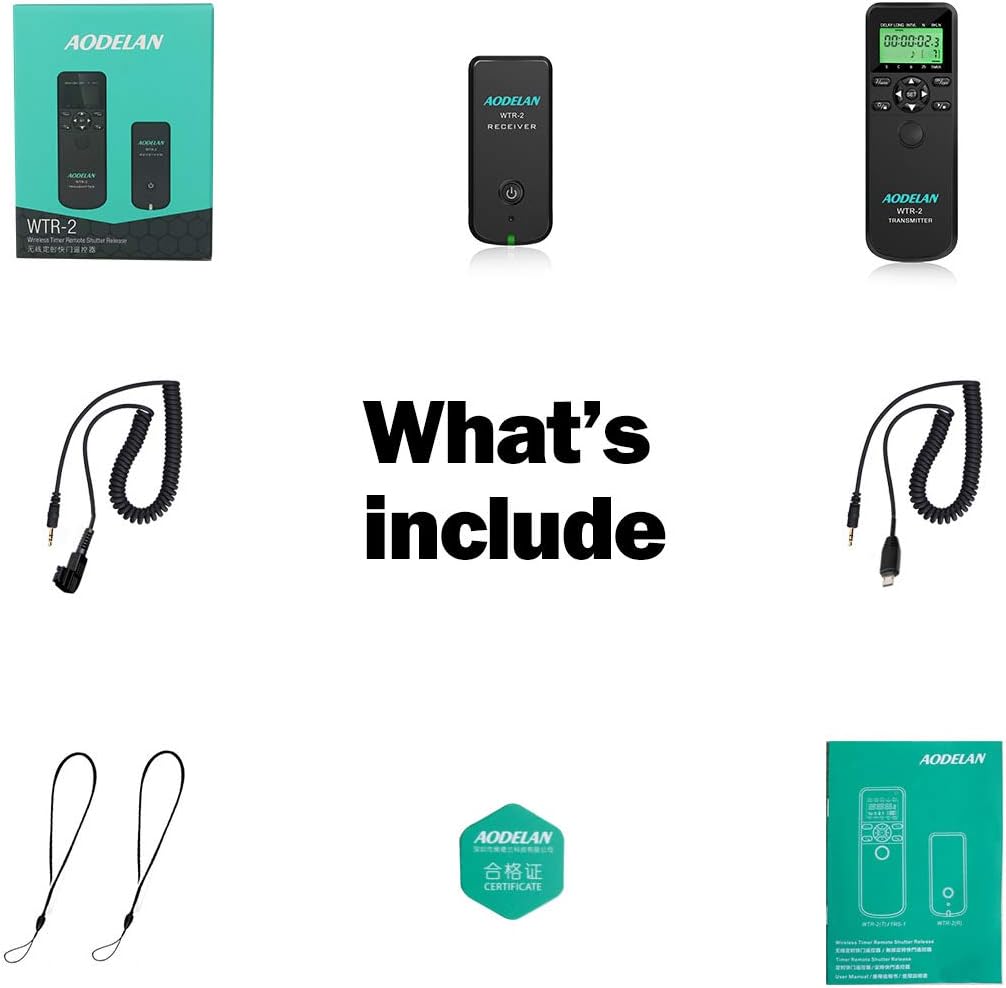
Image: An overview of the AODELAN WTR2 package contents, showing the transmitter, receiver, two coiled connecting cables, and a user manual.
Setup
1. Battery Installation
The AODELAN WTR2 Transmitter and Receiver each require 2 AAA batteries (not included). Ensure correct polarity when inserting batteries.
- Locate the battery compartment on the back of both the Transmitter and the Receiver.
- Open the battery compartment cover.
- Insert 2 AAA batteries into each unit, matching the positive (+) and negative (-) terminals as indicated.
- Close the battery compartment cover securely.
2. Connecting to Camera
The WTR2 can operate in both wireless and wired modes. Select the appropriate connecting cable for your camera model.
- For Wireless Operation:
- Connect one end of the appropriate connecting cable to the receiver's port.
- Connect the other end of the cable to your camera's remote control terminal.
- Mount the receiver onto your camera's hot shoe (optional, for convenience).
- Ensure both the transmitter and receiver are powered on.
- For Wired Operation (Transmitter directly to camera):
- Connect one end of the appropriate connecting cable to the transmitter's port.
- Connect the other end of the cable directly to your camera's remote control terminal.
- The receiver is not needed for wired operation.

Image: Illustration demonstrating both wireless and wired connection methods for the AODELAN WTR2. The wireless setup shows the receiver on the camera's hot shoe, while the wired setup shows the transmitter directly connected to the camera.
Operating Instructions
The AODELAN WTR2 offers multiple shooting modes and timer functions. Use the LCD display and control buttons on the transmitter to navigate and set parameters.
1. Shutter Release Modes
- Single Shooting: Press the shutter button on the transmitter once to take a single photo.
- Continuous Shooting: Press and hold the shutter button for continuous shots.
- Bulb Exposure: For long exposures, press the shutter button once to open the shutter, and press again to close it. This mode is ideal for capturing light trails or astrophotography.
- 2-Second Delay: Activates a 2-second delay before the shutter fires, useful for minimizing camera shake.

Image: Three example photographs demonstrating the effects achievable with bulb exposure, including smooth water, starry night sky, and light trails from moving vehicles.
2. Timer Functions
The WTR2 features advanced timer capabilities for precise control over your photography. All timer settings can be adjusted with 0.1-second accuracy.
- Delay Timer (DELAY): Sets a delay before the first shot is taken.
- Long Exposure Timer (LONG): Specifies the duration of the shutter opening for long exposures (in seconds).
- Interval Timer (INTVL): Defines the time between consecutive shots in a sequence.
- Number of Exposures (N): Sets the total number of photos to be taken in a timed sequence.
- Bracketed Long Exposure (BKLN): This function allows the camera to take a series of photos with automatically changing exposure times. It is particularly useful for creating High Dynamic Range (HDR) images in low-light conditions.

Image: The AODELAN WTR2 transmitter's LCD screen showing settings for time-lapse photography, including Delay, Long exposure, Interval, and Number of exposures. A sequence of time-lapse images is displayed above the remote.

Image: The AODELAN WTR2 transmitter highlighting its accuracy, with text indicating "Accurate to 0.1 sec" and "Shoot every moment you want."
Wireless Transmission
The AODELAN WTR2 utilizes 2.4GHz wireless transmission for reliable remote operation. The wireless control range extends up to 60 meters (approximately 196 feet), providing flexibility for various shooting scenarios. Ensure both the transmitter and receiver are within range and have sufficient battery power for optimal performance.

Image: The AODELAN WTR2 remote and receiver, emphasizing features such as professional anti-shake, 2.4G wireless connectivity, and a control range of 196 feet. The image also lists Bulb, Continuous, BKLN, and Timer functions.
Compatibility
The AODELAN WTR2 is compatible with a wide range of Sony and Konica Minolta cameras. Please refer to the list below to confirm your camera model's compatibility:
Compatible Sony Models:
- a9 II, a6100, a6600, a7R IV, a6400, a9, a99II, a99V, a77II, a6500, a6300, a6000, a5000, a5100, a3000
- a7sII, a7s, a7III, a7RIII, a7RII, a7R, a7II, a7, a68, a58, NEX-3N
- DSC-RX0, RX1RII, RX10, RX10II, RX10III, RX10 IV, RX100II, RX100III, RX100IV, RX100V, RX100 VI
- HX300, HX400, HX400V, HX50V, HX50, HX60V, HX60, HX90, HX90V, HX80
- ILCE-QX1, DSC-QX30, DSC-WX500
- a99, a77, a67, a65, a57, a55, a37, a35, a33, a900, a850, a700, a580, a560, a550, a500, a450, a400, a350, a300, a200, a100
Compatible Konica Minolta Models:
- DIMAGE A2, A1, 9, 7Hi, 7i, 7, 5, 4, 3
- DYNAX 7D, 5D
Maintenance
To ensure the longevity and optimal performance of your AODELAN WTR2, follow these maintenance guidelines:
- Cleaning: Use a soft, dry cloth to clean the exterior of the transmitter and receiver. Avoid using liquid cleaners or solvents.
- Storage: Store the device in a cool, dry place away from direct sunlight and extreme temperatures. If storing for an extended period, remove the batteries to prevent leakage.
- Battery Replacement: Replace batteries when the low battery indicator appears on the LCD screen or when the device's performance degrades. Always use fresh AAA batteries.
- Cable Care: Handle connecting cables with care. Avoid sharp bends or excessive pulling that could damage the connectors or wiring.
Troubleshooting
If you encounter issues with your AODELAN WTR2, please refer to the following common problems and solutions:
| Problem | Possible Cause | Solution |
|---|---|---|
| Device does not power on. | Dead or incorrectly inserted batteries. | Replace batteries with fresh AAA batteries, ensuring correct polarity. |
| Shutter does not release. | Incorrect cable connection; camera not in remote mode; receiver/transmitter not paired or out of range; low battery. | Ensure cable is securely connected to both WTR2 and camera. Check camera settings for remote control. Verify transmitter and receiver are powered on and within 60m range. Replace batteries. |
| Limited interval timer (e.g., 199 frames). | This is a design limitation for certain functions. | Understand that some functions may have inherent limits. For advanced time-lapse, consider external software or camera features if available. |
| Device feels fragile or cheap. | Perception of build quality. | Handle the device with care to prevent damage. Avoid dropping or subjecting it to harsh impacts. |
| Manual lacks detail on specific functions. | Instruction manual brevity. | Refer to your camera's manual for specific remote control terminal information. Experiment with settings to understand full functionality. |
Specifications
| Feature | Detail |
|---|---|
| Brand | AODELAN |
| Model Name | WTR2 |
| Part Number | WTR-2S |
| Compatible Devices | Camera (Sony, Konica Minolta) |
| Special Features | Remote control, Timer functions (Delay, Long Exposure, Interval, BKLN), Shutter release modes (Single, Continuous, Bulb, 2-second delay) |
| Battery Type | AAA (2 required for Transmitter, 2 for Receiver) |
| Connector Type | Wireless (2.4GHz) / Wired |
| Wireless Range | Up to 60 meters (196 feet) |
| Max Number of Supported Devices | 4 (likely refers to channels) |
| First Available Date | January 4, 2018 |
Warranty and Support
AODELAN products are designed for reliability and performance. For any technical support or warranty inquiries, please contact AODELAN customer service through their official website or the retailer where you purchased the product.
Official Website: www.aodelan.net
AODELAN has 15 years of experience in camera accessories, focusing on research, quality, and customer service. They offer OEM and ODM services, with products sold worldwide.
Related Documents - WTR2
 |
AODELAN WTR-2 TRS-1 Wireless Timer Remote Shutter Release User Manual Comprehensive user manual for the AODELAN WTR-2 and TRS-1 wireless and wired timer remote shutter release systems. Learn about features, setup, operation, safety, and technical specifications for photographers. |
 |
Shenzhen Aodelan WTR-2(T) Wireless Timer Remote Shutter Release Transmitter FCC Test Report FCC test report for the Shenzhen Aodelan WTR-2(T) Wireless Timer Remote Shutter Release Transmitter, detailing radiated emissions, bandwidth measurements, band edge testing, and antenna requirements. Includes test methodology and results from Shenzhen LCS Compliance Testing Laboratory Ltd. |
 |
AODELAN WTR-2 & TRS-1 Wireless Timer Remote Shutter Release User Manual Comprehensive user manual for the AODELAN WTR-2(T), WTR-2(R), and TRS-1 wireless and wired timer remote shutter release systems. Learn about features, setup, operation, and technical specifications. |
 |
Aodelan PEBBLE Wireless Shutter Remote User Manual This user manual provides instructions for the Aodelan PEBBLE Wireless Shutter Remote, covering its features, operation, troubleshooting, and warranty information. It details how to use the transmitter and receiver for various shooting modes including autofocus, single shot, continuous release, and Bulb shooting, as well as its functionality as a wired remote. |
 |
AODELAN WTR-2 II & TRS-1 II Wireless and Wired Timer Remote Shutter Release User Manual Comprehensive user manual for AODELAN WTR-2 II wireless timer remote shutter release and TRS-1 II wired timer remote shutter release. Covers setup, features, timer functions, manual release, specifications, and compliance information. |
 |
Wireless Remote Shutter Release Control User Manual User manual for the Wireless Remote Shutter Release Control (Model 1005010429476798 / Qalart P05715). Includes setup instructions, safety warnings, compliance information, and operation guide for shooting modes. |
Ask a question about this manual
Ask about setup, troubleshooting, compatibility, parts, safety, or missing instructions. Manuals+ will review the question and use this page’s manual context to help answer it.