
Ubio Labs 43237-2
Ubio Labs Slim 6,000 mAh Portable Charger User Manual
Model: 43237-2
Introduction
Thank you for choosing the Ubio Labs Slim 6,000 mAh Portable Charger. This high-capacity power bank is designed to provide reliable and fast charging for your mobile devices on the go. Its compact and durable aluminum construction makes it an ideal companion for travel and daily use. This manual provides essential information on setting up, operating, and maintaining your portable charger.
What's in the Box
- Two (2) Ubio Labs Slim 6,000 mAh Portable Power Banks
- Two (2) 2.4 Amp Wall Chargers
- Two (2) 3-foot Micro USB Cables

Image: The complete package contents, including two portable power banks, two wall chargers, and two braided micro USB cables.
Product Overview
Portable Power Bank
- Capacity: 6,000 mAh high capacity
- Output: 2.4 Amp high-speed USB output for fast charging
- Input: Micro USB input for recharging the power bank
- Indicator: LED charge indicator lights to show battery level
- Construction: Durable aluminum casing
- Dimensions: Approximately 5.5 x 2.75 x 0.5 inches

Image: Two Ubio Labs power banks, highlighting their slim profile and LED battery indicators.
Wall Charger
- Output: 2.4 Amp USB output
- Compatibility: Works with other USB devices
- Design: Folding wall prongs for compact travel
Micro USB Cable
- Length: 3 feet
- Construction: Durable braided jacket
- Connectors: Aluminum connectors for high-speed charge and data transfer
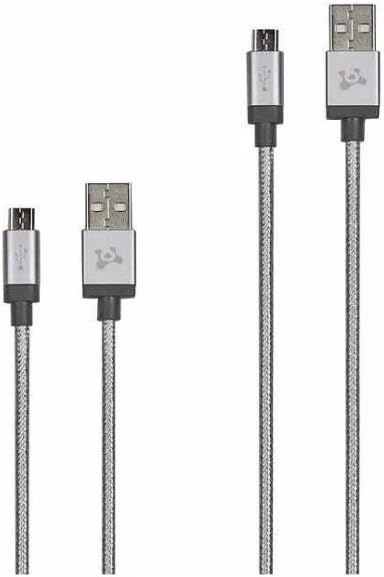
Image: The compact wall charger with its foldable prongs.

Image: The durable braided micro USB cables.
Setup: Initial Charging of the Power Bank
- Connect the Power Bank: Insert the micro USB connector of the provided 3-foot cable into the micro USB input port on the Ubio Labs power bank.
- Connect to Wall Charger: Insert the standard USB-A connector of the cable into the USB output port of the provided 2.4 Amp wall charger.
- Plug into Outlet: Fold out the prongs on the wall charger and plug it into a standard AC wall outlet.
- Monitor Charging: The LED indicator lights on the power bank will illuminate and blink to show the charging progress. All four LEDs will be solid when the power bank is fully charged.
- First Use: For optimal performance, fully charge the power bank before its first use.
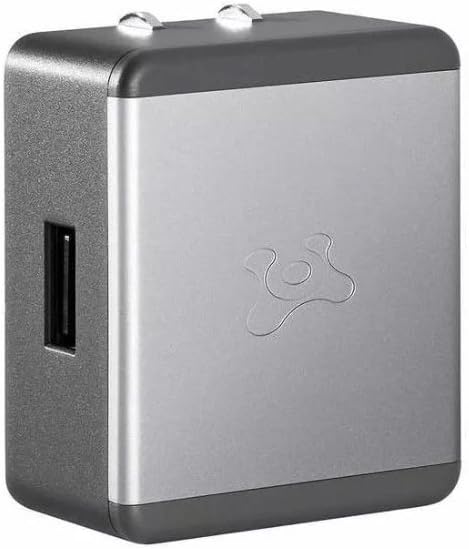
Image: Detail of the power bank's input and output ports.
Operating: Charging Your Devices
- Connect Your Device: Use your device's charging cable (e.g., Lightning cable for iPhone, USB-C for Android) and plug the standard USB-A end into the USB output port of the Ubio Labs power bank.
- Connect to Device: Plug the other end of your device's charging cable into your smartphone, tablet, or other compatible USB-powered device.
- Begin Charging: The power bank will automatically begin charging your device. The LED indicators on the power bank will show the remaining battery level.
- Charging Capacity: Each 6,000 mAh power bank can provide up to 2.5 full charges for most smartphones.
Note: For optimal charging speed, use the original charging cable that came with your device or a high-quality certified cable.
Maintenance
- Storage: Store the power bank in a cool, dry place away from direct sunlight and extreme temperatures.
- Cleaning: Use a soft, dry cloth to clean the exterior of the power bank and wall charger. Do not use liquid cleaners or aerosols.
- Battery Care: To prolong battery life, fully charge and discharge the power bank at least once every three months if not in regular use.
- Cable Care: Avoid sharp bends or kinks in the charging cables to prevent damage to the braided jacket and internal wires.
Troubleshooting
- Power bank not charging:
- Ensure the wall charger is properly plugged into a working outlet.
- Verify that the micro USB cable is securely connected to both the power bank's input port and the wall charger's USB port.
- Try a different wall outlet or USB port on a computer (charging may be slower).
- Check if the micro USB cable is damaged; try a different cable if available.
- Device not charging from power bank:
- Ensure the power bank has sufficient charge (check LED indicators).
- Verify that your device's charging cable is securely connected to both the power bank's output port and your device.
- Try a different charging cable for your device.
- Confirm your device is compatible with USB charging.
- Slow charging:
- Ensure you are using the provided 2.4 Amp wall charger for recharging the power bank, or a high-speed wall adapter.
- For device charging, ensure your device's cable is not damaged and is designed for fast charging.
- Avoid using your device heavily while it is charging.
Specifications
| Model Number | 43237-2 |
| Battery Capacity | 6,000 mAh (per power bank) |
| Power Bank Output | 2.4 Amp (USB-A) |
| Power Bank Input | Micro USB |
| Wall Charger Output | 2.4 Amp (USB-A) |
| Product Dimensions (Power Bank) | 5.5 x 2.75 x 0.5 inches |
| Item Weight (Total Package) | 1.32 pounds |
| Special Features | Travel-friendly, LED Indicator Lights, Fast Charging |
| Manufacturer | Ubiolabs |
Warranty and Support
For warranty information or technical support, please refer to the contact details provided with your product packaging or visit the official Ubio Labs website. Keep your proof of purchase for warranty claims.
Ask a question about this manual
Ask about setup, troubleshooting, compatibility, parts, safety, or missing instructions. Manuals+ will review the question and use this page’s manual context to help answer it.