
Marsrock WT060
Marsrock WT060 Wind Turbine Generator Controller User Manual
Model: WT060
1. Introduction
This manual provides essential information for the safe and efficient installation, operation, and maintenance of your Marsrock WT060 Wind Turbine Generator Controller. Please read this manual thoroughly before installation and operation to ensure optimal performance and safety.
2. Safety Information
- Ensure all connections are secure and correct before applying power. Incorrect wiring can damage the controller or other components.
- Always disconnect the battery and wind turbine before performing any maintenance or wiring changes.
- The controller is IP67 waterproof, but avoid submerging it in water for extended periods.
- Do not attempt to open or repair the controller yourself. Contact qualified personnel for service.
- Wear appropriate personal protective equipment (PPE) during installation, especially when working with electrical components.
3. Product Overview
The Marsrock WT060 is an automatic wind turbine generator controller designed to manage battery charging from a wind turbine. It features voltage and current limiting, reverse connection protection, and a comprehensive waterproof design.
3.1 Key Features
- Automatic control of wind turbines for battery charging.
- Automatic braking when the battery is fully charged.
- Automatic recovery to charging when battery voltage drops.
- Voltage and current limiting for optimal charging and protection.
- Unique reverse connection protection circuit (no fuse replacement needed).
- Modular design for enhanced system reliability.
- IP67 comprehensive waterproof protection for harsh environments.
3.2 Product Components


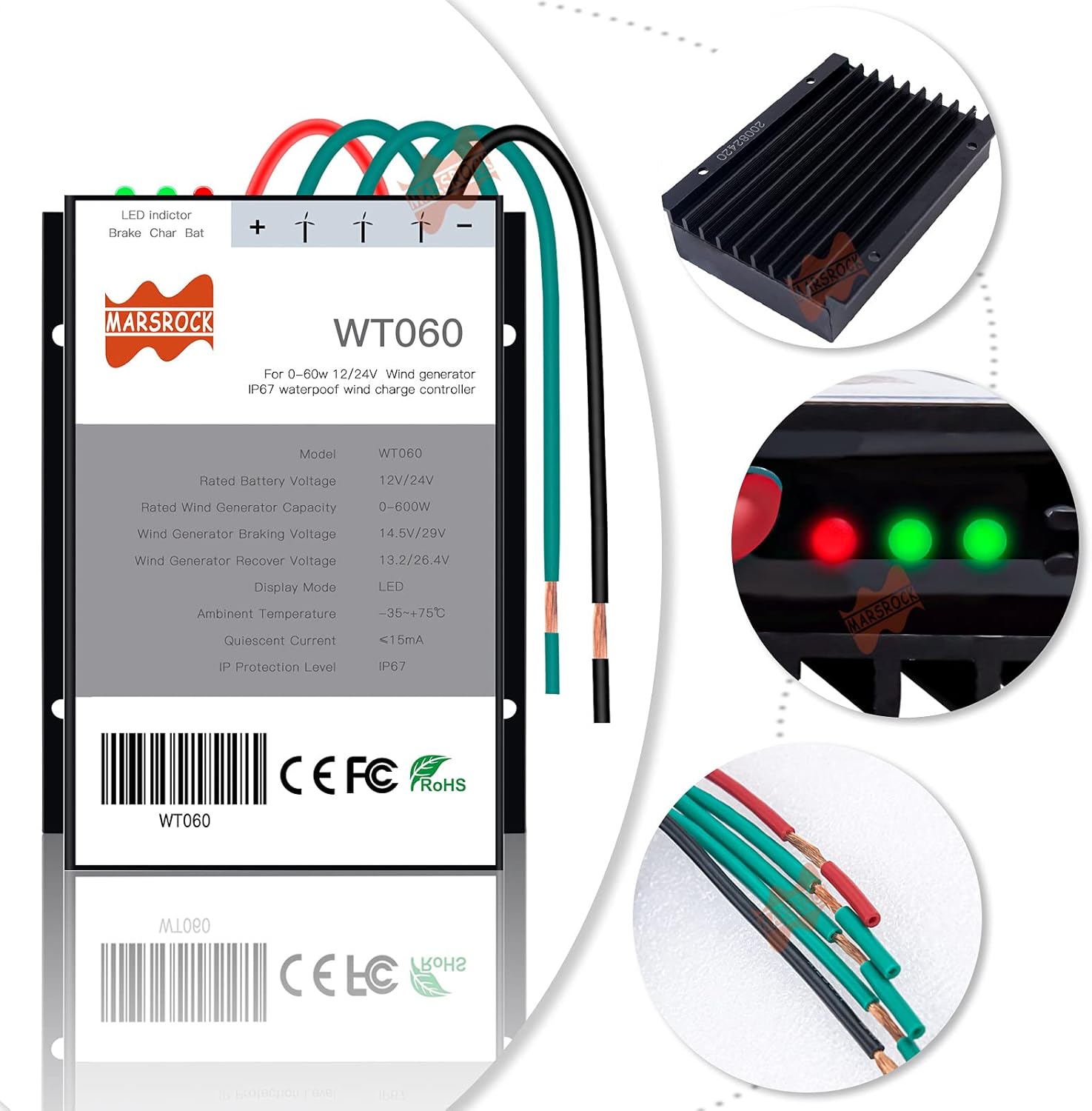
4. Specifications
| Parameter | Value |
|---|---|
| Model | WT060 |
| Rated Battery Voltage | 12V/24V (Automatic Identification) |
| Rated Wind Generator Capacity | 0-600W |
| Wind Generator Braking Voltage | 14.5V/29V |
| Wind Generator Recover Voltage | 13.2V/26.4V |
| Display Mode | LED |
| Ambient Temperature | -35℃ to +75℃ |
| Quiescent Current | <15mA |
| IP Protection Level | IP67 |
| Package Dimensions | 5.2 x 3.7 x 1.3 inches |
| Item Weight | 0.01 ounces |
5. Setup and Installation
Proper installation is crucial for the safe and effective operation of your wind turbine system. Follow these steps carefully.
5.1 Wiring Diagram

5.2 Connection Sequence
It is critical to follow the correct connection sequence to prevent damage to the controller and other components.
- Connect the Battery: First, connect the positive and negative terminals of the battery to the corresponding terminals on the controller. Ensure correct polarity.
- Connect the Wind Turbine: Next, connect the three phase wires from the wind turbine to the three AC input terminals on the controller.
Caution: Reversing the battery connection can damage the controller. Always double-check polarity before making connections.

5.3 Installation Video
For a visual guide on connecting the Marsrock WT060 controller, please refer to the video below:
6. Operating Instructions
Once correctly installed, the WT060 controller operates automatically to manage your wind turbine and battery charging.
6.1 Automatic Charging and Braking
- The controller automatically charges the battery when the wind turbine generates power.
- When the battery reaches its full charge voltage (14.5V for 12V systems, 29V for 24V systems), the controller will automatically engage the brake to prevent overcharging.
- If the battery voltage drops to the recover voltage level (13.2V for 12V systems, 26.4V for 24V systems), the controller will automatically release the brake and resume charging.
6.2 LED Indicators
The controller features three LED indicators to show its operational status:
- Brake LED: Indicates when the wind turbine's brake is engaged.
- Charge LED: Indicates when the battery is being charged.
- Battery LED: Indicates the battery status (e.g., charged, low).

7. Maintenance
Regular maintenance ensures the longevity and optimal performance of your controller.
- Periodically inspect all wiring connections for tightness and corrosion.
- Keep the controller clean and free from dust and debris.
- Ensure adequate ventilation around the controller, especially for the heat sink, to prevent overheating.
- Check the battery terminals for corrosion and clean if necessary.
8. Troubleshooting
This section addresses common issues you might encounter with your WT060 controller.
8.1 Common Issues and Solutions
- Controller not charging:
- Check all connections, especially to the battery and wind turbine, for proper contact and polarity.
- Ensure the wind turbine is generating sufficient power.
- Verify that the battery voltage is below the recover voltage level.
- Brake light always on:
- This may indicate the battery is fully charged, and the controller is actively braking the turbine.
- If the battery is not fully charged, check the battery voltage and connections.
- If the brake cannot be released, disconnect all cables and then reconnect the system in the correct sequence (battery first, then wind turbine).
- Controller damaged after reverse battery connection:
- The WT060 features a unique reverse connect protection circuit. If the battery was connected incorrectly, disconnect it, correct the polarity, and reconnect. The controller should reset without needing fuse replacement. If issues persist, contact support.
9. Warranty and Support
Marsrock Technology is committed to providing reliable products and customer support. For warranty information, technical assistance, or service inquiries, please contact Marsrock Power, the manufacturer, or refer to the official Marsrock website.
Marsrock Technology was founded in 2006 and specializes in renewable energy solutions, including wind power systems.
Related documentsWT060

Ask a question about this manual
Ask about setup, troubleshooting, compatibility, parts, safety, or missing instructions. Manuals+ will review the question and use this page’s manual context to help answer it.