
HUABAN MQ-3
HUABAN MQ-3 Alcohol Ethanol Gas Sensor Module User Manual
Model: MQ-3
Introduction
The HUABAN MQ-3 Alcohol Ethanol Gas Sensor Module is designed for detecting alcohol vapor concentrations in the air. It utilizes a sensitive material, low conductivity tin dioxide (SnO2), which changes its conductivity in the presence of alcohol gas. This change in conductivity is then converted into a corresponding output signal, making it suitable for various alcohol detection applications.
This manual provides essential information for the proper setup, operation, and maintenance of your MQ-3 sensor module.
Product Overview and Features


The MQ-3 sensor module offers high sensitivity to alcohol and is designed to resist interference from gasoline, smoke, and water vapor. It is a cost-effective solution for detecting various concentrations of alcohol in an atmosphere.
Key Features:
- High sensitivity to alcohol vapor.
- Low conductivity tin dioxide (SnO2) sensing material.
- Resistant to interference from gasoline, smoke, and water vapor.
- Provides both digital (DO) and analog (AO) output signals.
- Compact design for easy integration into various projects.
Technical Specifications
| Parameter | Value |
|---|---|
| Model | MQ-3 |
| Sensor Type | Alcohol/Ethanol Gas Sensor |
| Input Voltage | DC 5V |
| Power Consumption (Current) | 150mA |
| Digital Output (DO) | TTL digital 0 and 1 (0.1V and 5V) |
| Analog Output (AO) | 0.1V - 0.3V (relative to pollution), max 4V |
| Dimensions (L x W x H) | 32mm x 20mm x 22mm (1.26" x 0.79" x 0.76") |
| Weight | Approximately 0.49 ounces |
Pinout and Connections
The MQ-3 sensor module typically features four pins for connection to a microcontroller or other circuitry. These pins provide power, ground, and both analog and digital output signals.

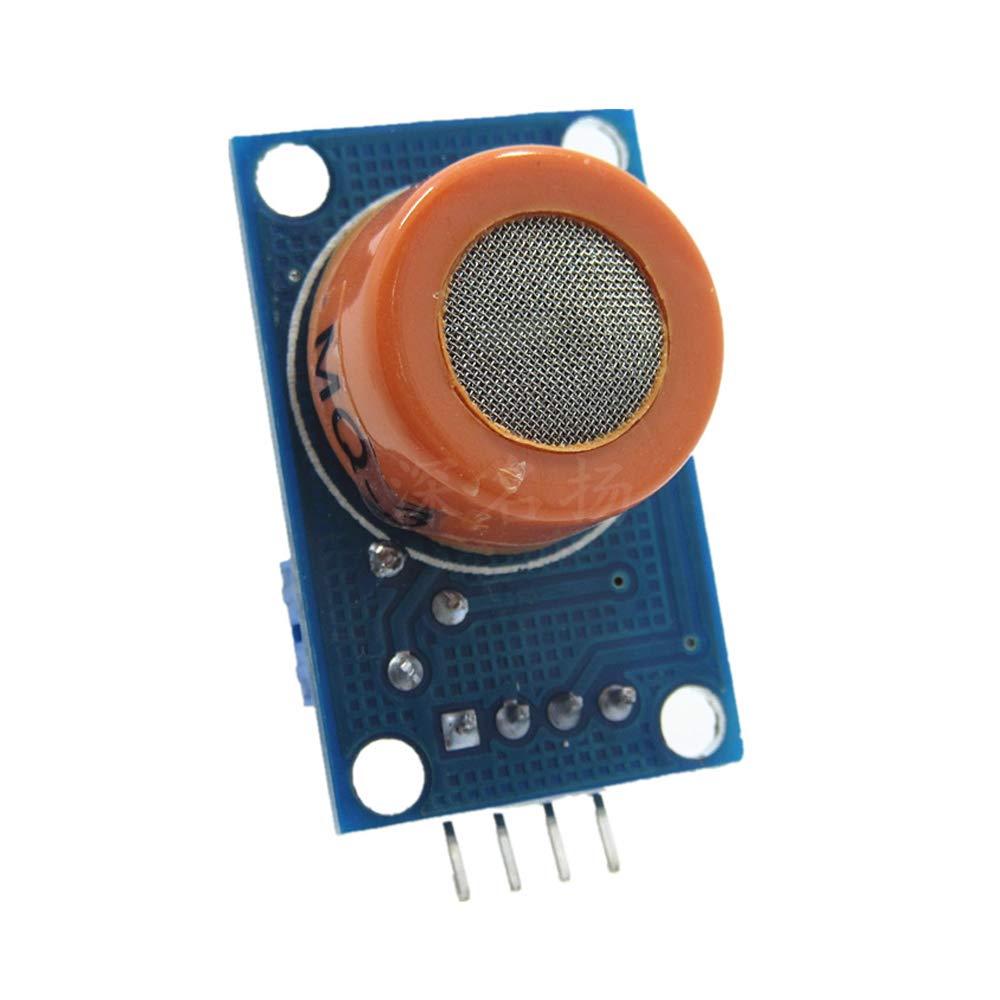
Typical Pin Configuration:
- VCC: Power supply (DC 5V).
- GND: Ground connection.
- DO (Digital Output): Provides a digital signal (HIGH/LOW) based on a threshold set by the onboard potentiometer.
- AO (Analog Output): Provides an analog voltage proportional to the alcohol concentration.
Note: Always refer to the specific datasheet or markings on your module for exact pin assignments.
Setup and Operation
1. Initial Setup:
- Connect Power: Connect the VCC pin to a stable 5V DC power supply and the GND pin to ground.
- Connect Outputs:
- For digital readings, connect the DO pin to a digital input on your microcontroller.
- For analog readings, connect the AO pin to an analog input (ADC) on your microcontroller.
- Warm-up Period: After applying power, the sensor requires a warm-up period of approximately 20 seconds to stabilize. During this time, the internal heating element reaches its operating temperature, and the sensor's readings will become stable. It is normal for the sensor to feel warm during operation due to this internal heating.
2. Operation:
- Analog Output (AO): The analog output voltage will vary proportionally with the concentration of alcohol vapor in the air. Higher concentrations typically result in higher voltage readings. This output is suitable for precise measurement and calibration.
- Digital Output (DO): The digital output provides a simple HIGH/LOW signal. This threshold can usually be adjusted using an onboard potentiometer on the module. When the alcohol concentration exceeds the set threshold, the DO pin will switch state (e.g., from LOW to HIGH or vice-versa, depending on the module's design).
For accurate measurements, it is recommended to calibrate the sensor in a known alcohol concentration environment or use the analog output with a microcontroller for more detailed data interpretation.
Maintenance
- Keep Clean: Ensure the sensor's metal mesh cap is free from dust, dirt, or any obstructions that could impede gas flow or contaminate the sensing element.
- Avoid Contaminants: Protect the sensor from exposure to high concentrations of corrosive gases, strong acids, or alkalis, which can damage the sensing material.
- Stable Environment: Operate the sensor in a stable environment, avoiding rapid changes in temperature or humidity, which can affect sensor performance.
- Storage: When not in use, store the sensor in a clean, dry, and non-corrosive environment.
Troubleshooting
| Problem | Possible Cause | Solution |
|---|---|---|
| No output or unstable readings | Incorrect wiring, insufficient warm-up time, faulty power supply. | Verify all connections (VCC, GND, DO/AO). Ensure the sensor has warmed up for at least 20 seconds. Check power supply voltage (must be 5V DC). |
| Digital output (DO) not triggering | Threshold potentiometer incorrectly set, alcohol concentration too low. | Adjust the onboard potentiometer to set the desired trigger threshold. Ensure the alcohol concentration is above the set threshold. |
| Inaccurate analog readings (AO) | Lack of calibration, environmental interference, sensor aging. | Calibrate the sensor in a known alcohol concentration. Ensure the environment is free from other interfering gases. Consider replacing the sensor if it's old or heavily used. |
| Sensor feels excessively hot | Normal operation (internal heating element). | This is normal. The sensor contains a heating wire to maintain optimal operating temperature. If it's excessively hot beyond normal operating temperature, check the input voltage. |
Safety Information
- This sensor module is intended for experimental and development purposes. It is not certified for life-critical applications or as a primary safety device.
- Always ensure proper ventilation when working with alcohol or other gases.
- Do not exceed the specified input voltage (DC 5V) to prevent damage to the module.
- Handle the module with care to avoid physical damage to the sensor element or PCB.
- Keep out of reach of children.
Warranty and Support
For warranty information or technical support regarding your HUABAN MQ-3 Alcohol Ethanol Gas Sensor Module, please contact your retailer or the manufacturer directly. Please have your purchase details and model number (MQ-3) available when seeking support.
Ask a question about this manual
Ask about setup, troubleshooting, compatibility, parts, safety, or missing instructions. Manuals+ will review the question and use this page’s manual context to help answer it.