
Jabra Elite 65t Earbuds - User Manual
Model: 100-99000000-02
Product Overview
The Jabra Elite 65t Earbuds are true wireless earbuds engineered for superior call performance and music experience. Featuring 4-microphone technology for effective wind noise reduction and integrated controls, these earbuds offer seamless connectivity and personalized sound.
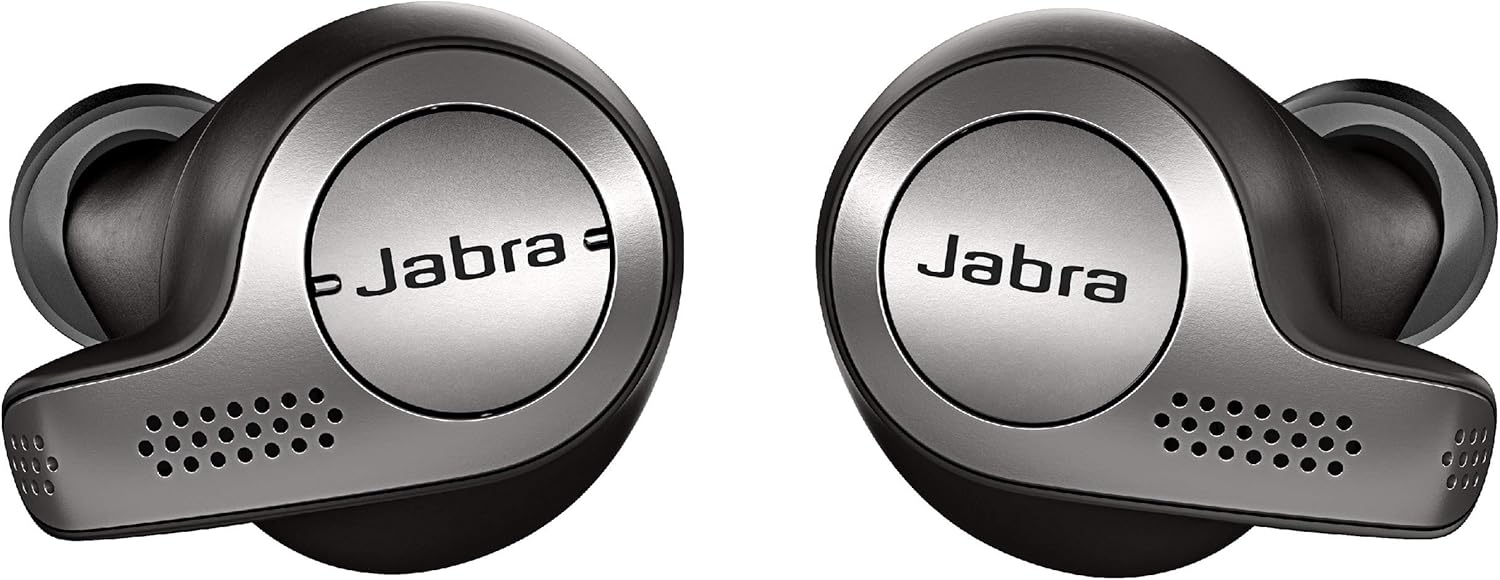
Image: Jabra Elite 65t Earbuds in Titanium Black, showcasing their sleek design.
What's in the Box
- Charging Case
- Micro USB cable
- 3 sets of Silicon EarGels (S, M, L)
- User Manual
- Warranty and Warning Leaflets, TA label

Image: All components included in the Jabra Elite 65t package, neatly arranged.
Setup and Pairing
Initial Setup
- Charge the Case: Before first use, fully charge the charging case using the provided Micro USB cable. The LED indicator on the case will show charging status.
- Charge Earbuds: Place the earbuds into the charging case. They will begin charging automatically.
- Install Jabra Sound+ App: Download the Jabra Sound+ app from your device's app store (Apple App Store or Google Play Store) for full customization and features.
Bluetooth Pairing
- Power On: Remove the earbuds from the charging case. They will automatically power on and enter pairing mode.
- Activate Bluetooth: On your smartphone or device, enable Bluetooth.
- Select Earbuds: In your device's Bluetooth menu, select "Jabra Elite 65t" from the list of available devices.
- Confirm Connection: Once paired, the earbuds will confirm the connection verbally.
Operating Your Earbuds
Controls
The Jabra Elite 65t features integrated controls for easy management of calls and music.
- Play/Pause Music: Single press the button on the right earbud.
- Answer/End Call: Single press the button on the right earbud.
- Volume Up/Next Track: Press the upper button on the left earbud. Hold for next track.
- Volume Down/Previous Track: Press the lower button on the left earbud. Hold for previous track.
- Voice Assistant (Alexa, Siri, Google Assistant): Long press the button on the right earbud to activate your preferred voice assistant.

Image: A man interacting with his Jabra Elite 65t Earbuds to use a voice assistant, demonstrating the one-touch access feature.
HearThrough Feature
The HearThrough feature allows you to hear ambient sounds around you while listening to music, enhancing situational awareness. This can be toggled on/off via the Jabra Sound+ app or through the earbud controls.
Call Quality
Equipped with 4-microphone technology, the earbuds provide enhanced call clarity by reducing wind noise and filtering background sounds. Both earbuds deliver audio during calls.

Image: Jabra Elite 65t Earbuds on a table, illustrating the 4-microphone technology for clear calls.
Official Product Video: Jabra Elite 65t Overview
Video: An official overview of the Jabra Elite 65t Earbuds, detailing their features and benefits for calls and music.
Battery Life and Charging
The earbuds offer up to 5 hours of battery life on a single charge. With the included pocket-friendly charging case, you can get up to 15 hours of total battery life.

Image: A man wearing Jabra Elite 65t Earbuds, illustrating the extended battery life with the charging case.
- Earbud Charging: Place earbuds in the case. LEDs on earbuds indicate charging status.
- Case Charging: Connect the Micro USB cable to the charging case and a power source.
- Quick Charge: A 15-minute charge provides up to 1.5 hours of battery life.
Maintenance and Care
- Cleaning: Regularly clean the earbuds and charging case with a dry, soft cloth. Avoid using harsh chemicals.
- EarGels: Ensure EarGels are clean and properly fitted for optimal sound quality and comfort. Replace if damaged.
- Storage: Store earbuds in the charging case when not in use to protect them and keep them charged.
- Water and Dust Resistance: The earbuds are IP55 rated for dust and water resistance. Avoid prolonged exposure to water.
Troubleshooting
Connectivity Issues
- Earbud Disconnects: Ensure both earbuds are fully charged. Try resetting the earbuds by placing them in the case and then removing them.
- Pairing Problems: Forget the device in your phone's Bluetooth settings and attempt to re-pair. Ensure earbuds are in pairing mode.
Sound Quality Issues
- Low Volume/Poor Bass: Check EarGel fit. Experiment with different EarGel sizes to ensure a proper seal in your ear canal. Adjust equalizer settings in the Jabra Sound+ app.
- Distorted Sound: Ensure earbuds are clean and free from debris. Check for interference from other wireless devices.
Specifications
| Feature | Detail |
|---|---|
| Model Name | Elite 65t |
| Connectivity Technology | Wireless, Bluetooth 5.0 |
| Microphones | 4-microphone technology |
| Battery Life (Earbuds) | Up to 5 hours |
| Battery Life (with Case) | Up to 15 hours |
| Water Resistance Level | IP55 (Dust and Water Resistant) |
| Control Type | Button Control, Touch, Voice |
| Ear Placement | In Ear |
| Item Weight | 11 ounces |
Warranty and Support
The Jabra Elite 65t Earbuds come with a 2-year warranty against water and dust (registration required via the Jabra Sound+ app).
For further support, troubleshooting, or warranty claims, please visit the official Jabra support website or contact their customer service.