Introduction
Thank you for purchasing the Seiko FW579B Disney Time Radio Wave Wall Clock. This clock features automatic time correction via radio waves, a decorative pendulum with Mickey and Minnie silhouettes, and plays a selection of melodies hourly. This manual provides essential information for proper setup, operation, and maintenance of your clock.
Safety Information
- Do not expose the clock to direct sunlight, high temperatures, or high humidity.
- Avoid strong magnetic fields or vibrations.
- Keep out of reach of small children.
- Do not attempt to disassemble or modify the clock.
- Dispose of used batteries according to local regulations.
Package Contents
Ensure all items are present in the package:
- Seiko FW579B Wall Clock
- Mounting Hardware (Wood screws, Gypsum board hangers)
- User Manual (This document)
- AA Alkaline Batteries (4 pieces, typically included or required)

Image: Included mounting hardware for various wall types.
Setup
1. Battery Installation
- Open the battery compartment cover located on the back of the clock.
- Insert four (4) AA alkaline batteries, ensuring correct polarity (+/-).
- Close the battery compartment cover securely.
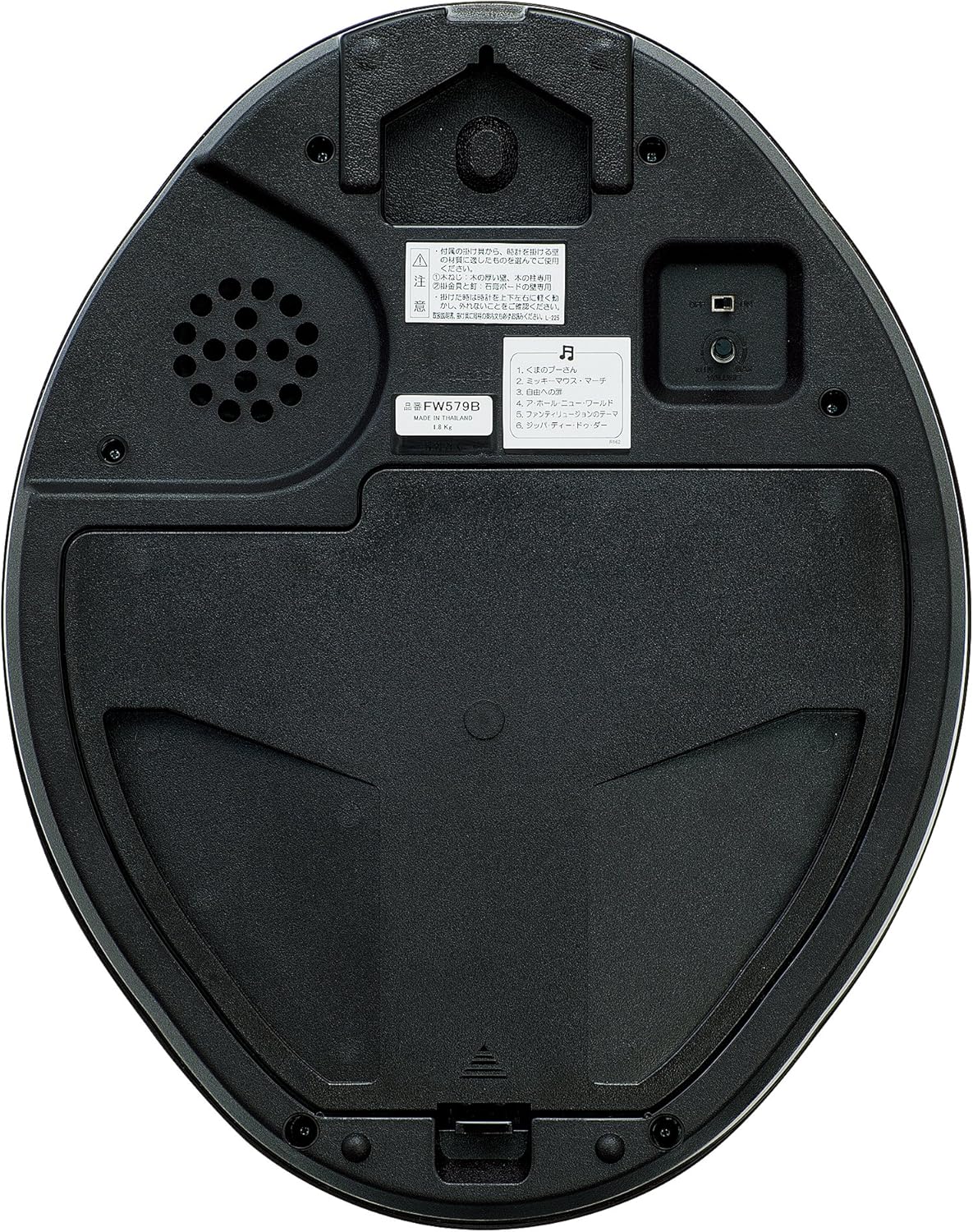
Image: Rear view of the clock, highlighting the battery compartment and controls.
2. Radio Wave Reception
The clock automatically attempts to receive radio waves for accurate time synchronization. For optimal reception:
- Place the clock near a window where radio waves can be easily received.
- Avoid locations near high-voltage lines, TV towers, train tracks, or large metal objects.
- Keep the clock away from electronic appliances such as TVs, refrigerators, air conditioners, computers, and fax machines, as these can cause interference.
- Reception may be difficult inside buildings, basements, or areas with heavy radio interference (e.g., construction sites, airports).

Image: Diagram showing radio wave coverage for time signal reception.
If radio waves are not received, the clock will operate with standard quartz accuracy.
3. Mounting the Clock
Use the appropriate mounting hardware for your wall type:
- For Wood Pillars or Thick Walls: Use the provided wood screws.
- For Gypsum Board Walls: Use the provided gypsum board hangers.
Ensure the clock is securely mounted to prevent falling. Do not use the provided hardware on concrete walls; purchase commercially available hangers suitable for concrete if needed.
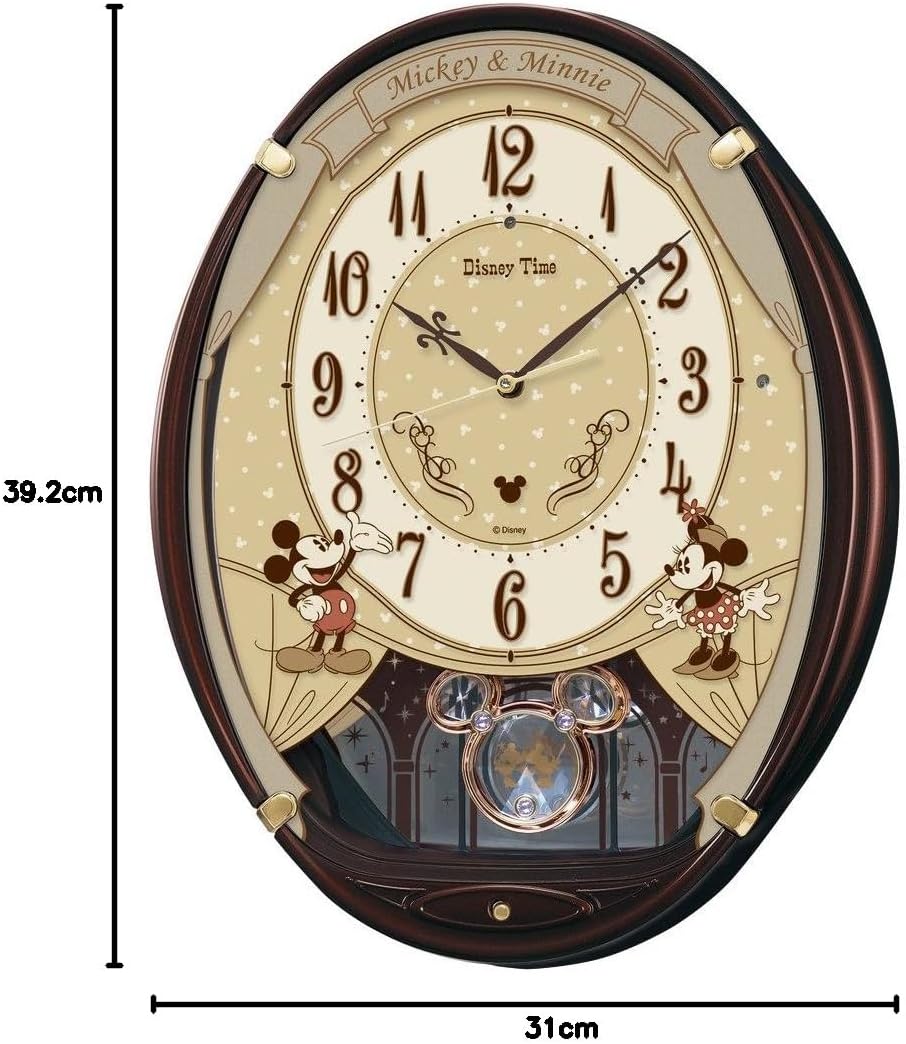
Image: Front view of the clock with approximate dimensions.
Operating Instructions
1. Automatic Time Setting (Radio Wave)
After battery installation, the clock will automatically search for and receive the time signal. This process may take several minutes to several hours depending on reception conditions. Once synchronized, the clock hands will move to the correct time.
2. Manual Time Setting
If the clock fails to receive the radio signal or if you need to adjust the time manually (e.g., for areas outside radio signal range):
- Locate the time adjustment button on the back of the clock (refer to the image of the clock's back).
- Press and hold the button to advance the hands. Release when the desired time is reached.
- For fine adjustments, press the button repeatedly for small increments.
Note: Manual setting will override the radio wave function until the clock successfully receives a signal again.
3. Melody Function
The clock plays one of six melodies hourly. The melody sound is a flute/crystal bell tone.
- Winnie the Pooh
- Mickey Mouse March
- Door to Freedom (Rapunzel on Tower)
- A Whole New World (Aladdin)
- Fantillusion Theme
- Zip-a-dee-doo-dah (Song of the South)

Image: List of hourly melodies.
Volume Adjustment
A volume control dial or switch is located on the back of the clock. Adjust it to your preferred sound level.
Automatic Sound Stop (Light Sensor)
The clock is equipped with a light sensor that automatically stops the melodies when the room is dark, ensuring quiet during nighttime hours.
4. Decorative Pendulum
The clock features a decorative pendulum with Mickey and Minnie silhouettes that swings continuously. Ensure it has clearance to move freely.
Maintenance
1. Battery Replacement
Replace all four AA alkaline batteries approximately once a year, or when the clock's performance (e.g., melody volume, timekeeping accuracy) begins to decline. Always replace all batteries at the same time with new ones of the same type.
2. Cleaning
Wipe the clock's surface with a soft, dry cloth. Do not use abrasive cleaners, solvents, or chemical sprays, as these can damage the finish.
Troubleshooting
| Problem | Possible Cause | Solution |
|---|---|---|
| Clock does not display correct time / Does not receive radio signal. |
|
|
| Melody does not play. |
|
|
| Clock hands are stuck or not moving smoothly. |
|
|
Specifications
- Model: FW579B
- Dimensions: Approximately 31 cm (Width) x 39.2 cm (Height) x 7.3 cm (Depth)
- Weight: Approximately 1.8 kg
- Material: Plastic frame (Brown Metallic coating), Glass front
- Movement: Radio correction function (40 kHz/60 kHz automatic selection), Quartz accuracy
- Power Source: 4 x AA Alkaline batteries (approx. 1-year battery life)
- Melodies: 6 tunes (Flute/Crystal Bell sound)
- Features: Volume adjustment, Automatic sound stop with light sensor, Decorative pendulum, Sweep second hand, Sleep second hand (automatic second hand stop with light sensor)
- Country of Origin: Thailand


