
1. Introduction
Thank you for purchasing the GOLDSTAR 70070-BKW Astronomical Telescope. This manual provides essential information for the proper assembly, operation, and maintenance of your telescope. With its 70mm objective lens and 700mm focal length, this refractor telescope is designed for both celestial observation, such as viewing the moon and planets, and terrestrial viewing. It includes multiple eyepieces, a star chart, and a smartphone adapter for capturing images.
2. Safety Information
- WARNING: Never look directly at the sun through the telescope or its finderscope. Doing so can cause immediate and irreversible severe eye damage, including permanent blindness. Always use a certified solar filter over the objective lens if observing the sun.
- CAUTION: Ensure the telescope is assembled and placed on a stable, level surface. An unstable setup can lead to the telescope tipping over, potentially causing damage to the equipment or personal injury.
- Keep the telescope away from moisture and extreme temperatures.
- Do not allow children to use the telescope unsupervised.
3. Package Contents
Verify that all the following items are included in your package:
- Telescope Optical Tube (70mm Objective, 700mm Focal Length)
- Adjustable Aluminum Tripod
- Finderscope
- Eyepieces: H20mm, H12.5mm, SR4mm
- 2x Barlow Lens
- 1.5x Erecting Eyepiece (Erect Image Lens)
- Smartphone Adapter
- Star Chart
- Accessory Tray
4. Setup and Assembly
Follow these steps to assemble your GOLDSTAR 70070-BKW telescope:
- Set up the Tripod: Spread the tripod legs to their full extent. Secure the accessory tray to the center brace of the tripod. Adjust the leg height as needed for comfortable viewing.
- Mount the Telescope Tube: Attach the telescope optical tube to the equatorial mount on top of the tripod. Ensure it is securely fastened using the provided screws.
- Attach the Finderscope: Slide the finderscope into its bracket on the main telescope tube and tighten the retaining screws.
- Insert Eyepiece: Loosen the thumbscrews on the diagonal mirror or erecting eyepiece holder. Insert your desired eyepiece (e.g., H20mm for lowest magnification) into the holder and tighten the thumbscrews to secure it.
- Attach Smartphone Adapter (Optional): If you plan to use the smartphone adapter, attach it to the eyepiece as shown in the image below.
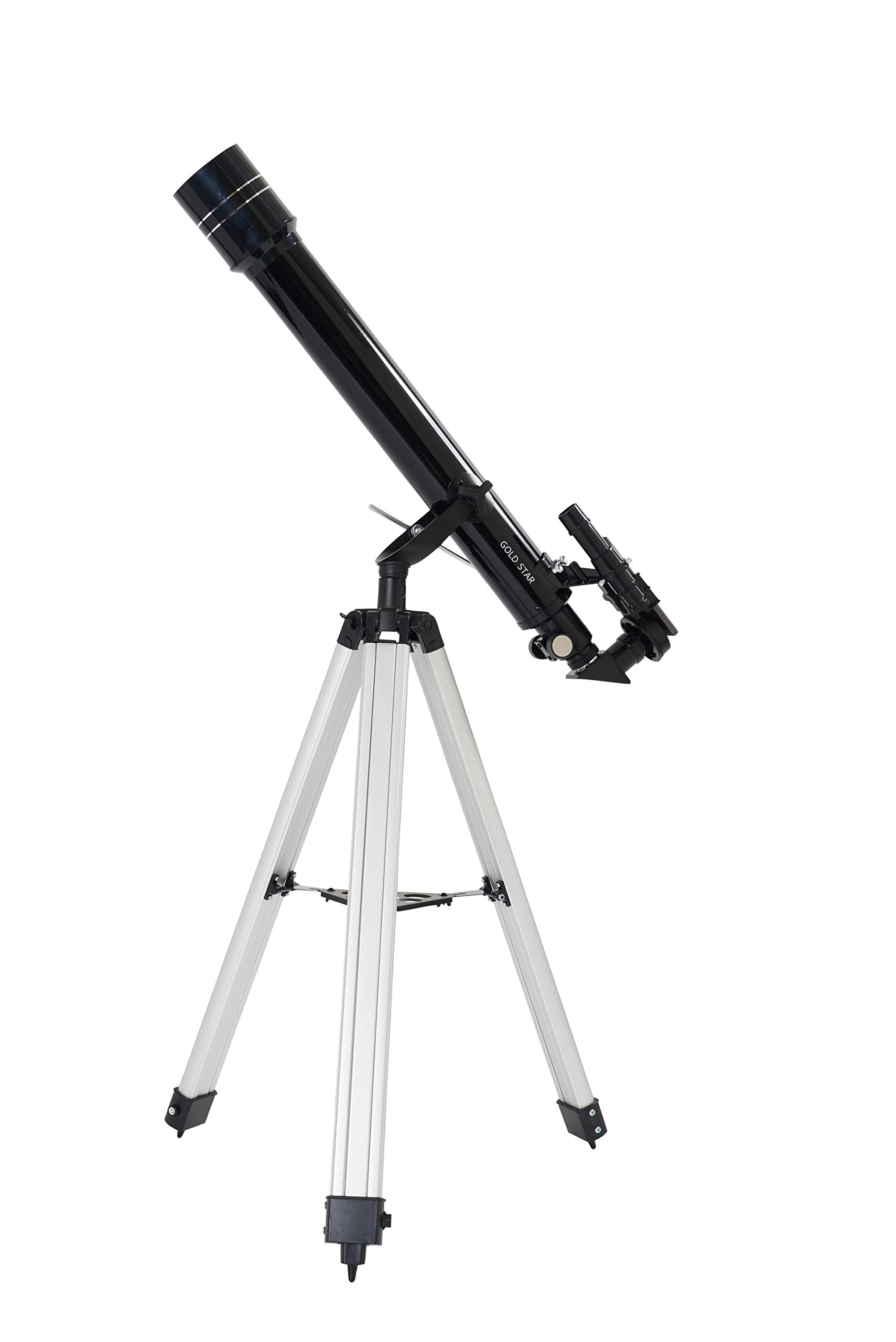
Image: Fully assembled GOLDSTAR 70070-BKW Astronomical Telescope.

Image: Telescope with smartphone adapter attached for photography.
5. Operating Instructions
5.1 Aligning the Finderscope
The finderscope helps you locate objects quickly. To align it:
- Point the main telescope at a distant, easily identifiable object (e.g., a distant tree or building) during daylight hours.
- Center the object in the main telescope's eyepiece.
- Look through the finderscope and adjust its alignment screws until the same object is centered in the finderscope's crosshairs.

Image: Close-up view of the telescope's main tube and finderscope.
5.2 Changing Magnification
The telescope comes with three eyepieces and a Barlow lens to vary magnification:
- H20mm Eyepiece: Provides 35x magnification (700mm / 20mm = 35x). Ideal for wide-field views and locating objects.
- H12.5mm Eyepiece: Provides 56x magnification (700mm / 12.5mm = 56x). Good for more detailed views of the moon and planets.
- SR4mm Eyepiece: Provides 175x magnification (700mm / 4mm = 175x). For high-power observation of specific details.
- 2x Barlow Lens: Doubles the magnification of any eyepiece. For example, using the H20mm eyepiece with the 2x Barlow lens will give 70x magnification (35x * 2 = 70x).
To change magnification, remove the current eyepiece and insert a different one, or insert the Barlow lens first, then the eyepiece into the Barlow lens.


Image: Various eyepieces and a 2x Barlow lens.
5.3 Focusing
Once an object is centered in the eyepiece, slowly turn the focus knob until the image appears sharp and clear. Fine-tuning may be required as objects move or as your eyes adjust.
5.4 Celestial Observation
For astronomical viewing, use the diagonal mirror (if included) to provide a more comfortable viewing angle. Start with the lowest magnification eyepiece (H20mm) to locate your target, then switch to higher magnifications for more detail. The included star chart can assist in identifying constellations and celestial objects.

Image: Included star chart to aid in celestial navigation.
5.5 Terrestrial Observation
For viewing objects on Earth, use the 1.5x Erecting Eyepiece. This accessory corrects the inverted image produced by the telescope, allowing you to see objects right-side up. Simply insert the erecting eyepiece into the focuser, then insert your desired eyepiece into the erecting eyepiece.

Image: The 1.5x Erecting Eyepiece for terrestrial viewing.
5.6 Smartphone Photography
The included smartphone adapter allows you to capture photos and videos through the telescope. Attach the adapter to an eyepiece, then secure your smartphone to the adapter. Align your phone's camera with the eyepiece lens and use your phone's camera app to take pictures or record videos.

Image: Smartphone adapter for attaching a phone to the eyepiece.
6. Maintenance
6.1 Cleaning Lenses
Handle optical surfaces with extreme care. Dust on lenses can be removed with a soft brush or a can of compressed air. For smudges or fingerprints, use a specialized optical cleaning solution and a microfiber cloth. Apply the solution to the cloth, not directly to the lens, and wipe gently in a circular motion. Avoid touching the lens surfaces with your fingers.
6.2 Storage
When not in use, store the telescope in a dry, dust-free environment. Keep all lens caps on to protect the optical surfaces. If possible, store the telescope in its original packaging or a dedicated carrying case.
6.3 General Care
Avoid exposing the telescope to sudden temperature changes, which can cause condensation. Do not overtighten screws or knobs, as this can damage the components.
7. Troubleshooting
- Image is blurry: Adjust the focus knob slowly. Ensure the correct eyepiece is fully inserted and secured. Check for condensation on the lenses.
- Cannot find objects: Ensure the finderscope is properly aligned with the main telescope. Start with the lowest magnification eyepiece (H20mm) for a wider field of view.
- Image is inverted/reversed: This is normal for astronomical telescopes. For terrestrial viewing, use the 1.5x Erecting Eyepiece to correct the image orientation.
- Telescope is unstable: Ensure the tripod legs are fully extended and locked, and the telescope tube is securely mounted. Avoid using the telescope on uneven surfaces.
8. Specifications
| Feature | Specification |
|---|---|
| Model Number | 70070-BKW |
| Optical Design | Refractor |
| Objective Lens Diameter | 70 mm |
| Focal Length | 700 mm |
| Eyepieces Included | H20mm (35x), H12.5mm (56x), SR4mm (175x) |
| Barlow Lens | 2x |
| Erecting Eyepiece | 1.5x |
| Mount Type | Equatorial (Manual) |
| Focus Type | Manual Focus |
| Included Accessories | Star Chart, Smartphone Adapter |
| Product Weight | Approximately 9.17 lbs (4.16 kg) |
9. Warranty and Support
For warranty information and customer support, please refer to the documentation provided at the time of purchase or contact your retailer. Keep your proof of purchase for any warranty claims.