1. Introduction
This user manual provides essential information for the safe and effective use of your Globalsaving AC Power Cord. This power cord is designed to provide reliable power supply to compatible Casio Data Projectors, specifically models XJ-A130, XJ-A135, and XJ-A140. Please read this manual thoroughly before use and retain it for future reference.

Image 1: The Globalsaving AC Power Cord, showing both the standard US 3-prong male plug and the female C13 connector. This cord is used to connect electronic devices to a power outlet.
2. Safety Information
Always observe the following safety precautions to prevent injury or damage to the product and connected devices:
- Do not use the power cord if it is damaged, frayed, or has exposed wires.
- Ensure the power cord is fully inserted into both the power outlet and the device.
- Do not overload electrical outlets.
- Keep the power cord away from water, heat sources, and sharp objects.
- This cord is designed for indoor use only.
- Unplug the cord from the power source before cleaning or when not in use for extended periods.
3. Setup
Follow these steps to properly set up your AC Power Cord:
- Identify the correct ports: Locate the power input port on your Casio Data Projector (XJ-A130, XJ-A135, or XJ-A140) and a standard AC power outlet.
- Connect to projector: Insert the female end (C13 connector) of the Globalsaving AC Power Cord firmly into the power input port of your Casio projector.
- Connect to power outlet: Insert the male end (standard US 3-prong plug) of the power cord into a grounded AC power outlet.
- Verify connection: Ensure both ends of the cord are securely connected.
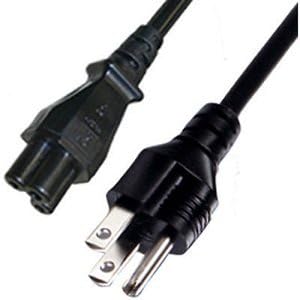
Image 2: A closer view of the power cord's connectors, highlighting the male plug (for wall outlet) and the female connector (for device). Proper connection ensures stable power delivery.
4. Operating
Once the Globalsaving AC Power Cord is properly connected to your Casio Data Projector and a power outlet, the projector should receive power. Turn on your projector using its power button as per its own user manual. The power cord itself does not require any operational steps beyond proper connection.
5. Maintenance
Proper maintenance extends the life of your power cord:
- Cleaning: Disconnect the power cord from all power sources before cleaning. Wipe the cord with a dry, soft cloth. Do not use liquid cleaners or abrasive materials.
- Storage: When not in use, coil the cord loosely. Avoid tight coiling or kinking, which can damage the internal wires. Store in a cool, dry place away from direct sunlight.
- Inspection: Periodically inspect the cord for any signs of damage, such as cuts, fraying, or discoloration. If damage is found, discontinue use immediately and replace the cord.
6. Troubleshooting
If you encounter issues, refer to the following common troubleshooting steps:
| Problem | Possible Cause | Solution |
|---|---|---|
| Projector not powering on. | Power cord not fully connected. | Ensure both ends of the power cord are securely plugged in. |
| Projector not powering on. | No power from outlet. | Test the outlet with another device. Check circuit breaker. |
| Projector not powering on. | Damaged power cord. | Inspect the cord for visible damage. If damaged, replace it immediately. |
| Intermittent power. | Loose connection. | Ensure connections are tight. Avoid pulling or straining the cord. |
7. Specifications
Key technical specifications for the Globalsaving AC Power Cord:
| Feature | Detail |
|---|---|
| Product Dimensions | 6 x 1 x 1.5 inches |
| Item Weight | 7 ounces |
| Connector Gender | Male-to-Female |
| Total Power Outlets | 1 |
| Compatible Projector Models | Casio XJ-A130, XJ-A135, XJ-A140 |
| Manufacturer | Globalsaving |
| ASIN | B077WCDM49 |
| UPC | 604286399447 |
8. Warranty and Support
For warranty information and customer support, please refer to the Globalsaving official website or contact your retailer. Keep your purchase receipt as proof of purchase.
For further assistance, you may contact Globalsaving customer service through their official channels. Please have your product model information and purchase details ready.