
Just Wireless 20069
Just Wireless FM Transmitter Car Charger User Manual
Model: 20069
Product Overview
The Just Wireless FM Transmitter USB Car Charger is designed to provide versatile audio playback and charging capabilities in your vehicle. It allows you to stream music from various sources, including your smartphone or a USB flash drive, directly to your car's FM radio. Additionally, it features a USB charging port to power your mobile devices while on the go. The device also supports hands-free calling for enhanced safety and convenience.
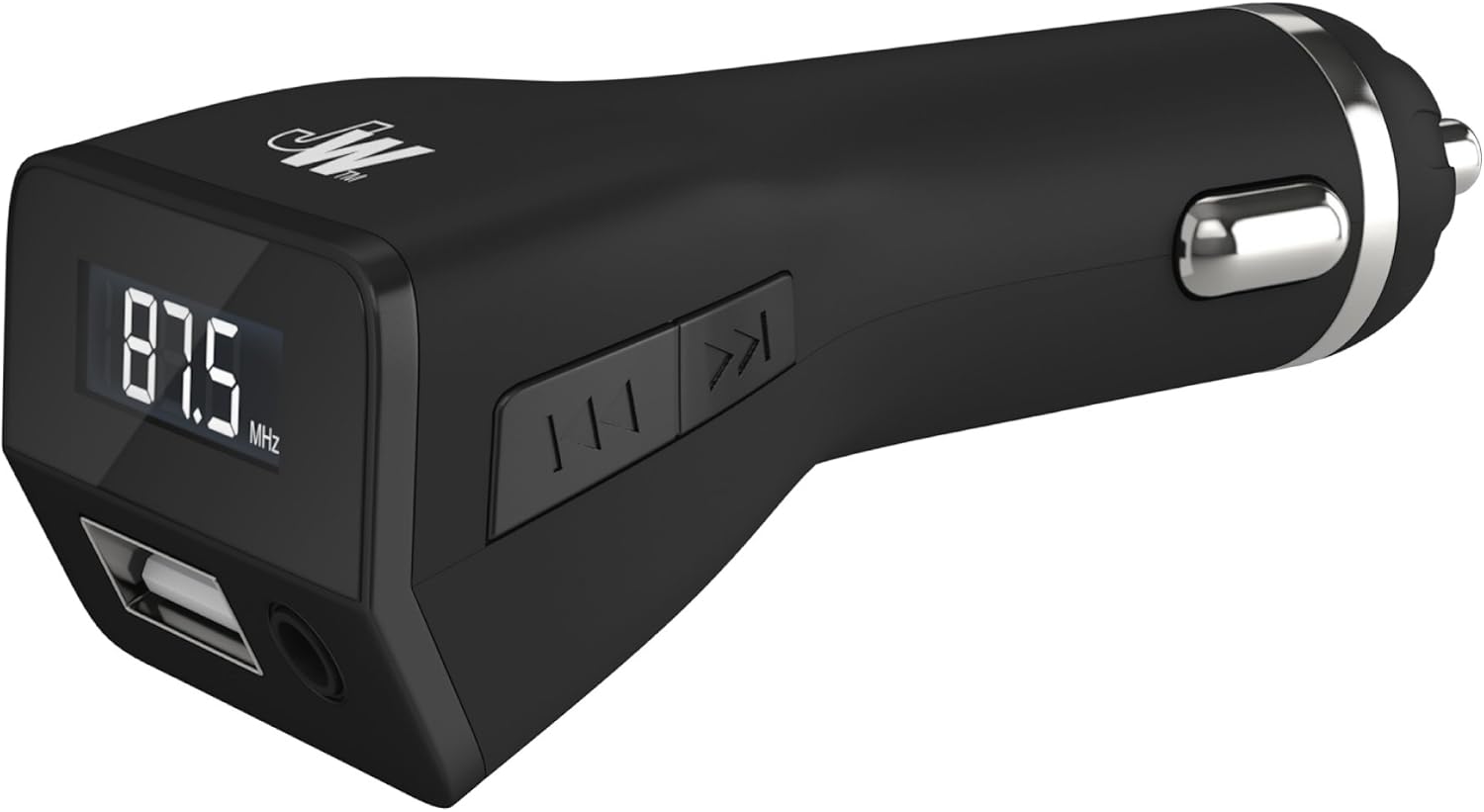
Figure 1: Just Wireless FM Transmitter Car Charger. This image shows the compact black device with an FM frequency display (87.5 MHz), a USB port, and a 3.5mm audio jack. Control buttons are visible on the side.
Key Features
- FM Transmission: Broadcasts audio from your device to your car's FM stereo system.
- Multi-Source Playback: Supports audio input via 3.5mm audio jack and USB flash drive (MP3 and WMA files).
- USB Charging Port: Allows simultaneous charging of mobile phones, GPS devices, and other USB-powered accessories.
- Hands-Free Calling: Answer incoming calls and speak through your car's stereo speakers with quick-touch controls.
- Universal Compatibility: Works with a wide range of smartphones, tablets, and other audio devices.
Components and Controls

Figure 2: Labeled diagram of the FM Transmitter's features. This image highlights the USB Charging & Flash Drive Port, 3.5 mm Jack Port, Next/Previous track buttons, Play/Pause button, and Channel (CH) button.
- USB Charging & Flash Drive Port: Used for charging devices and playing music from a USB flash drive.
- 3.5 mm Jack Port: Used for connecting audio devices via an auxiliary cable.
- Next/Previous Buttons: Used to skip tracks forward or backward during music playback.
- Play/Pause Button: Used to play or pause music, and to answer/end calls.
- Channel (CH) Button: Used to adjust the FM transmission frequency.
Setup Guide
- Power Connection: Insert the Just Wireless FM Transmitter into your vehicle's 12-volt power outlet or cigarette lighter socket. The device will power on automatically.
- Tune FM Frequency: On the FM Transmitter, press the 'CH' button to select an unused FM frequency. Then, tune your car's FM radio to the exact same frequency. Choose a frequency that is clear and free from strong radio signals to ensure optimal audio quality.
- Connect Audio Source:
- Via 3.5mm Audio Jack: Connect your smartphone, tablet, or MP3 player to the transmitter's 3.5mm audio jack port using an auxiliary cable.
- Via USB Flash Drive: Insert a USB flash drive containing MP3 or WMA audio files into the USB port. The transmitter will automatically detect and begin playing the music.
- Start Playback: Begin playing music on your connected device or from the USB flash drive. The audio will be transmitted to your car's stereo system.
Operation
Music Playback
Once connected and tuned, you can control music playback directly from your connected device or using the transmitter's buttons:
- Play/Pause: Press the Play/Pause button to start or stop music playback.
- Next/Previous Track: Use the Next (⏭) and Previous (⏮) buttons to navigate through your music tracks.

Figure 3: Multisource Playback. The image shows the FM Transmitter connected to both a USB flash drive and a 3.5mm audio cable, demonstrating its ability to play music from multiple sources. It also indicates support for MP3 and WMA file formats.
Charging Devices
The integrated USB port allows you to charge your mobile devices simultaneously while listening to music.
- Connect your device's USB charging cable to the USB port on the FM Transmitter.
- Ensure your device begins charging.

Figure 4: Charge & Play. This image illustrates the FM Transmitter connected to a smartphone via a charging cable, indicating that the device can charge and play music simultaneously.
Hands-Free Calling
When an incoming call is received on your connected smartphone:
- Press the Play/Pause button on the transmitter to answer the call.
- Your voice will be picked up by the transmitter's microphone, and the caller's voice will be heard through your car's stereo speakers.
- To end the call, press the Play/Pause button again.
- The transmitter will automatically switch back to music playback after the call ends.
Maintenance
To ensure the longevity and optimal performance of your FM Transmitter, follow these simple maintenance guidelines:
- Cleaning: Use a soft, dry cloth to clean the exterior of the device. Do not use liquid cleaners or abrasive materials.
- Storage: When not in use, store the device in a cool, dry place away from direct sunlight and extreme temperatures.
- Handling: Avoid dropping the device or subjecting it to strong impacts, as this can damage internal components.
Troubleshooting
| Problem | Possible Cause | Solution |
|---|---|---|
| No audio output | Incorrect FM frequency; Loose connection; Device volume too low | Ensure transmitter and car radio are on the same clear frequency. Check all cable connections. Increase volume on both the device and car stereo. |
| Static or poor audio quality | Interference from other radio stations; Weak signal | Change to a different, clearer FM frequency. Ensure the transmitter is securely plugged in. |
| Device not charging | Loose USB connection; Faulty cable; Car power outlet issue | Ensure USB cable is firmly connected. Try a different USB cable. Check if the car's 12V power outlet is functioning. |
| Hands-free calls not working | Phone not connected; Microphone obstructed | Ensure your phone is properly connected via the 3.5mm jack. Check for any obstructions around the transmitter's microphone. |
Specifications
| Feature | Detail |
|---|---|
| Model Number | 20069 |
| Product Dimensions | 3.49 x 2.54 x 8.26 cm |
| Item Weight | 62.6 grams |
| Color | Black |
| Connectivity Technologies | Bluetooth, USB, AUX |
| Special Features | Hands-free calls |
| Power Source | 12V Car Power Outlet |
| Supported Media Types | MP3, WMA |
| Compatible Devices | Smartphone, Camera, Headphone, Speaker, MP3 Player, Tablet |
| Hardware Interface | USB |
Safety Information
Please read and adhere to the following safety warnings for the correct use and handling of this electrical device:
- Do not expose the device to water, moisture, or extreme temperatures.
- Avoid disassembling or modifying the device, as this may void the warranty and pose safety risks.
- Keep the device out of reach of children.
- Ensure proper ventilation around the device during operation.
- Dispose of batteries and electronic waste responsibly according to local regulations.
Warranty and Support
Just Wireless is confident in the quality of its products. This FM Transmitter Car Charger comes with a Lifetime Warranty.
For any support inquiries, troubleshooting assistance, or warranty claims, please contact Just Wireless customer service through their official website or the retailer where the product was purchased.
Related documents20069


Ask a question about this manual
Ask about setup, troubleshooting, compatibility, parts, safety, or missing instructions. Manuals+ will review the question and use this page’s manual context to help answer it.