
Introduction
This instruction manual provides essential information for the assembly, setup, operation, and maintenance of your CELMAN Double Eagle Cada RC Jeep Defender Building Kit, Model DEC51004W. Please read this manual thoroughly before beginning assembly or operation to ensure safe and correct use of the product.
Safety Information
- Adult Supervision: This product contains small parts and is recommended for ages 6 and up. Adult supervision is advised during assembly and operation, especially for younger users.
- Small Parts Hazard: Keep small building blocks and components away from young children to prevent choking hazards.
- Battery Safety:
- Use only the recommended battery types.
- Do not mix old and new batteries, or different types of batteries.
- Insert batteries with correct polarity (+ and -).
- Remove exhausted batteries promptly.
- Do not recharge non-rechargeable batteries.
- Remove batteries if the product will not be used for an extended period.
- Operating Environment: Operate the RC vehicle in open, clear areas, away from obstacles, people, and pets. Avoid operating near water or in wet conditions.
- Electrical Components: Do not attempt to modify or tamper with the electrical components of the RC vehicle or remote control.
Package Contents
Your CELMAN Double Eagle Cada RC Jeep Defender Building Kit includes:
- 533 building block pieces for the Jeep Defender model.
- 1 x Remote Control unit.
- 1 x Main control unit/receiver for the vehicle.
- 1 x Motor unit.
- 1 x Steering servo.
- 1 x USB charging cable (for vehicle battery, if applicable).
- 1 x Detailed paper instruction manual for assembly.
Note: Batteries for the vehicle and remote control are typically sold separately unless otherwise specified on the packaging.
Assembly Instructions
The CELMAN Double Eagle Cada RC Jeep Defender is a complex building kit. Detailed, step-by-step assembly instructions are provided in the dedicated paper manual included in your package. Please follow these instructions carefully for successful construction.
General Assembly Steps:
- Unpack and Sort: Carefully unpack all components. It is highly recommended to sort the building blocks by type and color to facilitate the assembly process.
- Follow Paper Manual: Refer to the included paper instruction manual for precise, illustrated, step-by-step guidance. Each step will show which pieces to use and how to connect them.
- Chassis Construction: Begin by building the main chassis of the Jeep Defender, integrating the motor and steering servo as instructed.
- Bodywork Assembly: Continue with the body panels, interior, and roof structure.
- Wheel Attachment: Attach the wheels and tires to the axles.
- Electronic Integration: Install the main control unit/receiver and connect the motor and steering servo as per the manual's wiring diagrams.
- Final Checks: Before proceeding to setup, ensure all connections are secure and all parts are firmly attached.

Image: The fully assembled CELMAN Double Eagle Cada RC Jeep Defender, shown with its remote control. This view highlights the front grille, headlights, and overall structure of the vehicle.
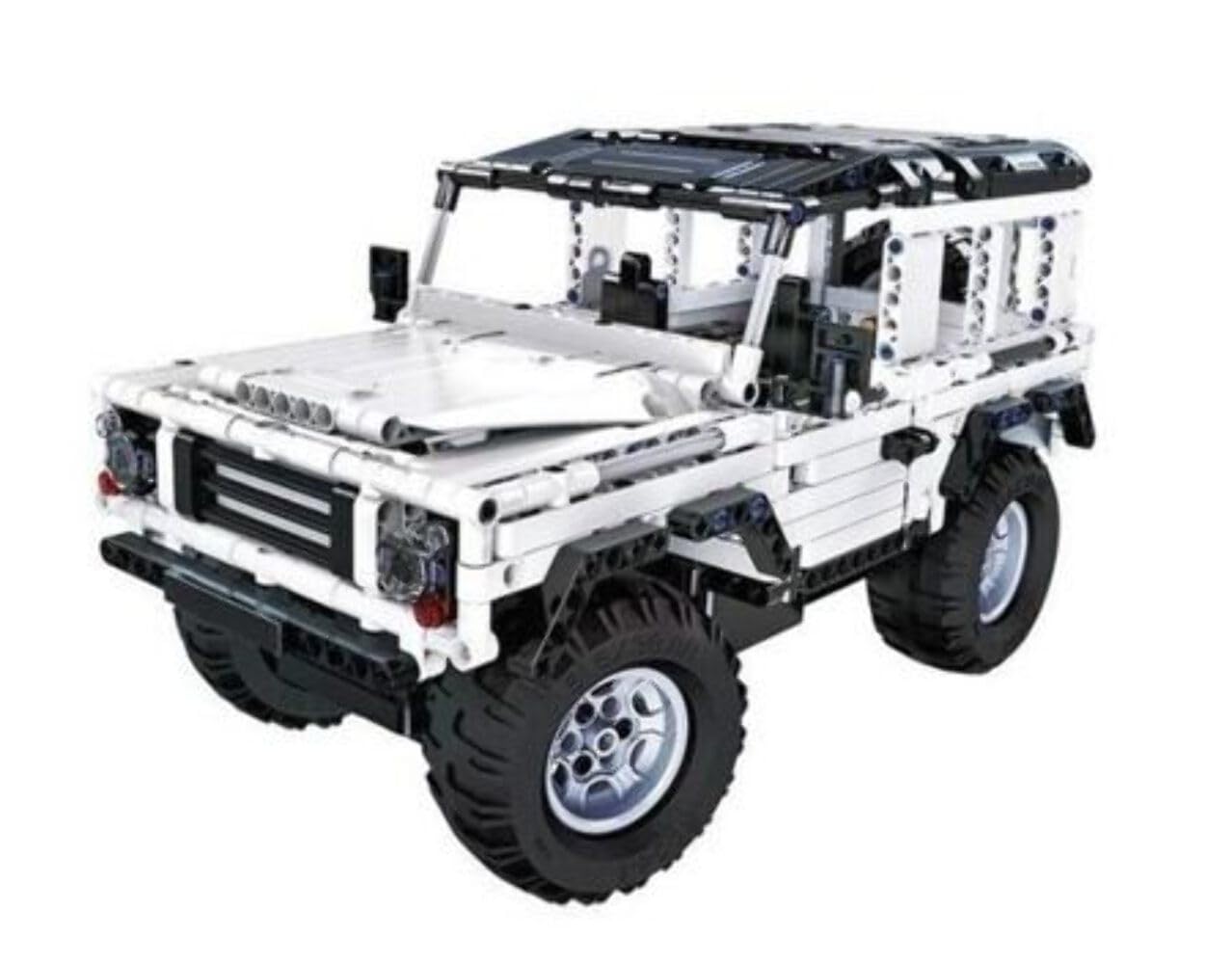
Image: A rear-side view of the assembled CELMAN Double Eagle Cada RC Jeep Defender. This perspective showcases the rear lights, spare wheel mount (if present), and the robust construction of the model.
Setup
1. Battery Installation
For the Vehicle:
- Locate the battery compartment on the vehicle's main control unit.
- Open the compartment cover.
- Insert the required rechargeable battery pack (e.g., 3.7V Li-ion, specific type as per manual) into the compartment, ensuring correct polarity.
- Close the compartment cover securely.
- If the battery is rechargeable, connect it to the USB charging cable and charge fully before first use.
For the Remote Control:
- Locate the battery compartment on the back of the remote control.
- Open the compartment cover.
- Insert the required non-rechargeable batteries (e.g., 2x AA batteries) into the compartment, ensuring correct polarity.
- Close the compartment cover securely.
2. Pairing the Remote Control with the Vehicle
- Ensure both the vehicle and the remote control have fresh or fully charged batteries installed.
- Turn on the vehicle's power switch (usually located on the main control unit). An indicator light may flash.
- Turn on the remote control's power switch.
- The remote control and vehicle should automatically pair. The indicator light on the vehicle and/or remote control will typically become solid once paired.
- If pairing fails, turn both devices off, wait a few seconds, and repeat the process. Refer to the paper manual for specific pairing instructions if issues persist.
Operating Instructions
Once the vehicle is assembled and paired with the remote control, you are ready to operate it.
- Forward/Backward: Use the left joystick (or trigger) on the remote control to move the vehicle forward or backward. Push up for forward, pull down for backward.
- Steering (Left/Right): Use the right joystick (or steering wheel) on the remote control to turn the vehicle left or right.
- Speed Control: Some models may have variable speed control. Adjust the joystick input for finer speed adjustments.
- Range: Operate the vehicle within the specified control range to maintain a stable connection.
- Stopping: Release the joysticks to bring the vehicle to a stop.
Always operate the vehicle responsibly and in a safe environment, away from hazards.
Maintenance
- Cleaning: Use a soft, dry cloth to wipe down the vehicle and remote control. Avoid using water or chemical cleaners, as these can damage electronic components.
- Storage: Store the vehicle and remote control in a cool, dry place, away from direct sunlight and extreme temperatures.
- Battery Removal: If the product will not be used for an extended period, remove all batteries from both the vehicle and the remote control to prevent leakage and damage.
- Component Check: Periodically check for any loose building blocks or connections and re-secure them as needed.
Troubleshooting
| Problem | Possible Cause | Solution |
|---|---|---|
| Vehicle does not move. |
|
|
| Vehicle moves erratically or loses connection. |
|
|
| Steering is unresponsive. |
|
|
Specifications
- Model Number: DEC51004W
- Brand: CELMAN (Manufacturer: Double Eagle)
- Number of Pieces: 533
- Recommended Minimum Age: 6 years (72 months)
- Educational Objective: Spatial Reasoning
- Product Type: Remote Control Building Kit
- ASIN: B077N8R4R2
Warranty and Support
For warranty information, please refer to the documentation included with your product at the time of purchase or contact the seller directly. CELMAN products are designed for quality and performance.
If you encounter any issues not covered in this manual or require further assistance, please contact your retailer or the manufacturer's customer support. Please have your model number (DEC51004W) and purchase details ready when contacting support.