
YLI Corporation YB300
YLI YB300 Heavy Duty Electric Backplate User Manual
Model: YB300
1. Introduction
This manual provides comprehensive instructions for the installation, operation, and maintenance of the YLI YB300 Heavy Duty Electric Backplate. The YB300 is an electrical security bolt designed for access control systems, suitable for various door types including glass, wooden, and metal doors. It features a robust metal construction and a solid holding force, ensuring reliable security.
Please read this manual thoroughly before installation and use to ensure proper function and safety.
2. Safety Information
Observe the following safety precautions during installation and operation:
- Ensure power is disconnected before performing any installation or maintenance.
- Installation should be performed by qualified personnel to prevent electrical hazards and ensure proper functionality.
- Use only the specified DC12V power supply.
- Do not expose the device to extreme moisture or corrosive environments.
- Verify all connections are secure before applying power.
3. Product Overview
The YB300 electric lock is a robust security component for access control. Key features include:
- Material: Superior strength aluminum alloy, stainless steel solid bolt.
- Operation: Normally Closed (NC) connection, meaning it stays closed only while there is electric current.
- Temperature Range: -10°C to 55°C.
- Durability: Long life with 50,000 cycles.
- Power: DC12V, minimum 3.0 Amper.
- Delay Time: Adjustable autolock delay (0, 3, 6, 9 seconds).
- Protection: MOV provides reverse current protection.
- Signal Output: Door status signal exit contact (NC.COM).

Figure 3.1: Front view of the YLI YB300 Electric Backplate, showing the main body and faceplate.

Figure 3.2: Angled view of the YB300, highlighting the adjustable autolock delay settings (0, 3, 6, 9 seconds) located on the side of the unit.
4. Specifications
| Attribute | Value |
|---|---|
| Model Number | YB300 |
| Manufacturer | YLI ELECTRONIC |
| Material | Aluminum, Metal |
| Item Weight | 710 g |
| Parcel Dimensions | 26.8 x 6.4 x 5.6 cm |
| Power Voltage | DC12V (minimum 3.0 Amper power supply required) |
| Operating Temperature | -10°C to 55°C |
| Cycles | 50,000 cycles |
| Autolock Delay Time | 0, 3, 6, 9 seconds |
| Door Status Signal Exit Contact | NC.COM |
5. Installation
The YB300 is designed for easy integration into access control systems. It can be installed on thin profile doors such as aluminum doors, as well as glass, wooden, or metal doors. Ensure the door frame has sufficient space for the lock body.
5.1 Component Dimensions and Wiring

Figure 5.1: Detailed dimensions of the YB300 unit and its wiring connections. The wiring includes Red (+), Black (-), Orange (OPEN), Green (COM), and Yellow (NC).
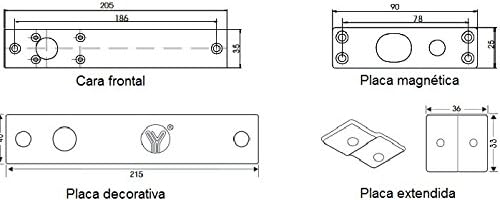
Figure 5.2: Dimensions for various components including the front plate, magnetic plate, decorative plate, and extended plate, crucial for precise installation.
5.2 Installation Steps
Follow these steps for proper installation:
- Prepare the Door Frame: Place the template for the lock body on the door frame, aligning it with the central line of the door frame. Mark the area to be cut.
- Cut the Opening: Create the necessary opening in the door frame based on the marked template. Ensure the cut is clean and precise to accommodate the lock body.
- Secure Mounting Plate: Fix the mounting plate into the prepared opening. This is particularly important for hollow metal frames.
- Connect Wires: Connect the necessary wires according to the wiring diagram (Figure 5.1 and Figure 5.3). Ensure all connections are secure and correctly matched (e.g., Red to +, Black to -, Orange to OPEN, Green to COM, Yellow to NC).
- Mount Lock Body and Test: Mount the main body of the lock into the door frame. After mounting, test the lock's functionality to ensure it operates correctly with the access control system.

Figure 5.3: Visual guide for the installation process, from marking the template to final mounting and testing.
5.3 Wiring Diagram for Access Control System
The YB300 can be integrated with various access control components. The following diagram illustrates a typical wiring setup:

Figure 5.4: Comprehensive wiring diagram showing connections for the YB300 electric bolt with an access control panel, power supply, electric door bell, alarm system, and release buttons. Note the NC (Normally Closed) connection for the electric bolt.
Key Connections:
- Power Supply: Connect to a stable DC12V power source (minimum 3.0A).
- Access Control Panel: Integrate the lock's NC (Normally Closed) and COM connections with the access control panel's output.
- Release Button: Connect normally open (N.O.) release buttons in parallel for exit.
- Door Status Signal: The NC.COM output provides real-time information on the door's status (locked/unlocked) to the access control system.
6. Operating Instructions
The YB300 operates as a normally closed (NC) electric bolt. This means the bolt remains extended and locked when power is applied. To unlock the door, the power to the bolt must be momentarily interrupted or reversed by the access control system.
- Locking: When the access control system applies power, the bolt extends, securing the door.
- Unlocking: Upon a valid access credential (e.g., card swipe, keypad entry), the access control system momentarily cuts power to the YB300, retracting the bolt and allowing the door to open.
- Autolock Delay: The autolock delay can be set to 0, 3, 6, or 9 seconds. This feature controls how long the bolt remains retracted after power is cut before automatically re-extending. Adjust this setting based on your specific security and traffic flow requirements.
- Door Status Monitoring: The NC.COM output provides real-time information on the door's status (locked/unlocked) to the access control system.
7. Maintenance
The YB300 is designed for low maintenance. Regular checks can ensure its longevity and reliable operation:
- Cleaning: Periodically clean the exterior of the lock with a soft, dry cloth. Avoid abrasive cleaners or solvents.
- Connection Check: Annually inspect all wiring connections to ensure they remain secure and free from corrosion.
- Bolt Movement: Ensure the bolt moves freely without obstruction. Clear any debris that might hinder its operation.
- Power Supply: Verify the power supply is stable and within the specified voltage range (DC12V).
8. Troubleshooting
If you encounter issues with your YB300 electric backplate, refer to the following common problems and solutions:
| Problem | Possible Cause | Solution |
|---|---|---|
| Lock does not engage/disengage | No power, incorrect wiring, faulty power supply, obstruction. | Check power connections and voltage. Verify wiring against diagram. Remove any physical obstructions. Test power supply. |
| Bolt is stuck or moves slowly | Debris in bolt mechanism, misaligned installation, insufficient power. | Clean the bolt area. Re-check alignment of the lock body and strike plate. Ensure adequate power supply. |
| Autolock delay not working as expected | Incorrect delay setting. | Verify the autolock delay switch setting on the unit (0, 3, 6, 9 seconds). |
| Door status signal is inaccurate | Incorrect wiring of NC.COM contacts, faulty sensor. | Check wiring of the NC.COM contacts to the access control panel. |
If the problem persists after attempting these solutions, contact customer support.
9. Warranty and Support
For warranty information and technical support, please refer to the documentation provided at the time of purchase or contact YLI Corporation directly through their official website or customer service channels. Keep your purchase receipt as proof of purchase for warranty claims.
YLI Corporation Contact Information: (Please refer to the official YLI Corporation website for the most current contact details.)
Ask a question about this manual
Ask about setup, troubleshooting, compatibility, parts, safety, or missing instructions. Manuals+ will review the question and use this page’s manual context to help answer it.