1. Introduction
This manual provides comprehensive instructions for the operation and maintenance of your SKMEI Analog-Digital Watch, Model 1228 Black. Please read this manual carefully to ensure proper use and to maximize the lifespan of your timepiece. This watch combines both analog and digital displays, offering versatile timekeeping functions.
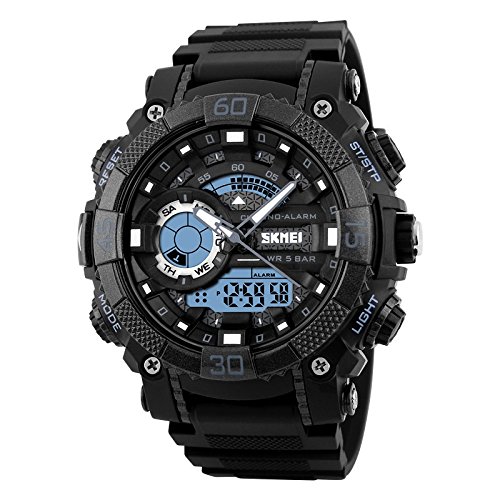
Figure 1.1: Front view of the SKMEI Analog-Digital Watch 1228 Black, showcasing its robust design and dual display.
2. Watch Components and Buttons
Familiarize yourself with the various components and buttons of your watch:
- MODE Button: Used to cycle through different modes (Time, Alarm, Chronograph, Dual Time).
- RESET Button: Used for resetting values or confirming settings in various modes.
- START/STOP Button: Used to start and stop functions like the chronograph, or adjust settings.
- LIGHT Button: Activates the EL backlight for illumination in low-light conditions.

Figure 2.1: Overview of watch buttons and their primary functions, including MODE, RESET, START/STOP, and LIGHT.
3. Setup and Initial Configuration
3.1 Setting Digital Time and Date
- In normal timekeeping mode, press the MODE button repeatedly until the digital time display starts flashing, indicating setting mode.
- Press the START/STOP button to cycle through the settings (seconds, hour, minute, month, date, day of week).
- Use the RESET button to adjust the flashing value. Hold to increase rapidly.
- Once all settings are correct, press the MODE button to exit the setting mode.
3.2 Setting Analog Time
The analog hands are typically synchronized with the digital time. If they are out of sync, follow these steps:
- Pull out the crown (the small knob on the side of the watch case) to the first click position.
- Rotate the crown to adjust the analog hands to the correct time.
- Once set, push the crown back in to secure the time and resume normal operation.
4. Operating Modes
Your SKMEI watch features several operating modes:
- Timekeeping Mode: Displays current time (analog and digital), day of week, and date.
- Alarm Mode: Set daily alarms.
- Chronograph (Stopwatch) Mode: Measure elapsed time.
- Dual Time Mode: Display a second time zone.

Figure 4.1: Key functions available on the watch, such as dual time, chronograph, alarm, date, week, EL light, and 12/24 hour clock.
4.1 Using the Alarm
- From Timekeeping Mode, press the MODE button until "AL" or "ALARM" appears on the digital display.
- Press the START/STOP button to select the hour or minute to set.
- Use the RESET button to adjust the flashing value.
- Press MODE to confirm and exit. To turn the alarm on/off, press START/STOP in Alarm Mode.
4.2 Using the Chronograph (Stopwatch)
- From Timekeeping Mode, press the MODE button until "CHRONO" or "STW" appears.
- Press the START/STOP button to start the stopwatch.
- Press START/STOP again to pause. Press again to resume.
- To reset the stopwatch to zero, press the RESET button while the stopwatch is paused.
4.3 Using the EL Backlight
Press the LIGHT button at any time to illuminate the digital display for a few seconds, allowing visibility in dark environments.
5. Maintenance and Care
Proper care will ensure the longevity and performance of your SKMEI watch.
- Water Resistance: This watch is water resistant up to 50 meters (5 ATM). It is suitable for daily use, hand washing, and short periods of swimming. Do not press any buttons while the watch is submerged in water. Avoid hot water or steam.
- Cleaning: Wipe the watch case and strap with a soft, dry cloth. For stubborn dirt, use a slightly damp cloth and mild soap, then dry thoroughly.
- Temperature: Avoid exposing the watch to extreme temperatures (hot or cold) for prolonged periods.
- Chemicals: Keep the watch away from solvents, detergents, perfumes, and other chemicals, as they may damage the case, strap, or seals.
- Impact: While designed to be rugged, avoid strong impacts or dropping the watch.

Figure 5.1: Key features contributing to the watch's durability and functionality, such as 50M water resistance, PC material shell, and EL lighting chip.
6. Troubleshooting
If you encounter issues with your watch, refer to the following common problems and solutions:
| Problem | Possible Cause | Solution |
|---|---|---|
| Digital display is blank or dim. | Low battery. | Replace the battery. Consult a professional watch repair service. |
| Analog hands are not moving or are incorrect. | Crown is pulled out; battery low; hands misaligned. | Push the crown back in. If battery is low, replace it. Manually adjust analog hands as per Section 3.2. |
| Buttons are unresponsive. | Watch is wet; internal malfunction. | Ensure watch is dry. If issue persists, seek professional service. |
| Alarm does not sound. | Alarm is not activated; incorrect alarm time. | Ensure alarm is set and activated in Alarm Mode (Section 4.1). Verify alarm time. |
7. Specifications
- Model: 1228 Black
- Brand: SKMEI
- Movement Type: Quartz (Analog-Digital)
- Dial Display: Analog-Digital
- Dial Color: White
- Case Material: PC (Polycarbonate) Plastic
- Case Diameter: 50 mm
- Band Material: PU (Polyurethane) Resin Plastic
- Band Color: Black
- Dial Glass Material: Mineral Resin Glass
- Water Resistance Depth: 50 Meters (5 ATM)
- Clasp Type: Buckle
- Functions: Dual Time, Chronograph, Alarm, Date, Week, EL Backlight, 12/24 Hour Clock
- Item Weight: 70 Grams
- Manufacturer: Guangzhou Skmei Watch Co.,LTD

Figure 7.1: Watch dimensions and strap perimeter for fitting reference.
8. Warranty and Support
8.1 Warranty Information
This SKMEI watch is covered by a manufacturer's warranty. For specific details regarding warranty duration and coverage, please refer to the warranty card included with your purchase or contact the manufacturer directly. The warranty typically covers manufacturing defects but does not cover damage caused by misuse, accidents, or unauthorized repairs.
8.2 Customer Support
For further assistance, technical support, or inquiries about your SKMEI watch, please visit the official SKMEI store on Amazon or contact their customer service. Keep your purchase receipt as proof of purchase.
Official SKMEI Store: SKMEI Store on Amazon.in