
1. Introduction
The KDLINKS X3 Dash Cam is designed to provide high-quality video recording for your vehicle, enhancing safety and providing crucial evidence in case of incidents. This manual provides detailed instructions on setting up, operating, and maintaining your device to ensure optimal performance.
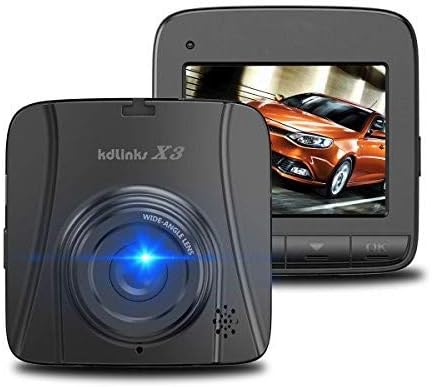
The KDLINKS X3 dash cam, shown from the front with its wide-angle lens and a separate view of its screen displaying a car.
The X3 Dash Cam incorporates advanced features such as 2.7K 2688x1520 Super HD video quality, a wide-angle lens, G-Sensor for accident detection, WDR (Wide Dynamic Range) for improved night vision, and loop recording. Its stealthy design and automatic on/off functionality contribute to a seamless user experience.
2. Package Contents
Verify that all items are present in your KDLINKS X3 Dash Cam package:
- 1 x USB cable
- 1 x Car Charger
- 1 x Car Dash Cam (KDLINKS X3)
- 1 x 3M Glue Pasted Bracket (adhesive mount)
- 1 x Suction Mount
- 1 x User Manual
3. Key Features
- 2.7K Super HD Quality (2688*1520): Records video in high definition for clear detail.
- Automatic Motion Detection (Advanced Parking Mode): The X3 automatically begins recording when motion is detected, even when the vehicle is off, and shuts off after a period of inactivity.
- Superior Night Vision with WDR: Features a 6-glass lens design and Wide Dynamic Range (WDR) technology for enhanced video quality in low-light conditions.
- High-Power, Built-In Battery: Equipped with a Li-polymer battery designed to withstand varying temperatures.
- Loop Recording: Continuously records by overwriting the oldest files when the memory card is full.
- G-Sensor (Accident Auto Detection): Automatically detects sudden impacts or collisions and locks the current video file to prevent overwriting.
- Stealthy Design: Compact size and pure black front face for discreet installation.
4. Setup
- Insert MicroSD Card: Ensure the dash cam is powered off. Insert a high-endurance MicroSD card (Class 10 or higher, U3 recommended, up to 128GB) into the designated slot until it clicks.
- Mount the Dash Cam:
- Adhesive Mount: Clean the windshield surface thoroughly. Peel off the protective film from the 3M adhesive bracket and firmly press it onto the desired location on your windshield, ensuring it does not obstruct your view.
- Suction Mount: Attach the suction cup mount to the windshield and secure it by flipping the lever.
- Connect Power: Connect the car charger to the dash cam's power input port and plug the other end into your vehicle's cigarette lighter socket. The dash cam will typically power on and begin recording automatically when the vehicle's ignition is turned on.
- Initial Settings: Upon first use, or after a reset, you may need to set the date and time. Navigate through the menu using the device buttons. Refer to the on-screen prompts for guidance.
5. Operating Instructions
5.1. Basic Recording
The KDLINKS X3 Dash Cam is designed for automatic operation. Once connected to power and the vehicle's ignition is on, it will automatically start recording. Recording will stop when the ignition is turned off.
- Starting Recording: Connect the dash cam to the car charger. It will power on and start recording automatically when the car engine starts.
- Stopping Recording: The dash cam will automatically save the current recording and power off when the car engine is turned off.
- Manual Recording: If the device is on but not recording, press the designated record button (refer to device interface) to start or stop recording manually.
5.2. Loop Recording
Loop recording ensures continuous recording by overwriting the oldest video files when the memory card reaches its capacity. This prevents the recording from stopping due to a full card.
- Video files are typically saved in segments (e.g., 1, 2, or 3 minutes).
- When the MicroSD card is full, the oldest unprotected file will be overwritten.
5.3. G-Sensor (Emergency Lock)
The built-in G-Sensor detects sudden acceleration, braking, or collisions. When triggered, it automatically locks the current video segment, preventing it from being overwritten by loop recording.
- These locked files are stored in a separate folder on the MicroSD card.
- To manually protect a recording, press the emergency lock button during recording.
5.4. Advanced Parking Mode (Motion Detection)
This feature allows the dash cam to monitor your vehicle while parked. If motion is detected, the camera will automatically start recording for a short period and then power off if no further motion is detected.
- Ensure your vehicle's power port provides continuous power for this feature to function when the ignition is off.
- Activate or deactivate Parking Mode through the device's menu settings.
5.5. WDR Night Mode
Wide Dynamic Range (WDR) technology improves video clarity in challenging lighting conditions, such as strong backlighting or low-light environments, ensuring details are captured effectively both day and night.
6. Maintenance
- Clean the Lens: Regularly clean the camera lens with a soft, lint-free cloth to ensure clear video quality.
- MicroSD Card Care: Format the MicroSD card periodically (e.g., once a month) to maintain optimal performance and prevent data corruption. Back up important files before formatting.
- Temperature: Avoid exposing the dash cam to extreme temperatures for extended periods. If parked in direct sunlight, consider removing the dash cam or using a sunshade.
- Firmware Updates: Check the KDLINKS official website for any available firmware updates to improve performance and add new features.
7. Troubleshooting
| Problem | Possible Cause / Solution |
|---|---|
| Dash cam does not power on. |
|
| Dash cam freezes or displays a white screen. |
|
| Date and time reset frequently. |
|
| Poor video quality. |
|
| MicroSD card error or not recording. |
|
8. Specifications
| Feature | Detail |
|---|---|
| Model Name | X3 |
| Video Capture Resolution | 2.7K 2688x1520 |
| Field Of View | 170 Degrees (approx.) |
| Display Type | LCD |
| Connectivity Technology | USB |
| Special Features | Advanced Parking Mode, Motion Sensing, G-Sensor, WDR Night Mode, Loop Recording |
| Mounting Type | Adhesive Mount (Suction Mount also available) |
| Battery | 1 Lithium Polymer battery (included) |
| Item Weight | 2.6 ounces |
| Product Dimensions | 2.5 x 2.5 x 0.7 inches |
9. Warranty and Support
The KDLINKS X3 Dash Cam comes with a 12-Month Warranty from the date of purchase. This warranty covers manufacturing defects and ensures product quality.
For technical assistance, troubleshooting, or warranty claims, please contact KDLINKS customer support. Refer to the contact information provided in your product packaging or visit the official KDLINKS website for the most up-to-date support details.
When contacting support, please have your product model (X3) and purchase details ready.