
BingoFit 107HR Plus (AS EU 107HR PLS BU)
AUSUN 107HR Plus Fitness Tracker User Manual
Model: 107HR Plus (AS EU 107HR PLS BU)
1. Introduction

Image: The blue AUSUN 107HR Plus Fitness Tracker, showing its sleek design and the digital display with time and date.
Thank you for choosing the AUSUN 107HR Plus Fitness Tracker. This device is designed to help you monitor your daily activities, track your health metrics, and stay connected. Please read this manual carefully before using the device to ensure proper operation and to maximize its lifespan.
Package Contents
- AUSUN 107HR Plus Fitness Tracker
- User Manual
2. Important Safety Information
- Do not attempt to disassemble or modify the device.
- Keep the device away from extreme temperatures and direct sunlight.
- Avoid exposing the device to strong impacts or drops.
- Consult a doctor before starting any new exercise program, especially if you have pre-existing health conditions.
- This device is not a medical device and should not be used to diagnose or treat any medical condition.
- Ensure the charging contacts are clean and dry before charging.
3. Getting Started
3.1 Charging the Device
Before first use, fully charge your fitness tracker. The device features a built-in USB charger for convenience.
- Gently pull off the strap from the side with the USB icon to reveal the USB plug.
- Insert the USB plug into any standard USB port (e.g., computer, USB wall adapter, power bank).
- The battery icon on the screen will indicate charging status. A full charge typically takes 1-2 hours.
- A single charge provides approximately 5-7 days of normal usage time.
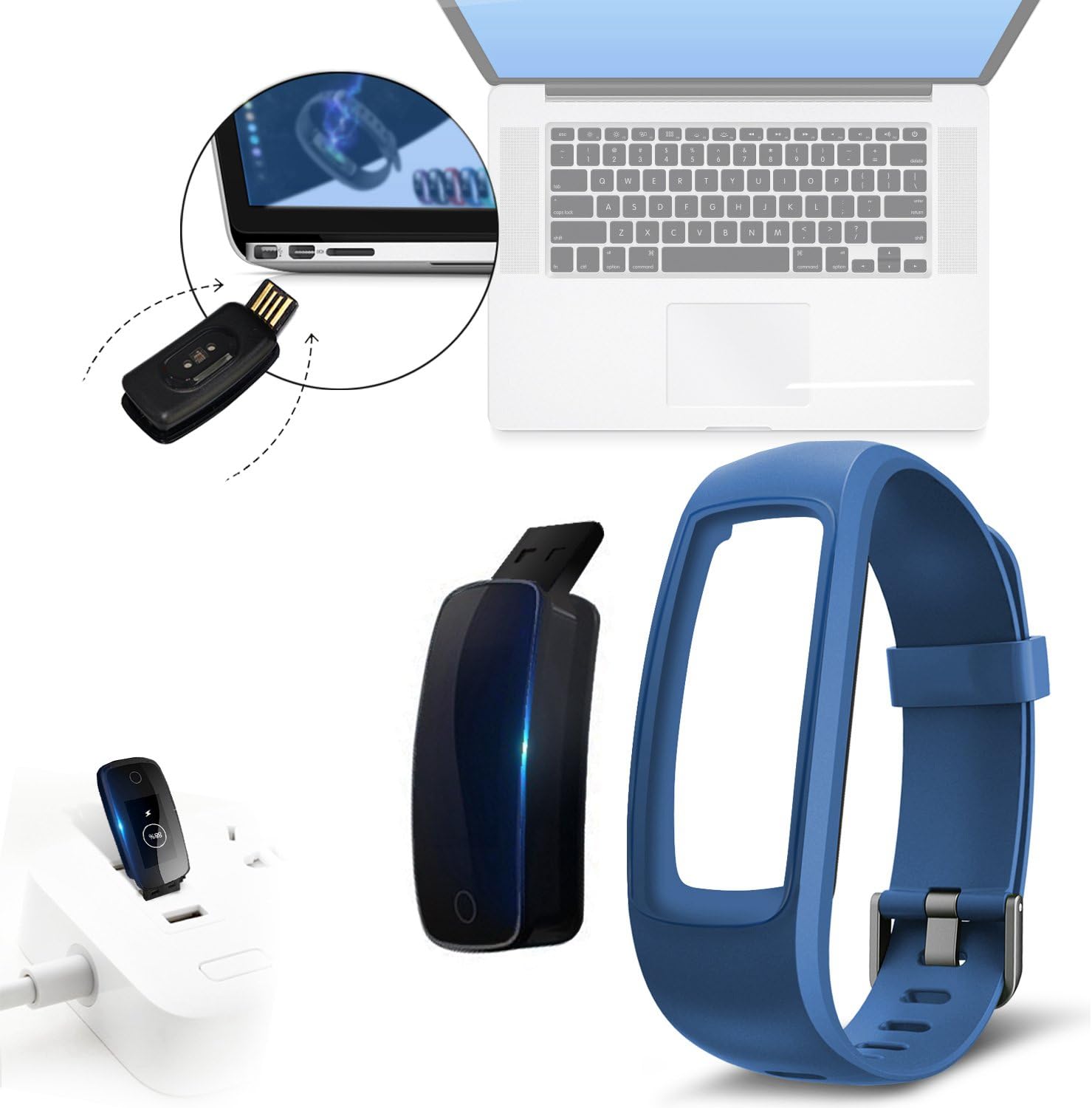
Image: The fitness tracker's main unit detached from one strap, revealing a USB plug. This plug is shown being inserted into a laptop's USB port and a wall adapter, illustrating the direct USB charging method.
3.2 App Installation and Pairing
To unlock all features and synchronize data, download the companion app.
- Download the "Veryfitpro" app from the Apple App Store (for iOS 7.1 and higher) or Google Play Store (for Android 4.4 and higher).
- Ensure Bluetooth is enabled on your smartphone.
- Open the Veryfitpro app and follow the on-screen instructions to create an account and pair your device.
- The tracker will vibrate to confirm successful pairing.
- Note: The device supports Bluetooth 4.0 and above. It is compatible with smartphones only, not with PCs, iPads, or tablets. It may not work with Samsung J3, J5, Huawei P8, and Windows Phone devices.
3.3 Wearing the Device
For accurate readings, wear the fitness tracker correctly.
- Wear the tracker on your wrist, about one finger's width above your wrist bone.
- Ensure the strap is snug but comfortable, not too tight or too loose.
- For heart rate monitoring, the sensor on the back of the device should be in contact with your skin.

Image: A diagram showing the dimensions of the fitness tracker's main unit (1.84 inches length, 0.54 inches width) and illustrating the recommended wrist circumference range for comfortable wear (5.5 inches to 9.8 inches).

Image: A person wearing the blue AUSUN 107HR Plus Fitness Tracker on their left wrist, looking down at the device while sitting outdoors, possibly after a run. The image shows the tracker comfortably fitted on the wrist.
4. Operating the Device
4.1 Navigating the Display
The tracker features an OLED display and a touch-sensitive button at the bottom of the screen.
- Tap the touch button to cycle through different display modes and functions.
- The display can show time, date, steps, distance, calories, heart rate, and more.
- You can customize the watch face through the Veryfitpro app.

Image: The blue AUSUN 107HR Plus Fitness Tracker displaying the time and date. To its right, three smaller images show different optional watch faces, indicating customizable display options.
4.2 Core Functions
The AUSUN 107HR Plus offers a range of tracking capabilities:

Image: The back of the blue AUSUN 107HR Plus Fitness Tracker showing the green light of the heart rate sensor. To the right, a grid of hexagonal icons represents various functions: Heart Rate, Pedometer, Alarm, Calories, SMS, Distance, Call, Camera Remote, Sedentary Reminder, and Sleep Monitor.
- Activity Tracking: Tracks steps, distance, and calories burned throughout the day.
- Heart Rate Monitoring: Automatically monitors your heart rate. View real-time data on the device or detailed trends in the app.
- Sleep Monitoring: Monitors your sleep quality and patterns, helping you understand your sleep habits.
- Smart Notifications: Receive alerts for incoming calls, messages (SMS), and notifications from social media apps (e.g., Facebook, WhatsApp) directly on your wrist when connected to your phone.
- 14 Sport Modes: Includes walking, running, cycling, fitness, yoga, dynamic cycling, basketball, football, badminton, pedestrian traffic, mountaineering, treadmill, tennis, and dancing. Select the appropriate mode in the app to track specific activities.
- Sedentary Reminder: Alerts you when you've been inactive for too long, encouraging you to move.
- Alarm: Set silent alarms through the app to wake you up or remind you of tasks.
- Camera Remote: Use the tracker as a remote shutter for your smartphone camera.

Image: A person wearing the blue AUSUN 107HR Plus Fitness Tracker on their left wrist, looking at their smartphone. This illustrates the connectivity and smart notification features of the device.
5. Care and Maintenance
5.1 Cleaning
- Regularly clean your tracker and wristband, especially after exercise or exposure to sweat.
- Wipe the device with a soft, damp cloth. Do not use harsh chemicals or abrasive cleaners.
- Ensure the device is completely dry before charging.
5.2 Waterproofing (IP68)
The AUSUN 107HR Plus is IP68 waterproof, meaning it is protected against continuous immersion in water up to 1 meter for 30 minutes.
- You can wear it while washing hands, in the rain, or during swimming.
- It is not recommended for hot showers, saunas, or diving, as steam and high pressure can damage the seals.
- After exposure to water, wipe the device dry before charging.
5.3 Battery Life
The device is powered by a Lithium-Ion battery. To optimize battery life:
- Charge the device fully when the battery is low.
- Avoid extreme temperatures, which can affect battery performance.
- Frequent use of features like continuous heart rate monitoring and smart notifications can reduce battery life.
6. Troubleshooting Guide
| Problem | Possible Cause | Solution |
|---|---|---|
| Device does not turn on. | Low battery. | Charge the device for at least 10 minutes, then try turning it on. |
| Cannot pair with smartphone. | Bluetooth is off; App not running; Device out of range; Incorrect pairing process. | Ensure Bluetooth is on. Restart the app. Bring the device closer to your phone. Follow app pairing instructions carefully. Restart both devices. |
| Inaccurate heart rate readings. | Device not worn correctly; Sensor dirty. | Ensure the tracker is snug on your wrist and the sensor is clean and in contact with your skin. Remain still during measurement. |
| No notifications received. | Bluetooth disconnected; App notification permissions not granted; App not running in background. | Check Bluetooth connection. Grant all necessary notification permissions to the Veryfitpro app in your phone settings. Ensure the app is running in the background. |
| Screen unresponsive. | Temporary software glitch. | Restart the device by connecting it to a charger or through the app if possible. |
7. Technical Specifications
| Feature | Detail |
|---|---|
| Model Name | 107HR Plus |
| Manufacturer Reference | AS EU 107HR PLS BU |
| Brand | BingoFit (Manufactured by AUSUN) |
| Display Size | 0.96 inches OLED |
| Battery Capacity | 65mAh |
| Charging Time | 1-2 hours |
| Battery Life | 5-7 days (normal usage) |
| Waterproof Level | IP68 (Swim-proof) |
| Compatibility | iOS 7.1+ & Android 4.4+ (Bluetooth 4.0+) |
| Charging Method | Built-in USB |
| Sensor Type | Pedometer, Heart Rate |
| UPC | 754610106484 |
8. Warranty and Support
For warranty information and customer support, please refer to the documentation provided with your purchase or contact the retailer/manufacturer directly. Keep your purchase receipt as proof of purchase.
For further assistance, you may visit the BingoFit store on Amazon: BingoFit Amazon Store
Ask a question about this manual
Ask about setup, troubleshooting, compatibility, parts, safety, or missing instructions. Manuals+ will review the question and use this page’s manual context to help answer it.