
Introduction
Thank you for choosing the Erato Verse True Wireless Bluetooth Earbuds. This manual provides detailed instructions on how to set up, operate, maintain, and troubleshoot your new earbuds to ensure the best possible audio experience. Please read this manual carefully before use and keep it for future reference.
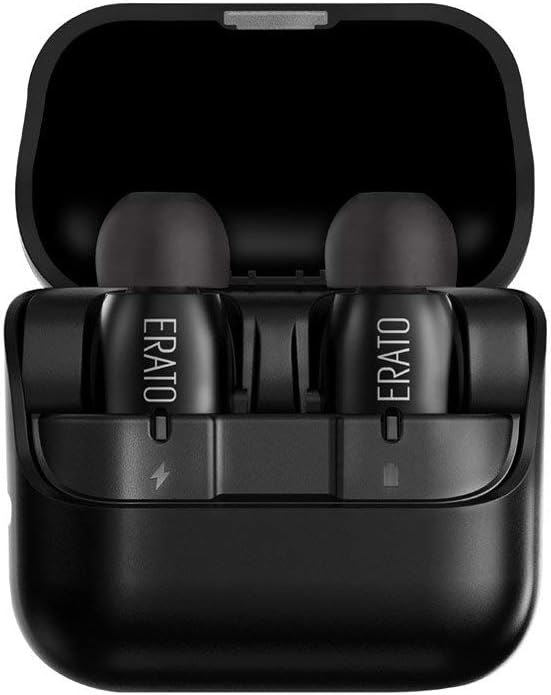
Figure 1: Erato Verse Earbuds in Charging Case
This image shows the Erato Verse earbuds, black in color, resting inside their matching black charging case. The case is open, revealing the two earbuds nestled in their charging slots. The earbuds have the 'ERATO' logo printed on them.
Package Contents
- Erato Verse True Wireless Earbuds (Left and Right)
- Charging Case
- SpinFit Ear Tips (various sizes)
- USB Charging Cable
- Quick Start Guide
Setup
1. Charging the Earbuds and Case
Before first use, ensure both the earbuds and the charging case are fully charged.
- Place the earbuds into their respective slots in the charging case.
- Connect the charging case to a power source using the provided USB cable.
- The indicator lights on the case and earbuds will show charging status. Refer to the Quick Start Guide for specific light indications.
- A full charge provides up to 3 hours of playtime for the earbuds, and the case holds up to 4 additional charges, extending total playtime to 15 hours.
2. Pairing with Your Device
The Erato Verse earbuds use Bluetooth technology for wireless connection.
- Ensure the earbuds are charged and in the charging case.
- Open the charging case. The earbuds will automatically enter pairing mode (or press and hold the multi-function button on both earbuds until the indicator lights flash).
- On your device (smartphone, tablet, computer), go to Bluetooth settings and turn Bluetooth on.
- Search for available devices and select "Erato Verse" from the list.
- Once connected, the earbuds will indicate successful pairing (e.g., a voice prompt or steady light).
Note: For the best musical experience, ensure your paired devices have the latest software updates. The Erato Verse is compatible with most Bluetooth devices, including iOS and Android phones and tablets.
Operating Instructions
1. Wearing the Earbuds
Proper fit is crucial for sound quality and comfort.
- Select the SpinFit ear tips that provide a snug and comfortable seal in your ear canal. The patented design allows the ear tip to rotate for a full seal and enhanced noise isolation.
- Gently insert each earbud into your ear, ensuring a secure fit.

Figure 2: Individual Erato Verse Earbuds
This image provides a close-up view of two individual Erato Verse earbuds. They are black, with a smooth, matte finish. The 'ERATO' logo is visible on the side of one earbud. The silicone ear tips are also black and appear soft and pliable.
2. Multi-function Button Controls
Each earbud features a multi-function button for easy control.
| Action | Function |
|---|---|
| Single Tap | Play/Pause music, Answer/End call |
| Double Tap (Right Earbud) | Next Track |
| Double Tap (Left Earbud) | Previous Track |
| Press and Hold (1-2 seconds) | Activate Voice Assistant (Siri, Google Assistant) |
| Press and Hold (3-5 seconds) | Power On/Off |
Note: Volume control may vary depending on your device. Adjust volume directly on your connected device if not controlled by the earbuds.

Figure 3: Erato Verse Earbuds with Button Detail
This image displays the Erato Verse earbuds from an angle that highlights the small, discreet multi-function button located on the side of each earbud. The 'ERATO' branding is also visible, along with the charging contacts at the bottom.
Maintenance
1. Cleaning
Regular cleaning helps maintain sound quality and hygiene.
- Use a soft, dry, lint-free cloth to wipe the earbuds and charging case.
- Remove ear tips and clean them with mild soap and water if necessary. Ensure they are completely dry before reattaching.
- Gently remove any earwax or debris from the earbud nozzles using a small, soft brush or cotton swab.
2. Water and Sweat Resistance
The Erato Verse earbuds are IPX5 water and sweat resistant. This means they can withstand splashes of water and sweat from exercise. However, they are not designed for submersion in water. Do not swim or shower with the earbuds. If they get wet, wipe them dry immediately before placing them back in the charging case.
3. Storage
When not in use, store the earbuds in their charging case to protect them and keep them charged. Store the case in a cool, dry place away from direct sunlight and extreme temperatures.
Troubleshooting
If you encounter any issues with your Erato Verse earbuds, please refer to the following common solutions:
| Problem | Possible Solution |
|---|---|
| Earbuds not pairing | Ensure earbuds are charged. Turn off and on Bluetooth on your device. Forget "Erato Verse" in your device's Bluetooth settings and re-pair. |
| No sound or low volume | Check device volume. Ensure earbuds are properly seated in your ears and ear tips provide a good seal. Clean earbud nozzles. |
| Intermittent connection / Audio dropouts | Ensure your device is within the Bluetooth range (typically 10 meters/33 feet). Avoid physical obstructions between earbuds and device. Reduce interference from other wireless devices. |
| Earbuds not charging | Ensure charging cable is securely connected. Check charging contacts on earbuds and case for debris. Try a different USB port or power adapter. |
| One earbud not working | Place both earbuds back in the case, close it, then open it again. Ensure both earbuds are charged. Re-pair the earbuds with your device. |
If the problem persists after trying these solutions, please contact Erato customer support.
Specifications
| Feature | Detail |
|---|---|
| Brand | Erato |
| Model Name | AEVE00BK |
| Item Model Number | AEVE00BK00 |
| Color | Black |
| Product Dimensions | 1.52 x 1.52 x 2.29 cm |
| Item Weight | 4.5 grams (per earbud) |
| Connectivity Technology | Wireless (Bluetooth) |
| Headphones Form Factor | In-Ear |
| Noise Control | Sound Isolation |
| Water Resistance Rating | IPX5 |
| Batteries | 2 Lithium Ion batteries required |
| Included Components | Wireless Charging Case |
| Material | Plastic |
| Age Range (Description) | Adult |
Warranty and Support
The Erato VERSE comes with a one-year warranty from the date of purchase. This warranty covers manufacturing defects and workmanship. It does not cover damage caused by misuse, accidents, unauthorized modifications, or normal wear and tear.
For warranty claims or technical support, please contact Erato customer service through the retailer where you purchased the product or visit the official Erato website for contact information.
Please retain your proof of purchase for warranty validation.