
Introduction
Welcome to the National Geographic Mega Construction Engineering Set. This kit provides 121 snap-fit pieces and a motorized unit, enabling the construction of 35 unique models, including vehicles, animals, and more. Designed to foster engineering skills and imagination, this manual provides essential information for assembly, operation, and care of your construction set.
Safety Information
- Small Parts Warning: This kit contains small parts which may pose a choking hazard for children under 3 years of age. Adult supervision is recommended during assembly and play.
- Battery Safety: The motorized unit requires batteries (not included). Ensure correct battery polarity. Do not mix old and new batteries, or different types of batteries. Remove batteries if the toy is not used for an extended period.
- General Use: Do not modify the components. Use the kit as intended for construction and play.
Package Contents
Verify that all components are present before beginning assembly:
- 121 Snap-Fit Construction Parts
- 1 Motorized Unit
- 1 Instruction Booklet (for basic models)
- Access to Interactive App with 3D Building Instructions
- Extractor Tool (for easy disassembly)
Setup
1. Battery Installation for Motorized Unit
- Locate the battery compartment on the motorized unit.
- Using a small screwdriver (not included), open the battery compartment cover.
- Insert the required batteries (e.g., 2x AA, not included) according to the polarity indicators (+/-).
- Replace the battery compartment cover and secure it with the screw.
2. App Download (Optional, for 3D Instructions)
For advanced 3D building instructions and walk-throughs, download the official National Geographic Construction Kit app:
- Search for "National Geographic Construction Kit" in the Apple App Store (for iOS devices) or Google Play Store (for Android devices).
- Download and install the free application.
Operating Instructions
1. Building Models
Refer to the included instruction booklet or the interactive app for step-by-step guidance on building various models. The snap-fit pieces are designed for easy assembly and disassembly.
- Connecting Pieces: Align the connectors and press firmly until you hear a click.
- Disassembling Pieces: Use the provided extractor tool to gently pry apart connected pieces. This prevents damage and makes reuse easier.
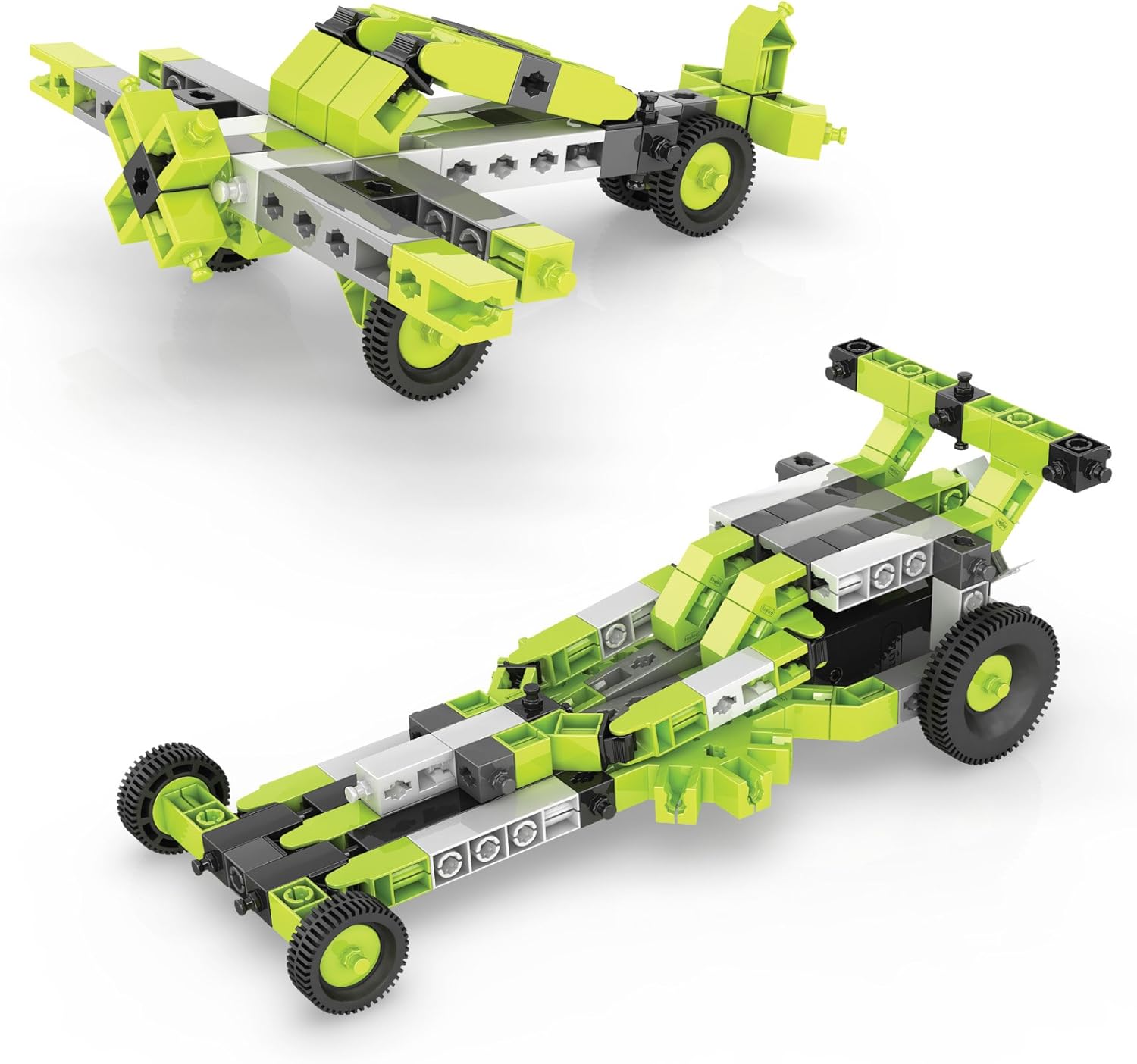
Example models: An airplane and a drag racing car built with the construction set.

Additional models: A helicopter and a dune buggy constructed from the kit.
2. Using the Motorized Unit
The motorized unit can be integrated into various models to bring them to life.
- Attachment: Follow the model-specific instructions to attach the motor securely to your construction.
- Operation: The motor typically has a switch for forward, off, and reverse functions. Toggle the switch to activate the motor and make your creation move.

Animal models: A spider, dragonfly, crab, and T-Rex dinosaur built using the kit.

Diverse models: A scorpion, motorcycle, bulldozer, and crane assembled from the set.
Maintenance
1. Cleaning
To clean the construction pieces, wipe them with a damp cloth. Do not submerge the motorized unit in water. Avoid using harsh chemicals or abrasive cleaners.
2. Storage
Store all components in a dry, cool place, away from direct sunlight. Keep small parts organized to prevent loss. Remove batteries from the motorized unit before long-term storage.
Troubleshooting
- Motor Not Working:
- Check if batteries are installed correctly with proper polarity.
- Replace old or depleted batteries with new ones.
- Ensure the motor is securely connected to the model and the switch is in the 'forward' or 'reverse' position.
- Pieces Not Snapping Together:
- Verify that you are using the correct pieces as indicated in the instructions.
- Ensure the connectors are aligned properly before applying pressure.
- App Not Loading/Functioning:
- Check your device's internet connection.
- Ensure your device meets the minimum system requirements for the app.
- Try restarting the app or your device.
Specifications
| Brand | National Geographic |
| Model Name | NGMEGACON35 |
| Number of Pieces | 121 |
| Educational Objective | Engineering Skills, Imagination Development, Interactive Skills, STEM |
| Special Features | Battery Operated Motor |
| Item Dimensions (L x W x H) | 31 x 22.9 x 5.6 cm |
| Item Weight | 454 g |
| Age Range (Recommended) | 72 months to 180 months (6 to 15 years) |
| Included Components | 121 Snap-Fit Parts, Motor, Building Instructions |
Warranty Information
This product is covered by a manufacturer's warranty. Please refer to the product packaging or the official National Geographic website for specific warranty terms, conditions, and duration. Retain your proof of purchase for any warranty claims.
Support Information
For further assistance, missing parts, or technical support, please contact National Geographic customer service. You can typically find contact details on the product packaging or by visiting the official National Geographic website.
For additional building ideas and interactive guides, utilize the dedicated National Geographic Construction Kit app available on major app stores.