
SCS Sentinel 3701085200244
SCS Sentinel AirBell 80 Wireless Chime User Manual
Model: 3701085200244
1. Introduction
Thank you for choosing the SCS Sentinel AirBell 80 Wireless Chime. This device is designed to provide a reliable and convenient doorbell solution for your home. It features a wireless push button and a portable chime unit with multiple melodies and a long operating range. Please read this manual carefully before installation and use to ensure proper operation and longevity of your product.

Figure 1: The AirBell 80 wireless chime unit (right) and the outdoor push button (left).
2. Safety Information
- Do not expose the chime unit to water or excessive humidity. The outdoor push button is weather-resistant but should not be submerged.
- Use only the specified battery type (GP23 12V) for the push button. Incorrect battery types may cause damage or malfunction.
- Keep batteries out of reach of children. If swallowed, seek immediate medical attention.
- Do not attempt to open or repair the device yourself. Refer all servicing to qualified personnel.
- Dispose of batteries and the product responsibly according to local regulations.
3. Package Contents
Please verify that all components are present in the package:
- 1 x Wireless Chime Unit (Receiver)
- 1 x Wireless Push Button (Transmitter)
- 1 x Visor for Push Button
- 1 x GP23 12V Battery for Push Button
- Mounting Screws and Wall Plugs
- User Manual
4. Setup and Installation
4.1. Installing the Push Button Battery
- Carefully open the push button casing.
- Insert the provided GP23 12V battery into the battery compartment, ensuring correct polarity (+/-).
- Close the push button casing securely.
4.2. Mounting the Push Button
The push button is designed for outdoor use and comes with a protective visor.
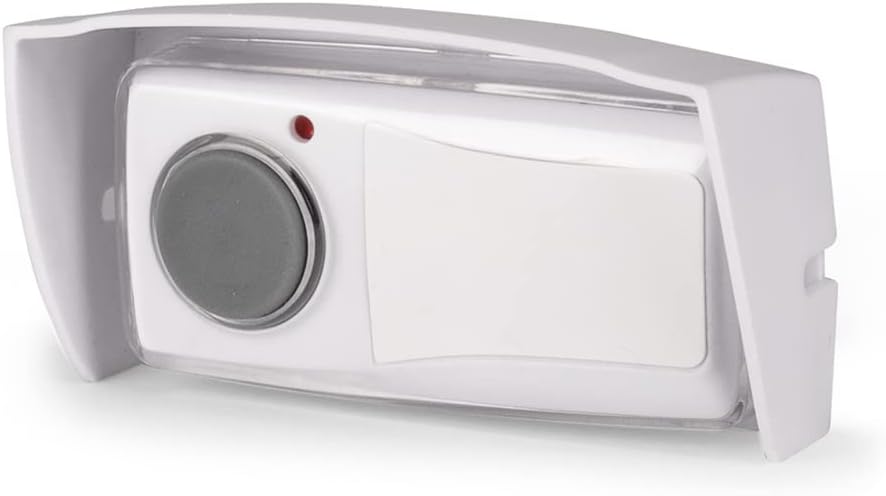
Figure 2: The wireless push button with its protective visor.
- Choose a suitable location near your entrance, ensuring it is easily accessible to visitors.
- Attach the visor to the wall using the provided screws and wall plugs. The visor helps protect the push button from direct rain and sunlight.
- Slide the push button into the visor until it clicks into place.
4.3. Positioning the Chime Unit
The chime unit is portable and can be placed or mounted.

Figure 3: The chime unit can be placed on a flat surface using its removable base or mounted on a wall.
- Placement: The chime unit can be placed on any flat surface such as a table, shelf, or desk. Its discreet and elegant design allows it to blend into any interior.
- Wall Mounting: The chime unit also features an option for wall mounting. Use appropriate screws and wall plugs (not included for the chime unit) to secure it to a wall.
- Range: The AirBell 80 offers a wireless range of up to 80 meters in an open field. For optimal performance, avoid placing the chime unit or push button near large metal objects, thick walls, or other sources of electromagnetic interference that may reduce the effective range.
5. Operating Instructions
5.1. Basic Operation
Once the push button battery is installed and the chime unit is powered on (if applicable, some models are battery-powered, others plug-in), the system is ready for use.
- To activate the chime, simply press the button on the outdoor transmitter.
- The chime unit will play the selected melody and may also provide a visual light signal.
5.2. Melody Selection
The AirBell 80 offers 8 pleasant melodies. To change the melody:
- Locate the melody selection button on the chime unit. (Refer to the product diagram if available, typically a small button on the side or back).
- Press the button repeatedly to cycle through the available melodies. The chime will play a short preview of each melody.
- Stop pressing when you hear your desired melody. The chime will save this selection.

Figure 4: The AirBell 80 features an 80-meter range and 8 selectable melodies.
6. Maintenance
6.1. Battery Replacement (Push Button)
If the push button stops working or its range significantly decreases, the battery may need replacement.
- Open the push button casing.
- Remove the old GP23 12V battery.
- Insert a new GP23 12V battery, observing correct polarity.
- Close the casing securely.
6.2. Cleaning
To maintain the appearance and functionality of your chime:
- Wipe the chime unit and push button with a soft, dry cloth.
- Do not use abrasive cleaners or solvents, as these may damage the surfaces.
7. Troubleshooting
If you experience issues with your AirBell 80, please consult the following table:
| Problem | Possible Cause | Solution |
|---|---|---|
| Chime does not ring when button is pressed. | Dead or incorrectly installed battery in push button. | Replace the GP23 12V battery in the push button, ensuring correct polarity. |
| Reduced operating range. | Low battery in push button; Obstacles between units; Interference from other devices. | Replace push button battery. Reposition chime unit or push button to minimize obstacles. Move away from strong electromagnetic fields. |
| Chime rings by itself (false rings). | Interference from other wireless devices; Environmental factors (e.g., extreme temperature changes affecting components). | Try repositioning the chime unit or push button. Ensure no other wireless devices are operating on similar frequencies nearby. If the issue persists, contact customer support. |
| Chime unit not producing sound. | Chime unit not powered (if applicable); Internal malfunction. | Ensure the chime unit is properly powered. If battery-operated, check/replace batteries. If issue persists, contact customer support. |
8. Specifications
| Feature | Detail |
|---|---|
| Model Number | 3701085200244 |
| Manufacturer | SCS SENTINEL |
| Wireless Range | Up to 80 meters (open field) |
| Melodies | 8 selectable melodies |
| Push Button Battery | 1 x GP23 12V (included) |
| Chime Unit Power | Electric (specific power source not detailed, assume plug-in or internal battery) |
| Color | White |
| Item Weight | 169 g |
| Product Dimensions | 3.2 x 8.7 x 4.4 cm |
| Specific Uses | Outside (for push button) |
9. Warranty and Support
SCS Sentinel products are designed for reliability and ease of use. This product comes with a 2-year warranty, ensuring its quality and performance.
For any questions, technical assistance, or warranty claims, please contact SCS Sentinel customer service. Your satisfaction is our priority, and we are committed to providing high-quality support.
Please retain your proof of purchase for warranty purposes.
Ask a question about this manual
Ask about setup, troubleshooting, compatibility, parts, safety, or missing instructions. Manuals+ will review the question and use this page’s manual context to help answer it.