
Introduction
This manual provides detailed instructions for the setup, operation, and maintenance of your Dayton Audio B452-AIR 4-1/2" 2-Way Bookshelf Speaker Pair with AMT Tweeter. Please read this manual thoroughly before using your speakers to ensure proper installation and optimal performance.

Figure 1: Front view of the Dayton Audio B452-AIR Bookshelf Speaker, showcasing the 4-1/2 inch woofer and 1 inch AMT tweeter.
Setup
1. Unpacking
Carefully remove the speakers and all accessories from the packaging. Ensure that all components are present and undamaged. The package should include:
- Dayton Audio B452-AIR Bookshelf Speaker Pair
- Speaker wire (as shown in Figure 3)
2. Placement
Proper speaker placement is crucial for optimal sound quality. Consider the following:
- Bookshelf Placement: Place speakers on a stable, flat surface at approximately ear level when seated. Avoid placing them too close to walls or corners, which can overemphasize bass.
- Wall Mounting: The speakers are designed for wall mounting. Use appropriate mounting hardware (not included) and ensure the wall can support the weight of the speakers. Refer to Figure 2 for the rear mounting bracket.
- Stereo Imaging: For a stereo setup, position the speakers equidistant from your primary listening position and spaced apart to create a wide soundstage.
3. Connections
Connect the speakers to your amplifier or receiver using the provided speaker wire. Observe correct polarity: connect the positive (+) terminal on the speaker to the positive (+) terminal on the amplifier, and the negative (-) terminal on the speaker to the negative (-) terminal on the amplifier. Incorrect polarity can result in poor sound quality.
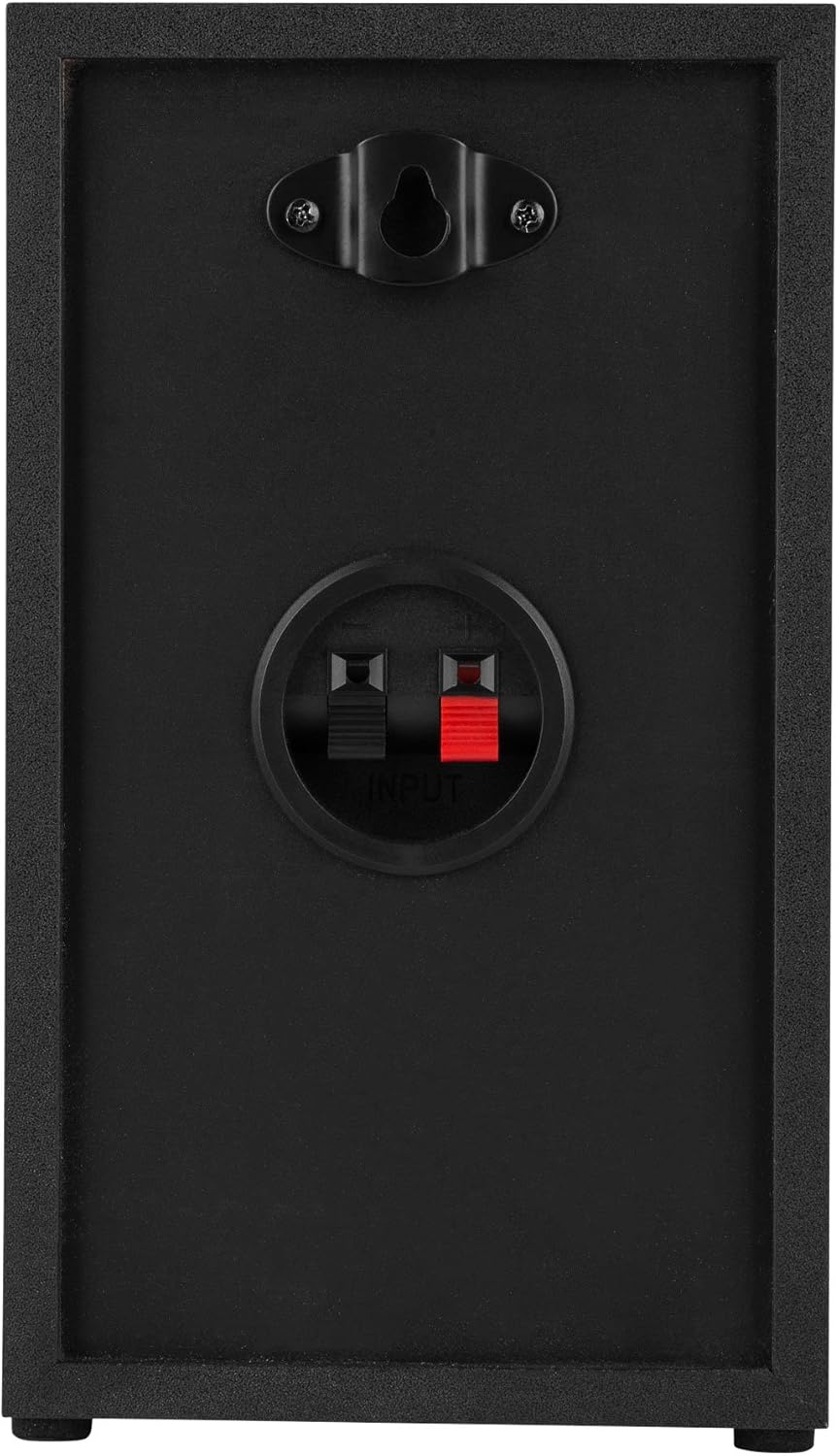
Figure 2: Rear view of the Dayton Audio B452-AIR Bookshelf Speaker, showing the spring-clip input terminals and wall-mount bracket.

Figure 3: The included speaker wire for connecting the speakers to an amplifier or receiver.
Operating Instructions
Once connected, ensure your amplifier or receiver is powered on and set to the correct input source. Start with a low volume level and gradually increase it to your desired listening level.
- Audio Source: Connect your audio source (e.g., CD player, turntable, streaming device) to your amplifier/receiver.
- Power On: Turn on your amplifier/receiver.
- Volume Control: Adjust the volume using your amplifier/receiver's controls. Avoid excessively high volumes to prevent speaker damage.
- Subwoofer Integration: For enhanced bass response, consider pairing these speakers with an active subwoofer. Set the crossover frequency on your amplifier/receiver or subwoofer to approximately 100-120 Hz for optimal integration.
Maintenance
To ensure the longevity and performance of your Dayton Audio B452-AIR speakers, follow these simple maintenance guidelines:
- Cleaning: Dust the speaker cabinets regularly with a soft, dry cloth. For stubborn marks, lightly dampen the cloth with water. Avoid using harsh chemicals or abrasive cleaners, which can damage the finish.
- Grilles: The speaker grilles can be removed for cleaning or if you prefer the aesthetic without them. Handle them gently to avoid damage.
- Environment: Keep speakers away from direct sunlight, excessive heat, moisture, and extreme temperature fluctuations.
- Connections: Periodically check speaker wire connections to ensure they are secure.
Troubleshooting
If you experience issues with your speakers, consult the following troubleshooting guide:
| Problem | Possible Cause | Solution |
|---|---|---|
| No sound from speakers |
|
|
| Distorted or unclear sound |
|
|
| Lack of bass response |
|
|
Specifications
| Feature | Detail |
|---|---|
| Brand | Dayton Audio |
| Model Name | B452-AIR |
| Speaker Type | Bookshelf |
| Speaker Maximum Output Power | 60 watts |
| Frequency Response | 20000 hertz |
| Connectivity Technology | Auxiliary, RCA |
| Audio Output Mode | Stereo, Surround |
| Mounting Type | Shelf Mount, Tabletop |
| Enclosure Material | Polypropylene, AMT |
| Woofer Diameter | 4.5 inches |
| Tweeter Diameter | 1 inches |
| Impedance | 6 ohm |
| Number of Audio Channels | 2 |
| Compatible Devices | Desktop, Laptop, Television, Projector |
| Power Source | Corded Electric |
| Item Dimensions (D x W x H) | 5.7"D x 5.5"W x 9.5"H |
| Item Weight | 8.5 pounds |
| Number of Items | 2 (Pair) |
Warranty and Support
Dayton Audio products are designed for reliability and performance. For specific warranty information, please refer to the documentation included with your purchase or visit the official Dayton Audio website. For technical support or further assistance, please contact Dayton Audio customer service.
Official Dayton Audio Website: www.daytonaudio.com


