
1. Introduction
Thank you for choosing the Aitoserlea LS-001 Digital Lab Scale. This high-precision electronic balance is designed for accurate weighing with a maximum capacity of 10kg and a readability of 0.1g. It features a clear LCD display with backlight, multiple weighing units, a counting function, and AC-DC power support. This manual provides detailed instructions for proper setup, operation, calibration, and maintenance to ensure optimal performance and longevity of your scale.
2. Safety Information
- Always operate the scale on a stable, level surface to ensure accurate readings.
- Avoid exposing the scale to extreme temperatures, humidity, or direct sunlight.
- Do not place the scale near strong electromagnetic fields or vibrating equipment.
- Protect the scale from sudden impacts or drops.
- Do not overload the scale beyond its maximum capacity of 10kg.
- Keep the scale clean and dry. Avoid using abrasive cleaners or submerging the unit in water.
- If using battery power, ensure batteries are inserted correctly and replace them when low to prevent leakage.
- Disconnect the power adapter during thunderstorms or when not in use for extended periods.
3. Package Contents
Upon unpacking, please verify that all items listed below are present and in good condition:
- Aitoserlea LS-001 Digital Lab Scale
- Power Adapter (AC-DC)
- Instruction Manual

This image displays the contents of the product package: the Aitoserlea LS-001 Digital Lab Scale, its power adapter, and the printed instruction manual.
4. Product Overview
Familiarize yourself with the components and features of your Aitoserlea LS-001 Digital Lab Scale.

Overall view of the Aitoserlea LS-001 Digital Lab Scale from a front-left angle, highlighting its stainless steel weighing platform, LCD display, and control buttons.
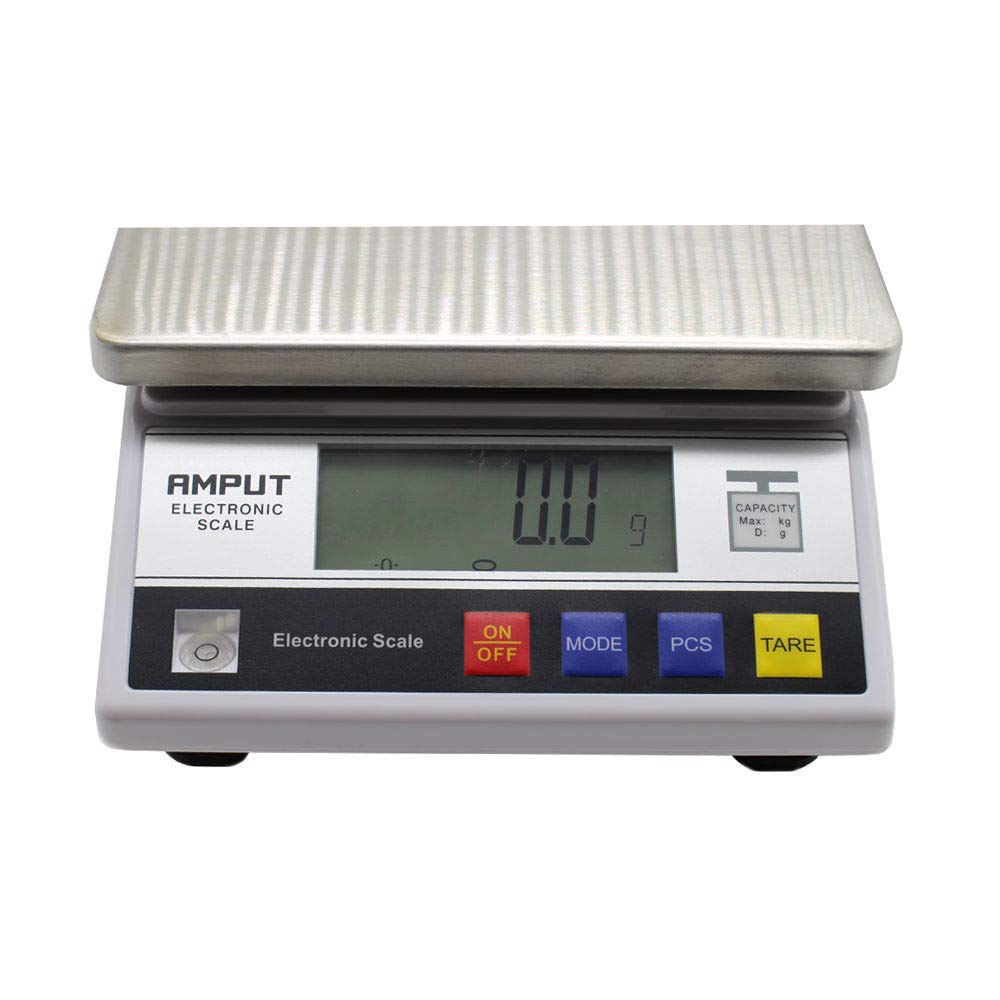
Direct front view of the scale, clearly showing the LCD display and the 'ON/OFF', 'MODE', 'PCS', and 'TARE' control buttons.
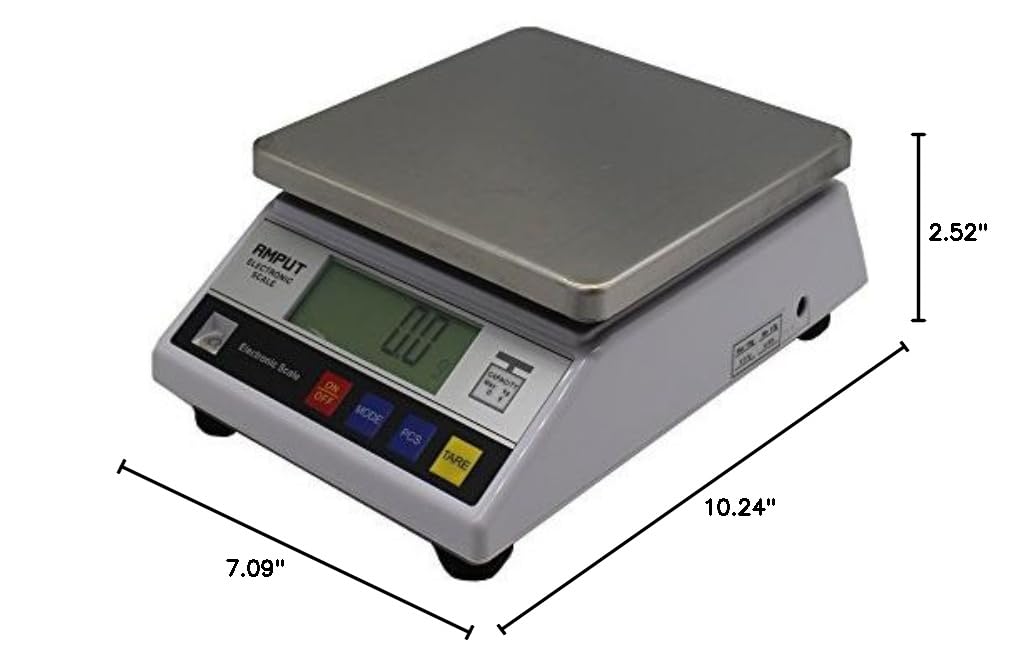
This image illustrates the physical dimensions of the Aitoserlea LS-001 Digital Lab Scale, with measurements for length, width, and height.

The underside of the scale, revealing the battery compartment cover and the four adjustable leveling feet.
5. Setup
5.1. Placement
Place the scale on a firm, level, and vibration-free surface. Adjust the four leveling feet at the bottom of the scale until the bubble in the level indicator (if present) is centered. Ensure the scale is away from drafts, direct heat sources, and strong electromagnetic interference.
5.2. Power Connection
The Aitoserlea LS-001 supports both AC power via the included adapter and DC power (batteries). For AC power, connect the power adapter to the scale's DC input port (located on the side) and then plug it into a suitable power outlet. For DC power, open the battery compartment on the underside of the scale and insert the required batteries (not included), ensuring correct polarity.

Side view of the scale, highlighting the power input port and product information label.
6. Operating Instructions
6.1. Power ON/OFF
- To Turn On: Press the ON/OFF key once. The display will show a self-test sequence (e.g., '000000' to '999999'), then '0.0g'.
- To Turn Off: Press and hold the ON/OFF key for approximately 3 seconds.
- Warm-up: For optimal accuracy, allow the scale to warm up for at least 15 minutes after turning it on before performing critical measurements.
6.2. Unit Conversion
Press the MODE key repeatedly to cycle through the available weighing units. The LS-001 supports 13 units: g (grams), ct (carats), lb (pounds), oz (ounces), dr (drams), gn (grains), ozt (troy ounces), dwt (pennyweights), MM (mommes), tl.J (Hong Kong taels), tl.T (Taiwan taels), tl.H (Singapore taels), and t (metric tons).
6.3. Tare Function
The Tare function allows you to subtract the weight of a container, so only the net weight of the contents is measured.
- Place the empty container on the weighing platform.
- Once the display stabilizes, press the TARE key. The display will reset to '0.0g' and a 'TARE' indicator will appear.
- Add the items to be weighed into the container. The display will show the net weight of the items.
- To clear the tare function, remove the container from the platform and press the TARE key again.
6.4. Counting Function (PCS)
The counting function allows you to count a large number of small items based on a sample weight.
- Turn on the scale and ensure it displays '0.0g'.
- Place a known quantity of sample items (e.g., 25, 50, 75, or 100 pieces) on the platform.
- Press the PCS key. The display will prompt you to select the sample quantity (e.g., 'PCS 25').
- Use the MODE key to select the correct sample quantity that you placed on the platform.
- Press the PCS key again to confirm. The scale will now enter counting mode.
- Remove the sample and place the bulk quantity of items to be counted on the platform. The display will show the total count.
- To exit counting mode, press the MODE key.
6.5. Backlight Control
The LCD display features a green backlight for improved visibility. When weighing, the backlight will be on. If no weight is on the platform and the scale is stable at zero, the backlight will automatically turn off to conserve power.
6.6. Alarm Function
The scale is equipped with a buzzer alarm function to indicate certain operational states or errors.
6.7. Power-Saved Function (Auto-Off)
To conserve battery life, the scale features an adjustable auto-off timer. The scale will automatically turn off after a period of inactivity. You can typically set the auto-off time to 0 (disabled), 2, 5, or 8 minutes.
6.8. Overload Indication
If the weight on the platform exceeds the scale's maximum capacity by a certain percentage (e.g., +9d for 6-digit models), the display will show an overload indication, typically 'HHHHHH'. Immediately remove the excess weight to prevent damage to the scale's sensor.

A scanned document displaying detailed instructions for the scale's key functions and calibration procedures.
7. Calibration
Regular calibration ensures the accuracy of your scale. The Aitoserlea LS-001 supports both outer (single point) and linear (multi-point) calibration.
7.1. Outer Calibration (Single Point)
This method uses a single known weight to calibrate the scale.
- With the scale turned on and stable, press and hold the MODE key for approximately 4 seconds until the display shows the full capacity (e.g., '10000g').
- Place a 5kg calibration weight (not included) onto the center of the weighing platform.
- Wait for the display to stabilize and show 'PASS'. Calibration is complete.
7.2. Linear Calibration (Multi-Point)
This method uses multiple known weights for more precise calibration across the weighing range.
- Ensure the scale is turned OFF.
- Press and hold the TARE button, then simultaneously press and hold the ON/OFF button for 3 seconds. The display will show 'SET'. Release all buttons.
- The display will then show 'OFF'. Press the ON/OFF button until 'SCL' appears at the bottom right of the screen, with a fluctuating numerical value.
- Press the ON/OFF button again. The display will show the first calibration weight value (e.g., '5000g'). Place a 5kg calibration weight onto the platform.
- After the display stabilizes, it will show the second calibration weight value (e.g., '10000g'). Remove the 5kg weight and place a 10kg calibration weight onto the platform.
- Wait for the display to stabilize and show 'PASS'. Calibration is complete.
7.3. Important Calibration Notes
- Outer calibration requires one 5kg weight.
- Linear calibration requires one 5kg weight and one 10kg weight.
- Calibration weights are typically not included with the scale due to their cost and shipping weight. It is recommended to purchase them locally or use any accurate 5kg or 10kg object (e.g., a container filled with precisely 5kg or 10kg of water) for calibration.
8. Maintenance
8.1. Cleaning
Wipe the scale's surface with a soft, damp cloth. For stubborn dirt, use a mild detergent. Do not use abrasive cleaners, organic solvents, or immerse the scale in water. Ensure the scale is completely dry before use.
8.2. Storage
When not in use for extended periods, store the scale in a clean, dry, and stable environment. If using batteries, remove them to prevent leakage and potential damage to the scale.
9. Troubleshooting
| Problem | Possible Cause | Solution |
|---|---|---|
| Scale does not turn on | No power, dead batteries, or faulty adapter. | Check power adapter connection. Replace batteries if using DC power. Ensure batteries are inserted with correct polarity. |
| Inaccurate or fluctuating readings | Unstable surface, drafts, vibrations, electromagnetic interference, or scale needs calibration. | Place scale on a stable, level surface. Avoid drafts. Move away from vibrating equipment or electronics. Perform calibration as described in Section 7. Allow warm-up time. |
| Display shows 'HHHHHH' or 'o_ld' | Scale is overloaded. | Immediately remove excess weight from the platform. Do not exceed 10kg capacity. |
| Calibration fails or is inconsistent | Incorrect calibration weight, unstable environment, or incorrect procedure. | Ensure correct calibration weights (5kg for outer, 5kg and 10kg for linear) are used. Verify weights are accurate. Follow calibration steps precisely. Ensure stable environment. |
| Counting function is incorrect | Incorrect sample quantity selected or inconsistent sample weight. | Ensure the sample quantity selected matches the actual number of items placed for the sample. Use consistent items for counting. |
10. Specifications
- Model: LS-001
- Brand: Aitoserlea
- Capacity: 10 kg (10000g)
- Readability: 0.1 g
- Display Type: LCD with Green Backlight
- Response Time: Approximately 2 seconds
- Weighing Units: g, ct, lb, oz, dr, gn, ozt, dwt, MM, tl.J, tl.T, tl.H, t (13 units)
- Power Supply: AC-DC Adapter (included), DC Batteries (not included)
- Special Features: Counting Function, Tare Function, Auto Calibration, Auto-Off
- Package Dimensions: 13.07 x 9.45 x 5.35 inches
- Item Weight: 4.7 Pounds
11. Warranty and Support
For warranty information, technical support, or service inquiries, please refer to the documentation provided at the time of purchase or contact your retailer. Keep your purchase receipt as proof of purchase.