
1. Introduction
Thank you for choosing Luwint LED Colorful Flashing Finger Lighting Gloves. These gloves are designed to provide a dazzling light show experience, perfect for parties, raves, concerts, or simply for fun. They feature multiple lighting modes and vibrant colors to enhance your visual display. This manual provides essential information on how to set up, operate, maintain, and troubleshoot your new LED gloves.

Image 1.1: Luwint LED Colorful Flashing Finger Lighting Gloves in action, showcasing their vibrant illumination.
2. Setup
Before using your Luwint LED gloves for the first time, you will need to activate the internal electronics by removing the battery insulation tab.
- Locate the small tab labeled "Remove" inside the wrist area of each glove. This tab is typically found near the on/off button.
- Gently pull the tab completely out of the glove. This connects the battery circuit, allowing the lights to function.
- Once the tab is removed, the gloves are ready for operation.

Image 2.1: Illustration of the on/off button and the battery insulation tab to be removed for initial setup.
3. Operating Instructions
Your Luwint LED gloves are designed for simple operation, allowing you to easily switch between various lighting modes.
3.1 Power On/Off
- To turn the gloves ON, locate the small circular button on the wrist area of each glove. Press this button once.
- To turn the gloves OFF, cycle through all the lighting modes until the lights turn off, or press and hold the button for a few seconds.
3.2 Changing Lighting Modes
Each press of the button will cycle through the 6 available lighting modes:
- Mode 1: Red and blue-green lights flash quickly together.
- Mode 2: Red and blue-green lights change slowly.
- Mode 3: Red and blue-green lights light up together, not flashing (steady on).
- Mode 4: The red light flashes alone.
- Mode 5: The blue light flashes alone.
- Mode 6: The green light flashes alone.

Image 3.1: Visual representation of the 3 colors and 6 distinct flashing modes.

Image 3.2: The gloves illuminated in a dark setting, demonstrating their visual impact.
4. Maintenance
Proper maintenance will ensure the longevity and optimal performance of your LED gloves.
4.1 Battery Replacement
The gloves come with replaceable batteries. When the lights become dim or stop working, it's time to replace them.
- Carefully open the Velcro on the glove wrist to access the battery compartment.
- Locate the small battery box. You may need a small screwdriver to open the battery compartment cover.
- Remove the old batteries and insert new ones, ensuring correct polarity. The gloves require 4 unknown batteries (likely button cell batteries).
- Securely close the battery compartment cover and the Velcro flap.

Image 4.1: Step-by-step guide for replacing the batteries in the LED gloves.
4.2 Cleaning and Storage
- The gloves are made of knit material. For cleaning, it is recommended to spot clean with a damp cloth. Do not submerge the gloves in water or machine wash, as this can damage the electronic components.
- When not in use, store the gloves in a cool, dry place away from direct sunlight and extreme temperatures.
- If storing for an extended period, consider removing the batteries to prevent leakage and preserve battery life.
5. Troubleshooting
If you encounter any issues with your Luwint LED gloves, refer to the following common problems and solutions:
| Problem | Possible Cause | Solution |
|---|---|---|
| Lights do not turn on. | Battery insulation tab not removed. | Ensure the "Remove" tab has been fully pulled out. |
| Lights do not turn on. | Dead or improperly inserted batteries. | Replace batteries, ensuring correct polarity. Refer to Section 4.1. |
| Lights are dim or flicker. | Low battery power. | Replace batteries. Refer to Section 4.1. |
| Lights are stuck on one mode or do not cycle. | Electronic malfunction. | Try replacing batteries. If the issue persists, contact customer service. |
6. Specifications
Detailed specifications for the Luwint LED Colorful Flashing Finger Lighting Gloves:
- Product Dimensions: 8.5 x 4.2 x 0.4 inches
- Item Weight: 2.9 ounces
- Item Model Number: LED-GLO-BWwh
- Manufacturer Recommended Age: 10 years and up
- Batteries: 4 Unknown batteries required (included and replaceable)
- Material: Breathable knit material (Cotton/Acrylic blend)
- Lighting Modes: 6 flashing modes
- Light Colors: Red, Blue, Green (combined for various effects)
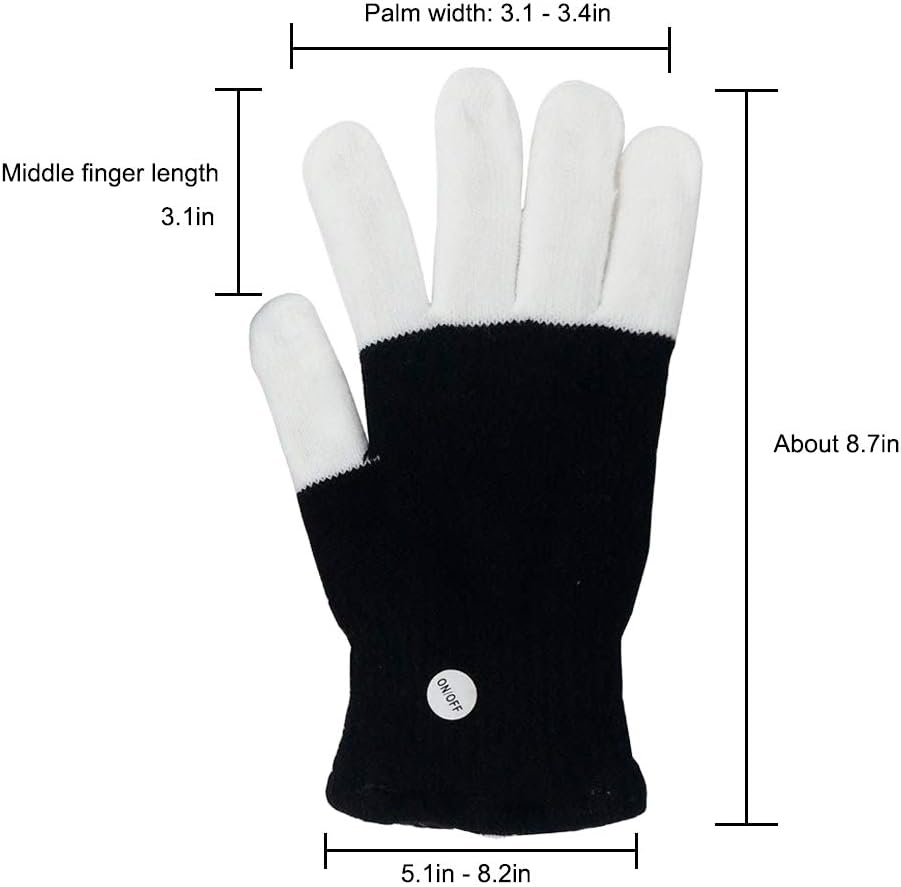
Image 6.1: Product dimensions for sizing reference.
7. Warranty and Support
Luwint stands behind the quality of its products.
7.1 Guarantee
Your Luwint LED Colorful Flashing Finger Lighting Gloves are backed by a 3-month money-back guarantee. If you are not satisfied with your purchase within this period, you may be eligible for a refund or replacement.
7.2 Customer Support
For any questions, concerns, or assistance with your product, please contact Luwint's top-rated customer service. Refer to the retailer's website or your purchase documentation for specific contact methods.