
1. Introduction
Thank you for purchasing the Yupiteru DRY-ST5000c Dashcam. This manual provides essential information for the proper installation, operation, and maintenance of your device. Please read this manual thoroughly before use to ensure optimal performance and safety. This dashcam is designed to record driving footage in high definition, featuring advanced functions like HDR, GPS, G-sensor, and optional motion detection for parking surveillance.
2. Product Overview
The Yupiteru DRY-ST5000c is a high-performance dashcam designed to capture clear video evidence on the road. Its compact design integrates seamlessly into your vehicle's interior.

Image: Front view of the Yupiteru DRY-ST5000c Dashcam, showcasing its compact design and integrated features like GPS and G-sensor.
Key Features:
- Full HD Recording: Captures video in 1080p resolution for clear and detailed footage.
- HDR (High Dynamic Range): Improves video quality in challenging lighting conditions, such as strong backlight or tunnels.
- GPS Functionality: Records location, date, time, and speed data, viewable with dedicated PC software.
- G-Sensor: Automatically detects impacts and sudden braking, protecting important video files from being overwritten.
- Motion Detection (Optional): Records automatically when motion is detected during parking, requiring an optional accessory.
- 2.0-inch LCD Display: For live view, playback, and menu navigation.
3. Setup
3.1. Installation
The DRY-ST5000c uses an adhesive mount for secure attachment to your vehicle's windshield. Choose a location that does not obstruct the driver's view and allows for a clear recording angle.
- Clean the chosen area on the windshield thoroughly to ensure strong adhesion.
- Attach the adhesive mount to the dashcam.
- Firmly press the dashcam with the attached mount onto the cleaned windshield area.
- Adjust the camera angle to ensure the road ahead is clearly visible in the recording frame.

Image: An example of the dashcam mounted on a car's windshield, positioned behind the rearview mirror for optimal placement.
3.2. Initial Configuration
- Insert SD Card: Ensure a compatible microSD card (8GB minimum, Class 10 or higher recommended) is inserted into the designated slot.
- Power Connection: Connect the dashcam to your vehicle's power outlet using the provided car charger. The device will typically power on automatically with the vehicle's ignition.
- Date and Time Settings: Upon first use, or after a power reset, set the correct date and time through the device's menu. The GPS function will automatically synchronize time once a signal is acquired.
- Format SD Card: It is highly recommended to format the SD card within the dashcam's menu before first use and periodically thereafter to ensure stable recording.
4. Operating Instructions
4.1. Recording Modes
The DRY-ST5000c offers continuous recording and event recording modes.
- Continuous Recording: The dashcam automatically starts recording when the vehicle's ignition is turned on. Footage is saved in short segments and loops, overwriting the oldest files when the SD card is full.
- Event Recording (G-Sensor): In the event of a sudden impact or braking, the G-sensor triggers an event recording. These files are protected from being overwritten by continuous recording.
- Motion Detection Recording (Optional): With an optional accessory, the dashcam can detect motion while parked and automatically record, providing surveillance.
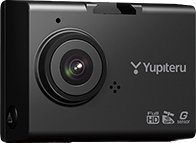
Image: The dashcam's LCD screen displaying live recording, showing recording duration, video resolution (1080p), and available memory.
4.2. HDR Function
The High Dynamic Range (HDR) feature enhances video clarity by balancing exposure in scenes with high contrast. This is particularly useful when driving against bright sunlight or entering/exiting tunnels, preventing overexposed bright areas and underexposed dark areas.

Image: A side-by-side comparison demonstrating the effect of HDR. The image on the left (with HDR) shows balanced exposure inside a tunnel, while the image on the right (without HDR) shows significant overexposure at the tunnel exit.
4.3. GPS Functionality
The built-in GPS module records your vehicle's location, speed, and driving route. This data can be viewed using dedicated PC viewer software, providing a comprehensive record of your journeys.

Image: Screenshot of the PC Viewer software, showing recorded video footage, a map with the vehicle's route, G-sensor graph, and speed display.
4.4. G-Sensor
The integrated G-sensor detects sudden changes in motion, such as impacts or rapid deceleration. When triggered, it automatically saves the current recording segment as an event file, preventing it from being overwritten during continuous recording. The sensitivity of the G-sensor can be adjusted in the device settings.
5. Maintenance
5.1. SD Card Management
- Formatting: Regularly format the microSD card (at least once a month) using the dashcam's menu to maintain optimal recording performance and prevent data corruption.
- Replacement: SD cards have a limited lifespan. If you experience frequent recording errors or file corruption, consider replacing the microSD card with a new, high-quality card.
- Capacity: Ensure your SD card has sufficient capacity for your recording needs. The dashcam will loop record, overwriting older files when full.
5.2. Cleaning
- Use a soft, dry cloth to clean the dashcam's lens and body.
- Do not use abrasive cleaners or solvents, as they may damage the device.
- Keep the windshield area around the camera clean to ensure clear video footage.
6. Troubleshooting
If you encounter issues with your Yupiteru DRY-ST5000c, refer to the table below for common problems and solutions.
| Problem | Possible Cause | Solution |
|---|---|---|
| Device does not power on. | No power supply; faulty cable. | Check power connection; ensure car charger is working; try a different power source if available. |
| Recording stops or freezes. | SD card error; full SD card; incompatible SD card. | Format the SD card; replace with a new, high-quality microSD card (Class 10 or higher). |
| Poor video quality. | Dirty lens; incorrect settings; extreme lighting conditions. | Clean the lens; check video resolution settings; ensure HDR is enabled for high-contrast scenes. |
| GPS not acquiring signal. | Obstructed view of sky; device interference. | Ensure the dashcam has a clear view of the sky; avoid placing near other electronic devices that may cause interference. |
7. Specifications
| Feature | Specification |
|---|---|
| Brand | Yupiteru |
| Model | DRY-ST5000c |
| Video Capture Resolution | 1080p (Full HD) |
| Display Type | LCD |
| Mount Type | Adhesive |
| Item Weight | 351 grams |
| Special Features | G-Sensor, GPS, HDR, Motion Detection (optional) |
8. Safety Information
- Do not operate the device or adjust settings while driving.
- Ensure the dashcam is installed in a location that does not obstruct your view of the road or interfere with airbag deployment.
- Use only the original power cable and accessories provided by Yupiteru.
- Avoid exposing the device to extreme temperatures, direct sunlight for prolonged periods, or excessive moisture.
- Keep the device out of reach of children.
9. Warranty and Support
For warranty information, technical support, or service inquiries, please refer to the warranty card included with your product or visit the official Yupiteru website. Keep your purchase receipt as proof of purchase for warranty claims.