
1. Introduction
This user manual provides comprehensive instructions for the installation, operation, and maintenance of the GOWE Delta HMI 10.1 inch Touch Operator Panel Display Screen, model DOP-B10E615. Please read this manual thoroughly before using the device to ensure proper functionality and safety.
2. Product Overview
The GOWE Delta HMI DOP-B10E615 is a 10.1-inch Human Machine Interface (HMI) touch panel designed for industrial automation applications. It features an Ethernet port and stereo output, providing versatile connectivity and control options. This device is equipped with a USB program cable for easy configuration and data transfer.

Figure 2.1: Front view of the GOWE Delta HMI DOP-B10E615 touch panel. The panel features a large display screen with the Delta logo at the top left and power/status indicators at the bottom right.
3. Setup and Installation
Proper installation is crucial for the reliable operation of the HMI panel. Follow these steps carefully:
- Unpacking: Carefully remove the HMI panel and all accessories from the packaging. Inspect for any signs of damage during transit.
- Mounting: The DOP-B10E615 is designed for panel mounting. Ensure the cutout dimensions in your control panel match the specifications provided in Section 7. Secure the HMI using the provided mounting clips.
- Power Connection: Connect the DC +24V power supply to the designated power terminals on the HMI. Ensure correct polarity.
- Ethernet Connection: Connect an Ethernet cable to the HMI's Ethernet port for network communication.
- USB Connection: Use the provided USB program cable to connect the HMI to a computer for programming and configuration.
- Serial Communication: If using serial communication, connect the appropriate RS-232 or RS-485 cables to the COM ports as required by your application.
Important: Ensure all connections are secure before applying power to the device.
4. Operating Instructions
Once installed and powered on, the HMI panel will boot up. The operation of the HMI is primarily through its touch screen interface.
- Power On/Off: The device powers on automatically when connected to a 24V DC supply. To power off, disconnect the power supply.
- Touch Screen Navigation: Interact with the displayed application by touching the screen. The responsiveness of the touch screen allows for intuitive control.
- Application Loading: User applications are loaded onto the HMI via the USB program cable using Delta's programming software. Refer to the software manual for detailed instructions on creating and uploading applications.
- Ethernet Communication: Configure the Ethernet settings (IP address, subnet mask, gateway) through the HMI's system settings or via the programming software to enable communication with PLCs or other network devices.
- Stereo Output: The HMI features a stereo output. Connect external audio devices if your application requires sound feedback.
5. Maintenance
Regular maintenance ensures the longevity and optimal performance of your HMI panel.
- Cleaning: Use a soft, lint-free cloth dampened with a mild, non-abrasive cleaner to wipe the screen and casing. Do not use harsh chemicals or abrasive materials. Ensure the device is powered off before cleaning.
- Ventilation: Ensure that the natural air circulation around the HMI is not obstructed to prevent overheating.
- Firmware Updates: Periodically check the GOWE or Delta website for firmware updates. Keeping the firmware updated can improve performance and add new features.
- Backup Battery: The HMI uses a 3V lithium battery (CR2032 x 1) for backup. The battery life is approximately 3 years or more at 25°C. Replace the battery when necessary to maintain real-time clock (RTC) and backup memory functionality.
6. Troubleshooting
This section provides solutions to common issues you might encounter with the DOP-B10E615 HMI panel.
| Problem | Possible Cause | Solution |
|---|---|---|
| HMI does not power on. | No power supply or incorrect voltage. | Check DC +24V power connection and ensure correct polarity. Verify power supply is active. |
| Touch screen unresponsive. | Software issue or calibration needed. | Restart the HMI. If issue persists, recalibrate the touch screen via system settings or re-upload the application. |
| Communication error with PLC. | Incorrect communication settings or cable issue. | Verify Ethernet/serial port settings (IP address, baud rate, parity). Check cable connections and integrity. Ensure PLC is online. |
| Display flickering or distorted. | Power fluctuations or internal hardware issue. | Ensure stable power supply. If problem continues, contact technical support. |
7. Specifications
The following tables detail the technical specifications of the GOWE Delta HMI DOP-B10E615.
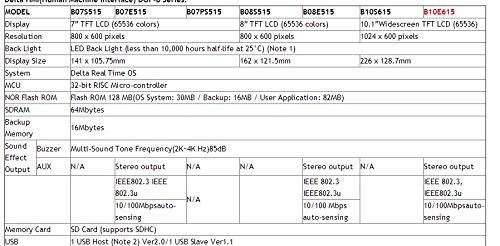
Figure 7.1: Part 1 of the technical specifications for the Delta HMI DOP-B series, focusing on display, resolution, backlight, system, MCU, memory, sound, output, Ethernet, and USB features. The DOP-B10E615 model is highlighted with a 10.1" Widescreen TFT LCD (65536 colors) and 1024 x 600 pixels resolution.
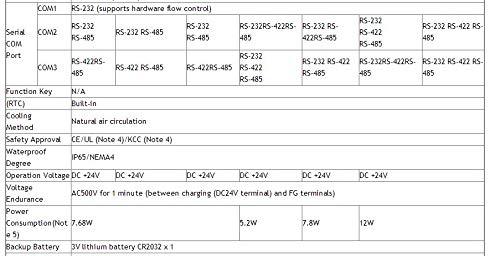
Figure 7.2: Part 2 of the technical specifications for the Delta HMI DOP-B series, detailing serial COM ports (RS-232, RS-485), function keys, built-in RTC, cooling method (natural air circulation), safety approvals (CE/UL/KCC), waterproof degree (IP65/NEMA4), operation voltage (DC +24V), voltage endurance, and power consumption (12W for DOP-B10E615).
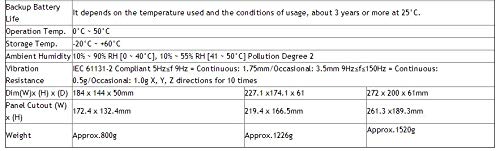
Figure 7.3: Part 3 of the technical specifications for the Delta HMI DOP-B series, covering backup battery life (approx. 3 years at 25°C), operation temperature (0°C ~ 50°C), storage temperature (-20°C ~ +60°C), ambient humidity, vibration resistance, dimensions (272 x 200 x 61mm for DOP-B10E615), panel cutout (261.3 x 189.3mm), and weight (approx. 1520g).
8. Warranty and Support
For warranty information and technical support, please refer to the official GOWE or Delta documentation provided with your purchase or visit their respective official websites. Keep your purchase receipt as proof of purchase for warranty claims.
For further assistance, you may contact GOWE directly through their Amazon store page: GOWE Amazon Store.