1. Introduction
Thank you for choosing the AZGIANT JSD-5118 Universal Bluetooth Car MP5 Player. This device is designed to enhance your in-car entertainment and communication experience with features such as FM radio, MP5 media playback, Bluetooth hands-free calling, and rear camera support. Please read this manual thoroughly before installation and operation to ensure proper use and to prevent damage.
2. Safety Information
- Always operate the device safely and responsibly. Distracted driving can lead to accidents.
- Ensure proper installation by a qualified professional to avoid electrical shorts or damage to your vehicle.
- Do not expose the unit to moisture or extreme temperatures.
- Disconnect the vehicle's battery before installation to prevent electrical hazards.
- Use only the specified voltage (12V) for operation.
3. Package Contents
Verify that all items are present in the package:
- AZGIANT JSD-5118 Car MP5 Player Unit
- Power and Speaker Wiring Harnesses
- Remote Control
- User Manual
- Installation Keys/Tools
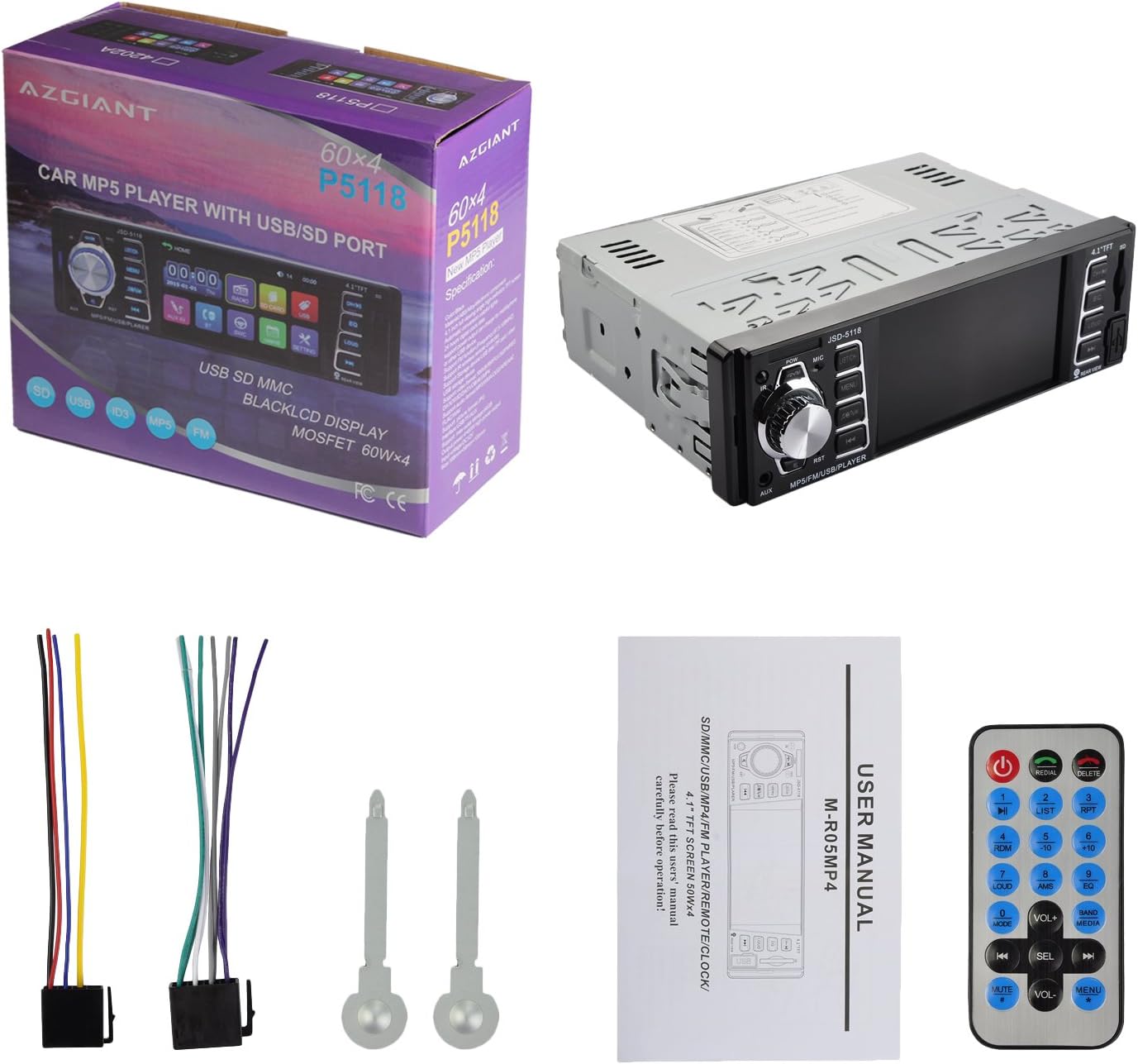
Image 3.1: Contents of the AZGIANT JSD-5118 package, showing the main unit, various cables, a remote control, and the instruction manual.
4. Product Overview
4.1 Front Panel Layout
The front panel features a 4.1-inch TFT display, control buttons, a rotary knob, and input ports for USB, SD card, and AUX. Familiarize yourself with the button functions for easy operation.

Image 4.1: Front view of the JSD-5118 unit, highlighting the display and control interface.
4.2 Rear Connection Ports
The rear of the unit provides essential connections for power, speakers, antenna, rear camera input, and audio/video outputs. Proper connection is crucial for full functionality.
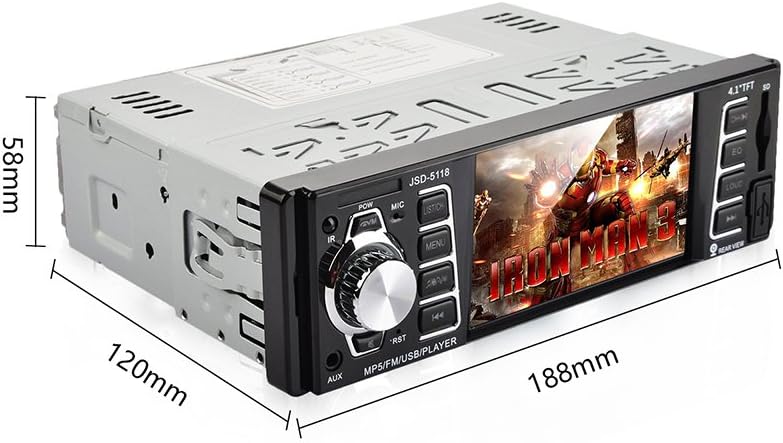
Image 4.2: Rear connections of the JSD-5118, indicating ports for power, audio, video, and antenna.
4.3 Product Dimensions
The unit is a single DIN size, designed to fit standard car stereo openings. Refer to the dimensions for compatibility with your vehicle's dashboard.

Image 4.3: Dimensional drawing of the JSD-5118 unit.
5. Installation
Installation of this car MP5 player requires basic automotive electrical knowledge. If you are unsure, please seek professional assistance.
5.1 Wiring Diagram
Refer to the wiring diagram provided with your unit for specific connections. Generally, the wiring includes:
- Power Wires: Constant 12V (Yellow), Accessory 12V (Red), Ground (Black).
- Speaker Wires: Typically color-coded for front left, front right, rear left, and rear right speakers (e.g., White/White-Black, Gray/Gray-Black, Green/Green-Black, Purple/Purple-Black).
- Antenna: Connect your car's radio antenna.
- Rear Camera Input: Connect the video signal cable from your rear view camera.
- Reverse Gear Trigger: A wire (often pink or brown) that connects to your car's reverse light circuit to automatically switch to the rear camera view.
5.2 Mounting
The JSD-5118 is a single DIN unit. Secure it into your vehicle's dashboard opening using the provided mounting brackets and screws. Ensure it is firmly seated and does not obstruct any vehicle controls.
6. Basic Operation
6.1 Power On/Off
Press the POW button on the front panel to turn the unit on or off. The unit will automatically power on when the vehicle's ignition is turned on (if wired correctly).
6.2 Volume Control
Rotate the large central knob to adjust the volume level. Pressing the knob may mute/unmute the audio.
6.3 Mode Selection
Press the MODE button (often labeled with a musical note or 'M') to cycle through available modes: FM Radio, USB, SD, AUX, Bluetooth.
7. Radio Operation
7.1 FM Tuning
- In FM mode, press the CH+/CH- buttons to manually tune to the next/previous frequency.
- Press and hold CH+/CH- for automatic seek tuning to the next strong station.
7.2 Storing Stations
To store a station, tune to the desired frequency, then press and hold one of the preset number buttons (1-6) until you hear a beep, indicating the station is saved.
8. Media Playback (USB/SD/AUX)
8.1 USB/SD Playback
Insert a USB drive into the USB port or an SD card into the SD card slot. The unit will automatically switch to USB/SD mode and begin playing compatible media files (audio, video, images). The JSD-5118 supports HD movie playback.

Image 8.1: The JSD-5118 unit demonstrating HD movie playback capability.
8.2 AUX Input
Connect an external audio device (e.g., smartphone, MP3 player) to the 3.5mm AUX input jack on the front panel using an audio cable. Select AUX mode to play audio from the connected device.
9. Bluetooth Operation
9.1 Pairing Your Device
- Switch the unit to Bluetooth mode. The display will show 'BT' or a Bluetooth icon.
- On your mobile device, enable Bluetooth and search for available devices.
- Select 'JSD-5118' (or similar name) from the list. If prompted for a password, enter '0000'.
- Once paired, the unit will confirm the connection.
9.2 Hands-Free Calling
After pairing, you can make and receive calls directly through the car stereo. The built-in microphone allows for clear communication, enhancing driving safety.
- Answer Call: Press the Answer button (often a green phone icon).
- End Call: Press the End button (often a red phone icon).
- Dialing: Use your phone to dial, and the audio will route through the car speakers.

Image 9.1: The JSD-5118 facilitating a hands-free phone call, promoting driving safety and call clarity.
9.3 Bluetooth Audio Streaming (A2DP)
Stream music wirelessly from your paired device to the car stereo. Use the unit's controls or your phone to play, pause, and skip tracks.
10. Rear Camera Function
The JSD-5118 supports a rear view camera input. When a compatible camera is connected and the vehicle is put into reverse gear, the unit's display will automatically switch to the camera feed, assisting with parking and reversing maneuvers.

Image 10.1: The JSD-5118 displaying the rear camera view for safe reversing.
11. Troubleshooting
If you encounter issues with your JSD-5118, refer to the following common problems and solutions:
- No Power: Check power connections (Yellow, Red, Black wires) and the vehicle's fuse box. Ensure the ignition is on.
- No Sound: Check speaker wiring, volume level, and mute function. Ensure the correct audio source is selected.
- Bluetooth Not Connecting: Ensure Bluetooth is enabled on both devices and the unit is in pairing mode. Delete previous pairings and try again.
- USB/SD Not Reading: Ensure the media is formatted correctly (FAT32 recommended) and contains compatible files. Try a different USB drive or SD card.
- Rear Camera Not Displaying: Check the camera's video input connection and the reverse trigger wire connection. Ensure the camera is powered.
If problems persist, consult a qualified technician.
12. Specifications
| Feature | Specification |
|---|---|
| Brand | AZGIANT |
| Model | JSD-5118 |
| Display Size | 4.1 Inches (visible area) |
| Audio Output Mode | Stereo |
| Audio Output Type | Speakers |
| Output Wattage | 200 Watts |
| Voltage | 12 Volts |
| Connectivity Technology | Bluetooth, USB |
| Mounting Type | 1 DIN |
| Product Dimensions | 18.49 x 13.49 x 5 cm |
| Product Weight | 2 kg (4.41 Pounds) |
13. Warranty and Support
For warranty information and technical support, please refer to the contact details provided with your purchase or visit the official AZGIANT website. Keep your proof of purchase for warranty claims.


