
1. Introduction
Thank you for purchasing the Nikai 32-inch HD LED TV, model NTV3200LED7-FL. This manual provides essential information for setting up, operating, and maintaining your television. Please read it thoroughly before use and keep it for future reference.
This 32-inch HD LED TV features a 1366 x 768 resolution, offering clear visuals. It includes multiple connectivity options such as HDMI, USB, VGA, and an RF antenna input. Enjoy UHB film playback and connect your headphones via the 3.5mm audio output.
2. Safety Information
To ensure safe operation and prevent damage, please observe the following safety precautions:
- Power Supply: Use only the specified power supply. Ensure the voltage matches your local power grid.
- Ventilation: Do not block ventilation openings. Allow adequate space around the TV for proper airflow to prevent overheating.
- Liquids: Keep the TV away from water, moisture, and any liquid spills. Do not place objects filled with liquids on the TV.
- Cleaning: Unplug the TV before cleaning. Use a soft, dry cloth. Avoid liquid cleaners or aerosol sprays.
- Placement: Place the TV on a stable, level surface. If wall-mounting, ensure the wall mount is securely installed and can support the TV's weight.
- Lightning: Unplug the TV during lightning storms or when unused for long periods.
- Servicing: Do not attempt to service the TV yourself. Refer all servicing to qualified personnel.
3. Package Contents
Verify that all items are present in the package:
- Nikai 32-inch HD LED TV
- Remote Control
- TV Stand (2 pieces)
- Wall Mount Bracket
- Power Cable
- User Manual (this document)
Note: Batteries for the remote control (AA size) are not included.
4. Setup
4.1 Unpacking
Carefully remove the TV and all accessories from the packaging. Retain the packaging materials for future transport or servicing.
4.2 Stand Installation
If placing the TV on a table, attach the included stand pieces to the bottom of the TV using the provided screws. Ensure they are securely fastened.
4.3 Wall Mounting
The TV supports VESA mounting standard 100 x 100 mm. A wall mount bracket is included. For detailed wall mounting instructions, refer to the separate wall mount guide or consult a professional installer. Ensure the wall can support the TV's weight (5.3 kg) and the bracket.
4.4 Power Connection
Connect the power cable to the TV's power input and then to a suitable wall outlet (AC 100-240V, 50-60Hz).
4.5 Initial Power On
Press the power button on the remote control or the TV to turn it on. Follow the on-screen prompts for initial setup, including language selection and channel scanning.
5. Operating Instructions
5.1 Power On/Off
Press the POWER button on the remote control to turn the TV on or off.
5.2 Input Source Selection
Press the SOURCE button on the remote control to cycle through available input sources (HDMI1, HDMI2, AV, VGA, USB, TV Tuner).
5.3 Menu Navigation
Press the MENU button to access the main menu. Use the arrow keys (UP/DOWN/LEFT/RIGHT) to navigate and ENTER to confirm selections. Common menu options include:
- Picture: Adjust brightness, contrast, color, sharpness, picture mode (e.g., Personal, Standard, Dynamic).
- Sound: Adjust volume, bass, treble, sound mode.
- Channel: Scan for channels, edit channels.
- Time: Set sleep timer, clock.
- Setup: Language, parental controls, factory reset.
5.4 Channel Tuning
In the Channel menu, select "Auto Scan" to automatically search and store available channels from the RF antenna input.
5.5 Media Playback (USB)
Insert a USB drive into the USB port. Select the USB input source. The TV will display a media browser, allowing you to select and play supported video (UHB film playback), audio, or image files.
6. Connections
The Nikai NTV3200LED7-FL TV offers various ports for connecting external devices:

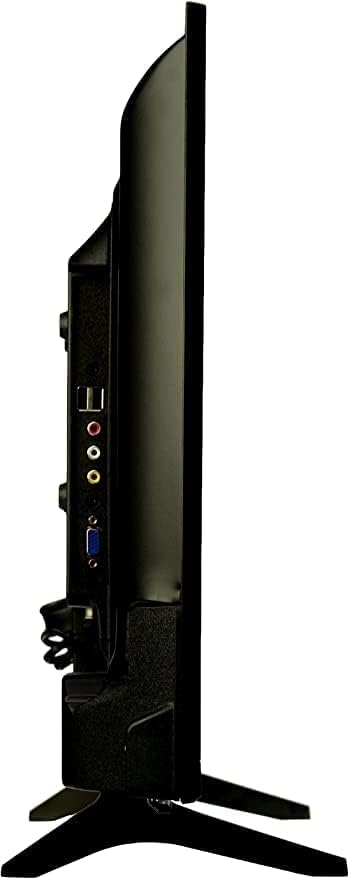
- HDMI Ports (x2): Connect high-definition devices such as Blu-ray players, gaming consoles, or set-top boxes.
- USB Ports (x2): Connect USB storage devices for media playback (photos, music, videos).
- VGA Input: Connect a computer or laptop.
- RF Antenna Input: Connect an antenna for receiving broadcast television signals.
- AV Input (Composite): Connect older devices using RCA cables (yellow for video, red/white for audio).
- 3.5mm Headphone Jack: Connect headphones for private listening.
7. Remote Control
The included remote control allows you to operate all functions of your TV. Insert two AA batteries (not included) into the battery compartment, ensuring correct polarity.
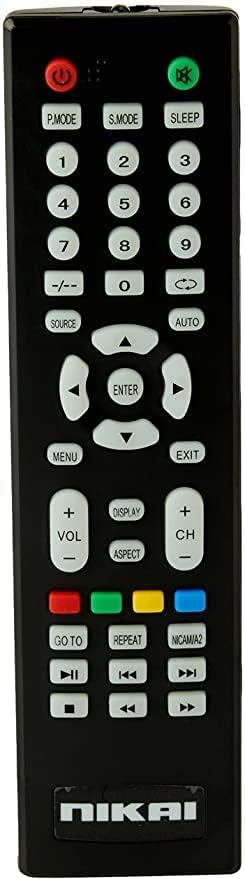
Key functions include:
- Power Button: Turns the TV on or off.
- Number Buttons: Direct channel selection.
- Volume Up/Down: Adjusts the volume level.
- Channel Up/Down: Changes channels sequentially.
- Source Button: Selects input source.
- Menu Button: Accesses the main menu.
- Navigation (Arrow) Buttons: Moves cursor in menus.
- Enter Button: Confirms selections.
- Exit Button: Exits menus.
- Sleep Timer: Sets a timer for the TV to turn off automatically.
- Child Lock: Activates parental control features.
8. Maintenance
8.1 Cleaning the Screen
Gently wipe the screen with a soft, lint-free cloth. For stubborn marks, slightly dampen the cloth with water or a specialized screen cleaner. Do not spray liquid directly onto the screen.
8.2 Cleaning the Cabinet
Wipe the TV cabinet with a soft, dry cloth. Avoid using abrasive cleaners or solvents that may damage the finish.
8.3 Storage
If storing the TV for an extended period, unplug it and cover it to protect it from dust. Store in a cool, dry place.
9. Troubleshooting
Before contacting support, try the following solutions for common issues:
| Problem | Possible Solution |
|---|---|
| No power | Check if the power cable is securely connected to the TV and the wall outlet. Ensure the outlet is working. Press the power button on the remote or TV. |
| No picture, but sound is present | Check the input source. Ensure the external device (e.g., DVD player) is turned on and connected correctly. |
| No sound, but picture is present | Check the volume level. Ensure the TV is not muted. Check audio cables if using external speakers. |
| Remote control not working | Check and replace batteries. Ensure there are no obstructions between the remote and the TV's IR sensor. |
| Poor picture quality | Adjust picture settings (brightness, contrast, sharpness). Check antenna connection for broadcast TV. Ensure the source device is outputting a high-quality signal. |
10. Specifications
Here are the detailed specifications for the Nikai 32-inch HD LED TV NTV3200LED7-FL:
| Feature | Detail |
|---|---|
| Brand | Nikai |
| Model Name | NE32LED |
| Model Number | NTV3272LED9 |
| Year of Manufacture | 2024 |
| Screen Size | 32 Inches |
| Display Technology | LED |
| Resolution | 1080 Pixels (HD Ready 1366 x 768) |
| Refresh Rate | 60 Hz |
| Aspect Ratio | 16:9 |
| Image Contrast Ratio | 1200:1 |
| Maximum Screen Brightness | 230 cd/m² |
| Viewing Angle | 178 Degrees |
| Response Time | 8 Milliseconds |
| Screen Backlight Technology | LED (Edge-lit, Adjustable) |
| HDR Format Support | HDR10+ |
| Image Quality Enhancement Technology | HDR10+, Dolby Vision |
| Connectivity Technology | HDMI, USB |
| Hardware Interface | HDMI, USB |
| Total HDMI Ports | 2 |
| Total USB Ports | 2 (USB 2.0) |
| Audio Output Mode | Stereo |
| Speaker Description | 16 Watt |
| Maximum Speaker Output Power | 16 Watt |
| Surround Sound Channel Configuration | 2.1 |
| Integrated Surround Sound Format | Possible 2.1 channel PCM |
| Wattage | 16 Watt |
| Line Voltage | AC 100-240 Volts, 50-60 Hz |
| Power Efficiency | Reduced power consumption for energy efficiency |
| Wireless Communication Technology | Wi-Fi |
| Supported Internet Services | Netflix, YouTube |
| Screen Mirroring Technology | Possible Apple AirPlay, Google Cast (Chromecast) |
| Control Method | Remote |
| Remote Control Technology | Bluetooth |
| Remote Control Battery Size Required | AA |
| Remote Battery Quantity Required | 1 |
| Product Dimensions (Depth x Width x Height) | 83 x 177 x 59 cm |
| Item Weight | 5.3 Kilograms |
| Color | Black |
| Mounting Type | Tabletop |
| VESA Mounting Standard | 100 x 100 mm |
| Parental Control Technology | Built-in device controls |
| Water Resistance Level | Not Water Resistant |
| Memory Storage Capacity | 8 Gigabytes |
11. Warranty and Support
This product comes with a 2-year manufacturer's warranty from the date of purchase. For warranty claims, technical support, or service inquiries, please contact the manufacturer or its authorized service agent. You may also contact Amazon for further details regarding your purchase and warranty support.
For additional assistance, refer to the official product demonstration video: