
Introduction
Thank you for choosing the SKMEI SkmeiMW53 Digital Sports Watch. This manual provides detailed instructions for the proper setup, operation, and maintenance of your watch. Please read this manual carefully to ensure optimal performance and longevity of your device.
Product Overview
The SKMEI SkmeiMW53 watch features a digital display with multiple functions. Familiarize yourself with the buttons and their functions:
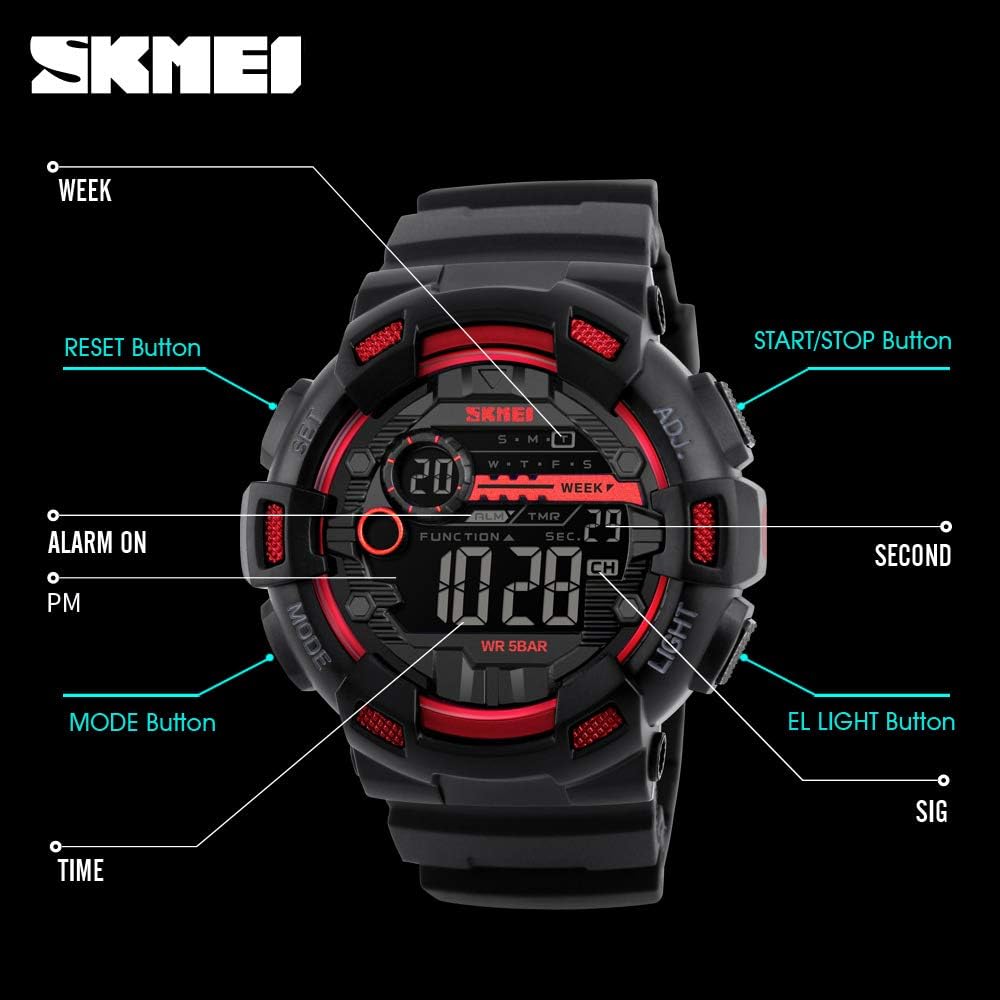
Image: Front view of the SKMEI SkmeiMW53 watch with key buttons and display indicators labeled for easy identification. This includes the SET, MODE, LIGHT, and ADJ buttons, along with indicators for Alarm, PM, Seconds, Signal, and Time.
- MODE Button: Cycles through different modes (Time, Stopwatch, Alarm, Dual Time, Countdown).
- LIGHT Button: Activates the LED backlight for visibility in low light conditions.
- ADJ (Adjust) Button: Used to enter and exit setting modes, and to confirm selections.
- SET Button: Used to select items for adjustment within a setting mode.
- START/STOP Button: Used to start/stop stopwatch, countdown, and adjust values.
- RESET Button: Used to reset stopwatch or countdown, and adjust values.
Setup Instructions
1. Time and Date Setting
- In normal time display mode, press the MODE button three times to enter time setting mode. The seconds will flash.
- Press the SET button to cycle through the setting items: Seconds → Hour → Minute → Month → Date → Day of Week.
- While an item is flashing, use the START/STOP or RESET button to adjust the value.
- To switch between 12-hour and 24-hour format, adjust the hour while it is flashing.
- Once all settings are complete, press the ADJ button to exit the setting mode.
2. Alarm Setting
- From normal time display, press the MODE button twice to enter alarm setting mode. The hour will flash.
- Press the SET button to switch between setting the hour and minute.
- Use the START/STOP or RESET button to adjust the hour and minute values.
- Press the ADJ button to exit alarm setting mode.
- To turn the alarm ON/OFF, in alarm mode, press the START/STOP button. An alarm icon will appear/disappear.
Operating Instructions
1. Stopwatch Function
- From normal time display, press the MODE button once to enter stopwatch mode.
- Press the START/STOP button to start the stopwatch.
- Press the START/STOP button again to stop the stopwatch.
- Press the RESET button to reset the stopwatch to zero.
2. Countdown Timer
- From normal time display, press the MODE button four times to enter countdown mode.
- Press the ADJ button to enter setting mode. The hour will flash.
- Press the SET button to cycle through setting hours, minutes, and seconds.
- Use the START/STOP or RESET button to adjust the values.
- Press the ADJ button to exit setting mode.
- Press the START/STOP button to start the countdown. Press again to pause.
- Press the RESET button to reset the countdown to its initial set time.
3. LED Backlight
Press the LIGHT button at any time to illuminate the display. The backlight will remain active for a few seconds.
4. Dual Time Display
This watch supports a dual time display feature, allowing you to view a second time zone. To access and set the dual time:

Image: The watch face showing two distinct time displays, illustrating the dual time function. This feature is useful for tracking time in different zones.
- From normal time display, press the MODE button five times to enter dual time mode.
- Press the ADJ button to enter setting mode. The hour will flash.
- Press the SET button to switch between setting the hour and minute.
- Use the START/STOP or RESET button to adjust the hour and minute values for the second time zone.
- Press the ADJ button to exit dual time setting mode.
Water Resistance Guidelines
The SKMEI SkmeiMW53 watch is water-resistant up to 50 meters (5 ATM). This means it is suitable for everyday use, including splashes, rain, and brief immersion in water. However, it is not recommended for:
- Hot water activities (e.g., showering, sauna), as steam can penetrate seals.
- Pressing buttons underwater, as this can compromise the water resistance.
- Deep diving or prolonged underwater activities.
Always ensure the crown (if applicable) is pushed in completely after setting the time to maintain water resistance.
Maintenance
- Cleaning: Wipe the watch regularly with a soft, dry cloth. For stubborn dirt, a slightly damp cloth can be used, followed by drying.
- Avoid Chemicals: Do not expose the watch to strong chemicals, solvents, or detergents, as these can damage the case, strap, or seals.
- Temperature Extremes: Avoid exposing the watch to extreme temperatures (hot or cold) for extended periods, as this can affect battery life and internal components.
- Impact: Protect the watch from strong impacts or drops.
- Battery Replacement: When the display becomes dim or functions are erratic, the battery may need replacement. It is recommended to have this done by a professional to ensure proper sealing and water resistance.
Troubleshooting
- Display is blank or dim: The battery may be low or depleted. Replace the battery.
- Time is incorrect: Re-set the time following the 'Time and Date Setting' instructions. Ensure 12/24-hour format is correctly selected.
- Buttons are unresponsive: Check if the watch is in a specific mode that locks button functions. Try pressing the MODE button to cycle through modes. If the issue persists, a battery replacement might be needed.
- Water inside the watch: If condensation or water appears inside the watch, stop using it immediately and take it to a professional for inspection and repair. Water damage is typically not covered under warranty if proper water resistance guidelines were not followed.
Specifications

Image: Side view of the SKMEI SkmeiMW53 watch with key dimensions highlighted, showing a case diameter of 51mm and a width of 50mm.
| Feature | Detail |
|---|---|
| Model Number | SkmeiMW53 |
| Display Type | Digital |
| Movement | Quartz |
| Case Material | Stainless Steel |
| Case Diameter | 46 mm |
| Band Material | Rubber |
| Band Width | 30 mm |
| Water Resistance Depth | 50 Meters (5 ATM) |
| Battery Type | 1 Lithium Ion (included) |
| Special Features | Alarm, Backlight, Stopwatch, Countdown, Dual Time, 12/24H Format, Date, Day |
Warranty and Support
This SKMEI watch comes with a 6-month manufacturer's warranty against manufacturing defects. Please retain your purchase receipt as proof of purchase for warranty claims.
The warranty does not cover:
- Damage resulting from improper use or negligence.
- Normal wear and tear of the case, strap, or glass.
- Battery replacement.
- Water damage if the watch was exposed to conditions beyond its specified water resistance or if buttons were pressed underwater.
For support or warranty inquiries, please contact your retailer or the official SKMEI service center.