
SIEMENS BF525LMS0
Siemens BF525LMS0 Built-in Microwave User Manual
Model: BF525LMS0 | Brand: SIEMENS
1. Introduction
This user manual provides essential information for the safe and efficient operation, installation, and maintenance of your Siemens BF525LMS0 built-in microwave. Please read these instructions carefully before using the appliance and keep them for future reference.
2. Safety Instructions
Always adhere to the following safety guidelines to prevent injury or damage to the appliance:
- Do not attempt to operate this oven with the door open as this can result in harmful exposure to microwave energy.
- Do not place any object between the oven front face and the door or allow soil or cleaner residue to accumulate on sealing surfaces.
- Do not operate the oven if it is damaged. It is particularly important that the oven door closes properly and that there is no damage to the: (1) door (bent), (2) hinges and latches (broken or loosened), (3) door seals and sealing surfaces.
- The oven should not be adjusted or repaired by anyone except properly qualified service personnel.
- Ensure proper ventilation around the appliance.
- Never use metal containers or foil in the microwave, as this can cause arcing.
- Supervise food heating, especially liquids, to prevent boil-overs.
3. Product Overview
The Siemens BF525LMS0 is a high-quality built-in microwave designed for seamless integration into your kitchen. It features a sleek stainless steel finish and an intuitive electronic clock with touch controls.
Key Features:
- cookControl 7: This technology offers 7 automatic programs for perfect preparation of your dishes. The programs handle the ideal settings for you.
- touchControl: The temperature of individual programs can be set by direct input or by moving the slider with a finger.
- Side-opening door: Side-mounted doors are ideal for high installation of the microwave. The wide opening angle simplifies access to all dishes.
- Easy-operation concept: With the easy-operation concept, you can set the programs without problems.
- Cooking and defrosting programs: Frozen meat or bread can be optimally defrosted with this built-in appliance, potatoes or vegetables cook on the glass turntable.
Product Views:

Figure 3.1: Front view of the Siemens BF525LMS0 built-in microwave, showcasing its stainless steel design and electronic display.
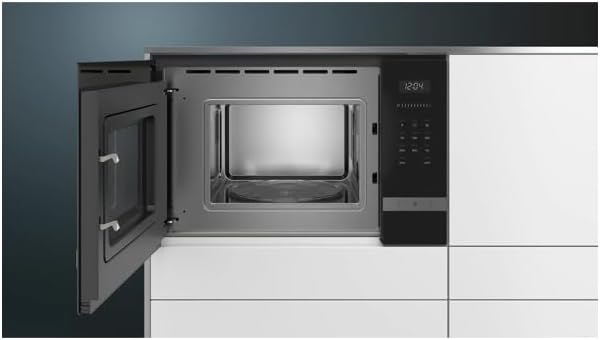
Figure 3.2: Interior view of the microwave with the door fully open, revealing the spacious stainless steel cooking cavity and the removable glass turntable.

Figure 3.3: A different angle of the microwave's interior, emphasizing the LED lighting for clear visibility during operation.
4. Setup & Installation
The Siemens BF525LMS0 is designed for partial integrated installation. It is highly recommended that installation be performed by a qualified professional to ensure proper fit and electrical safety.
Installation Dimensions:
The appliance dimensions are 29.7 cm (Height) x 59.4 cm (Width) x 38.2 cm (Depth). Ensure your cabinet opening meets the required specifications for a secure and flush fit.

Figure 4.1: Technical drawing illustrating the required cabinet dimensions and appliance measurements for installation.
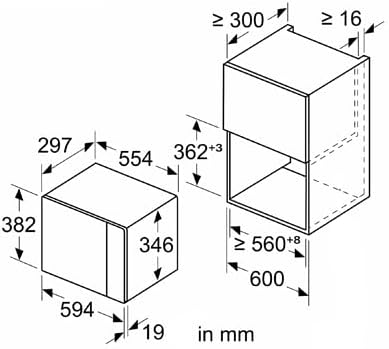
Figure 4.2: Another technical diagram showing specific cut-out and clearance dimensions for optimal built-in installation.
Installation Steps (Summary):
- Prepare the cabinet opening according to the provided dimensions.
- Ensure the electrical outlet is accessible and meets the appliance's power requirements (220 Volt, 800 Watt).
- Carefully slide the microwave into the prepared opening.
- Secure the appliance using the provided mounting screws.
- Connect the power cord to the electrical outlet.
- Perform a test run to ensure proper functionality.
5. Operating Instructions
Your Siemens BF525LMS0 microwave is equipped with user-friendly touch controls and an electronic clock for precise operation.
Basic Operation:
- Setting the Time: Use the electronic clock controls to set the current time. Refer to the detailed instructions in the full manual for specific steps.
- Power Levels: The microwave operates at 800 Watts. You can select various power levels for different cooking needs using the touch control interface.
- Starting a Program: Place food in a microwave-safe container on the glass turntable. Close the door. Select the desired power level and cooking time, then press Start.
Using cookControl 7 Programs:
The cookControl 7 feature simplifies cooking by offering pre-set programs for common dishes. To use:
- Select the desired automatic program from the menu.
- Follow the on-screen prompts, which may include entering the weight of the food.
- The microwave will automatically adjust cooking time and power.
Defrosting and Cooking Functions:
Utilize the dedicated defrosting programs for frozen items like meat or bread. For cooking vegetables or potatoes, place them on the glass turntable and select the appropriate cooking program or manually set the time and power.
6. Maintenance & Cleaning
Regular cleaning and maintenance will ensure the longevity and optimal performance of your microwave.
- Interior Cleaning: Wipe the stainless steel interior with a damp cloth and mild detergent after each use. For stubborn food residues, place a bowl of water with lemon slices inside and microwave for a few minutes to loosen the grime, then wipe clean.
- Exterior Cleaning: Clean the stainless steel exterior and touch control panel with a soft, damp cloth. Avoid abrasive cleaners that can scratch the surface. Due to the touch-sensitive surface, regular cleaning is recommended to avoid fingerprints.
- Glass Turntable: The glass turntable can be removed and washed with warm soapy water or in a dishwasher. Ensure it is completely dry before placing it back in the microwave.
- Door Seals: Regularly inspect and clean the door seals to ensure they are free from food particles and remain intact for proper sealing.
7. Troubleshooting
If you encounter issues with your Siemens BF525LMS0 microwave, refer to the following common problems and solutions before contacting service.
| Problem | Possible Cause | Solution |
|---|---|---|
| Microwave does not start/no power. | Power cord unplugged; circuit breaker tripped; door not closed properly. | Check power cord connection; reset circuit breaker; ensure door is securely latched. |
| Food not heating evenly. | Incorrect power level/time; food quantity too large; no stirring/rotating. | Adjust power/time; reduce food quantity; stir or rotate food during cooking. |
| Display shows error code (e.g., "E-E"). | System malfunction. | Disconnect the appliance from the power supply for 10 minutes, then reconnect. If the error persists, contact customer service. |
| Unusual noises during operation. | Turntable not seated correctly; foreign object inside. | Ensure turntable is properly placed; check for and remove any foreign objects. |
8. Specifications
Detailed technical specifications for the Siemens BF525LMS0 built-in microwave:
| Specification | Value |
|---|---|
| Manufacturer | SIEMENS |
| Model Number | BF525LMS0 |
| Product Dimensions (H x W x D) | 29.7 x 59.4 x 38.2 cm |
| Weight | 17 Kilograms |
| Capacity | 20 Liters |
| Wattage | 800 Watt |
| Voltage | 220 Volt |
| Material | Stainless Steel |
| Interior Material | Stainless Steel |
| Installation Type | Partial Integrated |
| Special Features | Shutdown sensor, Grill function, LED lighting, Touch Control |
| Defrost System | Automatic Defrosting |
| Controller Type | Push Button / Touch Control |
| Included Components | Microwave |
9. Warranty & Support
Your Siemens BF525LMS0 microwave comes with a standard manufacturer's warranty. Please refer to the warranty card included with your purchase for specific terms and conditions, including coverage period and what is covered.
For technical assistance, service requests, or to order spare parts, please contact Siemens customer support. Have your model number (BF525LMS0) and serial number ready when contacting support to expedite the process.
You can find contact information for Siemens customer service on the official Siemens website or in the documentation provided with your appliance.
Ask a question about this manual
Ask about setup, troubleshooting, compatibility, parts, safety, or missing instructions. Manuals+ will review the question and use this page’s manual context to help answer it.