
Magnavox MD699
MAGNAVOX MD699 SUITCASE TURNTABLE SYSTEM WITH BLUETOOTH
User Manual
Introduction
This manual provides comprehensive instructions for the operation and maintenance of your MAGNAVOX MD699 Suitcase Turntable System with Bluetooth. This versatile 3-in-1 system combines a turntable for vinyl records, Bluetooth wireless technology for audio streaming, and a 3.5mm auxiliary input. It also features decorative color-changing RGB lights to enhance your listening experience. Please read this manual thoroughly before using the device to ensure proper function and longevity.
Safety Information
- Do not expose the unit to rain or moisture to prevent fire or shock hazards.
- Ensure proper ventilation; do not block any ventilation openings.
- Use only the power adapter supplied with the unit.
- Protect the power cord from being walked on or pinched.
- Unplug the unit during lightning storms or when unused for long periods.
- Refer all servicing to qualified service personnel.
- Keep the unit away from direct sunlight, heat sources, and strong magnetic fields.
Package Contents
Please check that all items listed below are included in your package:
- MAGNAVOX MD699 Suitcase Turntable System
- Power Adapter
- Remote Control for LED Lights
- Extra Diamond-Tipped Record Needle (one is pre-mounted)
- User Manual (this document)
Product Features and Components
Familiarize yourself with the various parts of your MD699 Turntable System.

Figure 1: Front view of the Magnavox MD699 Suitcase Turntable System with the lid open, revealing the turntable platter, tone arm, control knobs, and the illuminated LED display on the inside of the lid.
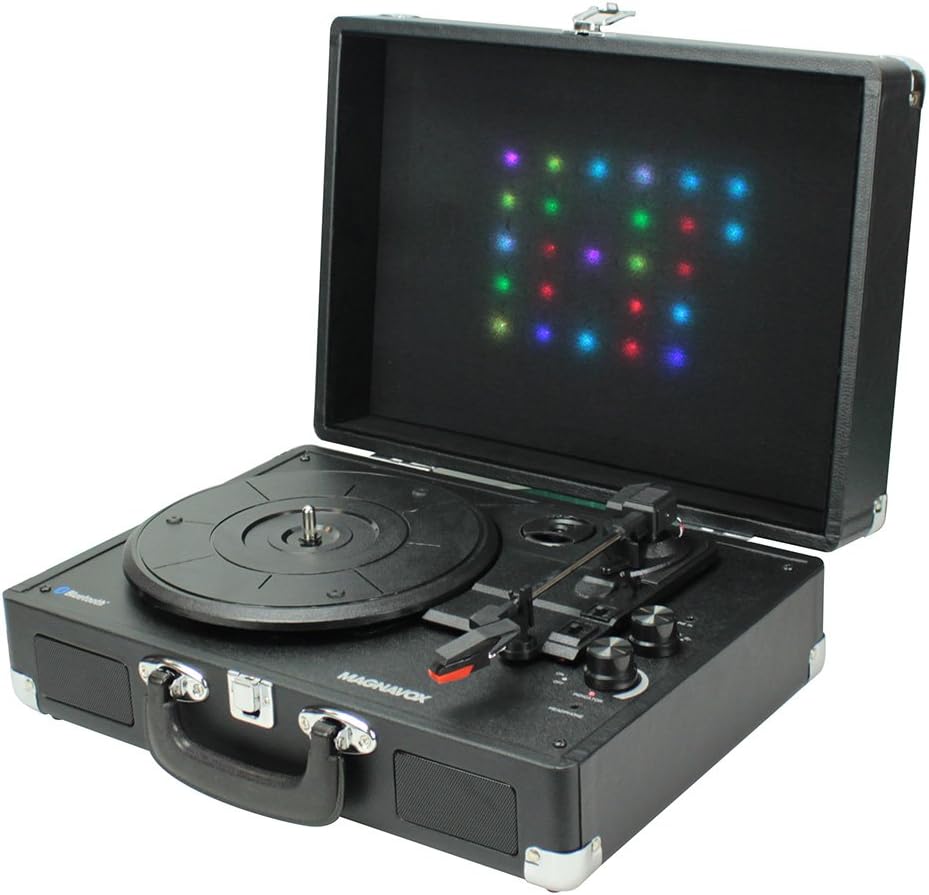
Figure 2: Angled view of the Magnavox MD699 Suitcase Turntable System with the lid open, providing a clearer perspective of the turntable components and the decorative LED lights on the lid.

Figure 3: Rear view of the Magnavox MD699 Turntable System, highlighting the DC IN port for power, and the RCA L/R audio OUT jacks for connecting to external amplified speakers.

Figure 4: Closed view of the Magnavox MD699 Turntable System, showcasing its portable suitcase design with a handle and latches, making it easy to transport.

Figure 5: The remote control for the Magnavox MD699, featuring buttons for LED ON/OFF, various LED light patterns (LED 1-5), and direct color selection (RED, GREEN, BLUE).
Key Features:
- Portable Design: Compact suitcase form factor for easy transport.
- Integrated Lighting: Decorative color-changing RGB lights on the lid, controllable via remote.
- 3-in-1 System: Functions as a turntable, Bluetooth receiver, and AUX-in player.
- Bluetooth Connectivity: Wirelessly connect to devices for audio playback.
- Multiple Playback Speeds: Supports 33, 45, and 78 RPM records.
- Tone Arm Cueing Lever: For gentle placement of the needle on records.
- Audio Output Options: 3.5mm headphone jack and RCA audio out jacks for external speakers.
- Durable Needles: Includes two diamond-tipped record needles for extended use.
Setup
- Unpacking: Carefully remove the turntable from its packaging. Retain the packaging for future transport or storage.
- Placement: Place the unit on a stable, level surface away from direct sunlight, heat sources, and strong vibrations.
- Power Connection: Connect the supplied power adapter to the DC IN port on the back of the unit (refer to Figure 3) and plug the other end into a standard wall outlet.
- Needle Check: The unit comes with one diamond-tipped needle pre-mounted. Ensure it is securely in place before first use. An extra needle is provided for future replacement.
- Lid Opening: Open the suitcase lid to reveal the turntable platter and controls.
Operating Instructions
1. Turntable Operation
- Select Speed: Adjust the 3-speed RPM selectable switch (33/45/78) to match the speed of your vinyl record. For 45 RPM records, place the included 45 RPM adapter on the center spindle.
- Place Record: Carefully place your vinyl record on the turntable platter.
- Prepare Tone Arm: Release the tone arm lock. Gently lift the tone arm using the cueing lever.
- Start Playback: Move the tone arm over the desired track on the record. Slowly lower the tone arm using the cueing lever. The needle will make contact with the record, and playback will begin.
- Adjust Volume: Use the volume knob on the unit to adjust the audio output.
- End Playback: At the end of the record, the tone arm will automatically return to its rest position (auto-stop function). Alternatively, lift the tone arm using the cueing lever and return it to its rest. Secure the tone arm lock.
2. Bluetooth Wireless Technology
- Enable Bluetooth: Turn on the MD699 unit. The Bluetooth indicator light will begin to flash, indicating it is in pairing mode.
- Pair Device: On your Bluetooth-enabled device (smartphone, tablet, etc.), enable Bluetooth and search for available devices. Select "MAGNAVOX MD699" from the list.
- Confirmation: Once successfully paired, the Bluetooth indicator light on the MD699 will stop flashing and remain solid. You can now stream audio from your device to the turntable system.
- Disconnect: To disconnect, simply turn off Bluetooth on your device or select "Forget Device" in your device's Bluetooth settings.
3. AUX Input Operation
- Connect Device: Use a 3.5mm audio cable (not included) to connect the headphone jack or line-out of an external audio device (e.g., MP3 player, CD player) to the 3.5mm AUX IN port on the MD699.
- Select Mode: The unit should automatically switch to AUX mode when a cable is inserted.
- Play Audio: Begin playback on your external device. Audio will be routed through the MD699's speakers.
- Adjust Volume: Control the volume using the knob on the MD699 and/or your external device.
4. Headphone Jack
For private listening, plug standard 3.5mm headphones into the headphone jack located on the unit. The internal speakers will be muted automatically.
5. Decorative RGB Lights
The MD699 features decorative RGB lights on the inside of the lid that can be controlled with the included remote control (refer to Figure 5).
- LED ON/OFF: Press the "LED ON/OFF" button to turn the lights on or off.
- Color Modes: Use buttons "LED 1" through "LED 5" to cycle through various pre-programmed color-changing patterns.
- Static Colors: Press "RED", "GREEN", or "BLUE" to set the lights to a solid color.
- Automatic Mode: The lights can also automatically change colors, often synchronized with the beat of the music.
Maintenance
- Cleaning the Unit:
Wipe the exterior of the unit with a soft, dry cloth. Do not use abrasive cleaners, waxes, or solvents as they may damage the finish. For the turntable platter, use a soft, slightly damp cloth if necessary, then dry thoroughly.
- Cleaning Records:
Always handle records by their edges. Use a dedicated record brush to gently remove dust and debris from the record surface before playing. Store records in their sleeves to prevent dust accumulation.
- Needle Care and Replacement:
The diamond-tipped needle is durable but will wear over time. A worn needle can damage your records and degrade sound quality. Replace the needle after approximately 300-500 hours of playback. To replace, carefully remove the old needle cartridge and snap the new one into place. Refer to the diagram in the needle replacement kit (if provided) or consult online resources for detailed instructions.
- Storage:
When not in use, close the lid of the suitcase turntable to protect the components from dust. If storing for an extended period, unplug the power adapter and store the unit in a cool, dry place.
Troubleshooting
| Problem | Possible Cause | Solution |
|---|---|---|
| No power | Power adapter not connected; outlet not active. | Ensure power adapter is securely plugged into the unit and a working wall outlet. |
| No sound from speakers | Volume too low; headphones connected; incorrect mode selected. | Increase volume. Disconnect headphones. Ensure correct input mode (Turntable, Bluetooth, AUX) is active. |
| Turntable not spinning or spinning incorrectly | Speed setting incorrect; tone arm not lifted. | Check RPM speed selector. Ensure tone arm is lifted from its rest. |
| Skipping or distorted sound from record | Record is dirty or scratched; needle is worn or dirty; unit is not level. | Clean record. Clean or replace needle. Place unit on a stable, level surface. |
| Bluetooth pairing issues | Device too far; Bluetooth not enabled on device; unit already paired. | Ensure device is within range. Enable Bluetooth on your device. Disconnect from other Bluetooth devices. |
| LED lights not working | Remote battery low; lights turned off. | Replace remote control battery (CR2025, if applicable). Press "LED ON/OFF" button on remote. |
Specifications
| Feature | Detail |
|---|---|
| Model Number | MD699 |
| Brand | Magnavox |
| Connectivity Technology | Bluetooth, 3.5mm AUX In, RCA Audio Out |
| Turntable Speeds | 33, 45, 78 RPM |
| Output Power | Total 3.6W RMS (2 x 1.8W) |
| Special Features | Portable, Decorative RGB Lights, Tone Arm Cueing Lever |
| Material | Plastic |
| Product Dimensions | 26.16 x 35 x 12.7 cm (10.3 x 13.8 x 5 inches) |
| Weight | 3.5 kg (7.7 lbs) |
| Power Source | AC Adapter (DC 9V, 1300mA) |
| Included Needles | 2 Diamond-tipped (one mounted, one spare) |
Warranty and Support
Magnavox products are designed and manufactured to the highest quality standards. For warranty information, technical support, or service inquiries, please refer to the warranty card included with your product or visit the official Magnavox website. Please have your model number (MD699) and purchase information ready when contacting support.
For the most up-to-date support information, please visit: www.magnavox.com/support
Ask a question about this manual
Ask about setup, troubleshooting, compatibility, parts, safety, or missing instructions. Manuals+ will review the question and use this page’s manual context to help answer it.