
1. Introduction and Product Overview
This manual provides essential information for the safe and effective operation of your Explore Warriors Jump Starter with Air Compressor. This multi-functional device combines a jump starter, tire inflator, power bank, and emergency light into a single portable unit.

Figure 1.1: The Explore Warriors 5-in-1 portable multi-function device, highlighting its compact design and various capabilities including jump starting and tire inflation.
Key features include:
- Jump Starter: Capable of jump-starting 12V vehicles with a peak current of 1200 Amps.
- Tire Inflator: Built-in air compressor with a maximum pressure of 85 PSI, suitable for car tires, motorcycles, and other inflatables. Features automatic shut-off.
- Power Bank: Integrated 8000mAh high-performance lithium polymer battery for charging digital devices.
- Intelligent Control System: LCD display for accurate readings, multiple pressure units (PSI, bar, KPa, Kg/cm²), and overheating protection for the compressor.
- Outdoor Lighting: Three lighting modes: Steady on, Flashing, and S.O.S. for emergency situations.
2. Parts List and Product Layout
Before using the device, please ensure all components are present and familiarize yourself with the product's layout.

Figure 2.1: The main unit of the jump starter and air compressor, along with its essential accessories including jump cables, inflation hose, and various nozzles.

Figure 2.2: Detailed diagram illustrating the various ports and features on the device, including DC 5V output, digital pressure control, DC 5V input, emergency light, 12V power supply, and air pump connection.
Standard package contents:
- Main Unit (Jump Starter & Air Compressor)
- Smart Start Power Clip (Jump Cables)
- 60cm Inflatable Tube
- Inflatable Mouth Conversion Joints (various nozzles)
- Charging Cable (USB)
- User Manual
- Nylon Packaging Box
3. Setup and Charging
Before initial use, fully charge the device. It is recommended to recharge the unit every 3-6 months to maintain battery health, even if not in use.
- Connect the provided USB charging cable to the DC 5V Input port on the device.
- Connect the other end of the USB cable to a suitable USB power adapter (not included) or a powered USB port.
- The LCD display will indicate charging status. Ensure the device is fully charged before first use.
4. Operating Instructions
4.1. Jump Starter Function
Use this function to start a 12V vehicle with a dead battery.
- Ensure the jump starter unit is sufficiently charged.
- Connect the red clamp of the smart start power clip to the positive (+) terminal of the vehicle's battery.
- Connect the black clamp of the smart start power clip to the negative (-) terminal of the vehicle's battery.
- Plug the smart start power clip into the 12V power supply port on the jump starter unit.
- Start the vehicle's engine.
- Once the engine starts, immediately disconnect the smart start power clip from the jump starter unit, then disconnect the clamps from the vehicle battery (black first, then red).
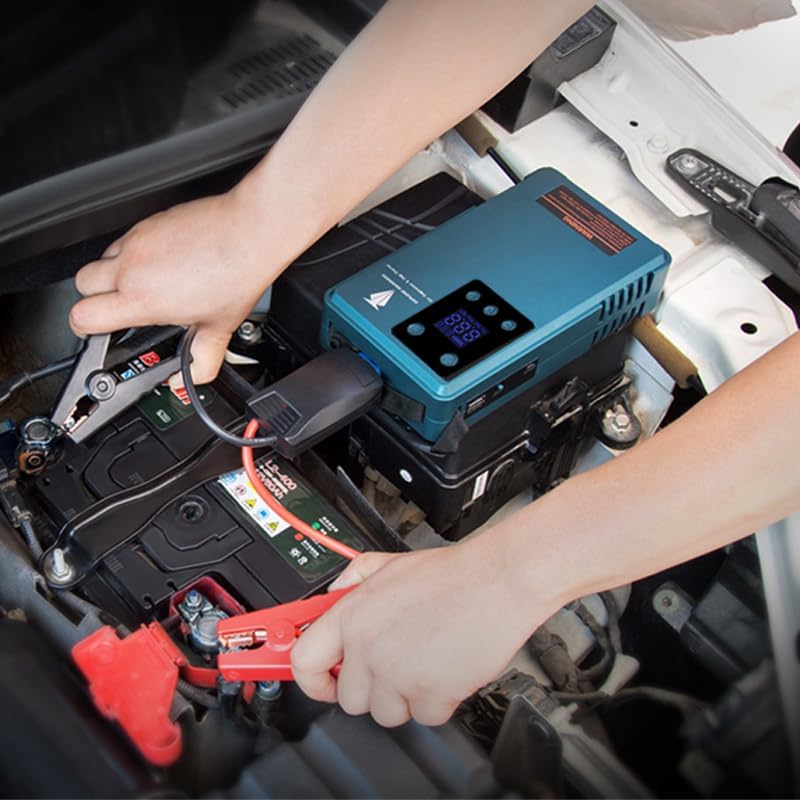
Figure 4.1: Illustrates the proper connection of the jump starter clamps to a vehicle's battery terminals for jump-starting.
4.2. Tire Inflator Function
This device can inflate car tires, motorcycle tires, bicycle tires, and other inflatables.
- Connect the inflatable tube to the air pump port on the device.
- Attach the appropriate inflatable mouth conversion joint (if needed) to the other end of the tube, then securely connect it to the tire valve or inflatable item.
- Power on the device. The LCD display will show the current pressure.
- Use the digital pressure control buttons to set the desired pressure (PSI, bar, KPa, or Kg/cm²).
- Press the start button to begin inflation. The compressor will automatically stop once the preset pressure is reached.
- For continuous inflation, the compressor will automatically stop after ten minutes to prevent overheating. Allow it to cool before resuming.
- Disconnect the tube from the tire valve and the device.
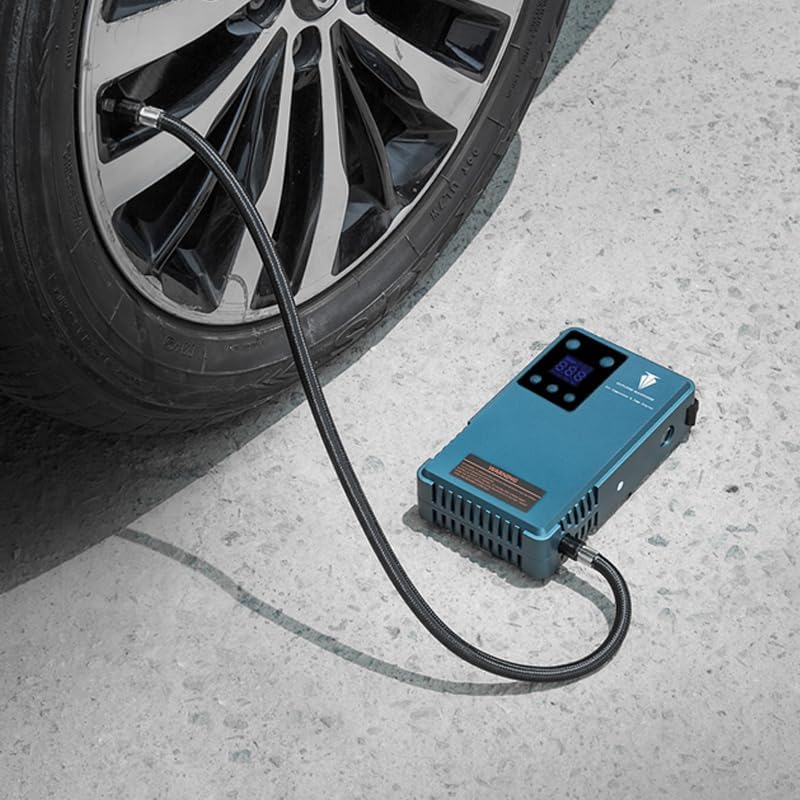
Figure 4.2: The device connected to a car tire, demonstrating its use as a portable tire inflator.
4.3. Power Bank Function
Use the device to charge your electronic gadgets.
- Connect your device's charging cable to the DC 5V Output port on the jump starter.
- Connect the other end of the cable to your smartphone or other digital product.
- The jump starter will begin charging your device.

Figure 4.3: A smartphone screen displaying charging status, indicating the power bank functionality of the device.
4.4. Outdoor Lighting Function
The built-in emergency light provides illumination in dark environments or during emergencies.
- Locate the emergency light button on the device.
- Press the button once for Steady On mode.
- Press again for Flashing mode.
- Press a third time for S.O.S. mode.
- Press a fourth time to turn off the light.

Figure 4.4: A close-up view of the device's integrated emergency light, emitting a bright beam.
5. Intelligent Control System
The device features an LCD display for monitoring and controlling various functions.

Figure 5.1: The LCD display showing current battery level, preset air pressure value, current real-time pressure, and selectable tire pressure units (Psi, Bar, Kpa, Kgf).
- LCD Display: Provides clear readings for battery level, preset air pressure, and real-time pressure.
- Pressure Units: Easily switch between PSI, bar, KPa, and Kg/cm² using the control buttons.
- Automatic Shut-off: The air compressor will automatically stop once the preset pressure is reached, preventing over-inflation.
- Overheating Protection: For safety and longevity, the air compressor will automatically stop after approximately ten minutes of continuous operation to prevent overheating. Allow the unit to cool down before further use.
- Tire Pressure Gauge: The display also functions as a digital tire pressure gauge.
6. Maintenance
- Cleaning: Wipe the device with a dry, soft cloth. Do not use harsh chemicals or abrasive cleaners.
- Storage: Store the device in a cool, dry place, away from direct sunlight and extreme temperatures.
- Battery Care: Recharge the unit every 3-6 months to maintain optimal battery performance and extend its lifespan, even if not in regular use.
- Inspection: Periodically inspect the cables, clamps, and inflation hose for any signs of damage or wear. Replace damaged parts immediately.
7. Troubleshooting
If you encounter issues with your device, refer to the following common problems and solutions:
| Problem | Possible Cause | Solution |
|---|---|---|
| Device does not power on. | Low battery or no charge. | Charge the device fully. |
| Jump starter not starting vehicle. | Incorrect clamp connection; vehicle battery completely dead; jump starter battery too low. | Ensure correct polarity (+ to +, - to -). Fully charge the jump starter. Consult vehicle manual for specific jump-starting procedures. |
| Air compressor not inflating. | Hose not securely connected; preset pressure not set; compressor overheated. | Check all connections. Set desired pressure on the display. Allow the unit to cool down if it stopped due to overheating. |
| Inaccurate pressure reading. | Loose connection to tire valve. | Ensure the inflation hose is securely attached to the tire valve. |
| Power bank not charging devices. | Device battery low; incorrect cable/port. | Charge the jump starter. Ensure you are using the DC 5V Output port and a functional charging cable. |
If problems persist, please contact customer support.
8. Specifications
| Feature | Detail |
|---|---|
| Brand | Explore Warriors |
| Model Number | PAP-10A |
| Product Dimensions | 1.92"D x 4.41"W x 7.68"H |
| Item Weight | 2.77 pounds |
| Amperage (Jump Start) | 500 Amps |
| Peak Output Current (Jump Start) | 1200 Amps |
| Battery Capacity | 8000mAh (Lithium Polymer) |
| Max Inflation Pressure | 85 PSI |
| Input | DC 5V |
| Output | DC 5V (for charging devices), 12V (for jump starting) |
| Manufacturer | Shenzhen Zhihai Wireless Technology Co., Ltd. |
| UPC | 712182193370 |
9. Safety Information
Please read and understand all safety warnings before using this product. Failure to follow these instructions may result in electric shock, fire, and/or serious injury.
- Always wear eye protection when working with batteries.
- Do not jump start a frozen battery.
- Ensure proper polarity when connecting jump cables (red to positive, black to negative). Incorrect connection can cause sparks, fire, or damage to the device and vehicle.
- Do not allow the red and black clamps to touch each other once connected to the jump starter.
- Keep the device away from children.
- Do not expose the device to rain or wet conditions.
- Do not disassemble the product. Servicing should only be performed by qualified personnel.
- Avoid operating the air compressor for extended periods without cooling breaks to prevent overheating.
- Do not over-inflate tires or other items. Always refer to the manufacturer's recommended pressure.
- Use the device only for its intended purpose.
10. Warranty and Support
This product comes with a standard manufacturer's warranty. For specific warranty details, please refer to the documentation included with your purchase or contact Explore Warriors customer support.
For technical assistance, troubleshooting, or warranty claims, please contact your retailer or the manufacturer directly. Contact information can typically be found on the product packaging or the manufacturer's official website.
Manufacturer: Shenzhen Zhihai Wireless Technology Co., Ltd.