1. Introduction
Thank you for choosing the Philips 5000 Series 2-in-1 Air Dehumidifier and Purifier. This appliance is designed to improve your indoor air quality by effectively removing excess moisture and purifying the air. Please read this user manual carefully before using the appliance and save it for future reference.
The DE5205/30 model combines powerful dehumidification with advanced air purification, featuring VitaShield IPS technology to capture ultrafine particles.
2. Important Safety Information
Always follow basic safety precautions when using electrical appliances to reduce the risk of fire, electric shock, and personal injury.
- Ensure the voltage indicated on the appliance matches the local power voltage before connecting.
- Do not operate the appliance with a damaged cord or plug.
- Keep the appliance away from water or other liquids. Do not immerse it.
- Do not block the air inlet or outlet. Maintain at least 20 cm clearance around the appliance.
- Unplug the appliance before cleaning, maintenance, or moving.
- This appliance is for indoor use only.
- Do not allow children to play with the appliance.
3. Product Overview
Familiarize yourself with the components of your Philips 2-in-1 dehumidifier and purifier.

Figure 1: Front view of the Philips DE5205/30 2-in-1 Air Dehumidifier and Purifier.

Figure 2: Close-up of the control panel with digital display and buttons.
Components:
- Control Panel with Digital Display
- Air Outlet
- Air Inlet
- Water Tank
- Continuous Drainage Outlet
- Pre-filter (inside)
- HEPA Filter (inside)
- Power Cord
4. Setup
4.1 Unpacking
Carefully remove the appliance from its packaging. Retain the packaging materials for future transport or storage.
4.2 Placement
- Place the dehumidifier on a firm, level surface.
- Ensure there is at least 20 cm (8 inches) of free space around the air inlet and outlet for optimal airflow.
- Do not place the appliance directly against a wall or furniture.
- Avoid placing the appliance in direct sunlight or near heat sources.
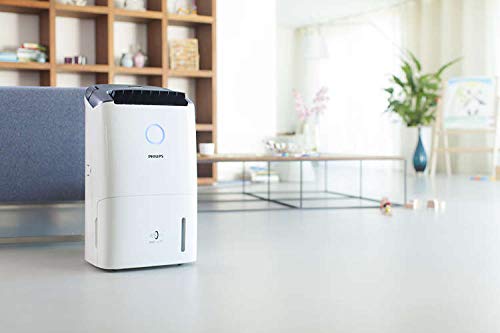
Figure 3: Proper placement of the dehumidifier in a room, ensuring adequate space for air circulation.
4.3 Power Connection
Plug the power cord into a grounded electrical outlet. The appliance will enter standby mode.
4.4 Continuous Drainage (Optional)
For continuous operation without emptying the water tank, connect the provided drainage hose to the continuous drainage outlet on the back of the appliance. Ensure the hose is directed downwards to a suitable drain.

Figure 4: Attaching the continuous drainage hose to the appliance.
5. Operating Instructions
5.1 Power On/Off
Press the power button (U) to turn the appliance on or off.
5.2 Setting Desired Humidity
In dehumidification mode, press the humidity setting button to cycle through desired humidity levels (e.g., 40%, 50%, 60%, 70%, Continuous). The digital display will show the current and target humidity.
5.3 Fan Speed Adjustment
Press the fan speed button to select from 5 available fan speeds. Higher fan speeds result in faster dehumidification and air purification.
5.4 Timer Function
Press the timer button to set the operating time from 1 to 9 hours. The appliance will automatically turn off after the set time.
5.5 LED Color Ring
The LED color ring provides real-time air quality feedback:
- Blue: Good air quality
- Blue-Purple: Fair air quality
- Purple-Red: Unhealthy air quality
- Red: Very unhealthy air quality
6. Operating Modes
6.1 Dehumidification Mode
This is the primary mode for removing excess moisture from the air. Set your desired humidity level, and the appliance will operate until that level is reached, then cycle on and off to maintain it.
6.2 Purifier Only Mode
In dry seasons or when dehumidification is not needed, you can activate the purifier-only mode. The VitaShield IPS technology will continuously purify the air, removing ultrafine particles as small as 0.02 microns.
6.3 Laundry Dry Mode
This specialized mode is designed to help dry clothes faster indoors by operating at a high dehumidification rate. Place the appliance in the room with the drying laundry.
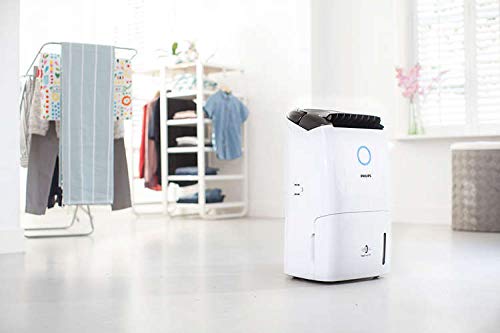
Figure 5: The dehumidifier in use during laundry dry mode, assisting with indoor clothes drying.
7. Maintenance
Regular maintenance ensures optimal performance and extends the lifespan of your appliance.
7.1 Cleaning the Water Tank
When the water tank is full, the appliance will stop operating and an indicator will light up. Carefully remove the water tank, empty it, and clean it with mild detergent and water. Rinse thoroughly and reinsert.
7.2 Cleaning Filters
The appliance includes a pre-filter and a HEPA filter. The pre-filter should be cleaned regularly (e.g., every 2 weeks) by rinsing it under running water or vacuuming it. The HEPA filter cannot be washed and should be replaced when indicated by the appliance.
7.3 Filter Replacement (Healthy Air Lock)
The Healthy Air Lock feature ensures that the appliance will not operate if the filters are not properly installed or if they need replacement. Follow the instructions on the display for filter replacement. Use only genuine Philips replacement filters.
7.4 Exterior Cleaning
Wipe the exterior of the appliance with a soft, damp cloth. Do not use abrasive cleaners or solvents.
8. Troubleshooting
If you encounter issues with your appliance, refer to the following common problems and solutions:
| Problem | Possible Cause | Solution |
|---|---|---|
| Appliance does not turn on. | No power supply; power cord not plugged in; water tank full or not properly inserted. | Check power connection; empty and reinsert water tank. |
| No dehumidification. | Room temperature too low; air filter blocked; humidity setting too high. | Ensure room temperature is above 5°C; clean or replace filters; lower desired humidity setting. |
| Water tank full alert. | Water tank is full. | Empty the water tank and reinsert it correctly. |
| Unusual noise. | Appliance not on a level surface; filter blockage. | Place on a level surface; clean or replace filters. |
If the problem persists, contact Philips customer support.
9. Specifications
Technical specifications for the Philips 5000 Series 2-in-1 Air Dehumidifier and Purifier DE5205/30.
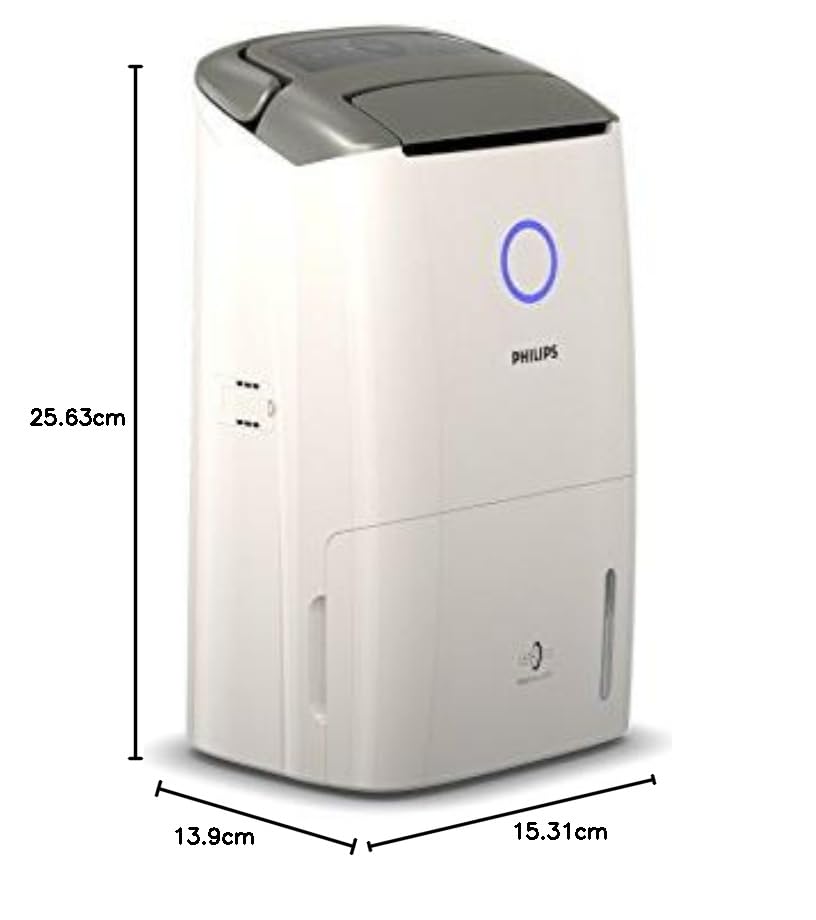
Figure 6: Product dimensions of the Philips DE5205/30.
- Model: DE5205/30
- Dehumidification Capacity: Up to 25 Litres/day
- Clean Air Delivery Rate (CADR): 270 m³/h
- Water Tank Capacity: 4 Litres
- Floor Area Coverage: Up to 70 m²
- Number of Fan Speeds: 5
- Wattage: 355 Watts
- Voltage: 220 Volts
- Product Dimensions (D x W x H): 13.9D x 15.3W x 25.6H Centimeters
- Item Weight: 14 kg
- Color: White or Light Gray
- Special Features: Digital Display, Timer, Healthy Air Lock, LED Color Ring
- Included Components: Dehumidifier unit
10. Warranty and Support
For detailed warranty information and customer support, please refer to the warranty card included with your product or visit the official Philips website. Keep your purchase receipt as proof of purchase.
For assistance, you may contact Philips customer service through their official channels.


