
Introduction
This manual provides essential information for the safe and efficient operation of your Comfort Zone CZ260ER 10,000-Watt Hard-Wired Digital Ceiling Mount Heater. Please read all instructions carefully before installation and use. This heater is designed to provide supplemental heat in garages, workshops, and similar indoor spaces.
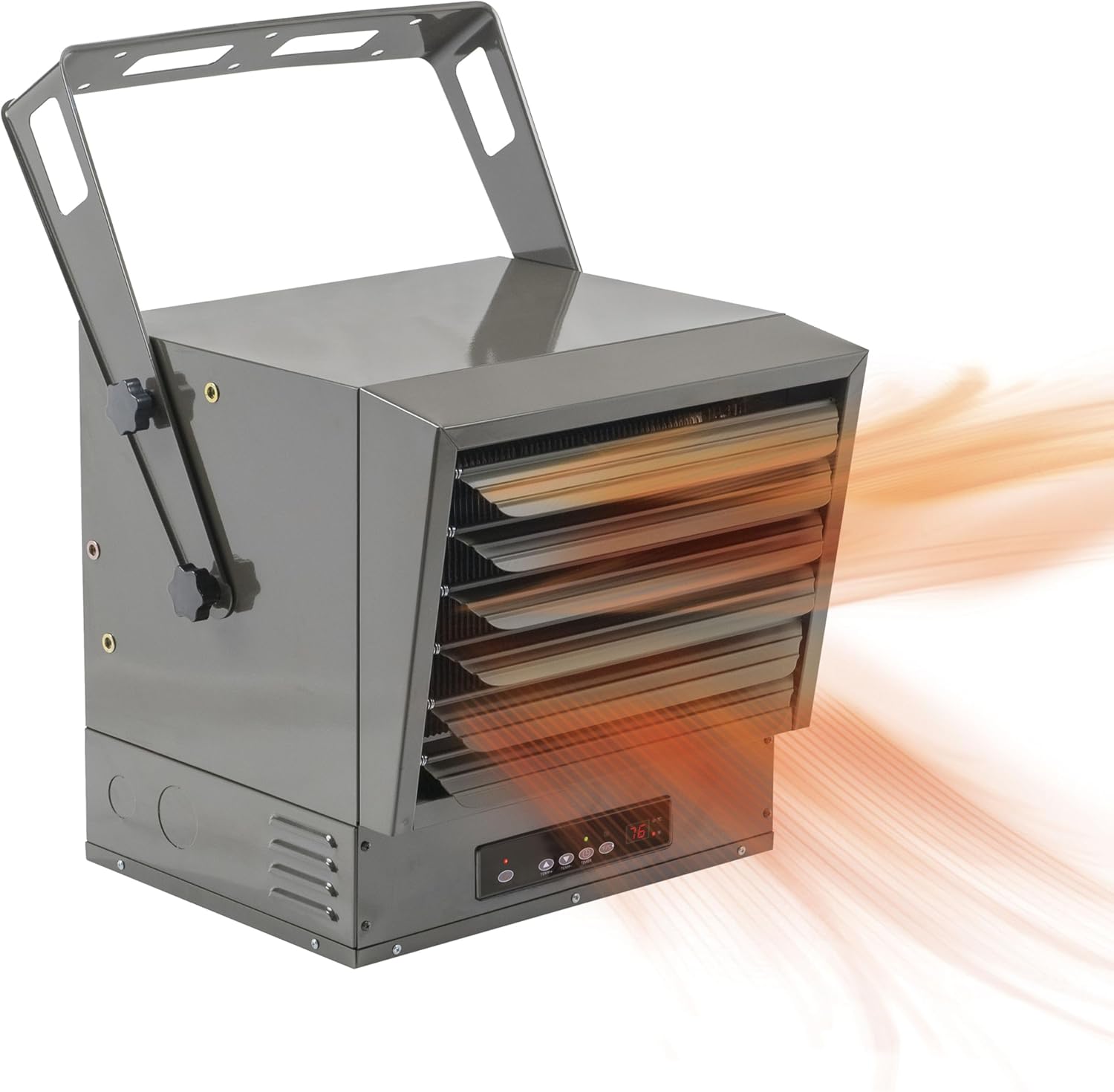
The Comfort Zone CZ260ER 10,000-Watt Hard-Wired Digital Ceiling Mount Heater, shown with heat emanating from its adjustable louvers.
Important Safety Information
To reduce the risk of fire, electric shock, or injury, observe the following safety guidelines:

An image detailing important safety warnings, including keeping the heater 3 feet from combustibles, not using if damaged, indoor use only, avoiding wet surfaces, and direct plug-in without extension cords.
- Clearance: Maintain a minimum distance of 3 feet (0.9 meters) between the heater and all combustible materials such as furniture, bedding, and curtains.
- Damage Inspection: Do not operate the heater if it has been dropped, has a damaged cord, or exhibits any malfunctions.
- Indoor Use Only: This heater is intended for indoor use in dry environments. Do not use in bathrooms, laundry rooms, or near sinks or pools.
- Stable Placement: Ensure the heater is mounted on a stable, non-combustible surface. Avoid mounting on carpets, vinyl flooring, plastic, or wet surfaces.
- Electrical Connection: This unit requires a hardwired connection. Do not use extension cords or power strips. Always disconnect power when not in use or during maintenance.
- Pet Owners: During initial use, some odors may be present as protective coatings burn off. Keep birds and small pets away from the area during this period, as they may be sensitive to these temporary emissions.
Setup
Mounting Instructions
The heater is designed for ceiling or wall mounting using the included adjustable bracket. Ensure the mounting surface can support the weight of the heater and that proper clearances are maintained.

The Comfort Zone CZ260ER heater mounted overhead in a garage setting, demonstrating its ceiling-mount capability.

Detailed diagrams showing various ceiling and wall mounting configurations for the heater, including tilt options and minimum distance requirements from walls and floor.
Electrical Connection
This heater requires a single-phase hardwired connection (208/240 Volt A.C.). Installation should be performed by a qualified electrician in accordance with all local and national electrical codes. The unit does not use a traditional plug-in outlet.

A diagram illustrating the hardwired electrical connection for the heater, showing black, ground, and white wires connecting to a breaker panel. It notes that the heater does not use a traditional outlet and recommends professional installation.

A close-up image showing the internal wiring compartment of the heater during a hardwired installation, with wires being prepared for connection. This highlights the single-phase 208-240 Volt A.C. requirement.
Operating Instructions
Controls and Indicators
The heater features a digital control panel and comes with a full-function remote control for convenient operation. The control panel includes buttons for power, temperature adjustment, and timer settings.

A close-up of the heater's control panel showing the 'POWER' and 'CAUTION' indicator lights, which provide operational status and safety alerts.
- Power Button: Turns the heater on or off.
- Temperature Adjustment: Use the 'Temp+' and 'Temp-' buttons to set your desired temperature. The digital display will show the current and set temperatures.
- Timer Function: The 12-hour timer allows you to program the heater to operate for a specific duration. Refer to the detailed timer instructions in the full product manual for programming steps.
- Indicator Lights: The 'POWER' light indicates the unit is receiving power. The 'CAUTION' light illuminates to signal a potential issue, such as overheating.
Airflow Adjustment
The heater is equipped with individually adjustable louvers to direct the airflow. This allows for targeted heating to specific areas within your space.

A hand adjusting one of the six individually adjustable louvers on the heater, indicating the ability to direct airflow for personalized heating comfort.
- Gently adjust each louver blade to direct the warm air flow as needed.
- Avoid forcing the louvers beyond their intended range of motion.
Maintenance
Regular maintenance ensures optimal performance and longevity of your heater. Always disconnect power before performing any maintenance.
- Cleaning: Periodically wipe the exterior of the heater with a soft, damp cloth. Do not use abrasive cleaners or solvents. Ensure the heater is completely dry before reconnecting power.
- Dust Removal: Use a vacuum cleaner with a brush attachment to remove dust from the grilles and internal components.
- Terminal Inspection: Annually, or as needed, inspect electrical terminals for tightness. Loose connections can lead to overheating and potential damage. This inspection should be performed by a qualified individual.
- Storage: If storing the heater for an extended period, ensure it is clean and dry. Store in a cool, dry place.
Troubleshooting
If you encounter issues with your heater, refer to the following common solutions:
| Problem | Possible Cause | Solution |
|---|---|---|
| Heater does not turn on. | No power, tripped breaker, or unit is off. | Check power supply, reset circuit breaker, ensure power button is pressed. Verify hardwired connection is secure. |
| Heater runs but no heat. | Thermostat set too low, or heating elements issue. | Increase thermostat setting. If problem persists, contact qualified service personnel. |
| Temperature reading seems inaccurate. | Temperature sensor placement. | The internal temperature sensor may be affected by the heater's own warmth. For more accurate ambient temperature readings, consider using an external thermometer to calibrate your desired setting on the heater. |
| Heater cycles on/off frequently. | Thermostat setting too close to ambient temperature, or restricted airflow. | Adjust thermostat setting. Ensure louvers are not blocked and there is adequate clearance around the unit. |
| Melted terminals or wiring issues. | Loose electrical connections. | Immediately disconnect power. This indicates a serious electrical issue. Have a qualified electrician inspect and tighten all wiring connections. Regular inspection of terminals is recommended. |
Specifications
| Feature | Detail |
|---|---|
| Brand | Comfort Zone |
| Model Number | CZ260ER |
| Power Output | 10,000 Watts |
| Voltage | 240 Volt A.C. |
| Amperage | 41.67 Amps |
| Heating Coverage | Up to 1500 sq. ft. |
| Mounting Type | Ceiling Mount |
| Special Features | Adjustable Temperature, Electronic Thermostat, Fast Heating, Remote Control, 12-Hour Timer, Overheat Protection |
| Product Dimensions | 18.03"D x 17.56"W x 18.19"H |
| Item Weight | 43 pounds |
| Min Temperature Setting | 68 Degrees Fahrenheit |
| Max Temperature Setting | 95 Degrees Fahrenheit |
| Included Components | Product Manual, Remote Control |
Warranty and Support
Warranty Information
This Comfort Zone heater comes with a 1-year warranty against manufacturer defects. Please retain your proof of purchase for warranty claims.
Customer Support
For technical assistance, troubleshooting beyond this manual, or warranty inquiries, please refer to the contact information provided in the full product manual included with your purchase. You may also visit the official Comfort Zone website for support resources.


