
1. Introduction
This manual provides essential information for the assembly, operation, and maintenance of your soges L-Shaped Gaming Desk, Model CS-ZJ02-OK. This desk is designed to offer a spacious and versatile workspace for various activities, including writing, working, handcrafting, and gaming.
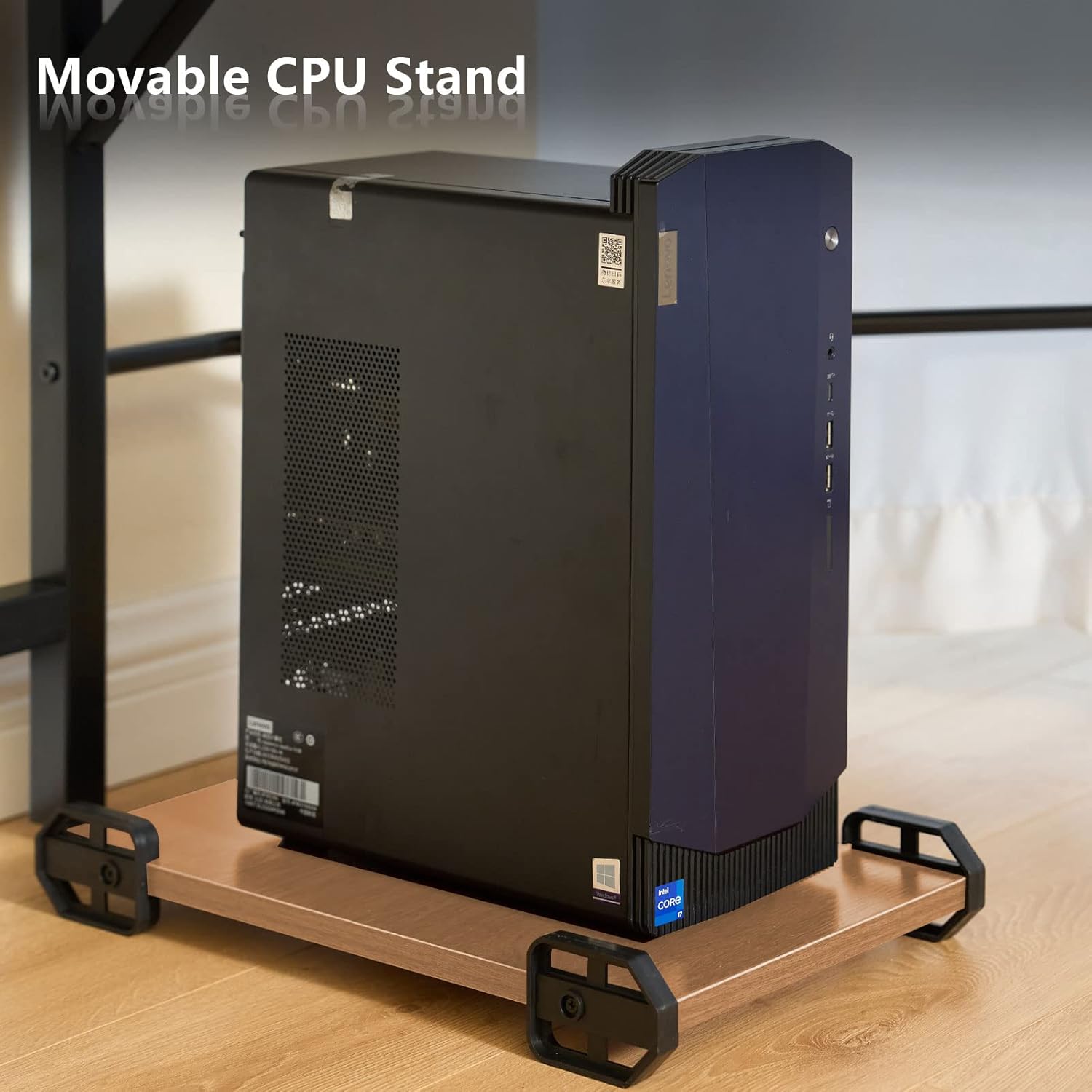
Key features include a generous working space of (59+59)L * 21.7W * 30H inches, an L-shaped design for space maximization, and a sturdy metal frame (1.2 mm thick) for enhanced stability. It also comes with a convenient movable CPU holder.
2. Safety Information
- Ensure proper assembly of all components before use.
- Do not exceed the maximum weight limit of 100 kg (220.5 lbs) on the desk surface.
- Use the adjustable leg pads to ensure stability on uneven surfaces and prevent wobbling.
- Avoid overtightening screws during assembly, as this may warp the metal frame or damage the desktop material.
- Keep the desk away from direct heat sources and excessive moisture.
3. Package Contents
Please verify that all components are present before beginning assembly. If any parts are missing or damaged, please contact customer support.
- L-shaped desktop panels (3 sections: 2 main, 1 corner)
- Metal frame components (legs, support bars)
- Movable CPU stand
- Assembly hardware (screws, bolts, adjustable leg pads, tools)
- Assembly instructions (refer to the included PDF manual for detailed steps)
4. Setup and Assembly
For detailed assembly instructions, please refer to the Installation Manual (PDF) provided with your product. The following are general guidelines and important tips:
- Unpacking: Be aware that the package may contain two protective boards not part of the desk, used solely for transit protection.
- Screw Selection: Always use the shorter screw (labeled 'C' in the manual) to fix the desktop panels. Using longer screws (labeled 'D') may cause them to poke through the board.
- Initial Tightening: When assembling, keep most screws "finger tight" until the majority of the desk structure is in place. This allows for minor adjustments to align pieces correctly. Fully tighten all screws only after the main structure is assembled and aligned.
- Avoid Overtightening: The metal frame is designed for stability but can warp if screws are overtightened. Apply firm but not excessive force when tightening.
- Adjustable Leg Pads: Once assembled, adjust the leg pads at the bottom of each leg to level the desk and prevent wobbling, especially on uneven floors.



5. Operating Instructions
The soges L-Shaped Gaming Desk is designed for versatile use in various settings. Once assembled and stable, it is ready for immediate use.
- Placement: Position the desk in a corner to maximize space utilization, or as a large workstation in an open area.
- Workstation Setup: Utilize the spacious desktop for multiple monitors, laptops, keyboards, and other peripherals. The L-shape allows for distinct work zones, such as a primary computing area and a secondary area for writing, documents, or creative tasks.
- CPU Placement: Use the provided movable CPU stand to keep your computer tower elevated and easily accessible. This helps protect it from dust and moisture on the floor.
- Weight Distribution: Distribute weight evenly across the desk surface. While sturdy, avoid concentrating heavy items in one small area, especially near the corner joint.


6. Maintenance
- Cleaning: Wipe the desk surface with a soft, damp cloth. Avoid abrasive cleaners or harsh chemicals that could damage the finish.
- Spills: Clean up spills immediately to prevent staining or damage to the wood particle board.
- Hardware Check: Periodically check all screws and bolts to ensure they remain tight. Retighten if necessary, but avoid overtightening.
- Environmental Conditions: Maintain a stable room temperature and humidity to prevent warping or cracking of the desktop material.
7. Troubleshooting
| Problem | Possible Cause | Solution |
|---|---|---|
| Desk wobbles or is unstable. | Uneven floor surface; loose connections. | Adjust the leg pads at the bottom of each leg until the desk is stable. Ensure all assembly screws are tightened properly. |
| Desktop panels are not flush at the corner joint, creating a "lip". | Screws tightened too early during assembly; slight manufacturing tolerance. | Ensure screws were only finger-tight during initial assembly to allow for alignment. If already tightened, slightly loosen relevant screws, adjust the panels to be as flush as possible, then re-tighten carefully. This is a known characteristic for some units. |
| Screws poke through the desktop. | Incorrect screw length used. | Always use the shorter screws (labeled 'C' in the manual) for attaching the desktop panels. Refer to the assembly manual for correct screw identification. |
| Metal frame appears warped. | Screws overtightened during assembly. | Avoid overtightening screws. If minor warping has occurred, carefully loosen and re-tighten screws, ensuring not to apply excessive force. |
8. Specifications
| Feature | Detail |
|---|---|
| Brand | soges |
| Model Name | CS-ZJ02-OK |
| Product Dimensions | 21.7"D x 59"W x 30"H (Overall L-shape) |
| Color | Oak |
| Shape | L-Shape |
| Base Material | Metal |
| Top Material Type | Wood (E1 degree solid particle wood) |
| Finish Type | Wood |
| Special Feature | Scratch Resistant |
| Maximum Weight Recommendation | 100 Kilograms (220.5 lbs) |
| Item Weight | 45 Pounds |
| Tabletop Thickness | 1 Inches |
| Included Components | Desk panels, metal frame, movable CPU stand, assembly hardware |
| Required Assembly | Yes |
9. Warranty and Support
This product is sold with No Warranty as per manufacturer specifications.
For any questions, concerns, or assistance with assembly or product issues, please contact soges customer support directly through their official channels or the retailer where the product was purchased. You can visit the soges Store on Amazon for more information.