
1. Introduction
This manual provides detailed instructions for the safe and effective installation and use of the ITW RED HEAD TW-1400 Mechanical Anchor. Please read this manual thoroughly before installation to ensure proper application and performance.
2. Safety Information
Always adhere to local building codes and safety regulations. Failure to follow these instructions may result in anchor failure, property damage, or serious injury.
- Wear appropriate personal protective equipment (PPE), including safety glasses and gloves.
- Ensure the base material is suitable for mechanical anchors and can support the intended load.
- Do not overload the anchor beyond its specified working load limits.
- Verify that no hidden utilities (electrical, plumbing) are present before drilling.
- Use only the specified drill bit diameter and depth.
3. Product Overview
The ITW RED HEAD TW-1400 is a carbon steel mechanical anchor designed for reliable fastening in concrete and other solid base materials. It features an expansion mechanism that provides strong holding power once set.
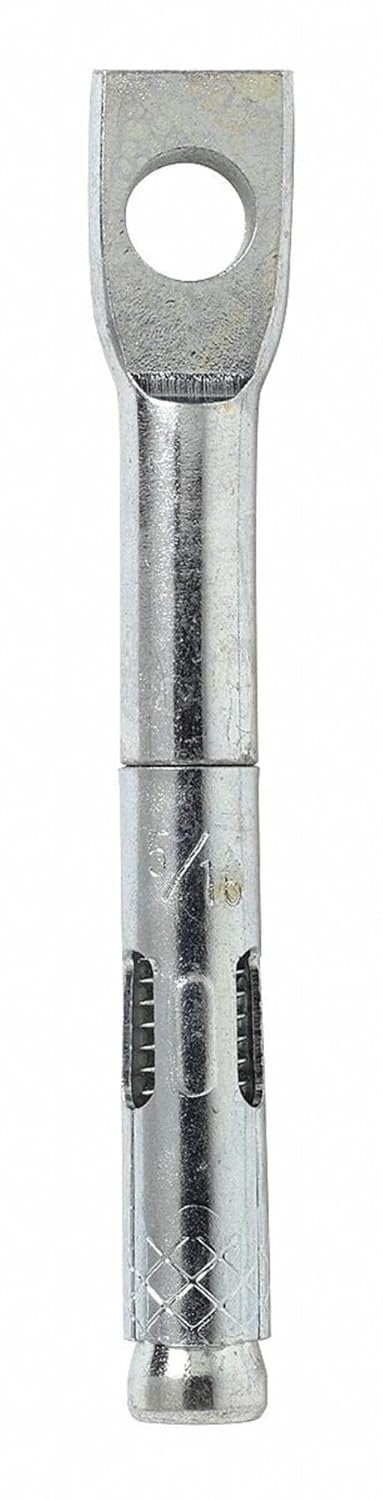
Figure 1: ITW RED HEAD TW-1400 Mechanical Anchor. This image displays the full length of the anchor, highlighting its eyelet head for attachment and the ribbed, expanding lower section designed for secure installation in concrete.
4. Installation Instructions
Follow these steps for proper installation of the TW-1400 Mechanical Anchor:
- Drill the Hole: Using a rotary hammer drill, create a hole in the base material (concrete, solid masonry) with the specified diameter and depth. For the 1/4x2-1/8 inch anchor, ensure the drill bit matches the anchor's diameter (typically 1/4 inch) and the hole depth is at least the anchor's embedment depth.
- Clean the Hole: Thoroughly clean the drilled hole using a wire brush and compressed air or a vacuum to remove all dust and debris. A clean hole is critical for proper anchor performance.
- Insert the Anchor: Place the anchor into the cleaned hole. The anchor should fit snugly. If using a hammer, gently tap the anchor until the top of the anchor is flush with the surface of the base material.
- Set the Anchor: Use a setting tool or a hammer to drive the expansion cone into the anchor body. This action expands the anchor sleeve against the sides of the drilled hole, creating a secure hold. Continue driving until the anchor feels firm and properly set. Refer to manufacturer's specific setting instructions or torque values if available for optimal performance.
- Attach Fixture: Once the anchor is set, attach your fixture to the eyelet or threaded portion of the anchor. Ensure the attachment is secure and within the anchor's load limits.
5. Operating and Usage
The ITW RED HEAD TW-1400 Mechanical Anchor is designed for permanent fastening applications. Once properly installed, it provides a secure attachment point for various fixtures. Ensure that any loads applied to the anchor do not exceed its rated capacity. This anchor is typically used for suspending objects, attaching cables, or securing light to medium-duty fixtures in concrete.
6. Maintenance
Mechanical anchors are generally maintenance-free once installed. However, periodic inspection of the anchor and the attached fixture is recommended, especially in applications subject to vibration, dynamic loads, or corrosive environments. Check for any signs of loosening, corrosion, or damage. If any issues are detected, consult a qualified professional for assessment and potential replacement.
7. Troubleshooting
- Anchor does not set properly:
- Ensure the drilled hole diameter matches the anchor specification.
- Verify the hole depth is sufficient for full embedment.
- Confirm the hole is thoroughly cleaned of all debris.
- Ensure the expansion cone is fully driven into the anchor body.
- Anchor feels loose after setting:
- The base material may be compromised or too weak.
- The hole may be oversized.
- The anchor may not have been fully expanded. Remove and replace with a new anchor in a new location if necessary.
8. Specifications
| Feature | Detail |
|---|---|
| Model | TW-1400 |
| Material | Carbon Steel |
| Anchor Size | 1/4 x 2-1/8 inches |
| Product Dimensions | 3.7 x 6.4 x 2.5 inches (packaging/box dimensions) |
| Weight | 4 Pounds (packaging/box weight) |
| Manufacturer | ITW Ramset/Red Head |
| ASIN | B076F8YPSN |
Note: Specific load capacities and drill bit requirements should be confirmed with the manufacturer's technical data sheet for your specific application and base material.
9. Warranty and Support
For information regarding product warranty, technical support, or specific application guidance, please contact ITW RED HEAD directly through their official website or customer service channels. Always refer to the latest product documentation for the most accurate and up-to-date information.