
Hyper Tough HT309
Hyper Tough HT309 OBDII CAN Code Reader User Manual
Model: HT309
Brand: Hyper Tough
Introduction
The Hyper Tough HT309 OBDII/CAN Code Reader is designed to quickly identify the cause of your vehicle's Check Engine Light. This versatile tool is compatible with most domestic, Asian, and European vehicles manufactured in 1996 and newer. It offers straightforward operation, allowing users to read, define, and clear diagnostic trouble codes (DTCs), check I/M Readiness Status, view Freeze Frame Data, and retrieve vehicle information.
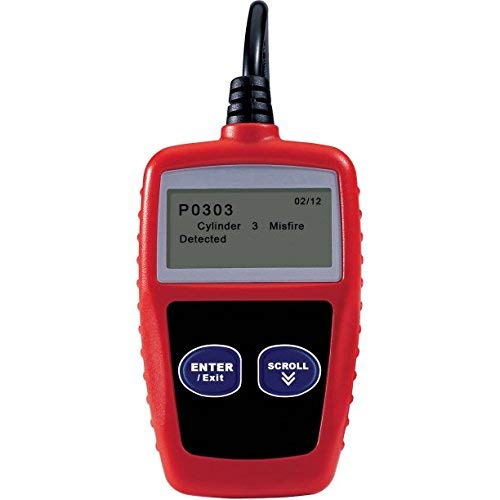
This image shows the Hyper Tough HT309 OBDII CAN Code Reader. The device is red with a black cable extending from the top. Its LCD screen displays 'P0303 Cylinder 3 Misfire Detected'. Below the screen are two blue buttons: 'ENTER / Exit' and 'SCROLL' with a down arrow.
Setup
- Locate the OBDII Port: The OBDII (On-Board Diagnostics II) port is typically located under the dashboard on the driver's side of the vehicle. Refer to your vehicle's owner's manual if you cannot locate it.
- Connect the Code Reader: With the vehicle's ignition off, firmly plug the attached OBDII cable from the HT309 into the vehicle's OBDII port.
- Turn On Ignition: Turn the vehicle's ignition to the "ON" position (do not start the engine). The HT309 will power on automatically.
- Initial Scan: The device will perform an initial scan of the vehicle's systems.
Operating Instructions
Reading Diagnostic Trouble Codes (DTCs)
Once connected and powered on, the HT309 will automatically display any detected Diagnostic Trouble Codes. Use the SCROLL button to navigate through multiple codes if present. The display will show the code (e.g., P0303) and a brief description.
Clearing Diagnostic Trouble Codes (DTCs)
To clear codes and turn off the Check Engine Light, ensure you have addressed the underlying issue first. With the codes displayed, press and hold the ENTER / Exit button. Follow any on-screen prompts to confirm the clearing process. Note: Clearing codes will also clear Freeze Frame Data.
I/M Readiness Status Check
This function checks the status of the emission-related monitors on your vehicle, indicating if your vehicle is ready for an emissions inspection. Navigate to the I/M Readiness menu using the SCROLL button and press ENTER / Exit to view the status.
Viewing Freeze Frame Data
Freeze Frame Data captures a snapshot of the vehicle's operating conditions at the moment an emission-related fault occurred. This data can be crucial for diagnosing intermittent problems. Access this feature via the menu using the SCROLL button.
Retrieving Vehicle Information
The HT309 can retrieve important vehicle information such as the Vehicle Identification Number (VIN), Calibration ID (CIN), and Calibration Verification Number (CVN). This information is typically found in the "Vehicle Info" menu option.
Language Selection
The HT309 supports multiple languages, including English, Spanish, and French. Refer to the device's menu options to change the display language as needed.
Maintenance
- Cleaning: Use a soft, dry cloth to clean the exterior of the device. Do not use abrasive cleaners or solvents.
- Storage: Store the HT309 in a clean, dry environment away from extreme temperatures and direct sunlight when not in use.
- Cable Care: Avoid bending or kinking the OBDII cable excessively. Always grasp the connector, not the cable, when plugging or unplugging.
Troubleshooting
| Problem | Possible Cause | Solution |
|---|---|---|
| Device does not power on. | Loose connection to OBDII port; vehicle ignition not on; vehicle's OBDII port fuse blown. | Ensure cable is firmly connected. Turn vehicle ignition to "ON". Check vehicle's fuse box for a blown fuse related to the OBDII port. |
| Cannot link to vehicle. | Incorrect protocol; vehicle not OBDII compliant; faulty cable. | Verify vehicle is 1996 or newer and OBDII compliant. Try connecting to another vehicle if possible to rule out a faulty device/cable. |
| Codes clear but Check Engine Light remains on. | Underlying issue not resolved; new fault detected immediately. | Ensure the vehicle fault has been properly repaired. Drive the vehicle for a short period to see if the light returns. If it does, re-scan for new codes. |
Specifications
- Model: HT309
- Brand: Hyper Tough
- Power Source: Vehicle OBDII Port (Corded Electric)
- Dimensions: Approximately 6.25 x 9.5 x 2.25 inches
- Item Weight: Approximately 13.6 ounces
- Supported Protocols: OBDII, CAN
- Supported Languages: English, Spanish, French
- Compatibility: Most 1996 and newer domestic, Asian, and European vehicles
Warranty Information
This product is tested and certified to look and work like new. For specific warranty details, including coverage and duration, please refer to the documentation included with your purchase or contact Hyper Tough customer support directly. Warranty terms may vary based on retailer and region.
Support
If you encounter issues not covered in this manual or require further assistance, please contact Hyper Tough customer support. Keep your product model number (HT309) and any purchase information readily available when seeking support.
For the most up-to-date support information, including contact details, please visit the official Hyper Tough website or the retailer where the product was purchased.
Related documentsHT309

Ask a question about this manual
Ask about setup, troubleshooting, compatibility, parts, safety, or missing instructions. Manuals+ will review the question and use this page’s manual context to help answer it.