
1. Introduction
The TELEFUNKEN M81 is a versatile dynamic microphone engineered for a wide range of sound sources in both studio and live performance environments. It delivers a smooth frequency response, clear audio reproduction, and robust body, making it suitable for vocals, guitar amplifiers, drums, horns, and other instruments. Its design minimizes proximity effect and offers superior feedback rejection, providing a condenser-like response in a dynamic microphone package. The M81 features a low-mass diaphragm and a custom-wound impedance matching transformer, ensuring reliable performance and high-quality sound capture.
2. Package Contents
Verify that your TELEFUNKEN M81 package contains the following items:
- TELEFUNKEN M81 Dynamic Microphone (Turquoise)
- Microphone Clip
- Zip Pouch
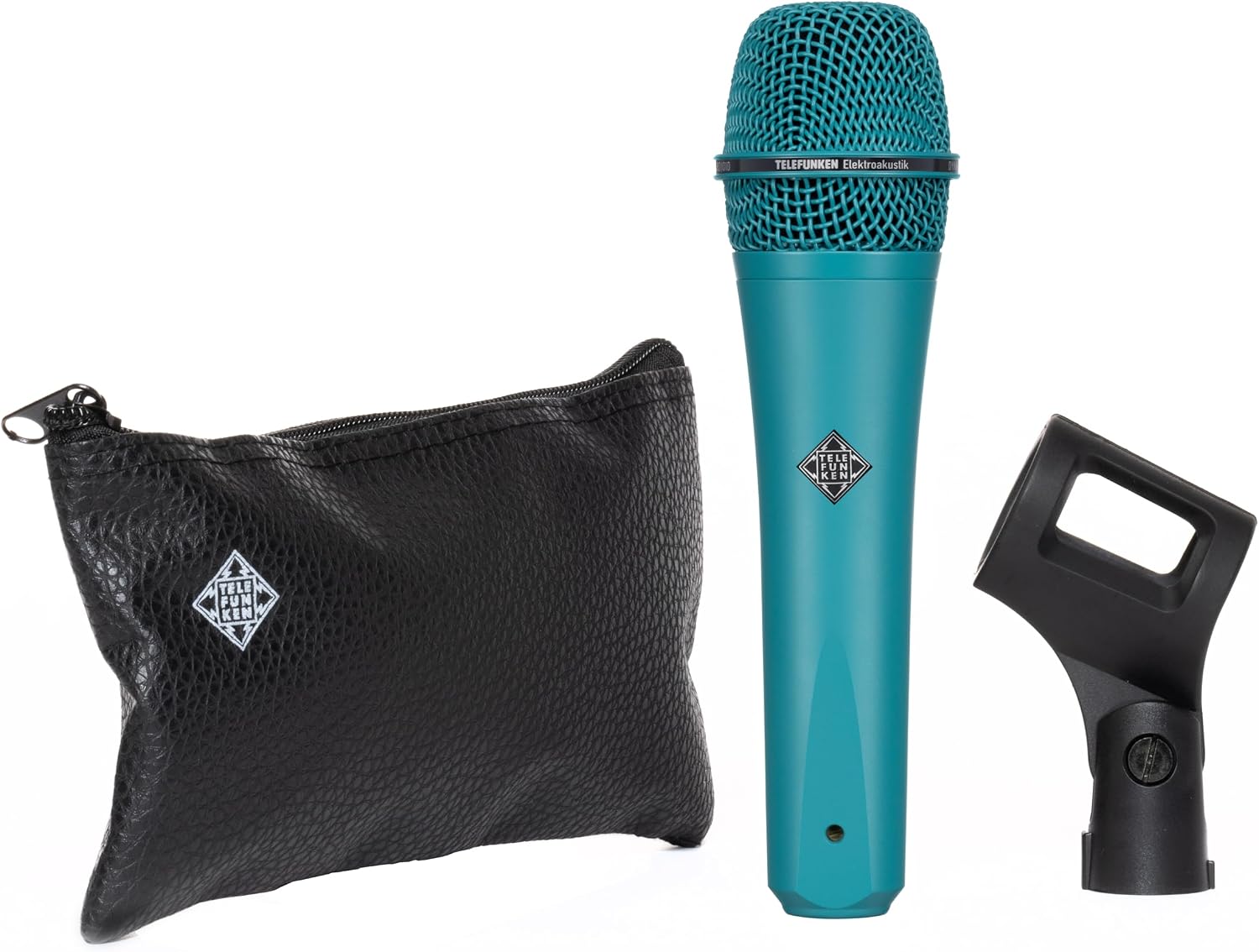
Image: The TELEFUNKEN M81 Turquoise Dynamic Microphone shown with its accompanying microphone clip and protective zip pouch.
3. Setup
Follow these steps to set up your M81 microphone:
- Attach Microphone Clip: Securely fasten the provided microphone clip to a standard microphone stand.
- Mount Microphone: Insert the base of the M81 microphone into the microphone clip. Ensure it is firmly seated to prevent accidental drops.
- Connect XLR Cable: Connect a standard 3-pin XLR cable to the XLR output connector at the base of the microphone. Connect the other end of the XLR cable to your mixer, audio interface, or preamplifier.
- Positioning: The M81 features a Supercardioid polar pattern, meaning it is most sensitive to sound directly in front of it and rejects sound from the sides and rear. Position the microphone directly towards the sound source for optimal capture and to minimize unwanted background noise.
4. Operating Instructions
To achieve the best performance from your M81 microphone:
- Gain Staging: Adjust the gain on your mixer or preamplifier to an appropriate level. The M81 has an audio sensitivity of 36 Decibels. Start with a lower gain setting and gradually increase it until you achieve a strong signal without clipping or distortion.
- Proximity Effect: The M81 is designed to have minimal proximity effect, which is the increase in bass response as a sound source gets closer to the microphone. This allows for consistent tonal quality even with varying distances from the sound source.
- Feedback Rejection: Due to its supercardioid polar pattern, the M81 offers excellent feedback rejection. When using in live sound environments, position stage monitors to the sides or slightly behind the microphone to further reduce the chance of feedback.
- Recommended Use: The M81 is highly recommended for singing and capturing various instruments. Experiment with microphone placement to find the optimal sound for your specific application.
5. Maintenance
Proper care will ensure the longevity and performance of your M81 microphone:
- Cleaning: The microphone features a durable metal enclosure. To clean, gently wipe the exterior with a soft, dry cloth. Avoid using harsh chemicals or abrasive materials, which can damage the finish. Do not attempt to clean the microphone grille internally.
- Storage: When not in use, store the M81 in its provided zip pouch to protect it from dust, moisture, and physical damage.
- Handling: Handle the microphone with care. Avoid dropping it or subjecting it to strong impacts, as this can affect its internal components and performance.
6. Troubleshooting
If you encounter issues with your M81 microphone, consider the following:
- No Sound Output:
- Ensure the XLR cable is securely connected at both the microphone and the input device (mixer/interface).
- Verify that the input channel on your mixer/interface is selected and its gain is turned up.
- Test with a different XLR cable to rule out a faulty cable.
- Test the microphone on a different input channel or with a different audio device.
- Low Output Level:
- Increase the gain on your mixer or preamplifier.
- Ensure the microphone is positioned close enough to the sound source.
- Distorted Sound:
- Reduce the gain on your mixer or preamplifier if the input signal is too hot (clipping).
- Ensure the sound source is not excessively loud for the microphone's capabilities.
- Excessive Feedback:
- Reposition the microphone and/or stage monitors to minimize direct sound from speakers entering the microphone.
- Utilize a graphic equalizer or feedback suppressor on your mixer.
7. Specifications
Detailed technical specifications for the TELEFUNKEN M81 Dynamic Microphone:
| Brand | TELEFUNKEN |
| Model Number | SYTM-050-TUR |
| Color | Turquoise |
| Connectivity Technology | XLR |
| Connector Type | XLR |
| Special Feature | Supercardioid |
| Polar Pattern | Super Cardioid |
| Audio Sensitivity | 36 Decibels |
| Item Weight | 430 Grams |
| Impedance | 325 Ohms |
| Microphone Form Factor | Handheld |
| Power Source | Corded Electric |
| Enclosure Material | Metal |
| Item Dimensions | 7.24 x 1.89 x 1.89 inches |
| Included Components | Mic clip, Zip pouch |
8. Warranty Information
TELEFUNKEN Elektroakustik products are covered by a limited warranty. For detailed information regarding warranty terms, conditions, and registration, please refer to the official TELEFUNKEN Elektroakustik website or contact their customer support directly. Please retain your proof of purchase for warranty claims.
9. Support
For further assistance, technical support, or inquiries about your TELEFUNKEN M81 Dynamic Microphone, please visit the official TELEFUNKEN Elektroakustik website. You can typically find FAQs, product documentation, and contact information for their support team there.
Official Website: www.telefunken-elektroakustik.com