
1. Introduction
This manual provides essential instructions for the safe and efficient use of your TANGSPOWER 48V 1.5A Li-ion Battery Charger, Model TP-84W-5461500. This charger is designed for 13S 48V lithium-ion battery packs, providing a stable 54.6V output at 1.5A. Please read this manual thoroughly before operation and retain it for future reference.

Image 1.1: The TANGSPOWER 48V 1.5A Li-ion Battery Charger, showing the main unit, detachable AC power cord, and the RCA output connector.
2. Safety Information
Failure to follow these safety instructions may result in electric shock, fire, or serious injury.
- Indoor Use Only: This charger is designed for indoor use in dry conditions. Do not expose it to rain, moisture, or extreme temperatures.
- Hazardous Area: Do not open the charger casing. There are no user-serviceable parts inside. All repairs must be performed by trained service personnel.
- Battery Compatibility: This charger is specifically designed for lithium-ion (Li-ion) batteries. Do not use it with LiFePO4 batteries or any other battery chemistry, as this can cause overheating, damage to the charger, or a fire hazard.
- Ventilation: Ensure adequate ventilation around the charger during operation to prevent overheating.
- Disconnect When Not In Use: Always disconnect the charger from the power supply when not in use.
- Proper Connection Sequence: Always connect the charger to the battery first, then to the AC power outlet. When disconnecting, first unplug from the AC power, then disconnect from the battery. Reversing this sequence, especially when the charging current is high (indicated by a red light), can damage the charger.
3. Components Overview
The TANGSPOWER charger package includes the following components:
- Charger Unit (Model: TP-84W-5461500)
- AC Power Cord
- RCA Output Connector

Image 3.1: Detail of the RCA output plug, indicating a 10mm diameter.

Image 3.2: The AC power input port on the charger unit.
4. Setup and Operation
- Connect to Battery: Ensure your battery is a 48V Li-ion pack compatible with a 54.6V charging voltage and RCA connector. Connect the charger's RCA output plug securely to your battery's charging port.
- Connect to AC Power: Plug the AC power cord into the charger unit's input port, then plug the other end of the AC power cord into a standard 100-240V AC wall outlet.
- Charging Indicator: The charger features an LED indicator:
- Red Light: Indicates the battery is currently charging.
- Green Light: Indicates the battery is fully charged. The charger will automatically stop charging.
- Post-Charge: After the LED turns green, indicating a full charge, it is recommended to leave the battery connected for an additional 2-3 hours to ensure a balanced charge.
- Disconnecting: First, unplug the AC power cord from the wall outlet. Then, disconnect the RCA plug from the battery.
5. Maintenance and Battery Care
Proper care of your battery and charger will extend their lifespan and ensure optimal performance.
- Avoid Deep Discharge: Do not allow your battery to completely run out of power before charging. This can damage the battery and prevent it from being protected by the charger's features.
- Optimal Charging Range: To maximize battery longevity, avoid discharging below 35% and charging above 85-90% capacity.
- Long-Term Storage: If a battery has not been used for an extended period (2-3 months), charge it before use. For long-term storage, it is advisable to perform a deep discharge cycle approximately every 3 months. This process, sometimes referred to as "re-lighting," helps activate dormant materials within the battery. A "luminous" state refers to the battery reaching the controller's undervoltage protection action.
- Cleanliness: Keep the charger and its connectors clean and free from dust and debris.
6. Troubleshooting
If you encounter issues with your charger, please review the following common problems and solutions:
- Charger Not Activating (No Red Light):
- Ensure both the AC power cord and the RCA plug are securely connected.
- Verify the wall outlet is functional.
- Confirm the battery is a compatible 48V Li-ion type and not fully charged.
- Charger Overheating:
- Ensure the charger is used in a well-ventilated area.
- Confirm the battery type is Li-ion. Using the charger with incompatible battery types (e.g., LiFePO4) will cause severe overheating.
- The charger has built-in thermal protection. If it overheats excessively, it may temporarily shut down. Allow it to cool before resuming use.
- Battery Not Charging Fully (Always Red Light or Green Light Too Soon):
- Check the battery's health. A damaged or very old battery may not accept a full charge.
- Ensure the charger's output voltage (54.6V) and current (1.5A) match your battery's requirements.
- Damage to Charger After Disconnecting:
- Always follow the correct disconnection sequence: AC power first, then battery. Disconnecting the battery while the charger is still connected to AC power, especially during high current charging, can damage the charger.
If problems persist, contact the retailer or a qualified service technician.
7. Specifications
| Model Number | TP-84W-5461500 |
| Input Voltage | 100-240V AC, 50/60Hz |
| Output Voltage | 54.6V DC |
| Output Current | 1.5A |
| Power | 84W |
| Efficiency | 80% |
| Fluctuation / Noise | <100MV |
| Working Temperature | 0-40 °C (32-104 °F) |
| Storage Temperature | -20-85 °C (-4-185 °F) |
| Working Humidity | 5% ~ 90% RH |
| Storage Humidity | 5% ~ 90% RH |
| Housing Material | PC |
| Connector Type | RCA |
| Special Feature | Short Circuit Protection, Thermal Protection, Overload Protection |
| Item Weight | 12.3 ounces (approx. 348 grams) |
| Package Dimensions | 7.05 x 4.45 x 2.05 inches |
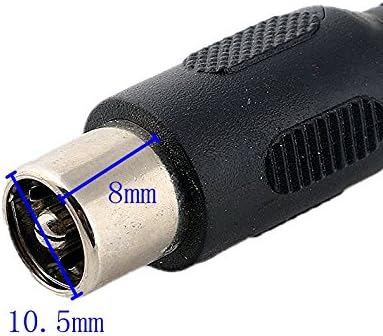
Image 7.1: Detailed dimensions of the RCA connector.
8. Warranty and Support
Information regarding product warranty and customer support was not provided in the available product data. Please refer to your purchase documentation or contact the retailer for details on warranty coverage and support options.