
ICOM IC-A25N
Icom IC-A25N VHF Airband Transceiver User Manual
Model: IC-A25N
Introduction
The Icom IC-A25N NAV/COM Handheld VHF Transceiver is a state-of-the-art air band radio designed for reliable communication and navigation. Featuring built-in GPS and Bluetooth capabilities, this powerful handheld unit delivers 6 watts of output power and boasts an IP57 waterproof rating, ensuring robust performance in various weather conditions. It is equipped with a large 2350mAh Li-ion battery, a user-friendly interface, and a clear 2.3-inch LCD display for easy programming and efficient in-flight operation.
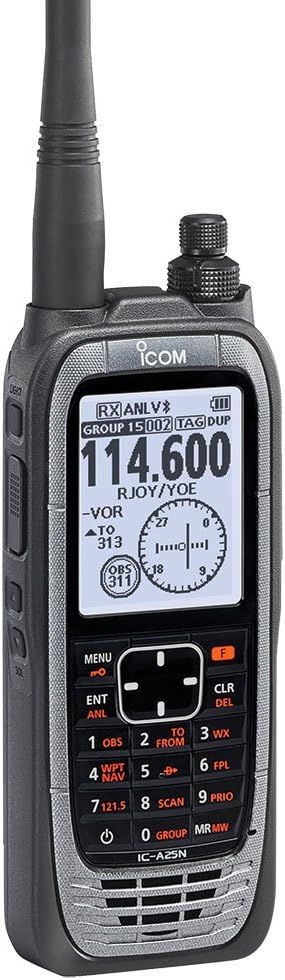
Figure 1: The Icom IC-A25N VHF Airband Transceiver, showcasing its compact design and clear display. This image provides a general overview of the product's appearance.
Setup
1. Battery Installation and Charging
The IC-A25N uses a BP-288 Li-ion Battery Pack. Ensure the battery is fully charged before first use.
- Align the battery pack with the grooves on the back of the transceiver.
- Slide the battery pack into place until it clicks securely.
- To charge, connect the supplied charger to the transceiver with the battery pack attached. The charging indicator will illuminate.
- A full charge typically takes several hours. Refer to the charger's specific instructions for charging times.
2. Antenna Attachment
The FA-B02AR antenna is included for optimal performance.
- Screw the FA-B02AR antenna clockwise onto the antenna connector on the top of the transceiver until it is finger-tight. Do not overtighten.

Figure 2: The Icom IC-A25N with its antenna fully extended, illustrating the proper attachment of the antenna for operation.
Operating Instructions
1. Power On/Off
- To power on, press and hold the POWER button until the display illuminates.
- To power off, press and hold the POWER button until the display turns off.
2. Basic Controls and Display
The IC-A25N features a large LCD display and an intuitive keypad for easy operation.
- Frequency Display: Shows the current operating frequency.
- Function Keys: Dedicated buttons for common functions like MENU, ENT (Enter), CLR (Clear), and F (Function).
- Numeric Keypad: Used for direct frequency entry and selecting menu options.
- Navigation Keys: Up/Down/Left/Right arrows for menu navigation and parameter adjustment.
3. Menu Navigation
Access various settings and features through the main menu.
- Press the MENU button to enter the main menu.
- Use the Up/Down navigation keys to scroll through menu options.
- Press ENT to select an option or enter a sub-menu.
- Press CLR to go back to the previous screen or exit the menu.
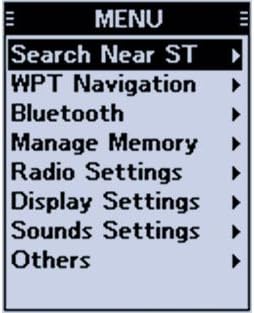
Figure 3: The main menu screen of the IC-A25N, showing options such as Search Near ST, WPT Navigation, Bluetooth, Manage Memory, Radio Settings, Display Settings, Sounds Settings, and Others.
4. Channel Selection and Recall
The transceiver supports 200 memory channels for quick access to frequently used frequencies.
- To recall a channel, press the MR/MW button to enter Memory Recall mode.
- Use the numeric keypad or Up/Down navigation keys to select the desired channel number.
- Press ENT to confirm the selection.

Figure 4: The Recall Channel screen, displaying a list of stored frequencies with their corresponding channel numbers. This allows for quick selection of pre-programmed channels.
5. GPS and Navigation Features
The built-in GPS provides accurate position information and supports VOR navigation.
- WPT Navigation: Allows you to navigate to pre-programmed waypoints. Access this feature from the main menu.
- VOR Display: Provides visual guidance for VOR navigation, showing bearing and deviation.

Figure 5: The navigation display of the IC-A25N, showing VOR information including bearing (TO 313) and deviation, along with the current frequency (114.600) and group/tag details.
6. Bluetooth Connectivity
Connect compatible Bluetooth headsets for hands-free operation.
- Go to the Bluetooth option in the main menu.
- Enable Bluetooth and search for devices.
- Select your headset from the list and pair.
Maintenance
1. Cleaning
- Wipe the transceiver with a soft, damp cloth. Do not use harsh chemicals or abrasive cleaners.
- Ensure the battery contacts are clean and free of debris.
2. Battery Care
- To prolong battery life, avoid fully discharging the battery frequently.
- Store the battery in a cool, dry place when not in use for extended periods.
3. Water Resistance (IP57)
The IC-A25N is rated IP57 for dust and water protection. This means it can withstand immersion in 1 meter of water for up to 30 minutes. However, it is not designed for continuous underwater use.
- Ensure the battery pack and all covers are securely attached before exposing the transceiver to water.
- After exposure to saltwater, rinse the transceiver thoroughly with fresh water and dry it completely.
Troubleshooting
| Problem | Possible Cause | Solution |
|---|---|---|
| No power | Battery discharged or improperly installed. | Charge the battery or re-install it correctly. |
| Cannot transmit | Incorrect frequency selected or PTT button not fully pressed. | Verify frequency is within transmit range. Ensure PTT button is fully depressed. |
| Poor reception | Antenna loose or damaged; interference. | Check antenna connection. Move away from sources of interference. |
| GPS not acquiring signal | Obstructed view of sky; indoors. | Move to an open area with a clear view of the sky. |
Specifications
| Feature | Detail |
|---|---|
| Model Number | IC-A25N |
| Dimensions (H x W x D) | 5.8 x 2.3 x 1.3 inches (147.3 x 58.4 x 33 mm) |
| Weight | Approx. 2 pounds (0.91 kg) |
| Battery Type | 2350mAh Li-ion Battery Pack (BP-288) |
| Frequency Range (RX) | 108.000 MHz – 136.992 MHz |
| Frequency Range (TX) | 118.000 MHz – 136.992 MHz |
| Number of Channels | 200 |
| Output Power | 6 Watts |
| Water Resistance | IP57 (1 meter depth for 30 minutes) |
| Special Features | Built-in GPS, Bluetooth, VOR Navigation |
Related documentsIC-A25N


Ask a question about this manual
Ask about setup, troubleshooting, compatibility, parts, safety, or missing instructions. Manuals+ will review the question and use this page’s manual context to help answer it.