
1. Introduction
This manual provides essential information for the safe and effective use of your FouceClaus 9.5V AC/DC Power Adapter. This power supply is designed to provide reliable power to compatible Casio keyboard models, replacing the need for batteries. Please read this manual thoroughly before use and retain it for future reference.
2. Important Safety Information
To ensure safe operation and prevent damage to the adapter or your device, observe the following safety guidelines:
- Voltage Compatibility: Verify that your Casio keyboard's power port explicitly states DC 9.5V. This adapter is NOT compatible with 9V keyboards.
- Indoor Use Only: This adapter is designed for indoor use in dry conditions. Do not expose to water, moisture, or extreme temperatures.
- Proper Connection: Ensure the adapter plug is fully inserted into the keyboard's power port and the wall outlet. A loose connection can cause overheating or malfunction.
- Cable Care: Do not bend, twist, or pull the power cord excessively. Avoid placing heavy objects on the cord.
- Disconnection: Always grasp the plug, not the cord, when disconnecting from the wall outlet or the device.
- Damage: Do not use the adapter if the cord, plug, or casing is damaged. Contact customer support for assistance.
- Children: Keep the adapter out of reach of children.

Image: Internal view of the FouceClaus power adapter, highlighting built-in safety electronics such as over-current, over-temp, over-voltage, and short circuit protection.

Image: The FouceClaus power adapter featuring a multi-protection design, including safeguards against over-current, over-voltage, temperature fluctuations, and short circuits.
3. Compatibility
This FouceClaus 9.5V AC/DC Power Adapter is specifically designed for Casio keyboards requiring a 9.5V DC input. It is compatible with the following models:

Image: A visual guide illustrating the compatibility of the FouceClaus 9.5V adapter with numerous Casio keyboard models, clearly distinguishing between 9.5V and 9V requirements.
- SA-46, SA-47, SA-51, SA76, SA-77, SA-78
- LK-120, LK-125, LK-127, LK-130, LK-135
- LK-160, LK-165, LK-170, LK-175, LK-190
- LK-240, LK-247, LK-260, LK-265, LK-280
- CTK-240, CTK-245, CTK-1100, CTK-1150
- CTK-1200, CTK-1300, CTK-1500, CTK-2080
- CTK-2200, CTK-2300, CTK-2400, CTK-2550
- CTK-3200, CTK-3500, CTK-4200, CTK-4400
- WK-220, WK-225, WK-240, WK-245
- XW-P1, XW-G1
- CT-S1, CT-S100, CT-S200, CT-S250
- CT-S300, CT-S400, CT-S410, CT-X700, CT-X800
Note: This adapter is not for 9V keyboards. Always check your keyboard's power input specifications before connecting.
4. Setup and Connection
Follow these steps to connect your FouceClaus power adapter to your Casio keyboard:
- Verify Voltage: Confirm that your Casio keyboard requires a 9.5V DC power input. This information is usually printed near the power port on your keyboard.
- Connect to Keyboard: Insert the barrel connector of the power adapter firmly into the DC 9.5V power input port on your Casio keyboard.
- Connect to Power Outlet: Plug the AC prongs of the adapter into a standard 100V-240V AC wall outlet.
- Power On: Once connected, the adapter is ready to supply power. Turn on your Casio keyboard using its power switch.
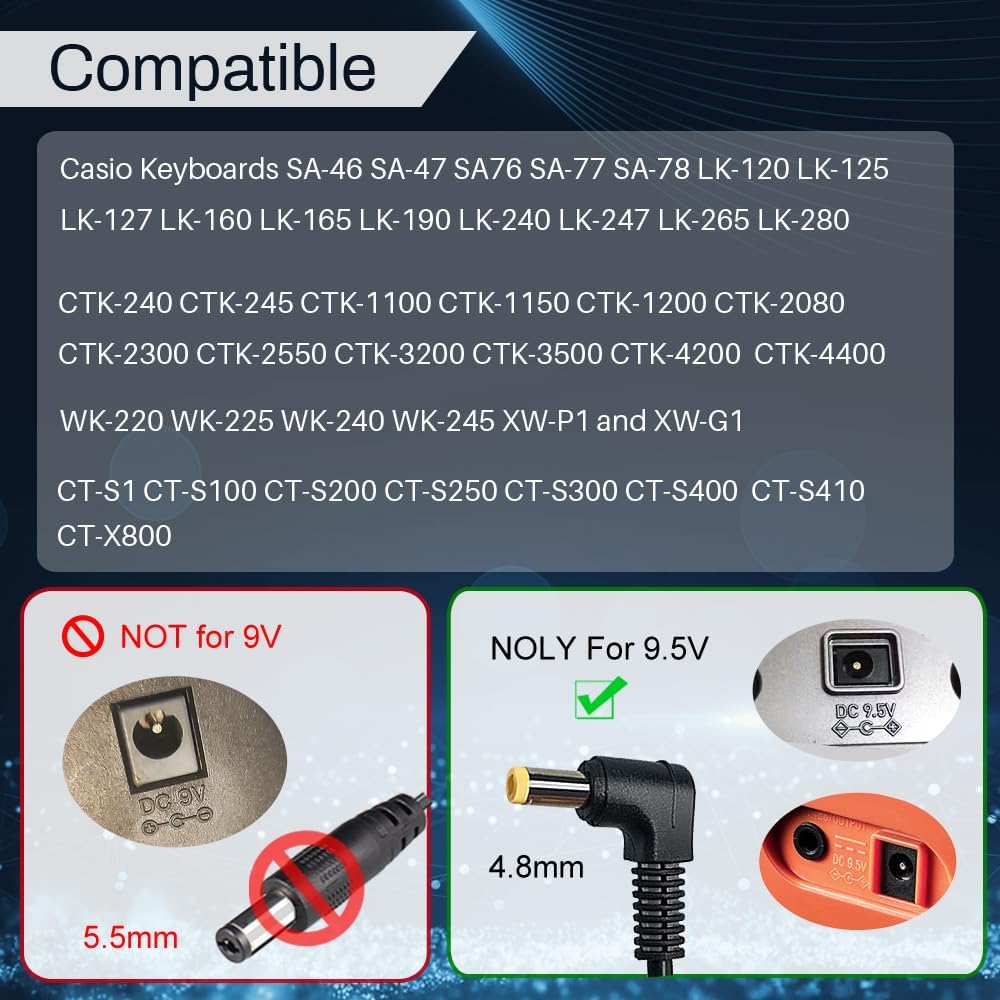
Image: The FouceClaus 9.5V AC/DC Power Adapter with its 8.4-foot cord, ready for connection to a Casio keyboard.
Video: A demonstration of connecting the FouceClaus 9.5V Power Adapter to a Casio keyboard, highlighting the compatibility and ease of use.
5. Operating Instructions
The FouceClaus 9.5V AC/DC Power Adapter operates automatically once connected. It converts standard AC wall power to the specific DC voltage required by your compatible Casio keyboard. There are no user-adjustable settings on the adapter itself.
- The adapter features an 8.4-foot (2.5-meter) long cord for flexible placement.
- The cord includes a hook-and-loop fastener for neat storage when not in use or for managing excess cable length.

Image: The FouceClaus power adapter showcasing its extended 8.4-foot (2.5-meter) cord, providing ample reach.

Image: A close-up of the power adapter's cable, highlighting its shielding features designed to protect against electromagnetic interference for clear signal transmission.
6. Maintenance and Care
To ensure the longevity and optimal performance of your power adapter:
- Cleaning: Disconnect the adapter from the power outlet and the keyboard before cleaning. Use a soft, dry cloth to wipe the exterior. Do not use liquid cleaners or solvents.
- Storage: When not in use, store the adapter in a cool, dry place, away from direct sunlight and excessive heat. Use the integrated hook-and-loop fastener to keep the cord neatly coiled.
- Inspection: Periodically inspect the cord and plug for any signs of damage, such as fraying, cuts, or bent prongs. If damage is found, discontinue use immediately.

Image: Details of the FouceClaus power adapter's quality assurance, including UL listing, copper wire for high-speed power transmission, card tail buffer, and nickel-plated metal plug.
7. Troubleshooting
If you encounter issues with your power adapter, consider the following:
- No Power to Keyboard:
- Ensure the adapter is securely plugged into both the wall outlet and the keyboard.
- Check if the wall outlet is functional by plugging in another device.
- Verify that your keyboard's power switch is in the 'ON' position.
- Confirm that your keyboard model is listed as compatible and requires 9.5V DC.
- Adapter Overheating:
- Disconnect the adapter immediately.
- Ensure there is adequate ventilation around the adapter. Do not cover it.
- If overheating persists, discontinue use and contact customer support.
- Unusual Noises or Smells:
- Immediately disconnect the adapter from the power source.
- Do not attempt to repair the adapter. Contact customer support.
8. Specifications
| Feature | Specification |
|---|---|
| Model Number | BSG18W-0951000H |
| Input Voltage | 100V-240V AC |
| Output Voltage | DC 9.5V |
| Output Current | 1A (1000mA) |
| Cord Length | 8.4 feet (2.5 meters) |
| Connector Type | Barrel Connector (4.8mm) |
| Safety Certifications | UL Listed, FCC Certified |
| Safety Features | Over-Current Protection, Over-Temp Protection, Over-Voltage Protection, Short Circuit Protection |
| Color | Black |
| Product Dimensions | 4.6 x 2.6 x 1.18 inches |
| Item Weight | 3.17 ounces |
9. Warranty and Support
FouceClaus products are designed for reliability and performance. For warranty information, technical support, or customer service inquiries, please refer to the contact information provided with your purchase or visit the official FouceClaus website.