
1. Introduction and Overview
Thank you for choosing the dé Mobile Wallbox 11 kW EV Charger. This device provides a convenient and efficient solution for charging your electric vehicle, whether at home, at work, or on the go. Designed for ease of use, it connects directly to an existing CEE socket, offering up to 11 kW of charging power.
This manual provides essential information for the safe and effective operation, setup, maintenance, and troubleshooting of your mobile charging station. Please read it thoroughly before first use and keep it for future reference.

Image 1: The dé Mobile Wallbox 11 kW EV Charger, showing the main unit, CEE plug, Type 2 connector, and adapters.
2. Setup and Package Contents
2.1 Package Contents
Before proceeding with installation, please verify that all items listed below are present in your package:
- dé Mobile Wallbox 11 kW EV Charging Station
- Waterproof Bag
- Carrying Strap
- Microfiber Cloth
- Schuko 16A 1-phase to CEE 3-phase 16A Adapter
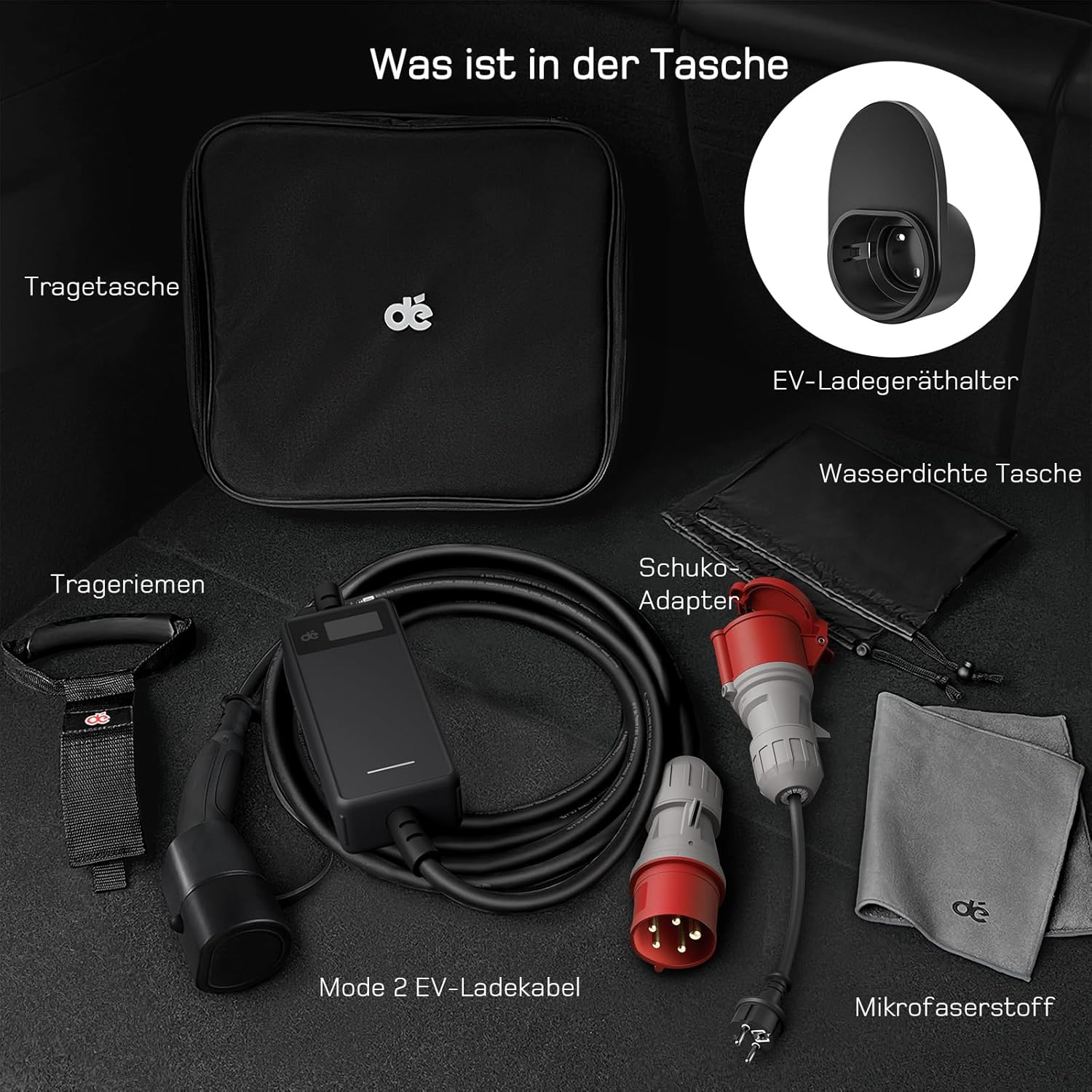
Image 2: All components included in the dé Mobile Wallbox package.
2.2 Installation
The dé Mobile Wallbox is designed for straightforward installation. No complex electrical work is required for its primary function.
- Select a Location: Choose a dry, well-ventilated area for charging. Ensure the CEE socket is easily accessible and the cable can reach your vehicle without tension.
- Connect to Power: Plug the CEE 16A 3-phase plug of the charging station into a compatible CEE 16A 3-phase socket. Ensure the connection is secure.
- Optional: Schuko Adapter: If using a standard household (Schuko) socket, connect the provided Schuko 16A 1-phase to CEE 3-phase 16A adapter to the charging station's CEE plug, then plug the adapter into the Schuko socket. Note that charging power will be significantly reduced when using a single-phase Schuko connection.
- Initial Check: Once connected to power, the display on the Wallbox should illuminate, indicating it is ready for operation.
Safety Note: Always ensure the CEE socket and electrical installation are in good condition and meet local electrical safety standards. Do not use damaged cables or sockets.
3. Operating Instructions
3.1 Charging Your Vehicle
- Connect to Vehicle: Take the Type 2 connector and firmly plug it into your electric vehicle's charging port. Ensure it clicks into place.
- Start Charging: The Wallbox will automatically detect the connection and initiate the charging process. The display will show real-time charging data.
- Monitor Display: The integrated display provides real-time information including voltage, current, and energy consumption. This allows you to monitor the charging status effectively.
- End Charging: To stop charging, unlock your vehicle's charging port (if applicable) and disconnect the Type 2 connector. Then, unplug the Wallbox from the power source.
3.2 Adjustable Current and Delay Function
The dé Mobile Wallbox allows you to adjust the charging current between 6A and 16A, and features a delay function.
- Current Adjustment: Use the control buttons on the Wallbox to select your desired charging current (6A, 8A, 10A, 13A, 16A). This can be useful for managing power consumption or adapting to different electrical installations.
- Delay Function: The delay function allows you to set a countdown timer after which charging will begin. This is useful for scheduling charging during off-peak electricity hours. Note: This function only sets a delay before charging starts; it does not allow setting a precise start time.
3.3 Important Notes on Charging Power
- 7 kW Vehicles: If your vehicle has a maximum charging power of 7 kW (single-phase 32A), the maximum charging power from this Wallbox will be approximately 3.5 kW. This is because only one phase of the circuit will be connected in such a scenario.
- Voltage Display: The real-time voltage display shows only the phase voltage (230 V), not the line voltage (400 V). To determine if the device is charging in 3-phase mode, observe the real-time power consumption.
- Faster Charging: When connected to a CEE 16A 3-phase socket, the Wallbox delivers 11 kW of charging power per hour (230 V x 16 A x 3 phases), which is approximately three times faster than standard 230 V x 16 A Schuko household sockets.
4. Maintenance
Proper maintenance ensures the longevity and reliable operation of your dé Mobile Wallbox.
- Cleaning: Use the provided microfiber cloth to gently clean the display and exterior of the Wallbox. Do not use abrasive cleaners or solvents. Ensure the device is unplugged before cleaning.
- Storage: When not in use, store the Wallbox and its cables in the provided waterproof bag. The compact and foldable design helps save space and protects the unit during transport. Use the carrying strap for cable management.
- Cable Inspection: Regularly inspect the charging cable and connectors for any signs of damage, wear, or corrosion. Do not use the device if any part is damaged.
- Environmental Protection: The waterproof bag is designed for use in rainy weather, providing additional protection for the unit.
5. Troubleshooting
If you encounter issues with your dé Mobile Wallbox, please refer to the following common problems and solutions:
- Charger Not Starting/LED Blinking: If the LED lamp blinks or an error code (e.g., error case 2) is displayed, this may indicate an unstable voltage supply or a temporary fault. Try disconnecting the cable from the electricity source and reconnecting it. Ensure the power supply is stable.
- No Charging: Verify that the Wallbox is securely plugged into the CEE socket and that the Type 2 connector is properly inserted into the vehicle's charging port. Check if the vehicle's charging port is unlocked.
- Reduced Charging Speed: Ensure you are connected to a 3-phase CEE 16A socket for maximum 11 kW charging. If using a single-phase connection (e.g., via Schuko adapter), charging speed will be lower. Also, check the current setting on the Wallbox.
- Compatibility Issues: This product is compatible with most Type 2 connector vehicles (e.g., ID.3, ID.4, Model Y, e-tron, Kona, Ioniq 5, Fiat 500, i4, 500 Hybrid). However, it is not compatible with Renault Zoe, Smart EQ, BMW i3, and Dacia Spring.
If the problem persists after attempting these solutions, please contact customer support.
6. Product Specifications
| Feature | Specification |
|---|---|
| Brand | dé |
| Model | deM2C11B25 |
| Manufacturer | deAccessories |
| Item Weight | 9.11 Kilograms |
| Product Dimensions (L x W x H) | 40 x 35 x 20 cm |
| Input Voltage | 230 Volts (AC) |
| Output Voltage | 230 Volts (AC) |
| Charging Power | 11 kW (3 phases) |
| Adjustable Current | 6-16 A |
| Cable Length | 25 meters |
| Input Connector | CEE 16A 3-phase |
| Output Connector | Type 2 |
7. Warranty Information
The dé Mobile Wallbox 11 kW EV Charger comes with a 2-year warranty from the date of purchase. This warranty covers manufacturing defects and ensures the product's quality and performance under normal use. Please retain your proof of purchase for warranty claims.
The warranty does not cover damage caused by misuse, accident, unauthorized modification, or improper installation.
8. Customer Support
Should you encounter any problems or have questions regarding your dé Mobile Wallbox, please do not hesitate to contact us directly. As the seller, we are committed to providing prompt assistance and will do our best to find a satisfactory solution for you.
Please refer to your purchase documentation or the platform where you bought the product for specific contact details.


