
Introduction
This manual provides detailed instructions for the installation, operation, and maintenance of your Amazon Basics Dual Monitor Stand, model DLB112. This desk-mounted stand is designed to support two monitors, enhancing your workspace ergonomics and organization. Please read this manual thoroughly before installation and use to ensure proper setup and safe operation.
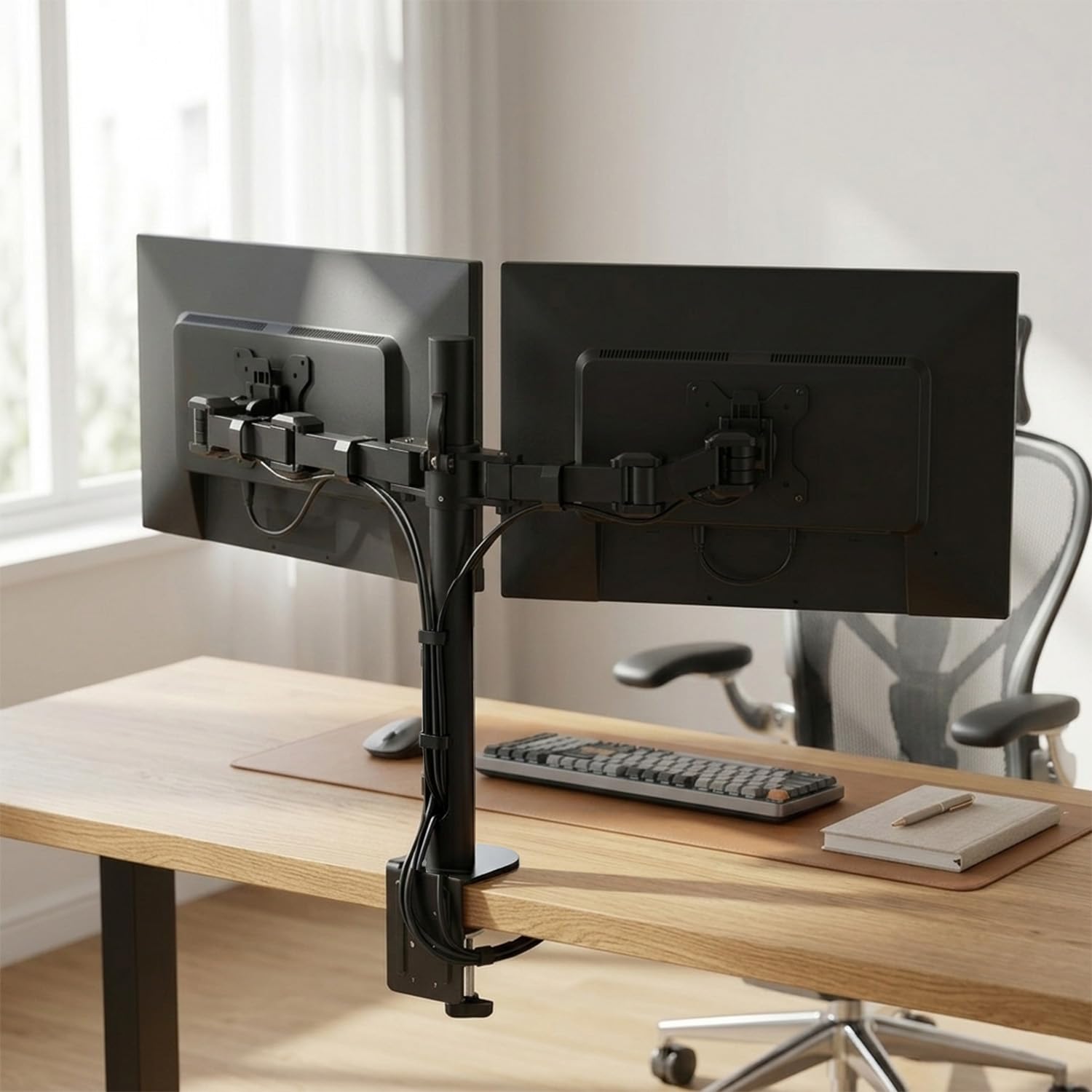
The Amazon Basics Dual Monitor Stand provides a stable and adjustable solution for two displays.
Safety Information
- Read all instructions: Ensure you understand all assembly and operating instructions before use.
- Weight Capacity: Do not exceed the maximum weight capacity of 10 kg (22 lbs) per arm. Overloading can cause instability and potential damage.
- Monitor Size: This stand is designed for monitors between 13 and 30 inches.
- Desk Thickness: Ensure your desk is between 0.8 to 3.9 inches thick for secure clamp installation.
- Pinch Points: Be aware of potential pinch points during adjustment and installation. Keep hands clear of moving parts.
- Secure Installation: Verify that all screws and connections are securely tightened before placing monitors on the stand.
- Children and Pets: Keep children and pets away from the stand during installation and adjustment.
Package Contents
Before beginning installation, ensure all parts are present and undamaged. If any parts are missing or damaged, do not proceed with assembly and contact customer support.
- Monitor Arm Body (Pole and Arms)
- Desk Clamp Assembly
- VESA Plates (Detachable)
- All necessary tools and hardware (screws, washers, Allen wrenches)
- Operating Manual (this document)
Setup Instructions
Follow these steps carefully to install your dual monitor stand.
Step 1: Prepare Your Desk
Ensure your desk surface is clean and clear. The desk clamp requires a desk thickness between 0.8 and 3.9 inches for secure attachment.
Step 2: Assemble the Desk Clamp and Pole
- Attach the desk clamp base to the main pole using the provided screws and tools.
- Position the assembled clamp and pole on the edge of your desk.
- Tighten the clamp securely to the desk using the adjustment knob until the pole is stable and does not wobble.

The desk clamp securely attaches the monitor stand pole to your desk surface.
Step 3: Attach VESA Plates to Monitors
Each monitor requires a VESA plate to be attached to its back panel.
- Identify the VESA mounting holes on the back of your monitors. This stand supports VESA patterns of 75x75mm and 100x100mm.
- Align a detachable VESA plate with the mounting holes on the back of one monitor.
- Secure the VESA plate to the monitor using the appropriate screws and washers provided. Do not overtighten.
- Repeat for the second monitor.

Attach the VESA plate to the back of your monitor using the provided screws.
Step 4: Mount Monitors to Arms
With the VESA plates attached to your monitors, you can now mount them onto the stand's arms.
- Carefully slide the monitor (with the attached VESA plate) onto the VESA head of one arm.
- Ensure the monitor is securely seated and the locking mechanism engages.
- Repeat for the second monitor on the other arm.
Step 5: Adjust Arm Height and Position
Once both monitors are mounted, you can adjust the arms along the pole to your desired height and position.
- Loosen the adjustment collars on the pole to move the arms up or down.
- Position the arms so your monitors are at an ergonomic viewing height. The horizontal arm mount adjusts from 7.9 to 14.2 inches high.
- Tighten the adjustment collars firmly to secure the arms in place.

The stand allows for height adjustment of the monitors for better posture and viewing.
Operating Instructions
The Amazon Basics Dual Monitor Stand offers various adjustments for optimal viewing comfort.
Monitor Rotation
Each monitor can be rotated 360 degrees, allowing for quick switching between landscape and portrait modes. Simply grasp the edges of your monitor and rotate it to the desired orientation.
Screen Tilt Adjustment
The screen tilt can be adjusted from -15 to +85 degrees. Loosen the tilt adjustment knob behind the VESA plate, tilt the monitor to your preferred angle, and then re-tighten the knob to secure it.

Monitors can be rotated 360 degrees and tilted from -15 to +85 degrees for flexible viewing.
Cable Management
The stand features an integrated cable-management system to keep your workspace tidy. Route monitor cables through the clips or channels along the arms and down the main pole. This helps to reduce clutter and maintain a clean appearance.

Integrated cable management helps organize monitor cables for a clutter-free desk.
Maintenance
- Regular Checks: Periodically check all screws, bolts, and connections to ensure they remain tight. Re-tighten as necessary to maintain stability.
- Cleaning: Clean the stand with a soft, dry cloth. For stubborn marks, a slightly damp cloth can be used, followed by drying. Avoid using abrasive cleaners, solvents, or strong chemicals, as these can damage the finish.
- Lubrication: No lubrication is required for the moving parts.
Troubleshooting
- Monitors are tilting or not holding position: Ensure the tilt adjustment knob behind the VESA plate is securely tightened. Some models may have an additional adjustment screw beneath a cover on the arm; check and tighten this if present.
- Stand wobbles: Verify that the desk clamp is fully and securely tightened to the desk surface. Ensure the desk itself is stable.
- Difficulty adjusting arm height: Loosen the adjustment collars on the main pole sufficiently before attempting to move the arms. Once at the desired height, re-tighten firmly.
- Monitors are not level: Slight adjustments can be made by carefully rotating the VESA plate on the arm or by adjusting the height of individual arms if your model allows for independent height adjustment.
Specifications
| Model Number | DLB112 |
| Brand | amazon basics |
| Mounting Type | Tabletop Mount (Clamp) |
| Movement Type | Rotate, Tilt |
| Material | Alloy Steel |
| Colour | Black |
| Compatible Devices | Monitor |
| Minimum Supported Screen Size | 13 Inches |
| Maximum Supported Screen Size | 30 Inches |
| Maximum Weight Capacity | 10 kg (22 lbs) per arm |
| Maximum Tilt Angle | 15 Degrees (up to +85 degrees) |
| Height Adjustment Range | 7.9 to 14.2 inches |
| VESA Compatibility | 75x75mm, 100x100mm |
| Desk Thickness Compatibility | 0.8 to 3.9 inches |
| Unit Count | 1 Count |
| Country of Origin | China |
| Item Weight | 9.63 Pounds |
| Manufacturer | Loctek Ergonomic Technology Corp. |
Warranty
This Amazon Basics Dual Monitor Stand comes with a 1-year limited warranty from the date of purchase. This warranty covers manufacturing defects and material flaws under normal use. It does not cover damage caused by misuse, accidents, unauthorized modifications, or exceeding the specified weight limits.
Please retain your proof of purchase for warranty claims.
Support
For warranty-related queries, technical assistance, or any other support needs, please contact:
- Phone: 1800-419-2373
- Email: clicktech@blubirch.com
- Working Hours: Monday - Saturday, 10:00 AM to 6:00 PM (excluding National Holidays)
Manufacturer Contact Information: Loctek Ergonomic Technology Corp., No.588 Qihang South Road, Binhai Industrial Zone Administrative Committee, Yinzhou District, Ningbo, China.


