
Product Overview
The Mr. Beams MB382 is a weatherproof, wireless, battery-powered LED spotlight designed to provide bright, motion-activated lighting for various outdoor applications. Featuring 400 lumens of light output and a motion sensor, it automatically illuminates areas when movement is detected, offering convenience and enhanced security. This model is typically sold as a 2-pack (MB382-WHT-02-13).

Front view of the Mr. Beams MB382 spotlight, showing the two LED lights and the central motion sensor.
What's Included
Your Mr. Beams MB382 package includes the following components:
- Mr. Beams MB382 Spotlight Unit(s)
- Mounting Hardware (screws and anchors)
- User Manual (this document)
Note: Four D-Cell batteries per spotlight are required and are not included in the package.

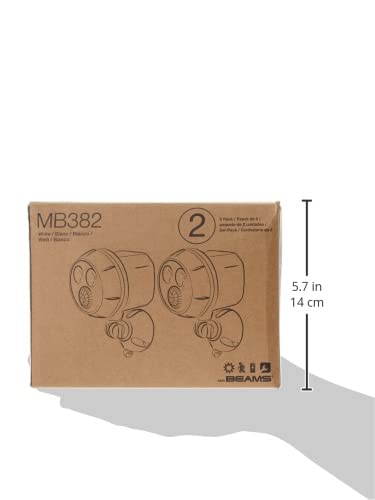
The product packaging for the Mr. Beams MB382, indicating a 2-pack.
Specifications
| Feature | Detail |
|---|---|
| Luminous Flux | 400 Lumens |
| Light Color Temperature | 5000K |
| Lighting Modes | Motion Activated |
| Motion Angle of Detection | 120° |
| Motion Range | Up to 25 ft. |
| Auto Shut Off | 20 Seconds (after motion stops) |
| Power Source | 4 D-Cell Batteries (not included) |
| Operating Conditions | 0 - 131°F (-17.8 - 55°C) |
| Mounting Options | Wall or Eave |
| Weatherproof Rating | IPX6 |
| Unit Dimensions | 7.2 x 4 x 4.4 Inches (18.3 x 10.2 x 11.2 cm) |
| Unit Weight | 0.84 Pounds (0.38 kg) |
Setup and Installation
1. Battery Installation
- Twist the back cover of the spotlight counter-clockwise to remove it.
- Insert four (4) new D-Cell batteries into the battery compartment, ensuring correct polarity (+/-).
- Replace the back cover by aligning it and twisting clockwise until secure.
2. Mounting the Spotlight
The Mr. Beams MB382 can be mounted on a wall or under an eave. Choose a location that provides the desired coverage and is within the motion sensor's range.
- Separate the mounting base from the spotlight unit by twisting.
- Position the mounting base at the desired location. Use a pencil to mark the screw holes.
- Drill pilot holes if necessary. For drywall or masonry, insert the provided anchors.
- Secure the mounting base to the surface using the provided screws.
- Reattach the spotlight unit to the secured mounting base by twisting until it clicks into place.
- Adjust the angle of the spotlight to direct the light as needed.
Underside view of the mounting plate, showing screw holes for installation.
Operating Instructions
The Mr. Beams MB382 spotlight operates automatically based on motion detection and ambient light levels.
- Motion Activation: The integrated motion sensor detects movement within a 120° angle and up to 25 feet.
- Automatic Illumination: The spotlight will only activate in dark conditions when motion is detected. It will not turn on during daylight hours or in brightly lit areas to conserve battery life.
- Auto Shut-Off: Once motion ceases, the light will remain on for approximately 20 seconds before automatically turning off.
Ensure the motion sensor is not obstructed by objects like plants or decorations to ensure optimal performance.
Maintenance
- Battery Replacement: When the light output diminishes or the unit stops activating, it is time to replace the D-Cell batteries. Always replace all four batteries with new ones simultaneously for best performance.
- Cleaning: Periodically wipe the lens and motion sensor with a soft, damp cloth to remove dirt or debris that may affect performance. Do not use abrasive cleaners.
- Weather Protection: While the unit is weatherproof (IPX6 rated), ensure the battery compartment is securely sealed after battery changes to maintain its water resistance.
Troubleshooting
| Problem | Possible Solution |
|---|---|
| Light does not turn on. |
|
| Light stays on constantly. |
|
| Motion sensor range is poor. |
|
| Light is dim. | Replace all D-Cell batteries with new ones. |
Warranty Information
All Mr. Beams products are guaranteed against defects in workmanship and materials for 1 year from the date of purchase. This warranty covers manufacturing defects under normal use. For warranty claims, please retain your proof of purchase.
Customer Support
For additional information, troubleshooting assistance, or to view more details on product support, please visit the official Mr. Beams product support page: