
Introduction
The JACO SmartPro 2.0 AC/DC Digital Tire Inflator Pump is designed for convenient and accurate tire inflation. This portable air compressor features automatic shut-off, a digital pressure gauge, and dual power compatibility (12V DC and 110-120V AC), making it suitable for various inflation needs, from vehicle tires to sports equipment.
Safety Information
- Always read and understand all instructions before operating the device.
- Keep children and pets away from the inflator during operation.
- Do not leave the inflator unattended while in use.
- Ensure the power source matches the inflator's requirements (12V DC or 110-120V AC).
- Avoid over-inflating tires. Refer to your vehicle or item's recommended PSI.
- Do not operate the inflator in wet conditions or near flammable liquids/gases.
- Allow the inflator to cool down after extended use to prevent overheating.
Package Contents
The JACO SmartPro 2.0 AC/DC Digital Tire Inflator Pump package includes the following items:
- JACO SmartPro 2.0 Digital Tire Inflator
- 110-120V AC Power Cord
- 12V DC Power Cord (attached)
- Heavy Duty Storage Case w/ Side Pocket
- Presta-to-Schrader Valve Adapter for Bike Tires
- Needle Inflation Nozzle (for sports balls)
- Inflatables Funnel Nozzle
- Spare Power Fuse
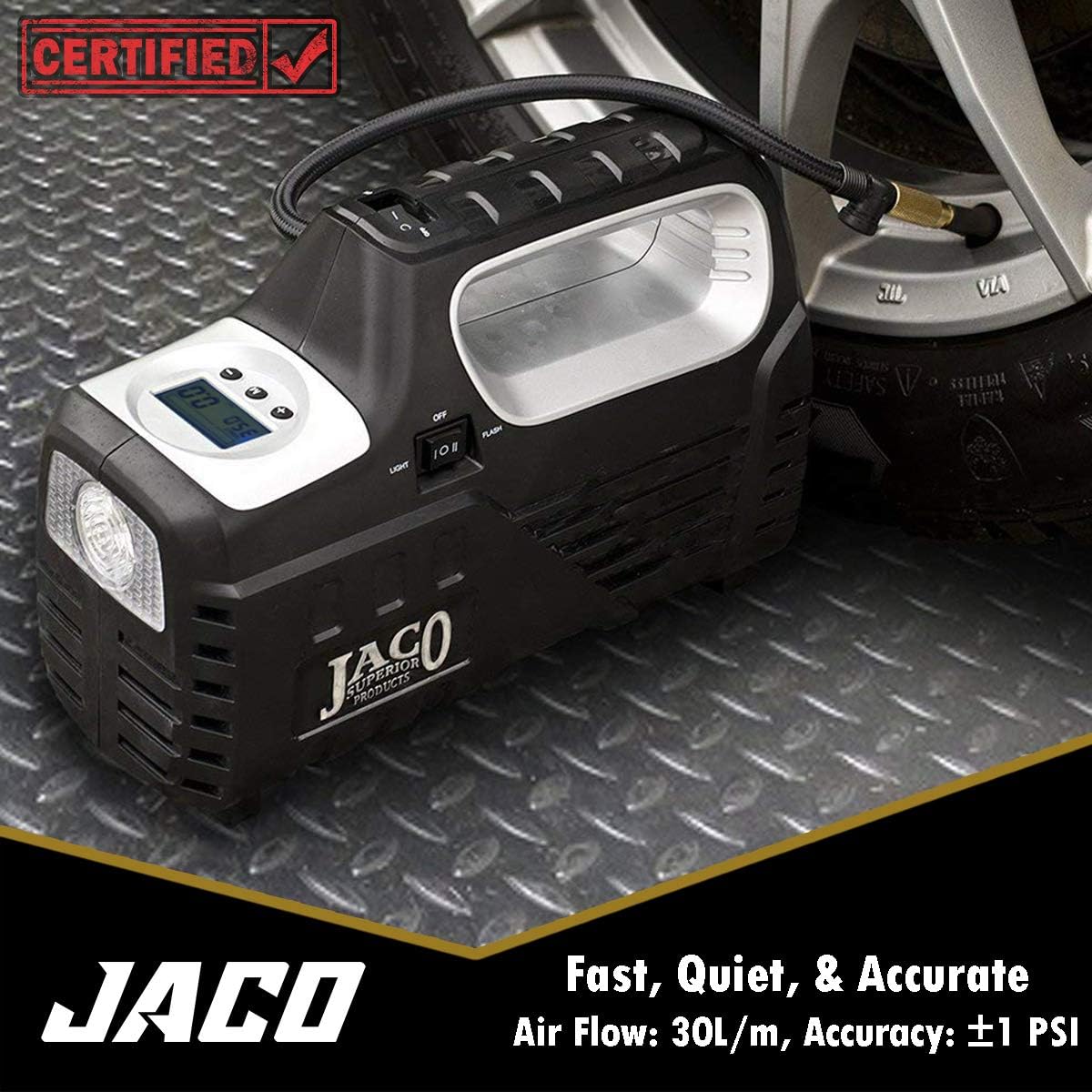
Product Overview
The SmartPro 2.0 features a robust design with integrated storage and intuitive controls.

Key Components:
- Digital LCD Display: Shows target pressure, current pressure, and unit of measurement (PSI, BAR, KPA). Features a bright backlight for visibility in low light.
- Control Buttons: '+', '-', and 'M' buttons for setting target pressure and changing units.
- Power Switch (ON/OFF): Activates or deactivates the inflation process.
- Light Switch: Controls the built-in LED light (OFF, Standard Flashlight, Flashing SOS).
- AC/DC Power Input: Selectable input for 110-120V AC (wall outlet) or 12V DC (vehicle accessory outlet).
- Woven Air Hose: 24-inch heavy-duty hose with a brass twist-connect nozzle.
- Air Bleeder Valve: Located on the nozzle, allows for pressure reduction from overinflated tires.
- Integrated Storage: Compartments for power cords and air hose.
Setup
- Choose Power Source:
- For home use, connect the 110-120V AC power cord to a standard wall outlet.
- For on-the-go use, connect the 12V DC power cord to your vehicle's accessory outlet.

Image: Rear view of the inflator, illustrating the AC and DC power input options. - Select Power Mode: Use the AC/DC selector switch on the back of the unit to match your chosen power source.
- Prepare Air Hose: Uncoil the woven air hose from its storage compartment at the bottom of the inflator.
- Prepare Tire Valve: Remove the valve stem cap from the tire you intend to inflate.
Operating Instructions
- Connect Nozzle: Securely twist the brass connector of the air hose onto the tire valve stem until it is tight and an airtight seal is formed.
- Power On: Flip the main power switch (ON/OFF) on the top handle to the 'ON' position. The digital display will illuminate.
- Select Pressure Unit: Press the 'M' button to cycle through available pressure units: PSI, BAR, or KPA.
- Set Target Pressure: Press and hold either the '+' or '-' button for 3 seconds until the target pressure value begins to flash. Use the '+' and '-' buttons to adjust the target pressure to your desired level. The setting will save automatically after a few seconds of inactivity.
- Start Inflation: Once the target pressure is set, press the main power switch (ON/OFF) to the 'ON' position to begin inflation. The inflator will automatically shut off once the target pressure is reached.
- Deflate (if needed): If a tire is overinflated, use the integrated air bleeder valve on the nozzle to release excess air. Press the button on the nozzle to release air while monitoring the pressure on the digital display.
- Disconnect: Once inflation is complete and the inflator has shut off, carefully unscrew the brass connector from the tire valve stem and replace the valve stem cap.

Using the LED Light:
The inflator includes a built-in LED light for visibility in dark conditions:
- Flip the 'LIGHT' switch to activate the standard flashlight mode.
- Flip the 'FLASH' switch to activate the flashing SOS emergency signal.
Official Product Video:
Maintenance
- Cleaning: Wipe the exterior of the inflator with a damp cloth. Do not use harsh chemicals or abrasive cleaners.
- Storage: After use, allow the unit to cool down. Neatly wrap and store the power cords and air hose in their designated compartments at the bottom of the inflator. Store the unit in its included carry bag in a cool, dry place away from direct sunlight and extreme temperatures.
- Fuse Replacement: If the unit stops working, check the spare power fuse included in the accessory kit. Refer to the full product manual for detailed instructions on fuse replacement.

Troubleshooting
| Problem | Possible Cause | Solution |
|---|---|---|
| Inflator does not turn on. | No power, incorrect power mode selected, blown fuse. | Ensure power cord is securely plugged in. Verify AC/DC selector switch matches power source. Check and replace fuse if necessary. |
| Air leaks from nozzle connection. | Nozzle not securely tightened, worn gasket. | Ensure the brass twist-connect nozzle is fully tightened onto the valve stem. Check for damage to the nozzle gasket. |
| Inflator runs but tire does not inflate. | Air leak, valve stem issue, hose obstruction. | Check all connections for leaks. Inspect tire valve stem for damage. Ensure air hose is not kinked or obstructed. |
| Inflator overheats and shuts off. | Extended continuous use. | Allow the unit to cool down for at least 10-15 minutes before resuming operation. Avoid continuous use for more than 10 minutes. |
Specifications
- Brand: JACO Superior Products
- Model Name: SmartPro 2.0
- Power Source: Corded Electric (AC/DC)
- Voltage: 120 Volts (AC), 12 Volts (DC)
- Maximum Operating Pressure: 100 PSI
- Air Flow Capacity: 30 Liters Per Minute
- Accuracy: ±1 PSI
- Hose Length: 24 Inches
- AC Power Cord Length: 6 ft.
- DC Power Cord Length: 10 ft.
- Noise Level: 40 Decibels
- Item Weight: 3 Pounds
- Product Dimensions: 10"L x 5"W x 8"H
- Material: Brass (nozzle), Rugged ABS (housing)
- Special Features: Digital display, Automatic shut-off, LED flashlight, SOS signal, Air bleeder valve.
Warranty and Support
The JACO SmartPro 2.0 AC/DC Digital Tire Inflator Pump is backed by a 100% Lifetime Warranty by JACO Superior Products. For warranty claims, technical support, or any product-related inquiries, please contact JACO Superior Products directly through their official website or customer service channels.
For additional information and resources, visit the JACO Superior Products Store.