1. Introduction
The Tekin RS Pro Black Edition BL Sensored/Sensorless ESC TEKTT1160 is an advanced electronic speed controller designed for high-performance RC vehicles, particularly for spec and stock racing. This manual provides essential instructions for setup, operation, and maintenance to ensure optimal performance and longevity of your ESC.
Key Features:
- ULR: Ultra Low Resistance Design
- QuickTune One Touch Programming
- Adjustable Throttle and Brake Frequencies
- High Voltage Programmable BEC
- HotWire Programming Port
- Data Logging Capability
- Sensor Checker On-Board Temperature Indicator
- ESC Self Diagnostics with Error Codes
- Fully Proportional Forward/Brake/Reverse
- Brushless and Brushed Motor Drive
- Sensored or Sensorless Operation
- LiPo Safe with Custom Voltage Cutoffs
- Sensor Plug for Precise Commutation
- Lightweight Chassis Design
- HDAC: High Density Copper PCB's
- Ultra-smooth and Precise Throttle and Braking Control
2. Product Overview / Components
The image below illustrates the Tekin RS Pro Black Edition ESC with its primary connections and controls.
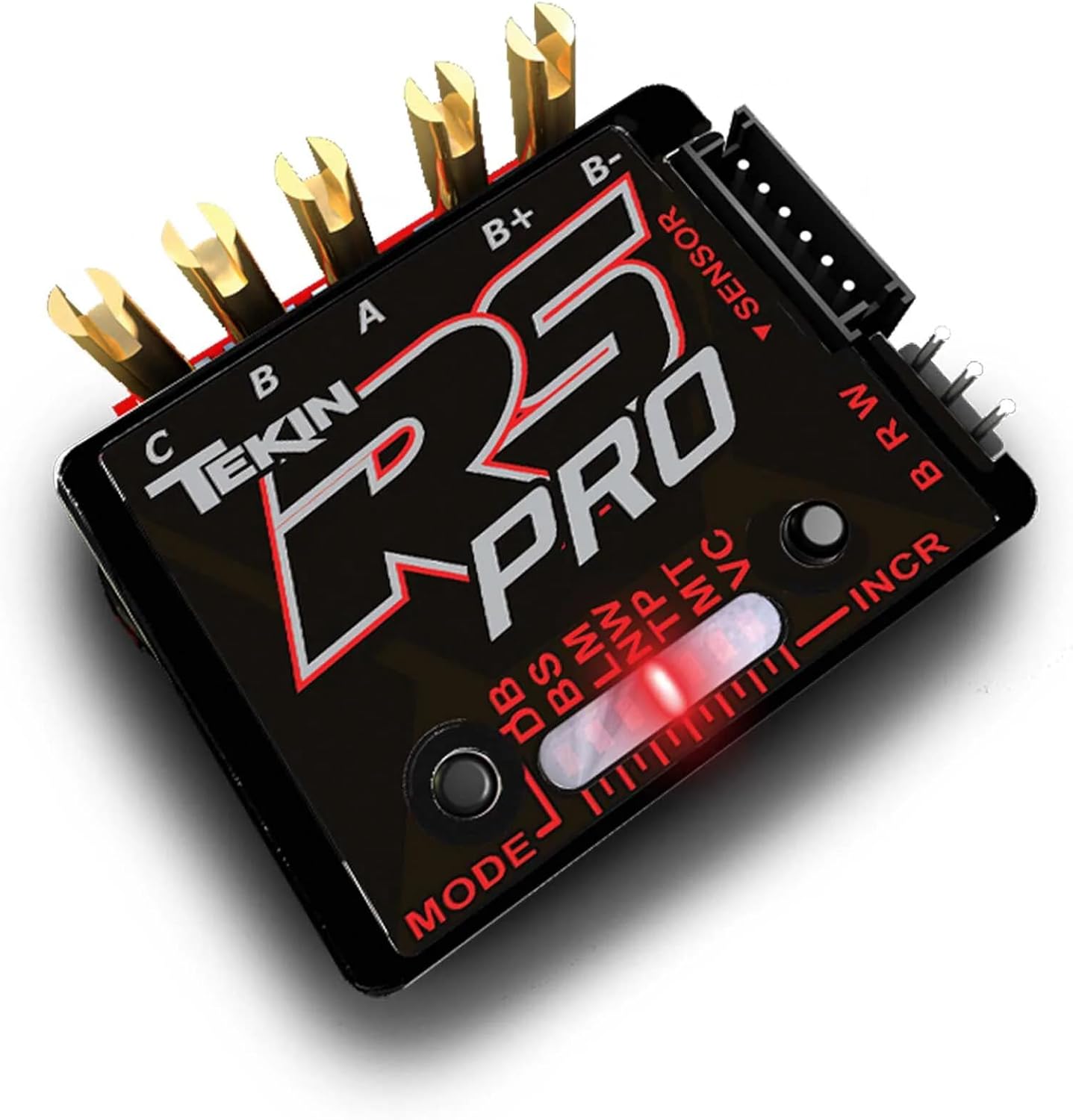
Figure 1: Tekin RS Pro Black Edition Electronic Speed Controller. This image displays the main unit of the ESC, highlighting its various connection points and control elements. Visible components include the motor phase terminals (C, B, A), battery terminals (B+, B-), sensor port, and programming buttons (MODE, INCR) with associated LED indicators.
Key Components:
- Motor Phase Connections (C, B, A): Three large gold-plated terminals for connecting to the motor phases.
- Battery Connections (B+, B-): Two large gold-plated terminals for connecting to the battery (positive and negative).
- Sensor Port (▼ SENSOR): A multi-pin connector for sensored motor operation.
- Control Buttons (MODE, INCR): Buttons for navigating and adjusting settings on the ESC.
- LED Indicators: A red LED bar and numerical displays for showing current settings and values.
- Auxiliary Ports (BRW): Additional ports for various connections.
3. Setup
Connecting the Program Card:
To configure your Tekin RS Pro Black Edition ESC, a compatible program card is required. The program port is typically located on the end of the switch, marked with symbols indicating negative, positive, and signal connections. Ensure correct orientation when plugging in the program card.
While the following video demonstrates the general procedure for connecting and using an LED program card to adjust ESC settings, please note that the specific program card shown is for a Hobbywing product. Always refer to your Tekin program card's specific instructions for precise connection and navigation, as details may vary.
Video 1: Generic LED Program Card Setup. This video illustrates the general steps for connecting an LED program card to an ESC and navigating its settings. It shows how to plug the card into the ESC's program port, power on the ESC, and use the item and value buttons to adjust parameters. While the specific card is for Hobbywing, the principles apply to many LED program cards.
Initial Configuration Steps:
- Ensure the ESC is powered off.
- Connect the program card to the designated program port on the ESC (often found on the switch wire).
- Power on the ESC. The program card should illuminate and display current settings.
4. Operating Parameters (Programming with Program Card)
The program card allows you to adjust various parameters of your ESC. Use the 'ITEM' button to cycle through the settings and the 'VALUE' button to change the value of the selected setting. Press 'OK' to save your changes. Always ensure the ESC is powered on when making adjustments.
Adjustable Settings:
- 1. RPM/Throttle Matching (FOC): This setting controls the motor's ability to maintain RPM under load, preventing stalling on inclines. It can be Enabled or Disabled. Disabling it may allow the motor to stall more easily.
- 2. LiPo Cells: Configures the ESC for the number of LiPo cells in your battery (e.g., 2S, 3S). The ESC often defaults to 'Auto' detection, but can be manually set if you consistently use a specific cell count.
- 3. Cutoff Voltage: Sets the voltage at which the ESC will reduce power to protect the battery. Options typically include Low, Intermediate, and High, corresponding to different voltage levels per cell (e.g., 3.3V, 3.5-3.6V, 3.7V per cell). For NiMH batteries, this setting should be Disabled.
- 4. ESC Thermal Protection: Activates or deactivates thermal protection for the ESC. It is recommended to keep this enabled to prevent overheating. Default settings usually provide a safe operating temperature range (e.g., 105°C/221°F or 125°C/257°F).
- 5. Motor Rotation: Determines the forward rotation direction of the motor. Options are Counter-Clockwise (CCW) or Clockwise (CW). This is crucial for ensuring your vehicle moves forward when throttle is applied, especially with different transmission setups (e.g., standard vs. backward drivetrain in crawlers).
- 6. BEC Voltage: Adjusts the voltage supplied by the ESC's Built-in Electronic Circuit (BEC) to your receiver and servo. Common options are 6.0V or 7.4V, depending on your servo's voltage requirements.
- 7. Drag Brake Force: Controls the strength of the drag brake, which is applied when the throttle is released to neutral. This is particularly important for rock crawlers to hold position on inclines. Multiple levels (e.g., Level 1-9) or Disabled options are available.
- 8. Drag Brake Rate: Determines how quickly the drag brake is applied when the throttle is released. A lower rate (e.g., Level 1 or 2) provides a smoother braking transition, preventing abrupt stops, which can be beneficial for precise control.
- 9. Max Reverse Force: Sets the maximum power available in reverse. Options typically range from 25% to 100%. Reducing this can make reverse movements smoother and more controlled, especially for fine adjustments.
5. Specifications
- Product Dimensions: 5.2 x 3.8 x 1.3 inches
- Item Weight: 3.84 ounces
- ASIN: B0766D3GF5
- Manufacturer Recommended Age: 14 months and up
- Manufacturer: Tekin
6. Maintenance
Regular maintenance ensures the longevity and optimal performance of your Tekin RS Pro Black Edition ESC.
- Keep Connections Dry: Always ensure all electrical connections, especially the program port, are free from moisture. Moisture can cause damage and malfunction. If the program port has a rubber cover, ensure it is properly re-inserted after use.
- Inspect Wiring: Periodically check all wires and connectors for signs of wear, fraying, or corrosion. Replace damaged components immediately.
- Cleanliness: Keep the ESC clean and free from dirt, dust, and debris. Use a soft brush or compressed air for cleaning.
- Temperature Monitoring: While the ESC has thermal protection, regularly monitor its temperature during operation, especially in demanding conditions, to prevent overheating.
7. Troubleshooting
If you encounter issues with your Tekin RS Pro Black Edition ESC, consider the following troubleshooting steps:
Common Issues and Solutions:
- No Power/Response:
- Check battery connections and ensure the battery is charged.
- Verify the ESC is properly connected to the receiver.
- Ensure the ESC switch is in the 'ON' position.
- Incorrect Motor Direction:
- Access the program card and adjust the 'Motor Rotation' setting (Item 5) to either CCW or CW until the desired forward direction is achieved.
- Motor Stalling on Incline:
- Check the 'RPM/Throttle Matching' setting (Item 1). Ensure it is 'Enabled' for better performance on inclines.
- Unexpected Shutdowns:
- Verify the 'LiPo Cells' (Item 2) and 'Cutoff Voltage' (Item 3) settings are correctly configured for your battery type.
- Check the 'ESC Thermal Protection' (Item 4) setting. If the ESC is overheating, it may shut down to prevent damage. Allow it to cool and check for excessive load or inadequate ventilation.
- Unresponsive Program Card:
- Ensure the program card is securely connected to the ESC's program port.
- Verify the ESC is powered on.
- If the program card displays generic numbers instead of specific values, it indicates it's reading the ESC's brain, not applying settings from the sticker. Always refer to the ESC's instruction manual for parameter definitions.
8. Warranty and Support
For warranty information, technical support, or service inquiries regarding your Tekin RS Pro Black Edition ESC, please contact Tekin customer service directly. Retain your proof of purchase for all warranty claims.