
New Comfort CA3500
Prolux New Comfort 6 Stage UV, Ozone Generator Air Purifier Cleaner HEPA Instruction Manual
Model: CA3500 | Brand: New Comfort
1. Product Overview
The Prolux New Comfort 6 Stage UV, Ozone Generator Air Purifier Cleaner is designed to provide comprehensive air purification for both home and commercial environments. This unit features a robust six-stage purification process, including UV and ozone generation, and HEPA filtration, to effectively clean spaces up to 3000 sq ft. Its portable design and adjustable settings offer flexibility and precise control over air quality.

Figure 1.1: Front view of the Prolux New Comfort Air Purifier.
2. Safety Information and Warnings
WARNING: This product contains chemicals known to the State of California to cause cancer and birth defects or other reproductive harm. (Proposition 65 Warning)
CAUTION: Use in unoccupied spaces only! Ventilate area after sanitizing. Eye damage may result from directly viewing the UV light. Do not operate product with cover removed. Always unplug unit before inspecting or removing cover. Read Owners Manual before operating.

Figure 2.1: Back view of the unit showing the caution label and power input.
- Always ensure the unit is unplugged before performing any maintenance or inspection.
- Do not operate the unit if any part is damaged or missing.
- Keep out of reach of children and pets.
- Statements regarding dietary supplements have not been evaluated by the FDA and are not intended to diagnose, treat, cure, or prevent any disease or health condition.
3. Product Components
The Prolux New Comfort Air Purifier comes with the following components:
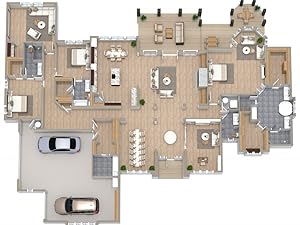
Figure 3.1: Included components of the air purifier system.
- 1 x 6 Stage Purifier Unit (CA3500)
- 1 x HEPA Filter - 6 Stage
- 1 x Charcoal Filter - 6 Stage
- 1 x UV Bulb - 6 Stage
- 2 x Ozone Plates - 6 Stage
- 1 x Purifier Power Cord
4. Setup
Follow these steps to set up your Prolux New Comfort Air Purifier:
- Unpack the Unit: Carefully remove all components from the packaging.
- Place the Unit: Position the air purifier on a flat, stable surface in the area you wish to purify. Ensure there is adequate space around the unit for proper airflow.
- Install Filters and Plates: Ensure the HEPA filter, charcoal filter, UV bulb, and ozone plates are correctly installed inside the unit. Refer to the internal view for proper placement.
- Connect Power: Plug the provided power cord into the unit's power inlet and then into a standard electrical outlet.

Figure 4.1: Internal view of the air purifier, illustrating the placement of filters and the UV bulb.
5. Operating Instructions
The Prolux New Comfort Air Purifier features adjustable controls for ozone output and fan speed.

Figure 5.1: Detailed view of the control panel with O3 Control and Ionization/UV/Fan Speed knobs.
5.1. General Operation
- Power On/Off: Turn the "Ionization & UV / Fan Speed" knob to the "ON" position to power on the unit. The green "POWER" indicator light will illuminate.
- Adjust Fan Speed: Rotate the "Ionization & UV / Fan Speed" knob to select desired fan speed: LOW, MEDIUM, or HIGH. A higher fan speed will circulate air more quickly.
- Adjust Ozone Output: Rotate the "O3 Control" knob to select the desired ozone output: LOW, MEDIUM, or HIGH. The red "OZONE" indicator light will illuminate when ozone generation is active.

Figure 5.2: Close-up of the control knobs for precise adjustment.
5.2. Using the Ozone Setting
The ozone feature is powerful and should be used with caution, primarily in unoccupied spaces. Follow these steps for effective ozone treatment:
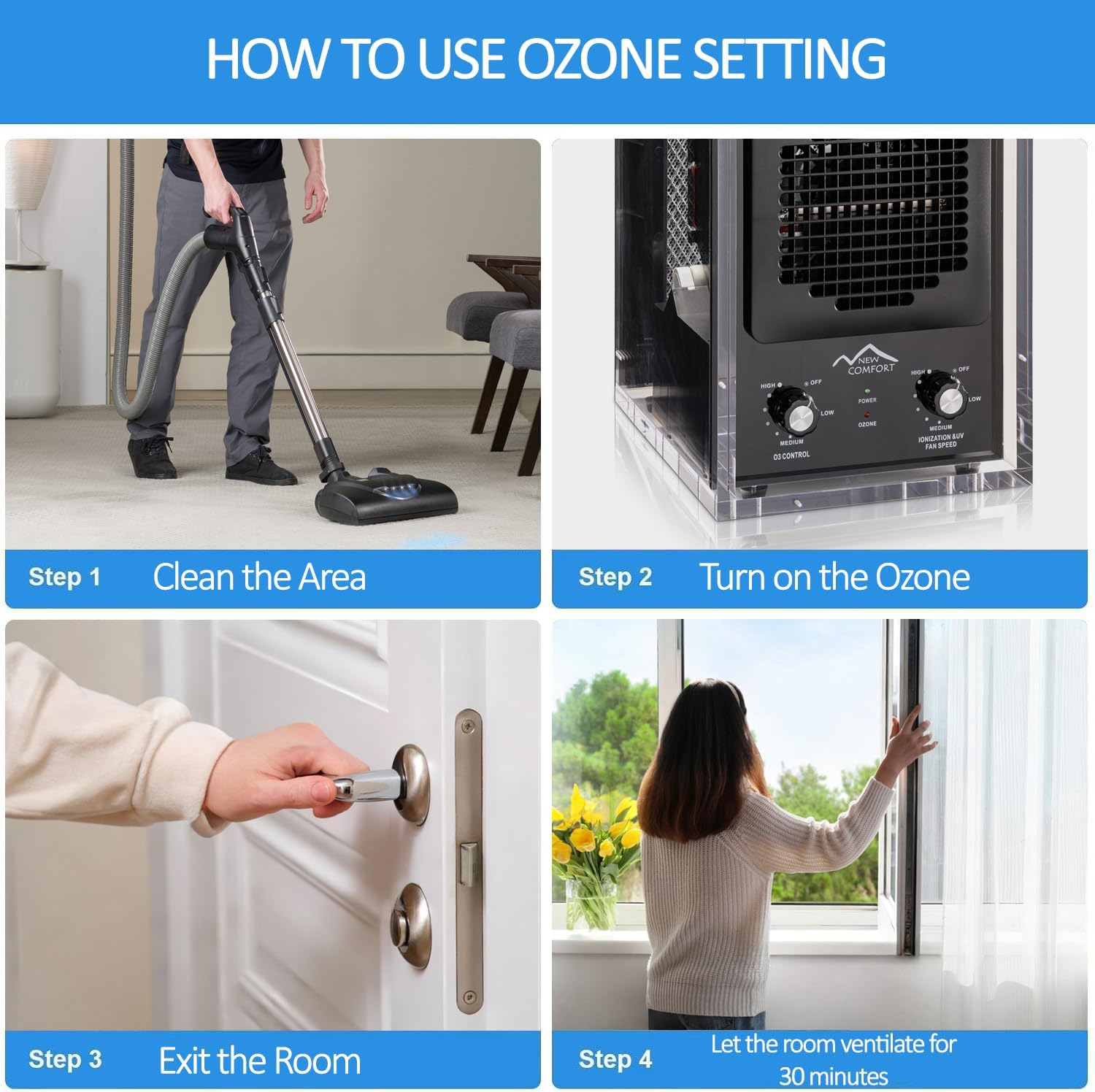
Figure 5.3: Step-by-step guide for using the ozone function safely.
- Step 1: Clean the Area. Before using the ozone setting, ensure the area to be treated is clean and free of debris. This maximizes the effectiveness of the ozone.
- Step 2: Turn on the Ozone. With the unit placed in the unoccupied room, turn the "O3 Control" knob to the desired setting (LOW, MEDIUM, or HIGH). Ensure no people or pets are present in the room.
- Step 3: Exit the Room. Immediately leave the room and close the door. Do not re-enter the room while the ozone generator is operating.
- Step 4: Ventilate the Room. After the desired treatment time, turn off the unit. Wait at least 30 minutes before re-entering the room, and open windows or doors to ventilate the area thoroughly.
The unit is effective in removing various airborne pollutants and odors, including allergens, dust, pet dander, foul odors, and smoke.

Figure 5.4: Types of airborne pollutants effectively removed by the purifier.

Figure 5.5: The unit's capability to destroy odors at their source, including smoke, pet odors, food odors, and viruses.
6. Maintenance
Regular maintenance ensures optimal performance and longevity of your air purifier.
6.1. Filter and Plate Replacement
The Prolux New Comfort Air Purifier utilizes a six-stage purification system that includes a HEPA filter, charcoal filter, UV bulb, and ozone plates. These components require periodic inspection and replacement.
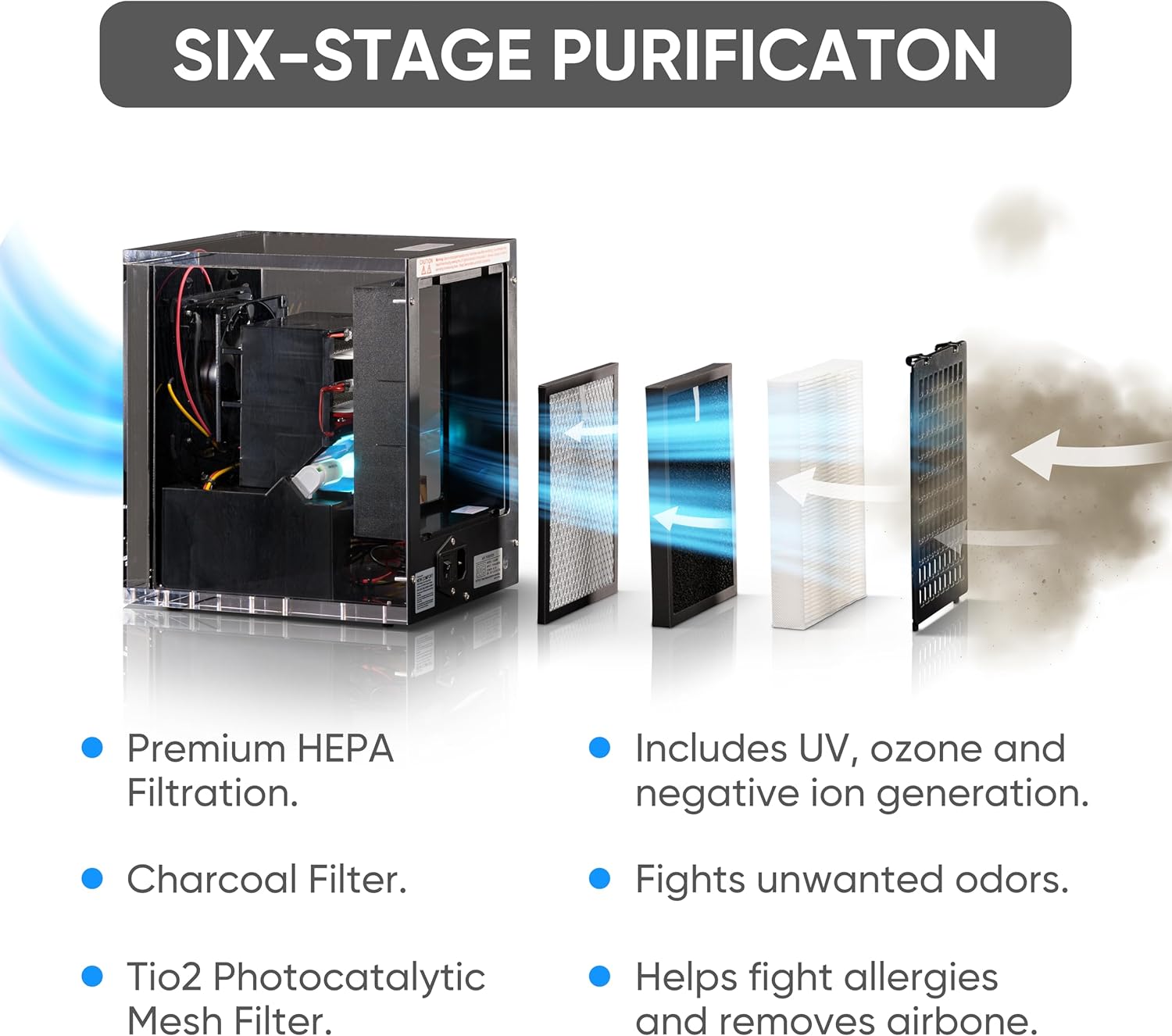
Figure 6.1: Overview of the six-stage purification system, highlighting the various filters and components.

Figure 6.2: The air purifier unit with its removable filters and plates.
- HEPA Filter: Inspect regularly and replace when visibly dirty or when airflow is reduced.
- Charcoal Filter: Replace periodically to maintain odor absorption effectiveness.
- UV Bulb: The UV bulb helps neutralize airborne pathogens. Replace the bulb when its effectiveness diminishes or as recommended by the manufacturer.
- Ozone Plates: Clean or replace ozone plates as needed to ensure efficient ozone generation.
- Cleaning the Exterior: Wipe the exterior of the unit with a soft, damp cloth. Do not use abrasive cleaners or solvents.

Figure 6.3: Close-up view of the UV bulb within the purification system.
Always unplug the unit before performing any maintenance or replacing components.
7. Troubleshooting
If you encounter issues with your Prolux New Comfort Air Purifier, refer to the following common troubleshooting steps:
| Problem | Possible Cause | Solution |
|---|---|---|
| Unit does not turn on. | Not plugged in; power outlet issue; unit switch off. | Ensure power cord is securely plugged into unit and outlet. Check if outlet is functional. Turn the "Ionization & UV / Fan Speed" knob to an ON position. |
| Reduced airflow. | Clogged HEPA or Charcoal filter. | Inspect and clean or replace the HEPA and Charcoal filters. |
| Ozone not being generated (red light off). | Ozone control knob is off; ozone plates are dirty or damaged. | Ensure "O3 Control" knob is set to LOW, MEDIUM, or HIGH. Inspect and clean or replace ozone plates. |
| Unusual noise from the unit. | Obstruction in fan; loose component. | Unplug the unit and check for any obstructions in the fan area. Ensure all internal components are securely in place. |
If the problem persists after attempting these solutions, please contact customer support.
8. Specifications
| Feature | Detail |
|---|---|
| Model Number | CA3500 |
| Brand | New Comfort |
| Product Dimensions | 11.75"D x 8.25"W x 10.25"H (10 x 8 x 11 inches; 10 Pounds) |
| Color | Clear / Black |
| Wattage | 40 watts |
| Floor Area Coverage | Up to 3000 Square Feet |
| Noise Level | 52 dB |
| Purification Stages | 6-Stage (UV, Ozone, HEPA, Charcoal, TiO2 Photocatalytic Mesh Filter, Negative Ion Generation) |

Figure 8.1: Example floor plan demonstrating the extensive coverage area of 3000 sq ft.
9. Warranty and Support
Prolux is committed to customer satisfaction and product quality.
9.1. Warranty Information
Prolux offers comprehensive warranty coverage for its products, including the New Comfort Air Purifier. This warranty typically covers parts and labor, and Prolux covers shipping both ways for warranty-related services. For specific warranty terms and conditions, please refer to the documentation included with your purchase or contact Prolux customer support.

Figure 9.1: Prolux commitment to quality, including warranty and return policies.
- Shipping Coverage: Prolux covers shipping costs both ways for warranty repairs.
- Parts and Labor: Warranty includes coverage for necessary parts and labor.
- Return Policy: A 61-day return policy is offered, with return shipping covered for a full refund.
9.2. Customer Support
For any product-related inquiries, technical assistance, or troubleshooting beyond what is covered in this manual, Prolux customer support is available to assist you. Their experts can provide guidance and help resolve issues efficiently.
Please visit the official Prolux website or refer to your product packaging for contact information.
Ask a question about this manual
Ask about setup, troubleshooting, compatibility, parts, safety, or missing instructions. Manuals+ will review the question and use this page’s manual context to help answer it.