
Serta 43807B
Serta Bryce Executive Office Chair User Manual
Model: 43807B
Introduction
The Serta Bryce Executive Office Chair is designed to provide exceptional comfort and support for extended periods of sitting. Featuring patented AIR Lumbar Support Technology, layered body pillows, and adjustable functions, this chair adapts to your movements to ensure proper posture and a serene seating experience. Its durable construction and premium materials make it a reliable choice for any office environment.

The Serta Bryce Executive Office Chair, featuring a cream white bonded leather finish and ergonomic design.
Safety Information
- Maximum Weight Capacity: This chair is designed to support a maximum weight of 275 pounds. Do not exceed this limit to ensure safety and product longevity.
- Assembly Required: Follow all provided instructions carefully during assembly. Two people are recommended for safe and efficient setup.
- Stable Placement: Ensure the chair is placed on a stable, level surface to prevent tipping.
- Avoid Standing on Chair: Do not stand on the chair or use it as a step stool.
- Regular Inspection: Periodically check all bolts and screws to ensure they are tight. Retighten as necessary.
Setup and Assembly
Assembly of the Serta Bryce Executive Office Chair is designed to be straightforward. Step-by-step instructions are included with your product to guide you through the process. For optimal ease and safety, it is recommended that two people perform the assembly.
For a detailed installation guide, please refer to the official PDF manual:
Download Installation Manual (PDF)
Ensure all components are present before beginning assembly. If any parts are missing or damaged, please contact customer support.
Operating Instructions
The Serta Bryce Executive Office Chair offers several adjustable features to customize your seating experience for maximum comfort and ergonomic support.
Height Adjustment
To adjust the chair's height, locate the lever on the right side of the seat. Lift the lever up to allow the chair to rise. While seated, lift the lever and apply pressure to lower the chair. Release the lever at your desired height.
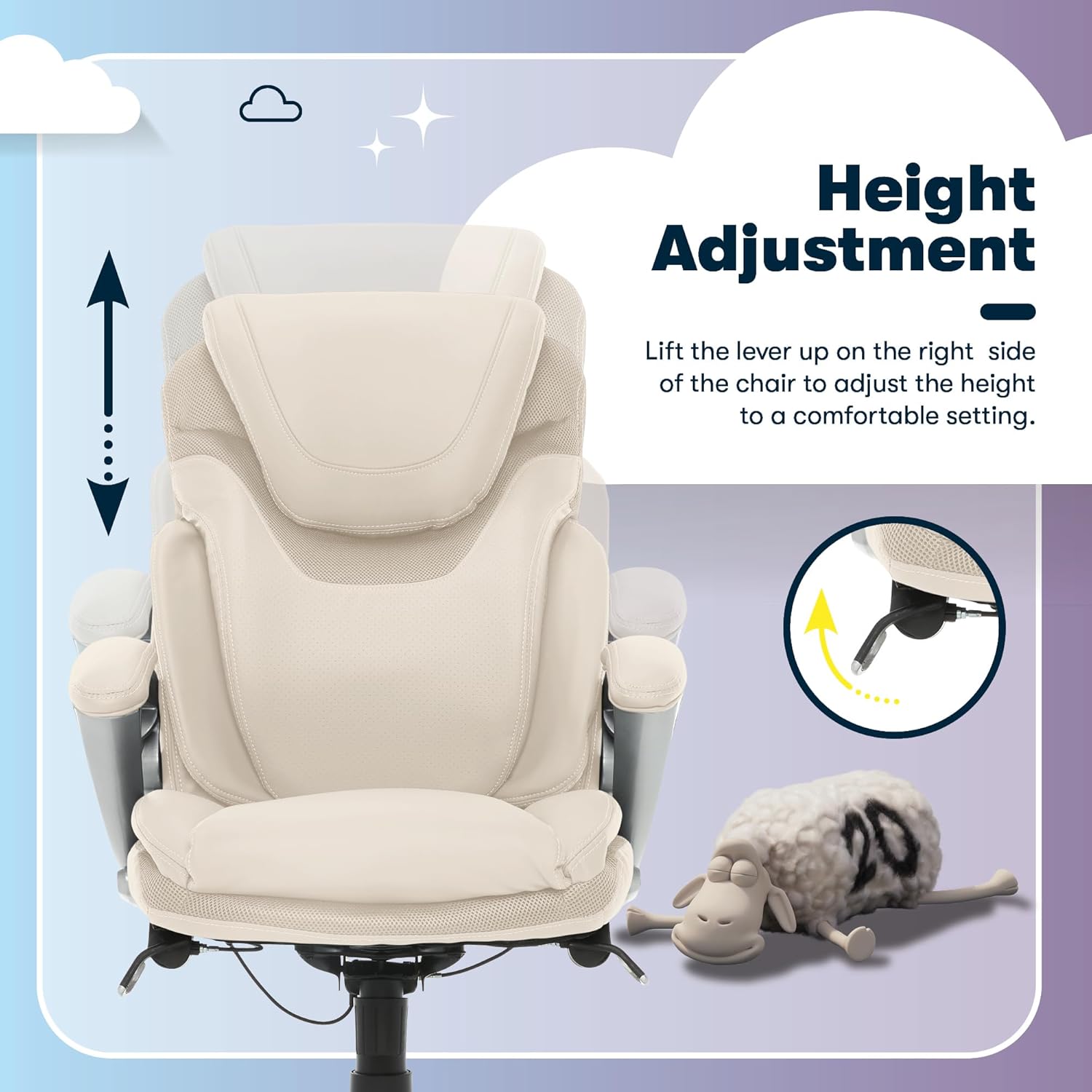
Lift the lever on the right side to adjust the chair's height.
Recline and Tilt Adjustment
The chair features a recline mechanism and tilt tension adjustment. To unlock the recline, lift the lever on the left side of the seat. To adjust the tilt tension, twist the knob located underneath the seat. Turn clockwise to increase tension (making it harder to recline) and counter-clockwise to decrease tension (making it easier to recline).

Adjust the recline and tilt tension using the left lever and under-seat knob.
AIR Lumbar Support Technology
The patented AIR Lumbar Support Technology is designed to flex and pivot with your body's movements, providing continuous lower back support and promoting proper posture throughout your workday.

The AIR Lumbar Support system adapts to your body for optimal comfort.
360-Degree Swivel and Mobility
The chair is equipped with durable dual-wheel casters that allow for smooth 360-degree rotation and easy movement across most carpeted surfaces.

The chair's casters provide smooth 360-degree motion for easy maneuverability.
Product Overview Video
This video provides a comprehensive overview of the Serta Bryce Executive Office Chair's features and benefits, including its ergonomic design and adjustable components.
Maintenance
To maintain the appearance and longevity of your Serta Bryce Executive Office Chair, follow these care instructions:
- Spot Clean: For general cleaning, spot clean the bonded leather upholstery with a damp cloth. Avoid using harsh chemicals or abrasive cleaners, as these may damage the material.
- Regular Dusting: Dust the chair regularly with a soft, dry cloth to prevent dust buildup.
- Check Fasteners: Periodically inspect all screws and bolts and tighten them if they have become loose.
- Avoid Direct Sunlight: Prolonged exposure to direct sunlight can cause the upholstery to fade or crack. Position the chair away from direct sunlight when possible.
Troubleshooting
If you encounter any issues with your Serta Bryce Executive Office Chair, consider the following common troubleshooting tips:
- Chair Sinks or Won't Stay Up: Ensure the height adjustment lever is fully engaged. If the issue persists, the gas lift cylinder may need replacement. Contact customer support for assistance.
- Chair Wobbles: Check that all assembly bolts are securely tightened. Ensure the chair is on a flat, even surface.
- Squeaking Noises: Apply a small amount of silicone lubricant to moving parts, such as the tilt mechanism or caster stems. Ensure all bolts are tight.
- Casters Not Rolling Smoothly: Check casters for trapped debris (hair, lint, etc.) and clean them. If casters are damaged, they may need replacement.
If these steps do not resolve the issue, please refer to the Customer Support section for further assistance.
Specifications
| Feature | Detail |
|---|---|
| Brand | Serta |
| Model Name | Bryce |
| Item Model Number | 43807B |
| Color | Cream White |
| Product Dimensions | 30.25"D x 25.75"W x 45.75"H |
| Item Weight | 40.8 pounds |
| Maximum Weight Recommendation | 275 Pounds |
| Furniture Finish | Bonded Leather |
| Special Features | Adjustable Height, Adjustable Lumbar, Swivel, Ergonomic, Arm Rest, Rolling, Upholstered Leather, Heavy Duty, Cushion Availability |
| Product Care Instructions | Spot Clean |
| Country of Origin | China |
Customer Support
For any questions, assistance with assembly, or support regarding your Serta Bryce Executive Office Chair, our dedicated U.S. based customer support team is ready to help.
You can visit our support page or scan the QR code below:
Visit True Innovations Support Page

Scan this QR code to access the True Innovations customer support page.
Related Documents - 43807B
 |
Serta Executive Chair Assembly Guide and Operating Instructions Comprehensive guide for assembling and operating your Serta Executive Chair, including parts list, step-by-step instructions, usage tips, and limited warranty information. |
 |
Executive Chair Assembly Instructions - Model 43675 Detailed assembly instructions and operating guide for the Executive Chair, Model 43675, including parts list, step-by-step assembly, and warranty information. |
 |
Serta Office Chair Assembly and Operating Instructions Comprehensive guide for assembling and operating your Serta office chair, including parts lists, step-by-step assembly instructions, and operating guidelines for height adjustment, tilt lockout, and tension control. Features information on the AIR Lumbar Technology and a limited warranty. |
 |
Serta Motion Renew™ Adjustable Base Owner's Manual Comprehensive owner's manual for the Serta Motion Renew™ adjustable base, detailing safety precautions, parts list, installation, operation, remote control functions, troubleshooting, and more. Includes multilingual content in English, Spanish, and French. |
 |
Serta Motion Essentials Adjustable Base 20-Year Limited Warranty Comprehensive warranty details for the Serta Motion Essentials adjustable bed base, outlining coverage periods, exclusions, terms, conditions, and contact information for Ergomotion Inc. |
 |
Serta Motion Perfect Adjustable Bed Base: Quick Setup and Installation Guide A comprehensive guide for setting up and installing the Serta Motion Perfect adjustable bed base. Includes a detailed parts list, step-by-step assembly instructions, and remote control guide. |
Ask a question about this manual
Ask about setup, troubleshooting, compatibility, parts, safety, or missing instructions. Manuals+ will review the question and use this page’s manual context to help answer it.