
1. Introduction
The Yamaha TF-Rack is a compact, rack-mountable digital mixing console designed for professional audio applications. It offers the same performance and operability as the larger TF Series consoles, providing a powerful solution for sound engineers. This manual provides essential information for the proper setup, operation, and maintenance of your TF-Rack unit.
Key features include 16 mic/line inputs (XLR/TRS combo), 1 stereo line input (RCA pin), 16 outputs (8 XLR + 8 TRS phone), and a total of 40 channels (32 mono, 2 stereo, 2 return). Its all-in-one rack-style design makes it suitable for various installations and mobile setups.
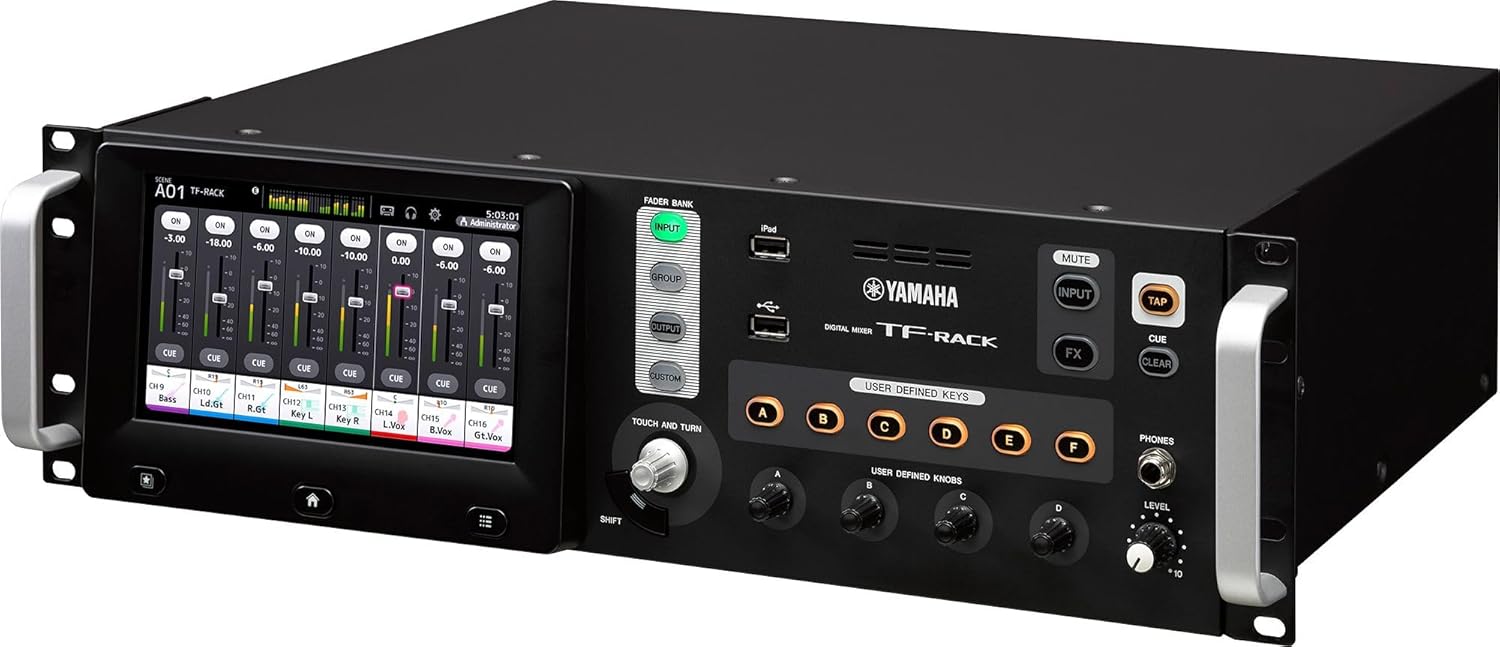
Figure 1.1: Angled front view of the Yamaha TF-Rack digital mixer, showcasing its compact design and integrated touchscreen interface.
2. Safety Information
Please read these safety instructions carefully before using the TF-Rack. Keep this manual for future reference.
- Power Source: Connect the unit only to an AC power outlet of the type specified in the specifications section. Ensure the power cord is securely plugged in.
- Grounding: Always ensure the unit is properly grounded to prevent electric shock.
- Ventilation: Do not block ventilation openings. Ensure adequate airflow around the unit, especially when rack-mounted, to prevent overheating.
- Moisture and Liquids: Do not expose the unit to rain, moisture, or any liquids. Do not place objects filled with liquids on the unit.
- Foreign Objects: Do not insert any foreign objects into the unit's openings.
- Servicing: Do not attempt to service this unit yourself. Refer all servicing to qualified service personnel.
- Placement: Place the unit on a stable surface or securely mount it in a standard equipment rack. Avoid locations with excessive vibration, dust, or extreme temperatures.
3. Package Contents
Verify that all items listed below are included in your package. If any items are missing or damaged, contact your dealer immediately.
- Yamaha TF-Rack Digital Mixer Unit
- AC Power Cord
- Rack-mount Brackets (pre-attached or included separately)
- Owner's Manual (this document)
4. Setup
4.1 Physical Installation
The TF-Rack is designed for standard 19-inch rack mounting. Ensure the rack has sufficient depth and ventilation.
- Attach the included rack-mount brackets to the sides of the TF-Rack using the provided screws, if not already attached.
- Carefully slide the TF-Rack into the desired rack space.
- Secure the unit to the rack rails using appropriate rack screws. Ensure it is firmly seated to prevent movement.
4.2 Connecting Audio Devices
The rear panel of the TF-Rack provides all audio input and output connections.

Figure 4.1: Rear panel of the Yamaha TF-Rack, illustrating the various input (XLR/TRS combo, RCA) and output (XLR, TRS phone) connectors, along with power and USB ports.
- Inputs: Connect microphones, line-level instruments, or other audio sources to the 16 XLR/TRS combo jacks labeled "INPUT". For stereo line-level sources, use the RCA pin jacks labeled "ST IN".
- Outputs: Connect power amplifiers, powered speakers, or recording devices to the 8 XLR outputs and 8 TRS phone outputs labeled "OMNI OUT".
- USB: The "TO HOST" USB port can be used for connecting to a computer for multi-track recording/playback or for firmware updates. The "USB" ports are for USB storage devices.
- Network: The Ethernet port allows for remote control via a network connection.
4.3 Power Connection
- Ensure the power switch on the rear panel is in the "OFF" position.
- Connect the supplied AC power cord to the "AC IN" inlet on the rear panel.
- Plug the other end of the power cord into a suitable AC power outlet.
- Turn on the unit by flipping the power switch to the "ON" position. The display will illuminate, indicating the unit is powering up.
5. Operating the TF-Rack
The TF-Rack features an intuitive touchscreen interface combined with physical controls for efficient operation.

Figure 5.1: Front panel of the Yamaha TF-Rack, highlighting the large touchscreen display, FADER BANK buttons, USER DEFINED KEYS, TOUCH AND TURN knob, and other essential controls.
5.1 Touchscreen Interface
The large touchscreen display is the primary interface for navigating menus, adjusting parameters, and monitoring audio levels.
- Channel Strips: The main screen displays virtual channel strips, allowing direct control over input gain, EQ, dynamics, and sends.
- Navigation: Use the icons at the bottom of the screen to access different views and settings, such as scenes, effects, and system configurations.
5.2 Physical Controls
- TOUCH AND TURN Knob: This multi-function knob allows for precise adjustment of parameters selected on the touchscreen. Pressing the "SHIFT" button can alter its function.
- FADER BANK Buttons (INPUT, GROUP, OUTPUT, CUSTOM): These buttons switch the fader bank displayed on the touchscreen, allowing access to different sets of channels (inputs, groups, outputs, or user-defined custom layers).
- USER DEFINED KEYS (A-F): These six buttons can be assigned to various functions for quick access, such as scene recall, mute groups, or specific effect parameters.
- USER DEFINED KNOBS (A-C): These three rotary encoders can be assigned to control frequently used parameters.
- MUTE, INPUT, FX, TAP, CUE, CLEAR Buttons: Dedicated buttons for common mixing functions.
- PHONES Jack and LEVEL Knob: For connecting headphones and adjusting their output level.
5.3 Basic Operation Flow
- Input Setup: Select an input channel on the touchscreen. Adjust the input gain (preamp) to achieve an optimal signal level. Apply EQ and dynamics as needed.
- Routing: Assign input channels to output buses (mixes, matrices) as required for your sound system or recording setup.
- Mixing: Use the virtual faders on the touchscreen or the TOUCH AND TURN knob to adjust channel levels. Utilize the FADER BANK buttons to switch between input, group, and output faders.
- Effects: Access the built-in effects processors (FX) to add reverb, delay, or other effects to your mix.
- Monitoring: Use the PHONES output to monitor your mix.
6. Maintenance
- Cleaning: Use a soft, dry cloth to clean the exterior of the unit. For the touchscreen, use a soft, lint-free cloth specifically designed for displays. Do not use abrasive cleaners or solvents.
- Firmware Updates: Periodically check the Yamaha website for firmware updates. Follow the instructions provided with the update files carefully to ensure proper installation.
- Storage: When not in use for extended periods, store the unit in a dry, dust-free environment.
7. Troubleshooting
If you encounter issues with your TF-Rack, refer to the following common troubleshooting steps.
- No Power:
- Ensure the power cord is securely connected to both the unit and the AC outlet.
- Verify that the power outlet is functional.
- Check the power switch position.
- No Audio Output:
- Check all audio cable connections to and from the TF-Rack.
- Ensure output levels (master fader, bus faders) are not muted or set too low.
- Verify that input channels are assigned to the correct output buses.
- Check the gain staging for all input channels.
- Distorted Audio:
- Reduce input gain if the signal is clipping.
- Check for proper impedance matching between connected devices.
- Inspect cables for damage.
- Touchscreen Unresponsive:
- Try restarting the unit.
- Ensure the screen is clean and free of debris.
For more detailed troubleshooting or issues not covered here, please consult the full owner's manual available on the Yamaha website or contact Yamaha customer support.
8. Specifications
Below are the key technical specifications for the Yamaha TF-Rack Digital Mixer.
| Feature | Specification |
|---|---|
| Model Number | TF-RACK |
| Channels | 40 (32 mono + 2 stereo + 2 return) |
| Inputs | 16 mic/line (XLR/TRS combo) + 1 stereo line (RCA pin) |
| Outputs | 16 (8 XLR + 8 TRS phone) |
| Item Weight | 20 pounds |
| Product Dimensions | 20 x 8 x 22 inches |
| Hardware Interface | Express Card |
| Power Source | Corded Electric |
9. Warranty and Support
The Yamaha TF-Rack Digital Mixer is covered by a manufacturer's warranty. Please refer to the warranty card included with your product or visit the official Yamaha website for detailed warranty terms and conditions specific to your region.
For technical support, service, or inquiries, please contact Yamaha customer support through their official website or the contact information provided in your product documentation.