
1. Introduction
The GoTEK SFR1M44-U100 is a 3.5-inch USB Floppy Drive Emulator designed to replace traditional 1.44MB floppy disk drives. It utilizes a standard USB flash drive as the storage medium, offering a modern and reliable alternative for data transfer and storage in systems that traditionally rely on floppy disks. This emulator is built with a 32-bit CPU, ensuring high integration and reliable performance.

Image 1.1: The GoTEK SFR1M44-U100 USB Floppy Drive Emulator, showing its compact design and front panel with USB port and display.
2. Product Features
- USB Flash Drive Compatibility: Uses ordinary USB flash drives for data storage, eliminating the need for floppy disks.
- High Integration: Designed with a 32-bit CPU for high integration and reliable performance.
- Easy Installation: Connects via the standard floppy drive interface (34-pin) and uses a 5V DC power supply, making installation straightforward.
- Partition Support: Supports up to 1000 partitions on a single USB flash drive.
- Self-Format Function: Includes a built-in self-format function for USB drives (refer to relevant documents for usage).
- Display and Controls: Features an 8-segment number display for partition indication, a green LED for read/write status, and two buttons for navigation.
3. Compatibility
This emulator is suitable for various machines that utilize a standard 1.44MB floppy disk and driver. It is designed for floppy drivers with a 34-pin interface and a 5V DC power plug.
3.1. Supported Floppy Disk Specifications:
- Capacity: 1.44MB (2HD)
- Cylinders: 80
- Tracks: 160
- Sectors/Track: 18
- Bytes/Sector: 512
- Data Transfer Rate: 500 kbps
- Encoding Method: MFM
3.2. Example Compatible Machines:
- STOLL flat knitting machines
- MULLER3 BONAS STAUBLI JC4 JC5 label weaving machines
- YAMAHA, KORG, and other music instruments that use 1.44MB floppy disks and drivers.

Image 3.1: Guide for selecting the correct emulator model based on disk capacity and interface type.
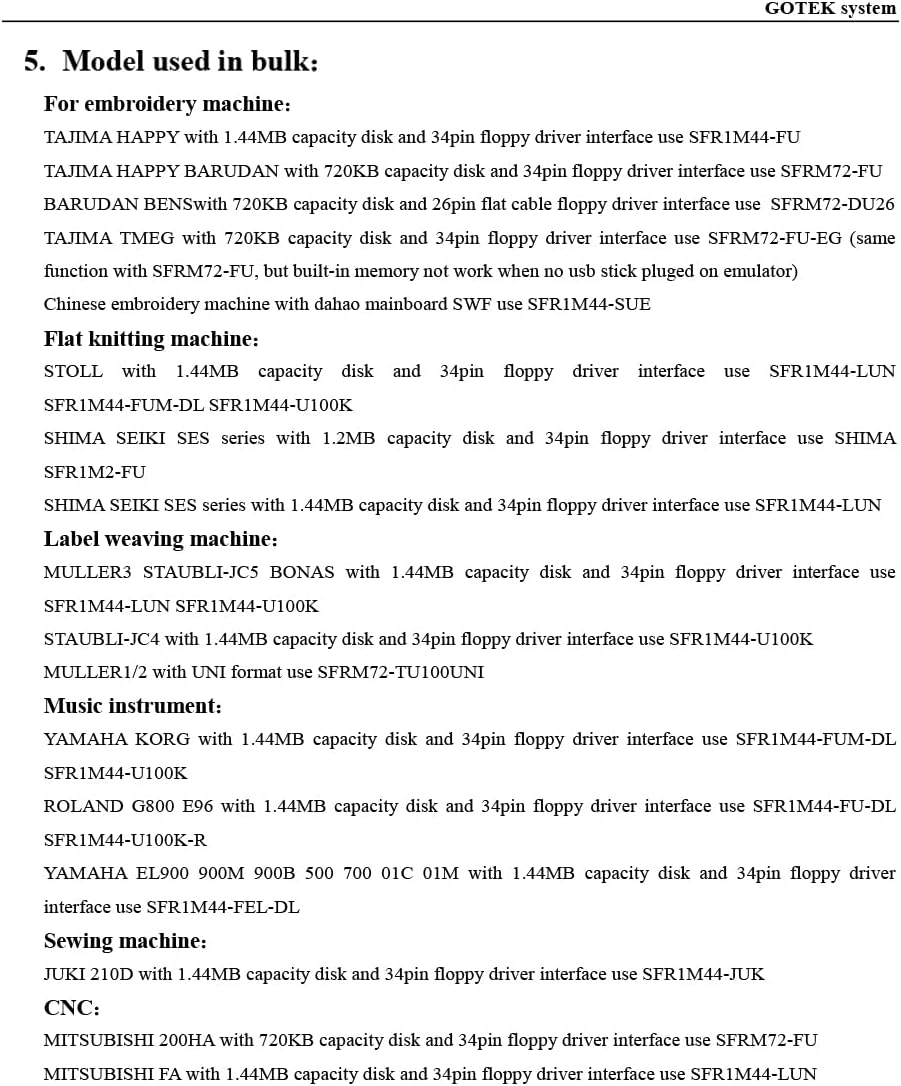
Image 3.2: Detailed list of compatible machines and corresponding emulator models for embroidery, flat knitting, label weaving, music instruments, sewing, and CNC.
4. Installation
Follow these guidelines for proper installation of the GoTEK SFR1M44-U100 emulator:
- Cable Connection: Connect the emulator to your device via the floppy drive interface. Ensure the cable is connected correctly and not reversed. Incorrect cable orientation can damage the unit or the host machine.
- Power Supply: Connect the 5V DC power plug to the emulator.
- USB Drive Preparation: The USB drive intended for use with the emulator must be formatted into 1.44MB FAT12 format. The emulator will not recognize USB drives formatted in other formats (e.g., FAT32, NTFS).

Image 4.1: Close-up view of the emulator's rear connectors, highlighting the 34-pin floppy drive interface and the 4-pin power plug.

Image 4.2: Internal view of the GoTEK SFR1M44-U100, showing the circuit board and internal wiring.
5. Operation
The front panel of the GoTEK SFR1M44-U100 provides visual indicators and control buttons for easy operation.
5.1. Panel Overview:
- 8-Segment Numbers: This display shows the current partition number being accessed on the USB flash drive.
- Green LED: Indicates the status of read and write operations. It will illuminate or blink during data access.
- USB Port: This is where you connect your USB flash drive.
5.2. Button Functions:
- Left Button: Used to increment the ten-digit of the partition number.
- Right Button: Used to increment the single-digit of the partition number.
- Press Both Buttons Together: Used to increment the hundred-digit of the partition number.

Image 5.1: Front panel of the emulator, detailing the 8-segment display, green LED, USB port, and control buttons.
6. Troubleshooting & Important Notes
- USB Drive Not Recognized: Ensure your USB drive is formatted to 1.44MB FAT12. The emulator will not recognize other formats. Some older or smaller capacity USB drives may work better for initial formatting.
- Firmware Compatibility: The default loaded firmware is from the GoTEK manufacturer, supporting 1.44M, 34-pin IBM/PC interface, and DOS/FAT12 format. The chip used is AT32F415 Cortex-M4. Verify that your machine is compatible with these specifications.
- AMIGA Systems: If you intend to use this emulator with an AMIGA system, you will need to change the default firmware to FlashFloppy firmware. This process typically requires external tools and knowledge.
- Cable Reversal: Always double-check the cable connection during installation. Connecting the cable in reverse can cause damage to the emulator or the host machine.

Image 6.1: Internal view highlighting the AT32F415 Cortex-M4 chip used in the emulator.
7. Specifications
| Attribute | Value |
|---|---|
| Model | SFR1M44-U100 |
| Hard Drive Interface | USB 1.1 |
| Hard Disk Size | 1.44 MB |
| Hard Disk Form Factor | 3.5 Inches |
| Compatible Devices | PC (and various industrial/musical equipment) |
| Installation Type | Internal Hard Drive |
| Color | Grey |
| Item Weight | 5.1 ounces |
| Product Dimensions (LxWxH) | 4.8 x 3.94 x 0.98 inches |
| Special Feature | Plug and Play |
| Manufacturer | Gotek |
| First Available Date | September 30, 2017 |

Image 7.1: Diagram illustrating the physical dimensions of the GoTEK SFR1M44-U100 emulator.
8. What's in the Box
The product package typically includes the following items:
- USB floppy drive emulator (GoTEK SFR1M44-U100)
- Mounting screws (usually 4 pieces)
- Basic user manual / quick start guide

Image 8.1: Contents of the GoTEK SFR1M44-U100 package, including the emulator, screws, and documentation.
9. Support & Warranty
For technical support, troubleshooting assistance beyond this manual, or warranty inquiries, please refer to the contact information provided with your purchase or visit the official GoTEK website. Keep your purchase receipt as proof of purchase for warranty claims.
The manufacturer's default return policy typically allows for returns or replacements within 30 days of purchase, subject to specific terms and conditions.