
BLACK+DECKER HCUA525J
BLACK+DECKER POWERSERIES Pro 20V Lithium 2-in-1 Cordless Vacuum User Manual
Model: HCUA525J
Introduction
This user manual provides essential information for the safe and efficient operation, maintenance, and troubleshooting of your BLACK+DECKER HCUA525J POWERSERIES Pro 20V Lithium 2-in-1 Cordless Vacuum. Please read this manual thoroughly before first use and retain it for future reference.
The BLACK+DECKER HCUA525J POWERSERIES PRO 20V Lithium 2-in-1 Vacuum is designed for versatile cleaning, offering strong suction and extended runtime. Its innovative design allows for easy conversion from an upright vacuum to a portable canister for comprehensive floor-to-ceiling cleaning. Key features include SMARTECH technology with AUTOSENSE for automatic suction adjustment, BATTERYSENSE for battery level indication, and FILTERSENSE for filter cleaning alerts. The vacuum also features touchpad controls, swivel steering, a low-profile design, and an LED light for enhanced visibility.
Important Safety Instructions
Always follow basic safety precautions when using electrical appliances to reduce the risk of fire, electric shock, and personal injury. This includes, but is not limited to:
- Read all instructions before using the appliance.
- Do not use outdoors or on wet surfaces.
- Do not allow to be used as a toy. Close attention is necessary when used by or near children.
- Use only as described in this manual. Use only manufacturer's recommended attachments.
- Do not use with damaged cord or plug. If appliance is not working as it should, has been dropped, damaged, left outdoors, or dropped into water, return it to a service center.
- Do not pull or carry by cord, use cord as a handle, close a door on cord, or pull cord around sharp edges or corners. Do not run appliance over cord. Keep cord away from heated surfaces.
- Do not unplug by pulling on cord. To unplug, grasp the plug, not the cord.
- Do not handle plug or appliance with wet hands.
- Do not put any object into openings. Do not use with any opening blocked; keep free of dust, lint, hair, and anything that may reduce air flow.
- Keep hair, loose clothing, fingers, and all parts of body away from openings and moving parts.
- Do not pick up anything that is burning or smoking, such as cigarettes, matches, or hot ashes.
- Do not use without dust bag and/or filters in place.
- Turn off all controls before unplugging.
- Use extra care when cleaning on stairs.
- Do not use to pick up flammable or combustible liquids, such as gasoline, or use in areas where they may be present.
- Store the appliance indoors.
- Charge only with the charger specified by the manufacturer.
- Do not incinerate the appliance even if it is severely damaged. The batteries can explode in a fire.
Product Components
Familiarize yourself with the main components of your BLACK+DECKER POWERSERIES Pro 2-in-1 Cordless Vacuum.

Figure 1: Front view of the BLACK+DECKER HCUA525J POWERSERIES Pro 2-in-1 Cordless Vacuum in upright mode.

Figure 2: The vacuum with its portable canister detached, showcasing its 2-in-1 versatility.

Figure 3: Detailed view of the removable canister and flexible hose for handheld cleaning.
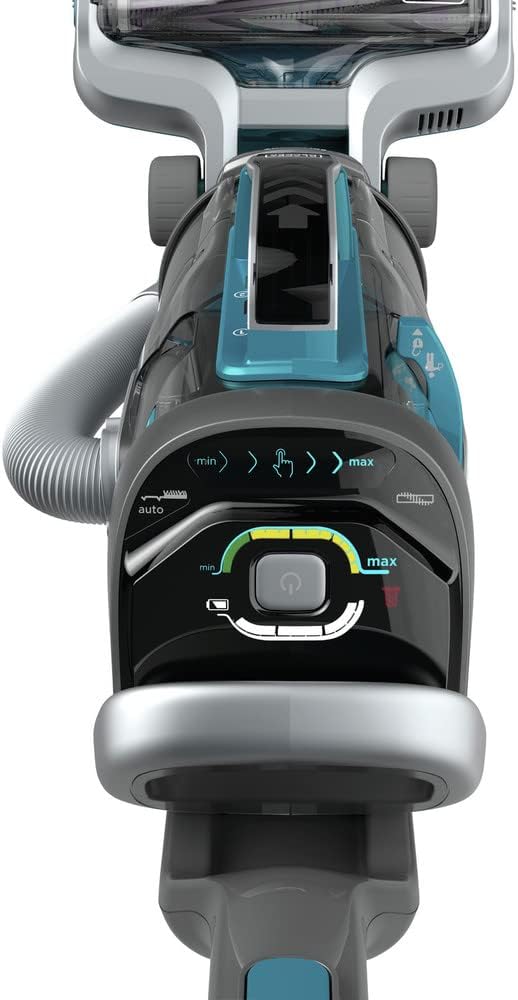
Figure 4: The top control panel with touchpad controls for suction speed, AUTOSENSE, and LED light.

Figure 5: The versatile 3-in-1 accessory tool, including a 6-inch nozzle, crevice tool, and upholstery brush.
Included Components:
- 1) HCUA525J 2-in-2 Cordless Vacuum
- 1) Jack Plug charger
- 1) 3-in-1 Accessory Tool (6-inch nozzle, crevice tool, and upholstery brush)
- 1) CUABF10 washable filter kit
Setup and Assembly
Follow these steps to assemble your vacuum cleaner before first use.
- Unpack Components: Carefully remove all components from the packaging. Ensure all listed parts are present.
- Attach Handle: Insert the handle into the main body of the vacuum until it clicks securely into place.
- Charge Battery: Before initial use, fully charge the vacuum's lithium-ion battery. Connect the Jack Plug charger to the charging port on the vacuum and plug it into a standard electrical outlet. The BATTERYSENSE indicator lights will show charging progress. A full charge takes approximately 6 hours.
- Install Filter: Ensure the CUABF10 washable filter is correctly installed in the dust canister. Refer to the "Maintenance" section for detailed filter installation and cleaning instructions.
Operating Instructions
Your BLACK+DECKER POWERSERIES Pro vacuum offers versatile cleaning modes and smart features.
Upright Vacuum Mode
- Power On: Press the power button on the touchpad control panel (Figure 4).
- Adjust Suction Speed: Use the touchpad controls to adjust suction speed between minimum (min) and maximum (max) settings.
- Activate AUTOSENSE: Enable the AUTOSENSE feature via the touchpad. This automatically adjusts suction power based on the floor type, optimizing performance and battery life.
- LED Light: Control the integrated LED light from the touchpad to illuminate cleaning surfaces, especially in dimly lit areas or under furniture.
- Maneuverability: The swivel steering and low-profile design allow for easy navigation around furniture and access to hard-to-reach areas.
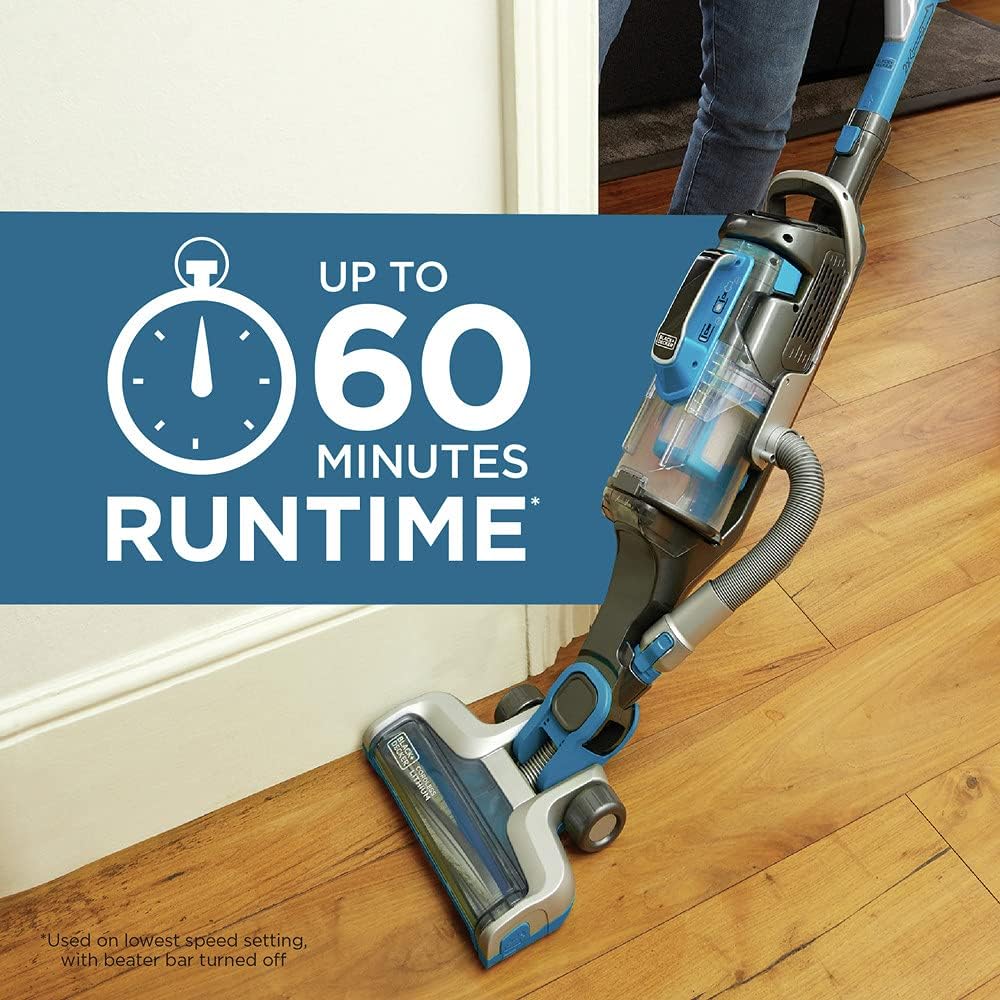
Figure 6: The vacuum in operation on a hard floor, highlighting its impressive runtime of up to 60 minutes on the lowest speed setting with the beater bar turned off.
Portable Canister Mode (Grab+Go)
- Detach Canister: Press the release button to detach the portable canister from the main vacuum body.
- Attach Accessories: Connect the 3-in-1 accessory tool (6-inch nozzle, crevice tool, or upholstery brush) to the end of the flexible hose for specialized cleaning tasks.
- Versatile Cleaning: Use the portable canister for cleaning stairs, upholstery, car interiors, and other elevated or confined spaces.
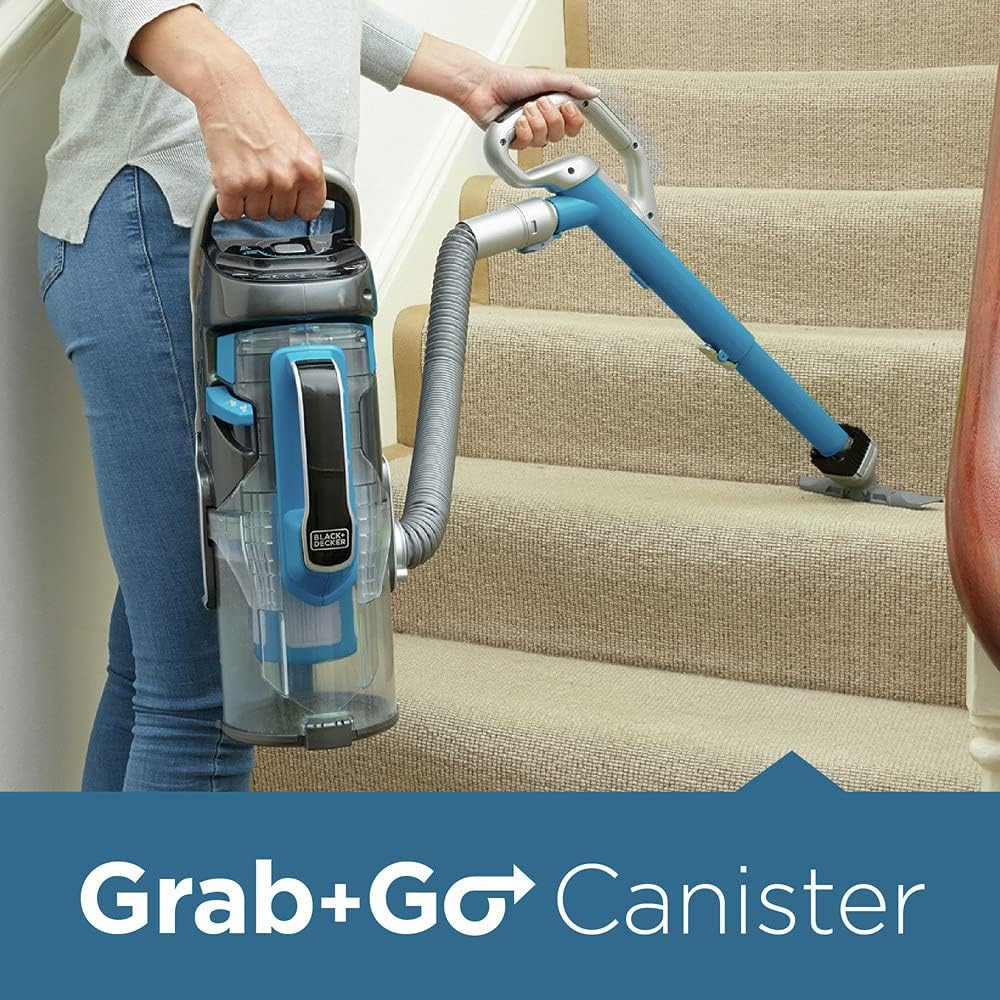
Figure 7: A user demonstrating the "Grab+Go" feature, using the detached canister and hose to clean stairs, providing excellent versatility.
Official Product Video
Video 1: An official product video demonstrating the features and versatility of the BLACK+DECKER POWERSERIES PRO Cordless Vacuum, 2 in 1, Blue (HCUA525J). This video showcases the vacuum's powerful suction, 2-in-1 design, SMARTECH sensors, and ease of use for various cleaning tasks.
Maintenance
Regular maintenance ensures optimal performance and extends the life of your vacuum.
Emptying the Dust Canister
The dust canister features a unique dust compactor, allowing it to hold more dirt and reducing the frequency of emptying. Empty the canister when the dirt reaches the "Max Fill" line or when the FILTERSENSE indicator alerts you.
- Power Off: Ensure the vacuum is turned off before emptying.
- Detach Canister: Press the release button to detach the dust canister.
- Empty Contents: Position the canister over a trash bin and press the release button to open the bottom flap, allowing dirt and debris to fall out.
- Reattach Canister: Close the bottom flap securely and reattach the canister to the vacuum until it clicks into place.
Cleaning the Filter
The CUABF10 washable filter kit should be cleaned regularly to maintain suction power. The FILTERSENSE feature will alert you when cleaning is needed.
- Remove Filter: With the dust canister detached, carefully remove the filter assembly.
- Wash Filter: Rinse the filter under cool, running water until the water runs clear. Do not use hot water or detergents.
- Dry Filter: Allow the filter to air dry completely for at least 24 hours before reinserting. Do not use a dryer or other heating device.
- Reinstall Filter: Once completely dry, reinsert the filter into the dust canister and reattach the canister to the vacuum.
Cleaning the Brush Bar
Periodically check the brush bar for tangled hair or debris. The brush bar detaches easily for quick cleaning.
- Power Off: Ensure the vacuum is turned off.
- Remove Brush Bar: Follow the instructions in the manual to release and remove the brush bar from the vacuum head.
- Clean Debris: Use scissors or a brush to remove any tangled hair, strings, or debris from the brush bar.
- Reinstall Brush Bar: Reinsert the clean brush bar securely into the vacuum head.
Troubleshooting
This section addresses common issues you might encounter with your vacuum cleaner.
| Problem | Possible Cause | Solution |
|---|---|---|
| Vacuum does not turn on. | Battery is not charged. | Charge the battery fully (approx. 6 hours). Check BATTERYSENSE indicator. |
| Power button not pressed correctly. | Ensure the power button on the touchpad is pressed firmly. | |
| Reduced suction power. | Dust canister is full. | Empty the dust canister. |
| Filter is clogged. | Clean or replace the filter (CUABF10). The FILTERSENSE indicator will alert you. | |
| Brush bar is tangled or blocked. | Remove and clean the brush bar. Check for obstructions in the nozzle. | |
| Hose or attachments are blocked. | Check the hose and accessory tools for blockages and clear them. | |
| Vacuum stops unexpectedly. | Battery is depleted. | Recharge the battery. |
| Overheating protection activated. | Turn off the vacuum and allow it to cool down for at least 30 minutes. Clear any blockages. |
If the problem persists after attempting these solutions, please contact BLACK+DECKER customer support for assistance.
Specifications
| Feature | Detail |
|---|---|
| Brand | BLACK+DECKER |
| Model Name | BLACK+DECKER HCUA525J POWERSERIES™ PRO 20V Lithium 2-in-1 Vacuum |
| Model Number | HCUA525J |
| Power Source | Battery Powered (20V Lithium-Ion) |
| Runtime | Up to 60 minutes (on lowest speed setting) |
| Charging Time | Approx. 6 hours |
| Filter Type | Disk (CUABF10 washable filter kit) |
| Form Factor | Upright / Handheld (2-in-1) |
| Color | Blue |
| Item Weight | 11 pounds |
| Product Dimensions | 8.9 x 11.8 x 33.67 inches |
| Noise Level | 78 dB |
| Special Features | SMARTECH (AUTOSENSE, BATTERYSENSE, FILTERSENSE), Touchpad Controls, LED Light, Dust Compactor, Swivel Steering |
Warranty and Support
Your BLACK+DECKER HCUA525J POWERSERIES Pro 20V Lithium 2-in-1 Cordless Vacuum is backed by BLACK+DECKER'S 2-year limited warranty. This warranty covers defects in material or workmanship for a period of two years from the date of purchase.
For warranty claims, technical support, or to purchase replacement parts (such as the CUABF10 washable filter kit), please contact BLACK+DECKER customer service. You may also refer to the official user manual PDF for more detailed information, available at https://manuals.plus/m/680ddf346521725983c53d4fc3d2c4b0ba3c31edbc0ebe10a410a6040819e918.
Contact Information:
- Visit the official BLACK+DECKER website for support resources.
- Refer to the contact details provided in your product packaging or on the BLACK+DECKER website for customer service.
Related documentsHCUA525J


Ask a question about this manual
Ask about setup, troubleshooting, compatibility, parts, safety, or missing instructions. Manuals+ will review the question and use this page’s manual context to help answer it.