Introduction
This manual provides comprehensive instructions for the safe and efficient operation, maintenance, and troubleshooting of your Nespresso Expert Coffee and Espresso Machine. Please read this manual thoroughly before first use and retain it for future reference.
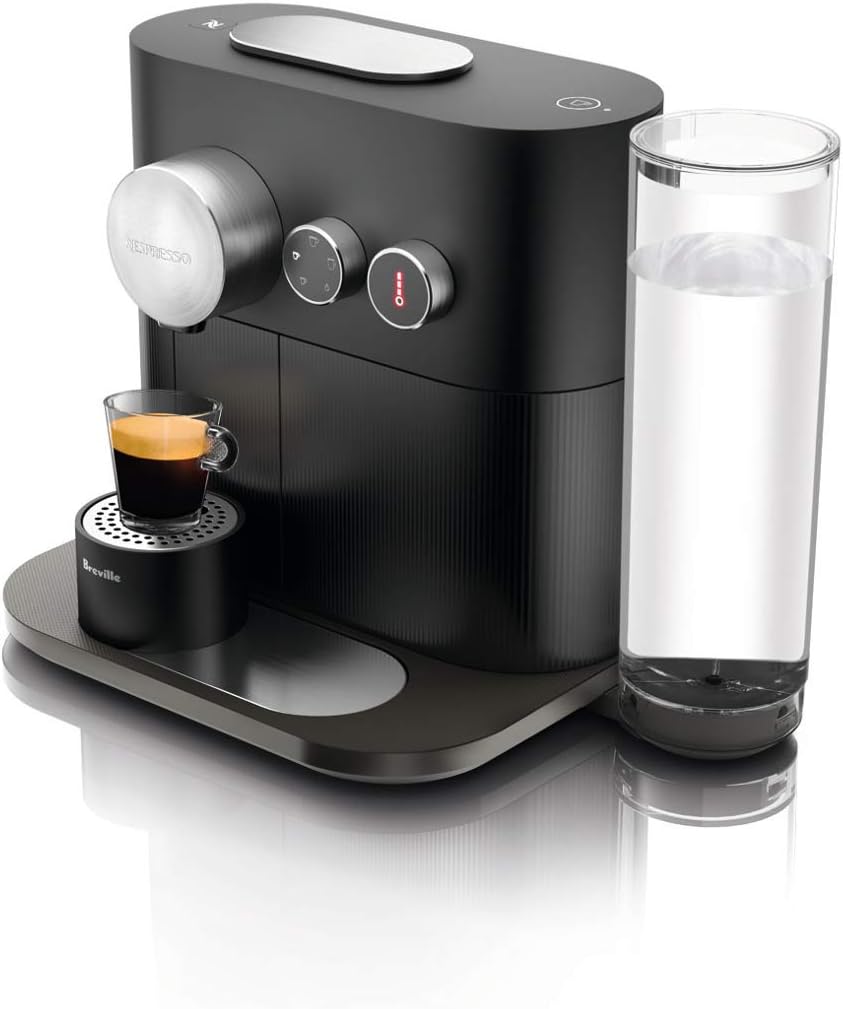
Figure 1: Nespresso Expert Coffee Machine, showcasing its sleek design and a prepared espresso shot.
Important Safety Instructions
When using electrical appliances, basic safety precautions should always be followed to reduce the risk of fire, electric shock, and/or injury to persons, including the following:
- Read all instructions.
- Do not touch hot surfaces. Use handles or knobs.
- To protect against fire, electric shock, and injury to persons, do not immerse cord, plugs, or coffee machine in water or other liquid.
- Close supervision is necessary when any appliance is used by or near children.
- Unplug from outlet when not in use and before cleaning. Allow to cool before putting on or taking off parts, and before cleaning the appliance.
- Do not operate any appliance with a damaged cord or plug or after the appliance malfunctions, or has been damaged in any manner. Return appliance to the nearest authorized service facility for examination, repair, or adjustment.
- The use of accessory attachments not recommended by the appliance manufacturer may result in fire, electric shock, or injury to persons.
- Do not use outdoors.
- Do not let cord hang over edge of table or counter, or touch hot surfaces.
- Do not place on or near a hot gas or electric burner, or in a heated oven.
- Always attach plug to appliance first, then plug cord into the wall outlet. To disconnect, turn any control to "off", then remove plug from wall outlet.
- Do not use appliance for other than intended use.
Setup
1. Unpacking and Initial Placement
Carefully remove the machine from its packaging. Place the machine on a clean, stable, and level surface. Ensure there is adequate space around the machine for ventilation and access to the water tank and capsule container.
2. Filling the Water Tank
Remove the water tank from the back of the machine. Fill it with fresh, potable water up to the 'MAX' level indicator. Replace the water tank securely on the machine.

Figure 2: The Nespresso Expert machine positioned on a counter, showing the clear water tank filled with water.
3. First Use and Rinsing
Before first use, or after a long period of inactivity, rinse the machine. Plug the machine into a grounded power outlet. Place a container (at least 20 oz) under the coffee outlet. Press any coffee button to start the rinsing cycle. Repeat this process two to three times until clear water flows out.
Operating Instructions
1. Powering On
Press the power button located on the top of the machine. The machine will begin to heat up, indicated by flashing lights on the coffee buttons. The lights will become steady when the machine is ready for use (approximately 25 seconds).
2. Coffee Preparation
The Nespresso Expert offers four coffee cup sizes and three temperature settings. Use the selector dials to choose your desired settings.
- Cup Size Selection: Rotate the left dial to select from Ristretto (0.85 oz), Espresso (1.35 oz), Lungo (3.7 oz), or Americano (0.85 oz coffee + 4.2 oz hot water).
- Temperature Selection: Rotate the right dial to choose from Warm, Hot, or Extra Hot.

Figure 3: The intuitive dial for selecting various coffee cup sizes, including Ristretto, Espresso, Lungo, and Americano.
Lift the lever, insert a Nespresso OriginalLine capsule, and close the lever. Place your cup under the coffee outlet. Press the selected coffee button to start brewing. The machine will automatically stop when the desired volume is reached. For Americano, the machine will first brew the coffee, then dispense hot water.
3. Bluetooth Connectivity (Nespresso App)
The Nespresso Expert features Bluetooth Smart technology, allowing you to connect the machine to the Nespresso mobile application. This enables features such as personalized coffee recipes, capsule reordering, and machine care assistance.
- Download the Nespresso App from your device's app store.
- Follow the in-app instructions to pair your machine. Ensure Bluetooth is enabled on your mobile device.
- Through the app, you can customize coffee volumes, set brewing schedules, receive descaling alerts, and access troubleshooting guides.

Figure 4: The Nespresso mobile application, demonstrating its interface for customizing coffee settings.
Maintenance and Cleaning
1. Daily Cleaning
- Drip Tray and Capsule Container: Empty and rinse the drip tray and used capsule container daily. Wash them with warm water and a mild detergent.
- Water Tank: Rinse the water tank daily and refill with fresh water.
- Machine Exterior: Wipe the machine's exterior with a soft, damp cloth. Do not use abrasive cleaning agents or immerse the machine in water.
2. Descaling
Descaling is crucial for maintaining machine performance and coffee quality. The machine will indicate when descaling is required (often via the Nespresso App or a specific light indicator). Use only the Nespresso descaling solution and follow the instructions provided with the descaling kit or in the Nespresso App.
The descaling process typically involves:
- Emptying the water tank, drip tray, and capsule container.
- Filling the water tank with the descaling solution mixed with water as per instructions.
- Placing a large container under the coffee outlet.
- Initiating the descaling cycle (refer to the Nespresso App or machine manual for specific button combinations).
- Rinsing the machine thoroughly after the descaling solution has run through.

Figure 5: Nespresso offers recycling programs for used capsules, promoting environmental responsibility.
Troubleshooting
If you encounter issues with your Nespresso Expert machine, refer to the table below for common problems and solutions. For persistent issues, contact Nespresso Customer Service.
| Problem | Possible Cause | Solution |
|---|---|---|
| No coffee flow or very slow flow | Machine needs descaling; water tank empty; capsule not properly inserted. | Perform descaling cycle; refill water tank; ensure capsule is correctly placed and lever is closed. |
| Water leaking from machine base | Drip tray is full or improperly seated; internal leak. | Empty and correctly re-seat drip tray. If leaking persists, contact customer service. |
| Bluetooth connectivity issues | Bluetooth off on device; machine not in pairing mode; app issues. | Ensure Bluetooth is on; restart machine and app; try re-pairing. |
| Warning light illuminated | Descaling required; water tank empty; general error. | Check water level; perform descaling; consult Nespresso App for specific error codes. |

Figure 6: The warning light on the machine, indicating a need for attention such as descaling or water refill.
Specifications
| Feature | Detail |
|---|---|
| Brand | Breville |
| Model Name | Nespresso Expert by Breville, Black (BEC720BLK1AUC1) |
| Color | Black |
| Dimensions (L x W x H) | 17 x 10 x 15.25 inches |
| Item Weight | 9.7 pounds |
| Pressure System | Patented 19-bar Pressure Extraction System |
| Coffee Maker Type | Pour Over (Capsule System) |
| Filter Type | Reusable (Capsule-based) |
| Operation Mode | Fully Automatic |
| Voltage | 120 Volts (AC) |
| Human Interface Input | Touchscreen (Dials) |
| Included Components | Coffee machine, water tank & lid, adjustable cup support & drip lid, drip tray, capsule container |
| Date First Available | November 4, 2017 |
Warranty and Support
Your Nespresso Expert machine is covered by a manufacturer's warranty, typically for 1 to 2 years from the date of purchase. This warranty covers defects in materials and workmanship under normal use. Please retain your proof of purchase for warranty claims.
For technical assistance, troubleshooting beyond this manual, or to inquire about warranty service, please contact Nespresso Customer Service. You can find contact information on the official Nespresso website or within the Nespresso mobile application.
A digital version of the user manual is also available for download at: Nespresso Expert User Manual (PDF).


