
1. Introduction
This manual provides essential instructions for the safe installation, operation, and maintenance of the Zoeller Sewage Package System with Alarm, Model 915-0005. This system is designed for efficient and reliable handling of sewage and wastewater in residential or light commercial applications. Please read this manual thoroughly before installation or use to ensure proper function and to prevent injury or damage.
2. Important Safety Information
WARNING: Risk of electric shock, fire, or injury. Always disconnect power before servicing the pump or alarm system.
- Ensure all electrical connections comply with local codes and regulations.
- Do not operate the pump with a damaged cord or plug.
- Never handle the pump or alarm system with wet hands or while standing in water.
- This system is designed for sewage and wastewater. Do not use for flammable liquids or chemicals.
- Keep children and unauthorized personnel away from the system.
- Wear appropriate personal protective equipment (PPE) when working with the system.
3. System Components
The Zoeller Sewage Package System (Model 915-0005) includes the following main components:
- Sewage Pump Assembly with Basin Lid
- Alarm System
- Check Valve
- Power Adapter for Alarm
- Mounting Hardware (e.g., hose clamp)
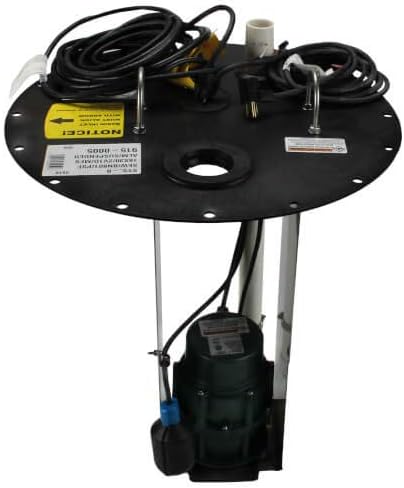
Figure 1: Main Sewage Package System. This image shows the complete pump assembly, including the pump motor submerged in the basin, the discharge pipe, and the black lid with electrical cords and float switches.

Figure 2: Accessory Components. This image displays the separate alarm unit (black box), a quiet check valve (grey cylinder), a power adapter, and a metal hose clamp, which are included with the system.
4. Setup and Installation
Proper installation is critical for the system's performance and longevity. If you are unsure about any step, consult a qualified professional.
4.1 Site Preparation
- Ensure the installation area is clean, level, and provides adequate space for maintenance.
- Verify that the electrical supply meets the pump's requirements (AC/DC, as specified).
- Confirm that plumbing connections for inlet and discharge pipes are ready.
4.2 Pump and Basin Installation
- Place the sewage basin in its designated location.
- Lower the pump into the basin, ensuring it sits level on the bottom.
- Connect the discharge pipe from the pump to the main discharge line. Use the provided check valve in the discharge line to prevent backflow.
- Connect the inlet pipe(s) to the basin.
- Secure the basin lid, ensuring all electrical cords pass through the designated openings without pinching.
4.3 Alarm System Installation
- Mount the alarm unit in a dry, accessible location, away from direct moisture.
- Connect the alarm float switch cable from the basin to the alarm unit.
- Plug the alarm power adapter into a standard electrical outlet.
- Test the alarm by manually lifting the alarm float switch to ensure it activates.
4.4 Electrical Connections
- Plug the pump's power cord into a dedicated, grounded electrical outlet.
- Ensure all connections are secure and protected from moisture.
5. Operating Instructions
The Zoeller Sewage Package System operates automatically. The pump will activate when the liquid level in the basin rises to the "ON" float switch level and will turn off when the level drops to the "OFF" float switch level.
5.1 Normal Operation
- Once installed and powered, the system will monitor the liquid level.
- The pump will cycle on and off as needed to maintain the desired liquid level.
5.2 Alarm System
- If the liquid level rises above the normal operating range (e.g., due to pump failure or blockage), the alarm float switch will activate.
- The alarm unit will emit an audible alert and/or visual indicator.
- Upon alarm activation, investigate the cause immediately and take corrective action. Silence the alarm by pressing the designated button on the alarm unit, but note that it may reactivate if the high-water condition persists.
6. Maintenance
Regular maintenance ensures optimal performance and extends the life of your sewage system. Always disconnect power before performing any maintenance.
6.1 Monthly Checks
- Inspect Floats: Manually lift and lower the pump and alarm float switches to ensure they move freely and activate/deactivate correctly.
- Check Basin: Visually inspect the basin for excessive debris or buildup.
- Listen for Abnormal Noises: During pump operation, listen for unusual sounds that may indicate a problem.
6.2 Annual Inspection
- Clean Basin: If necessary, remove the pump and thoroughly clean the basin to remove any accumulated sludge or debris.
- Inspect Pump Impeller: Check the pump impeller for any obstructions or wear.
- Verify Check Valve: Ensure the check valve is functioning properly and not allowing backflow.
- Electrical Connections: Inspect all electrical cords and connections for wear, damage, or corrosion.
7. Troubleshooting Guide
This section provides solutions to common issues. For problems not listed here, contact customer support.
| Problem | Possible Cause | Solution |
|---|---|---|
| Pump does not run. | No power; tripped breaker; faulty float switch; pump obstruction. | Check power supply and breaker. Inspect float switch for free movement. Disconnect power and check pump intake for debris. |
| Pump runs continuously. | Stuck float switch; check valve failure; continuous inflow. | Inspect float switch for obstructions. Check check valve for proper closure. Reduce inflow if possible. |
| Alarm activates frequently. | Pump failure; discharge line blockage; alarm float switch malfunction. | Check pump operation. Inspect discharge line for blockages. Verify alarm float switch movement. |
| Pump is noisy. | Debris in impeller; worn bearings; cavitation. | Disconnect power and clear impeller. Contact service if bearings are suspected. Ensure adequate water level. |
8. Specifications
| Feature | Detail |
|---|---|
| Model Number | 915-0005 |
| Brand | Zoeller |
| Manufacturer | ZOELLER PUMP COMPANY |
| Style | Above Ground |
| Material | Foam (Poly Struc Foam for basin) |
| Power Source | AC/DC |
| Item Package Quantity | 1 |
9. Warranty Information
Zoeller products are manufactured to the highest standards. For specific warranty terms and conditions, please refer to the documentation included with your product or visit the official Zoeller Pump Company website. Keep your purchase receipt as proof of purchase for any warranty claims.
10. Customer Support
If you require technical assistance, replacement parts, or have questions regarding your Zoeller Sewage Package System, please contact Zoeller Pump Company customer support. Have your model number (915-0005) and date of purchase ready when contacting support.
For more information, visit the Zoeller Store on Amazon or the official Zoeller Pump Company website.