
1. Introduction
This manual provides essential information for the safe and effective use of your EPtech 2-prong polarized power cable. Please read these instructions carefully before connecting the cable to your device. This power cable is designed as a replacement or spare for compatible Insignia LED TV models.
2. Product Overview
The EPtech power cable is a 2-prong polarized cord, approximately 6 feet (1.8 meters) in length, designed for various electronic devices requiring a polarized power connection. It features a durable construction and incorporates multiple safety protections.
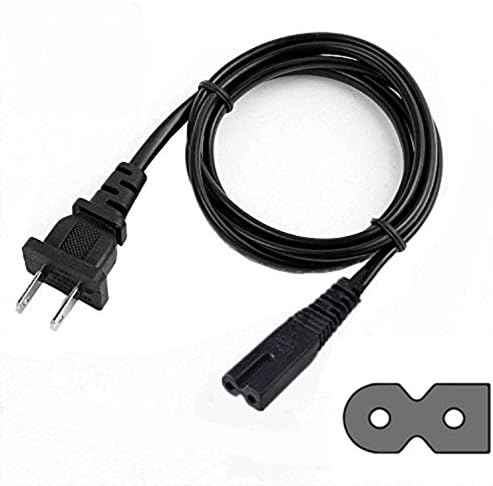
Image 2.1: The EPtech 2-prong polarized power cable, showing the two-pin plug and the figure-8 connector.
2.1 Key Features
- Connector Type: 2-Prong Polarized (Male-to-Female)
- Cable Length: Approximately 6 feet (1.8 meters)
- Compatibility: Specifically designed for Insignia LED TV models NS-32DR310NA17, NS-32DR420NA16, NS-39D400NA14, and other compatible devices.
- Safety Features: Includes Over Current Protection, Total Power Protection, Over Voltage Protection, and Short Circuit Protection.
- Certifications: Manufactured with high-quality materials and certified by FCC, CE, and RoHS standards.
2.2 Cable Construction

Image 2.2: Illustration of the power cable's internal design, highlighting high-quality copper wire and PVC insulation jacket for durability and safety.
2.3 Safety Protections

Image 2.3: Visual representation of the integrated safety features, including protection against over-temperature, over-voltage, over-current, and short circuits.
2.4 Design Characteristics

Image 2.4: This image illustrates the durable and compact design of the power cable, ensuring reliable performance and ease of use.
3. Setup Instructions
- Identify the Power Port: Locate the 2-prong (figure-8) power input port on your Insignia LED TV or other compatible device.
- Connect the Cable to Device: Align the figure-8 connector of the EPtech power cable with the power input port on your device. Gently push the connector firmly into the port until it is fully seated. Ensure the polarized end (one prong wider than the other) matches the port's orientation.
- Connect to Power Outlet: Insert the 2-prong plug of the power cable into a standard, grounded electrical wall outlet.
- Verify Connection: Ensure both ends of the cable are securely connected.
4. Operating Instructions
Once the power cable is correctly connected to your device and a power outlet, your device should receive power. Turn on your device using its power button or remote control as usual.
- Always ensure the cable is not kinked, pinched, or placed under heavy objects.
- Avoid pulling the cable by the cord itself when disconnecting; always grasp the plug firmly.
5. Maintenance
To ensure the longevity and safe operation of your power cable, follow these maintenance guidelines:
- Cleaning: Disconnect the cable from both the device and the power outlet before cleaning. Wipe the cable with a soft, dry cloth. Do not use liquid cleaners or abrasive materials.
- Storage: When not in use, store the cable in a cool, dry place, away from direct sunlight and extreme temperatures. Avoid tightly coiling the cable to prevent damage.
- Inspection: Periodically inspect the cable for any signs of damage, such as cuts, fraying, or bent prongs. If any damage is observed, discontinue use immediately and replace the cable.
6. Troubleshooting
If your device is not receiving power after connecting the EPtech power cable, consider the following:
- No Power to Device:
- Ensure both ends of the power cable are fully and securely inserted into the device and the wall outlet.
- Verify that the wall outlet is functional by plugging in another known working appliance.
- Check if the device's power switch is in the 'On' position.
- Inspect the power cable for any visible damage. If damaged, replace it.
- Intermittent Power:
- Ensure connections are tight and stable. Loose connections can cause intermittent power.
- Avoid placing the cable where it can be easily disturbed or pulled.
If issues persist after following these steps, please contact customer support.
7. Specifications
| Brand | EPtech |
| Model Number | JAE170921199 |
| Connector Gender | Male-to-Female |
| Cable Length | 6 feet (1.8 meters) |
| Voltage Rating | 300 Volts |
| Plug Format | Type A or Type B (2-prong polarized) |
| Color | Black |
| Item Weight | 2.39 ounces |
| Package Dimensions | 8.66 x 4.57 x 1.22 inches |
8. Support and Contact Information
For any questions, concerns, or technical assistance regarding your EPtech power cable, please do not hesitate to contact our customer support team.
Email: epcustomerservice@yahoo.com